
Management Network
Connectivity
Most NetScaler devices offer redundant 1GbE OAM ports, notated as 0/1 and 0/2. To provide for redundancy in case of a switch failure, you should connect the relevant ports to different upstream switches.
A high-level overview of the recommended connectivity is outlined in the following diagram:
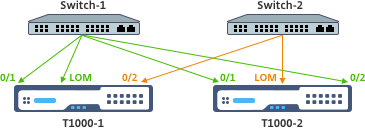
After the NetScaler appliance is connected to the management network, subsequent configuration steps can be performed remotely using SSH or web connectivity to the CLI and GUI respectively.
Routing
The add route command may be used to configure any routes appropriate to the management network. The relevant gateway should be reachable on the NSIP subnet, as shown below.
Example:
add route <network> <netmask> <gateway>