
Configuring Multiple Untagged VLANs across Multiple Subnets
In environments with multiple untagged VLANs across multiple subnets, a VLAN is configured for each IP subnet. A network interface is bound to one VLAN only. The following figure shows this configuration.
Figure 1. Multiple Subnets with VLANs - No Tagging
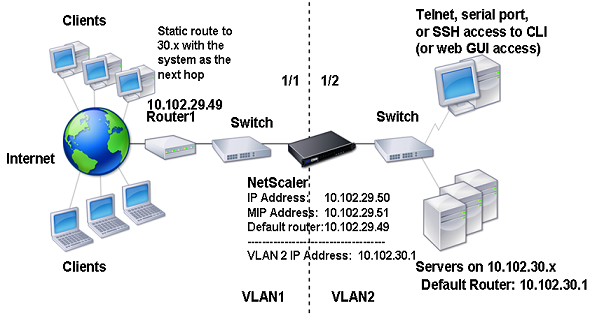
To implement the configuration shown in the above figure, perform the following tasks:
-
Add VLAN 2.
-
Bind the 1/2 network interface of the NetScaler to VLAN 2 as an untagged network interface.
-
Bind the IP address and subnet mask to VLAN 2.
For procedures on these tasks, see Configuring a VLAN.