
Deploy NetScaler Kubernetes Gateway Controller with CPX in OpenShift using NetScaler Operator
In this setup, NetScaler Kubernetes Gateway Controller configures NetScaler CPX deployed in the OpenShift cluster.
Prerequisites
-
Access to Red Hat OpenShift Cluster (version 4.11 or later).
-
Deploy NetScaler Operator. For information on how to deploy NetScaler Operator, see Deploy NetScaler Operator.
-
To export to any service monitor, install the service monitor CRD by using the following command:
kubectl create -f https://raw.githubusercontent.com/prometheus-operator/prometheus-operator/refs/heads/main/example/prometheus-operator-crd/monitoring.coreos.com_servicemonitors.yaml -
Install Prometheus Operator if you want to view the metrics of the NetScaler CPX collected through the direct Prometheus export.
-
Install the Gateway API CRDs from the official standard channel if they are not already installed.
Deploy NetScaler Kubernetes Gateway Controller as a sidecar with NetScaler CPX
Perform the following steps:
-
Log in to the OpenShift 4.x Cluster console.
-
Deploy a CNNwebsite application using the console.
-
Navigate to Workloads > Deployments > Create Deployment and use the following YAML file to create the deployment.
apiVersion: apps/v1
 kind: Deployment
 metadata:
   name: cnn-website
   labels:
     name: cnn-website
     app: cnn-website
 spec:
   selector:
     matchLabels:
       app: cnn-website
   replicas: 2
   template:
     metadata:
       labels:
         name: cnn-website
         app: cnn-website
     spec:
       containers:
       - name: cnn-website
         image: quay.io/sample-apps/cnn-website:v1.0.0
         ports:
         - name: http-80
           containerPort: 80
         - name: https-443
           containerPort: 443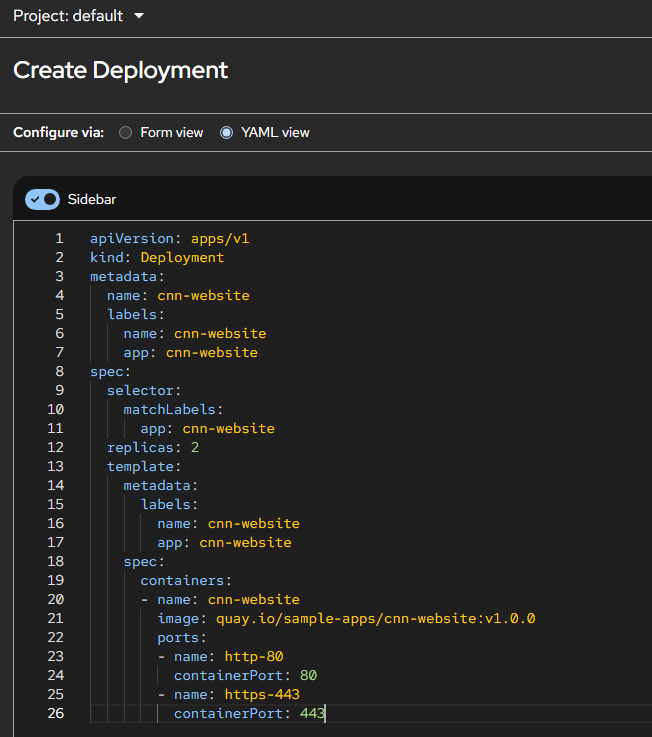
-
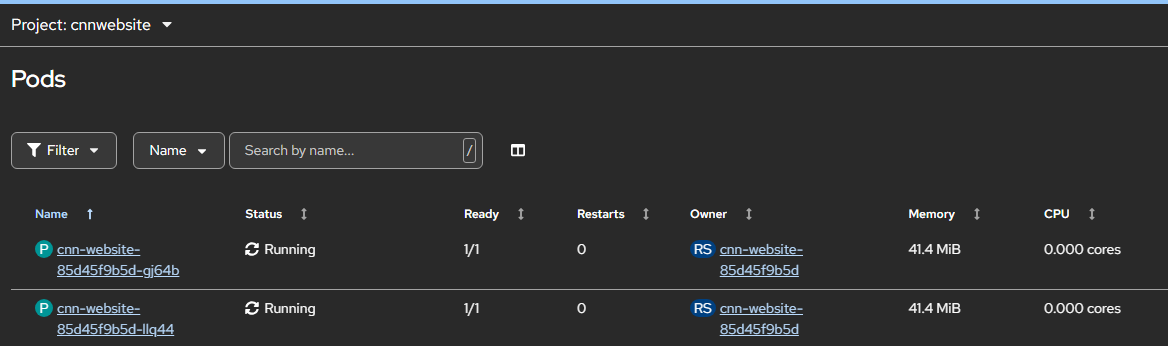
Navigate to Workloads > Pods section and ensure that the CNNwebsite application pods are up and running.
-
-
Create a service for the CNNwebsite application. Navigate to Networking > Services > Create Service and use the following YAML file.
apiVersion: v1
 kind: Service
 metadata:
   name: cnn-website
   labels:
     app: cnn-website
 spec:
   type: NodePort
   ports:
   - name: http-80
     port: 80
     targetPort: 80
   - name: https-443
     port: 443
     targetPort: 443
   selector:
name: cnn-website -
Create Self-Signed Certificate, Gateway Class, Gateway, and HTTP Route for CNNwebsite application.
-
Create a self-signed SSL certificate and a key to be used with the Gateway-Listener for TLS configuration. The following command is just a sample command to create a self-signed certificate and assumes that the host name of the application is example.com
openssl genrsa -out cnnwebsite_key.pem 2048

 openssl req -new -key cnnwebsite_key.pem -out cnnwebsite_csr.pem -subj "/CN=example.com"

 openssl x509 -req -in cnnwebsite_csr.pem -sha256 -days 365 -extensions v3_ca -signkey cnnwebsite_key.pem -CAcreateserial -out cnnwebsite_cert.pem

oc create secret tls app1-secret --key cnnwebsite_key.pem --cert cnnwebsite_cert.pem -
Deploy Gateway Class, Gateway, and HTTP Route.
apiVersion: gateway.networking.k8s.io/v1
 kind: GatewayClass
 metadata:
   name: example-gateway-class
 spec:
   controllerName: citrix.com/nscpxgw-controller
 ---
 apiVersion: gateway.networking.k8s.io/v1
 kind: Gateway
 metadata:
   name: example-gateway
 spec:
   gatewayClassName: example-gateway-class
   listeners:
   - name: http
     protocol: HTTP
     port: 80
   - name: https
     protocol: HTTPS
     port: 443
     tls:
       mode: Terminate
       certificateRefs:
       - kind: Secret
         name: app1-secret
 ---
 apiVersion: gateway.networking.k8s.io/v1
 kind: HTTPRoute
 metadata:
   name: example-route
 spec:
   parentRefs:
   - name: example-gateway
   hostnames:
     - "example.com"
   rules:
   - matches:
     - path:
         type: PathPrefix
         value: /
     backendRefs:
     - name: cnn-website
       namespace: default
       port: 443
-
-
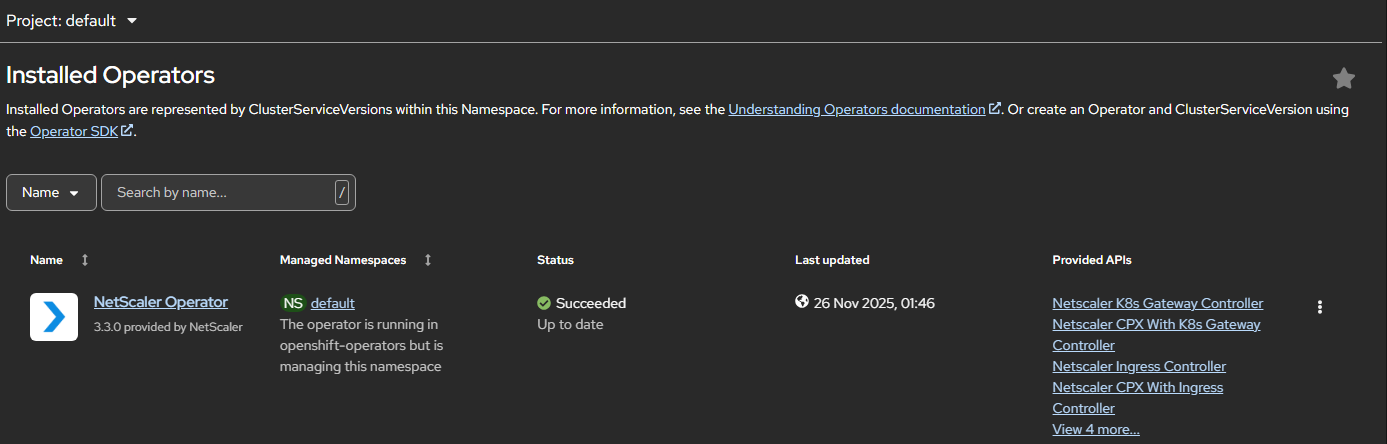
Navigate to Operators > Installed Operators and click NetScaler Operator.
-
Click the Netscaler CPX With K8s Gateway Controller tab and select Create NetscalerCpxWithK8sGatewayController.
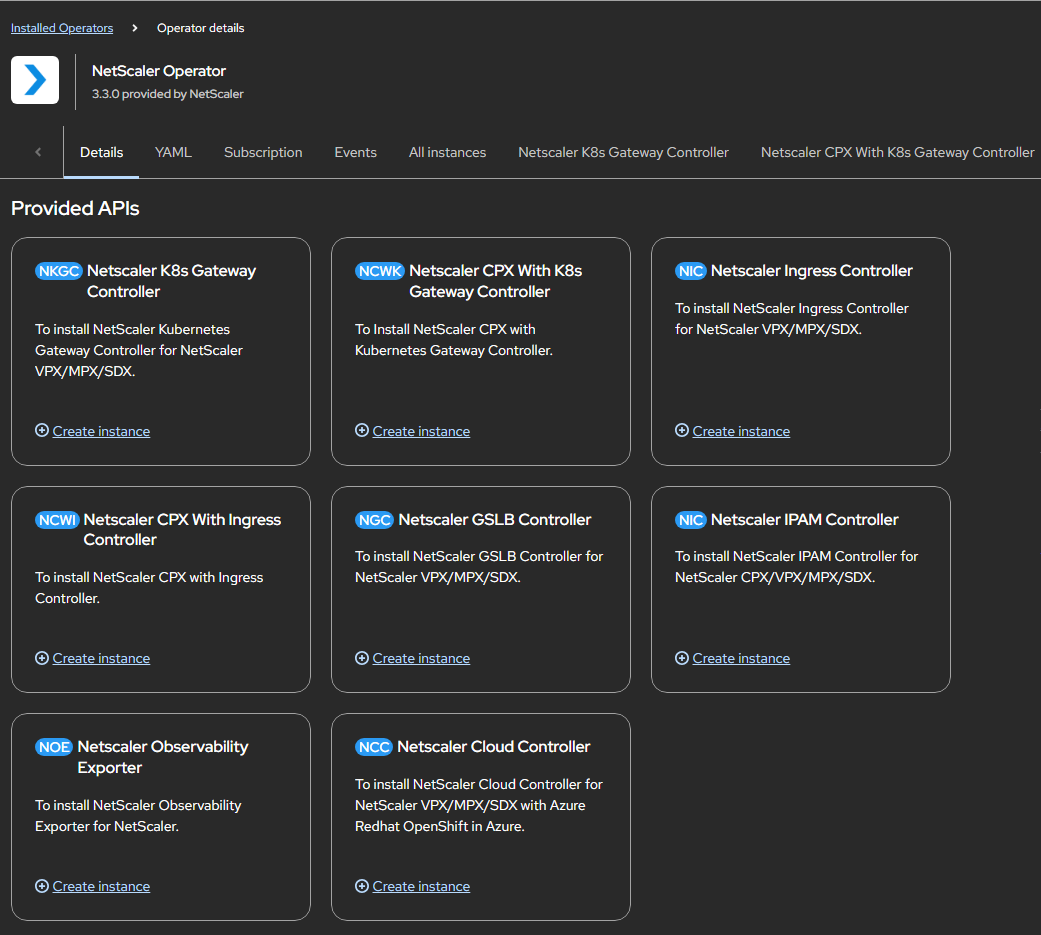 The NetScaler CPX with Kubernetes Gateway Controller YAML definition is displayed. Optionally, you can select Form view button and update the parameters in a form.
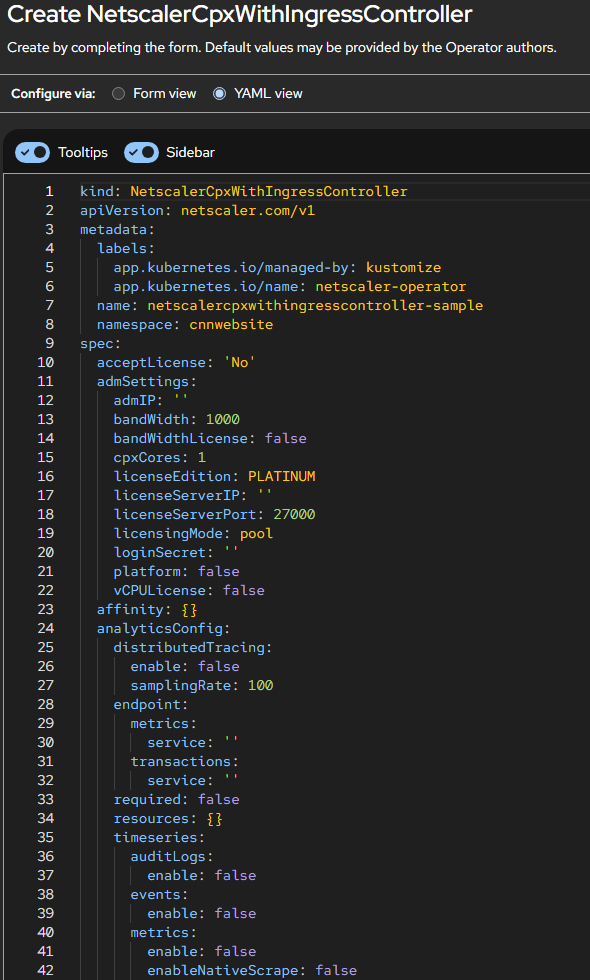
-
Refer the following table that lists the mandatory and optional parameters that you can configure during installation.
spec:
   acceptLicense: 'Yes'
   gatewayController:
     entityPrefix: gwy
     gatewayControllerName: citrix.com/nscpxgw-controller
   netscalerCpx:
     service:
       annotations: {}
       spec:
         type: NodePort
         ports:
           - port: 80
             targetPort: 80
             protocol: TCP
             name: http
           - port: 443
             targetPort: 443
             protocol: TCP
             name: https
Parameters Mandatory or Optional Default value Description acceptLicense Mandatory No Set this value to Yesto accept the NetScaler K8s Gateway Controller EULA.affinity Optional N/A Affinity labels for pod assignment. apiPriorityAndFairness Optional N/A Configure Kubernetes API Priority and Fairness for requests from NetScaler K8s Gateway Controller to the Kubernetes API server. Set apiPriorityAndFairness.enabledtotrueto enable it (defaultfalse), and use theflowSchemaandpriorityLevelConfigurationfields to tune it.createClusterRoleAndBinding Optional true Set to falseto skip creating the ClusterRole and ClusterRoleBinding. You must then create them yourself.extraVolumes Optional N/A Additional volumes for the NetScaler CPX with NetScaler K8s Gateway Controller pod. Mount them in the containers by using netscalerCpx.extraVolumeMounts,gatewayController.extraVolumeMounts, orexporter.extraVolumeMounts.imagePullSecrets Optional N/A List of secret names used to pull images from a private registry. The operator adds them to the service account that it creates (they are not used when serviceAccount.createisfalse). For more information on how to create this secret, see Pull an Image from a Private Registry.nodeSelector Optional N/A The node label key:value pair to be used for nodeSelector option in NetScaler Ingress Controller deployment. podAnnotations Optional N/A Map of annotations to add to the pods. replicaCount Optional 1 The number of CPX-NSIC pods to be deployed. With cpxBgpRouter : true, replicaCount is 1 because CPX is deployed as a DaemonSet. serviceAccount Optional N/A Service account for the pod. serviceAccount.create(defaulttrue) controls whether the operator creates it.serviceAccount.namesets its name (default: the resource name) and is mandatory whenserviceAccount.createisfalse.tokenExpirationSeconds Optional 31536000 The expiration time, in seconds, for the service account token mounted into the pod. Allowed range: 600 to 31536000. tolerations Optional N/A Specify the tolerations for the CPX-NetScaler K8s Gateway deployment. upgradeImageAlways Optional true When true(the default), the operator deploys the images that are built into this operator release and ignores the image values in this resource. Set it tofalseto deploy the images that you specify.NetScaler Console settings (admSettings)If you setadmSettings, includeadmIPandloginSecret(they can be empty for pool licensing).Parameters Mandatory or Optional Default value Description admIP Optional N/A The NetScaler Console (formerly NetScaler ADM) IP address. bandWidth Optional 1000 The desired bandwidth capacity for NetScaler CPX in Mbps. bandWidthLicense Optional false Set this parameter to true if you want to use bandwidth-based licensing for NetScaler CPX. cpxCores Optional 1 The desired number of vCPUs for NetScaler CPX. licenseEdition Optional PLATINUM The possible values are STANDARD,PLATINUM, andENTERPRISE.licenseServerIP Optional N/A NetScaler Console (formerly NetScaler ADM) IP address to license NetScaler CPX. For more information, see Licensing. licenseServerPort Optional 27000 NetScaler Console (formerly NetScaler ADM) port if a non-default port is used. loginSecret Optional N/A The secret key to log in to NetScaler Console. platform Optional false Set to true to enable CP1000 platform license. vCPULicense Optional false Set the value to true if you want to use a vCPU-based license for NetScaler CPX. licensingMode Optional pool Set the licensing mode as poolorlas. For licensingModelas, set admIP, loginSecret, bandWidth, and licenseEdition. Forpool, set licenseServerIP and either bandWidthLicense or vCPULicense.Exporter (exporter)Parameters Mandatory or Optional Default value Description required Optional false Set this parameter to true to run the Exporter for NetScaler Stats along with NetScaler Ingress Controller to pull metrics for NetScaler CPX. image Optional quay.io/netscaler/netscaler-adc-metrics-exporter@sha256:a994d1de39c4dda24d92dbb77c0fcbb224b71e80ac80dfddad268072739c76c5 The metrics exporter image hosted on Quay.io. Used only when upgradeImageAlwaysisfalse.pullPolicy Optional IfNotPresent The exporter image pull policy. resources Optional N/A CPU/memory resources for the metrics exporter container. ports.containerPort Optional 8888 The exporter container port. extraVolumeMounts Optional N/A Additional volume mounts for the exporter container. serviceMonitorExtraLabels Optional N/A Extra labels for the exporter ServiceMonitor, for example to match your Prometheus serviceMonitorSelector. Gateway Controller (gatewayController)Parameters Mandatory or Optional Default value Description analyticsConfig Optional N/A Configures the analytics block ( NS_ANALYTICS_CONFIG) that the operator adds to the controller ConfigMap, for distributed tracing and Splunk export. SetanalyticsConfig.requiredtotrueto enable it (defaultfalse). Sub-fields:logAllJsonFields(defaultfalse),distributedTracing.enable(defaultfalse),distributedTracing.samplingRate(0 to 100, default100),splunk.enable(defaultfalse), andsplunk.servers(each withname,endpoint,port,authToken.nameandauthToken.namespaceof the secret that holds the Splunk HEC token, andprofiles).certBundle Optional false Set to trueto add the certificates from Gateway TLS secrets to NetScaler as an SSL certificate key bundle (certkeybundle), including the intermediate CA certificates. Requires NetScaler 14.1 build 21.x or later. For more information, see Certificate key bundle.disableAPIServerCertVerify Optional false Set this parameter to true for disabling API server certificate verification. enableLivenessProbe Optional true Set this parameter to false to disable liveness probe settings for NetScaler Ingress Controller. enableReadinessProbe Optional true Readiness probe settings for NetScaler Ingress Controller. entityPrefix Optional k8s The prefix for the resources on NetScaler CPX. extraVolumeMounts Optional N/A N/A gatewayControllerName Mandatory N/A The controller name that NetScaler K8s Gateway Controller registers. It must match spec.controllerNamein your GatewayClass (citrix.com/nscpxgw-controllerin this procedure).image Mandatory quay.io/netscaler/netscaler-k8s-ingress-controller@sha256:c7b1f64d2a5f7b17b6fa0330a1fbcb7e9b581f336539ff1933b1a435eff08166 The NetScaler Ingress Controller image hosted on Quay.io. Used only when upgradeImageAlwaysisfalse.jsonLog Optional false Set this parameter to true if log messages are required in the JSON format. kubernetesURL Optional N/A The kube-apiserver URL that NetScaler Ingress Controller uses to register events. If not specified, it uses the internal kube-apiserver IP address. livenessProbe.initialDelaySeconds Optional 50 The time period in seconds for which Kubernetes waits before performing the first liveness check. livenessProbe.periodSeconds Optional 60 After the initial delay, Kubernetes performs a liveness check every 60 seconds. logLevel Optional INFO The log level to control logs generated by NSIC. Supported levels: DEBUG, INFO, WARNING, and ERROR. openshift Optional true Set this parameter to false if the OpenShift environment is not being used. pullPolicy Mandatory IfNotPresent The NetScaler Ingress Controller image pull policy. readinessProbe Optional initialDelaySeconds 50, periodSeconds 60, failureThreshold 3, successThreshold 1 Readiness probe settings. resources Optional requests: cpu 32m, memory 256Mi; limits: cpu 100m, memory 512Mi CPU/memory resources for the NetScaler Ingress Controller container. NetScaler CPX settings (netscalerCpx)Parameters Mandatory or Optional Default value Description cpxCommands Optional N/A User-provided NetScaler bootup config applied when CPX is instantiated. Not dynamic — changes to the ConfigMap do not reflect until the pod is restarted. cpxConfigPersistenceEnabled Optional false Set to trueso that NetScaler CPX saves its running configuration at shutdown and restores it on restart. When enabled, the operator does not overwrite the saved bootup configuration.cpxLicenseAggregator Optional N/A IP address or FQDN of the CPX License Aggregator (if used) to license CPX. cpxShellCommands Optional N/A User-provided bootup commands applied when CPX is instantiated. Not dynamic — changes require pod restart. enableLivenessProbe Optional true Set to false to disable liveness probe settings for NetScaler CPX. enableStartupProbe Optional true Set to false to disable startupProbe settings for NetScaler CPX. extraVolumeMounts Optional N/A Additional volume mounts for CPX. hostname Optional N/A Host name to set for the CPX. image Mandatory quay.io/netscaler/netscaler-cpx@sha256:a6dd380c6bccdf76b3514cefe7b6e0859d57dfa48811546c4419b74befbeee04 NetScaler CPX image hosted on Quay.io. Used only when upgradeImageAlwaysisfalse.livenessProbe Optional initialDelaySeconds 50, periodSeconds 5, failureThreshold 3, successThreshold 1 Liveness probe settings for NetScaler CPX. mgmtHttpPort Optional 9080 HTTP port to be used for a NodePort CPX service. mgmtHttpsPort Optional 9443 HTTPS port to be used for a NodePort CPX service. nitroReadTimeout Optional 20 NITRO read timeout in seconds. nsProtocol Optional HTTP Protocol used for communication between NetScaler CPX and NetScaler Ingress Controller. pullPolicy Mandatory IfNotPresent NetScaler CPX image pull policy. resources Optional requests: cpu 128m, memory 512Mi; limits: cpu 500m, memory 1Gi CPU/memory resources for the NetScaler CPX container. service.annotations Optional N/A Dictionary of annotations for the CPX service (for example, for exposing TLS secret through annotations). service.spec Optional N/A Service specification for CPX. To expose CPX as NodePort set service.spec.type: NodePort and use service.citrix.com/secret annotation to reference TLS secret. startupProbe Optional initialDelaySeconds 30, periodSeconds 5, failureThreshold 20, successThreshold 1 Startup probe settings for NetScaler CPX. Example: Export analytics to Splunk. The operator adds the analytics configuration only whenanalyticsConfig.requiredistrue. First create the secret with the Splunk HEC token, for exampleoc create secret generic splunktoken --from-literal=authToken=<splunk-hec-token> -n <namespace>.apiVersion: netscaler.com/v1
kind: NetscalerCpxWithK8sGatewayController
metadata:
name: cpx-gw
spec:
acceptLicense: 'Yes'
gatewayController:
entityPrefix: gwy
gatewayControllerName: citrix.com/nscpxgw-controller
analyticsConfig:
required: true
distributedTracing:
enable: true
samplingRate: 50
splunk:
enable: true
servers:
- name: my-splunk
endpoint: <splunk-endpoint>
port: 8088
# Secret that holds the Splunk HEC token under the key authToken
authToken:
name: splunktoken
namespace: <namespace>
# Profile attribute values are strings, so quote numbers.
profiles:
timeseries:
metricsexportfrequency: "60"
analyticsendpointurl: netscaler/metric
streaminsight:
analyticsendpointurl: /services/collector/event
analyticsendpointcontenttype: application/json
netscalerCpx: {} -
After updating the values for the required parameters, click Create. Ensure that the NetScaler CPX with Kubernetes Gateway Controller is successfully deployed and initialized.
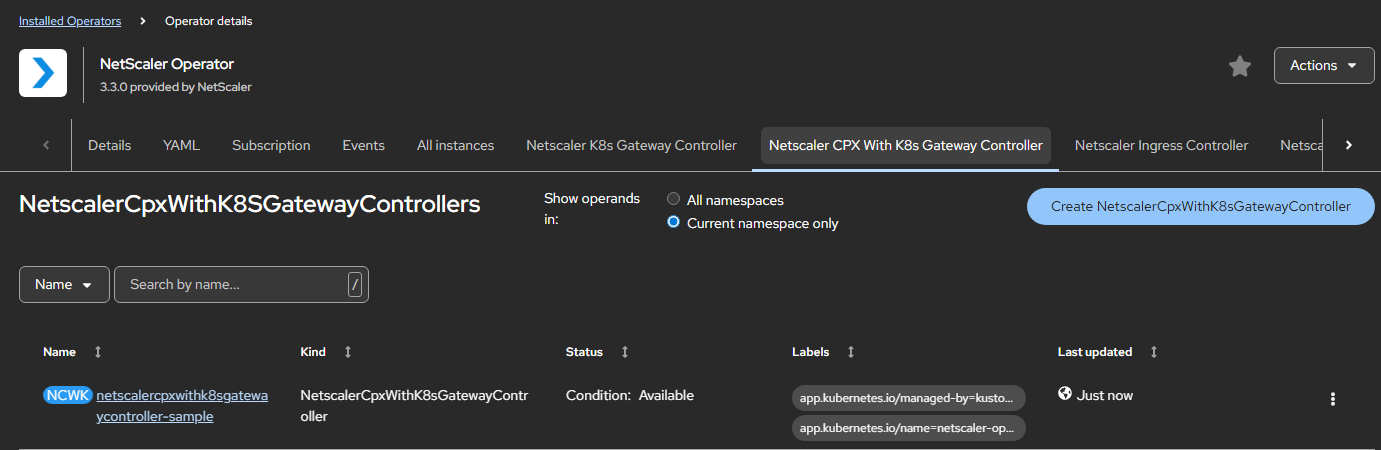
-
Attach privileged security context constraints to the service account of NetScaler CPX (as it runs as a privileged pod) by using the following command:
-
Get the service account name used by NetScaler CPX using the following command in the namespace where NetScaler CPX has been deployed:
oc get sa -
Attach privileged SCC to the service account of NetScaler CPX:
oc adm policy add-scc-to-user privileged system:serviceaccount:<namespace>:<CPX-ServiceAccount-Name retrieved in the previous step>
-
-
Navigate to Workloads > Pods section and verify that the
netscaler-cpx-with-gateway-controllerpod is up and running.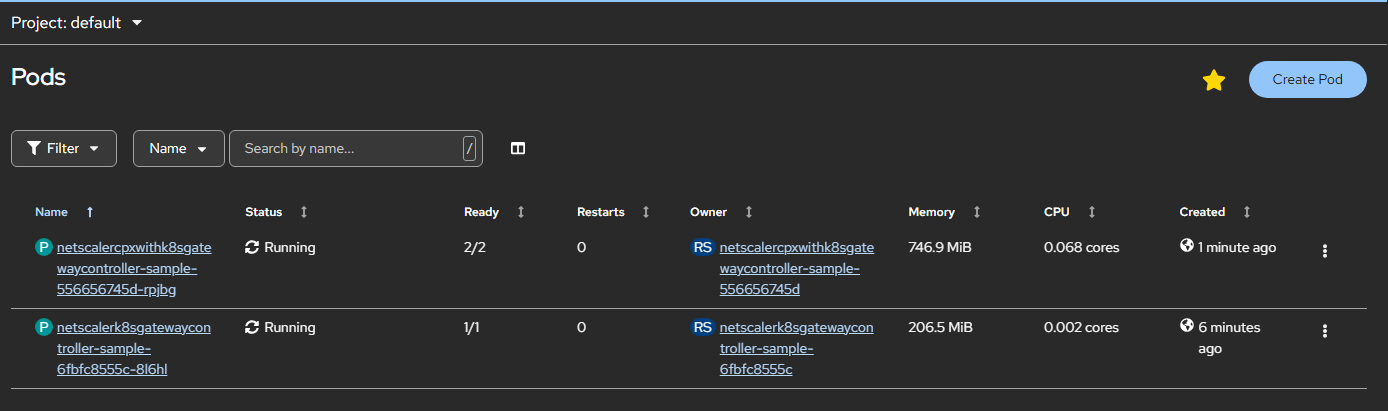
-
Verify the deployment by sending traffic.
-
Obtain the NodePort details using the following command:
oc get svc -
Use cpx-service NodePort and send the traffic as shown in the following command:
curl https://example.com:<NodePort> --resolve example.com:<NodePort>:<Master-Node-IP>The preceding cURL command must return the following output:<html><body><h1>It works!</h1></body></html>
-