-
Getting Started with NetScaler
-
Solutions for Telecom Service Providers
-
-
Subscriber aware traffic steering with TCP optimization
-
Load Balance Control-Plane Traffic that is based on Diameter, SIP, and SMPP Protocols
-
Provide Subscriber Load Distribution Using GSLB Across Core-Networks of a Telecom Service Provider
-
Authentication, authorization, and auditing application traffic
-
Basic components of authentication, authorization, and auditing configuration
-
-
Web proxy support for outbound calls to IDP or third party endpoints
-
Web Application Firewall protection for VPN virtual servers and authentication virtual servers
-
On-premises NetScaler Gateway as an identity provider to Citrix Cloud™
-
Authentication, authorization, and auditing configuration for commonly used protocols
-
Troubleshoot authentication and authorization related issues
-
Troubleshoot authentication, authorization and auditing issues
-
Configure EULA as an authentication factor in NetScaler nFactor system
-
Configure periodic Endpoint Analysis scan as a factor in nFactor authentication
-
Configure post-authentication Endpoint Analysis scan as a factor in NetScaler nFactor authentication
-
Configure pre-authentication Endpoint Analysis scan as a factor in nFactor authentication
-
Configure pre-auth and post-auth EPA scan as a factor in nFactor authentication
-
Configure prefill user name from certificate in NetScaler nFactor authentication
-
Configure protected user as an authentication factor in NetScaler nFactor authentication
-
Localize error messages generated by NetScaler nFactor system
-
Configure NetScaler Gateway preauthentication EPA scan for the domain check
-
-
-
-
-
-
-
Configure DNS resource records
-
Configure NetScaler as a non-validating security aware stub-resolver
-
Jumbo frames support for DNS to handle responses of large sizes
-
Caching of EDNS0 client subnet data when the NetScaler appliance is in proxy mode
-
Use case - configure the automatic DNSSEC key management feature
-
Use Case - configure the automatic DNSSEC key management on GSLB deployment
-
-
-
Source IP address whitelisting for GSLB communication channels
-
Use case: Deployment of domain name based autoscale service group
-
Use case: Deployment of IP address based autoscale service group
-
-
Persistence and persistent connections
-
Advanced load balancing settings
-
Gradually stepping up the load on a new service with virtual server–level slow start
-
Protect applications on protected servers against traffic surges
-
Retrieve location details from user IP address using geolocation database
-
Use source IP address of the client when connecting to the server
-
Use client source IP address for backend communication in a v4-v6 load balancing configuration
-
Set a limit on number of requests per connection to the server
-
Configure automatic state transition based on percentage health of bound services
-
-
Use case 2: Configure rule based persistence based on a name-value pair in a TCP byte stream
-
Use case 3: Configure load balancing in direct server return mode
-
Use case 6: Configure load balancing in DSR mode for IPv6 networks by using the TOS field
-
Use case 7: Configure load balancing in DSR mode by using IP Over IP
-
Use case 10: Load balancing of intrusion detection system servers
-
Use case 11: Isolating network traffic using listen policies
-
Use case 12: Configure Citrix Virtual Desktops for load balancing
-
Use case 13: Configure Citrix Virtual Apps and Desktops for load balancing
-
Use case 14: ShareFile wizard for load balancing Citrix ShareFile
-
Use case 15: Configure layer 4 load balancing on the NetScaler appliance
-
-
-
-
Support for hybrid Post Quantum cryptography on the frontend
-
-
Create a certificate signing request and use SSL certificates on a NetScaler appliance
-
Configure SSL acceleration with HTTP on the front end and SSL on the back end
-
Export certificates used on a NetScaler appliance as PFX file
-
Configure SSL monitoring when client authentication is enabled on the back-end service
-
Configure SSL action to forward client traffic if a cipher is not supported on the ADC
-
Configure synchronization of files in a high availability setup
-
-
-
Authentication and authorization for System Users
-
-
-
Configuring a CloudBridge Connector Tunnel between two Datacenters
-
Configuring CloudBridge Connector between Datacenter and AWS Cloud
-
Configuring a CloudBridge Connector Tunnel Between a Datacenter and Azure Cloud
-
Configuring CloudBridge Connector Tunnel between Datacenter and SoftLayer Enterprise Cloud
-
Configuring a CloudBridge Connector Tunnel Between a NetScaler Appliance and Cisco IOS Device
-
CloudBridge Connector Tunnel Diagnostics and Troubleshooting
This content has been machine translated dynamically.
Dieser Inhalt ist eine maschinelle Übersetzung, die dynamisch erstellt wurde. (Haftungsausschluss)
Cet article a été traduit automatiquement de manière dynamique. (Clause de non responsabilité)
Este artículo lo ha traducido una máquina de forma dinámica. (Aviso legal)
此内容已经过机器动态翻译。 放弃
このコンテンツは動的に機械翻訳されています。免責事項
이 콘텐츠는 동적으로 기계 번역되었습니다. 책임 부인
Este texto foi traduzido automaticamente. (Aviso legal)
Questo contenuto è stato tradotto dinamicamente con traduzione automatica.(Esclusione di responsabilità))
This article has been machine translated.
Dieser Artikel wurde maschinell übersetzt. (Haftungsausschluss)
Ce article a été traduit automatiquement. (Clause de non responsabilité)
Este artículo ha sido traducido automáticamente. (Aviso legal)
この記事は機械翻訳されています.免責事項
이 기사는 기계 번역되었습니다.책임 부인
Este artigo foi traduzido automaticamente.(Aviso legal)
这篇文章已经过机器翻译.放弃
Questo articolo è stato tradotto automaticamente.(Esclusione di responsabilità))
Translation failed!
Subscriber aware traffic steering with TCP optimization
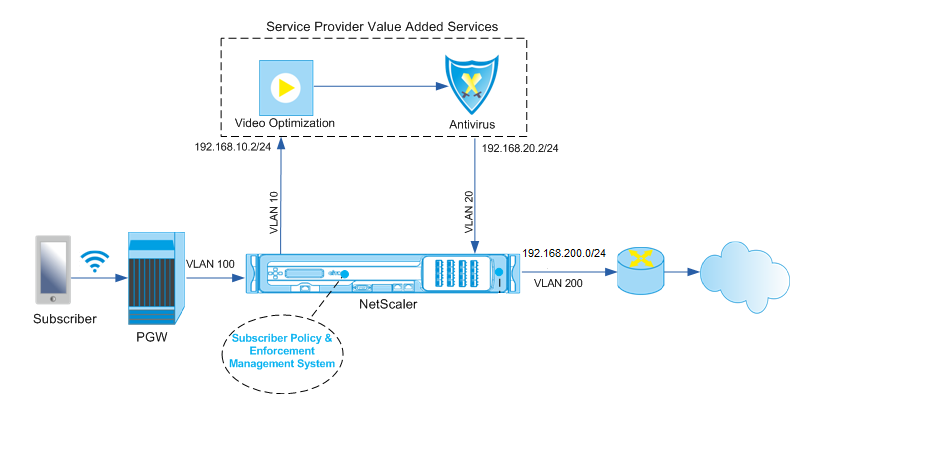
Traffic steering directs subscriber traffic from one point to another. When a subscriber connects to the network, the packet gateway associates an IP address with the subscriber and forwards the data packet to the NetScaler appliance. The appliance communicates with the PCRF server over the Gx interface to get the subscriber policy information. Depending on the policy information, the appliance performs one of the following actions:
- Forward the data packet to another set of services (as shown in the following illustration).
- Perform only TCP optimization.
The values shown in the following figure are configured in the CLI procedure that follows the figure. A content switching virtual server on the NetScaler appliance directs requests to the value added services or skips them and performs TCP optimization, depending on the defined rule, and then sends the packet out to the Internet.
Note
Support for the configuration shown below was introduced in release 11.1 build 50.10.
To configure traffic steering for the above deployment by using the CLI:
-
Add the appliance’s subnet IP (SNIP) addresses.
add ns ip 192.168.10.1 255.255.255.0 -type snip add ns ip 192.168.20.1 255.255.255.0 -type snip add ns ip 192.168.100.1 255.255.255.0 -type snip add ns ip 192.168.200.1 255.255.255.0 -type snip add ns ip 10.102.232.236 255.255.255.0 –type snip <!--NeedCopy--> -
Add the VLANs. VLANs help the appliance identify the source of the traffic. Bind the VLANs to the interfaces and subnet IP addresses.
add vlan 10 add vlan 20 add vlan 100 add vlan 200 add vlan 102 bind vlan 10 -ifnum 1/4 -tagged -IPAddress 192.168.10.1 255.255.255.0 bind vlan 20 -ifnum 1/4 -tagged -IPAddress 192.168.20.1 255.255.255.0 bind vlan 100 -ifnum 1/2 -tagged -IPAddress 192.168.100.1 255.255.255.0 bind vlan 200 -ifnum 1/2 -tagged -IPAddress 192.168.200.1 255.255.255.0 bind vlan 102 –ifnum 1/1 –tagged –IPAddress 10.102.232.236 255.255.255.0 <!--NeedCopy--> -
Configure a service and virtual server of type Diameter, and bind the service to the virtual server. Specify the PCRF realm and values for the subscriber Gx interface parameters. Also specify the service path AVP that indicates where the appliance can find the service path name within the subscriber session. For primary PCEF functionality, configure a RADIUS listener service and RADIUS interface, and specify the interface type as “RadiusAndGx”.
add service sd1 10.102.232.200 DIAMETER 3868 add lb vserver vdiam DIAMETER 0.0.0.0 0 -persistenceType DIAMETER -persistAVPno 263 bind lb vserver vdiam sd1 set ns diameter -identity netscaler.sc1.net -realm pcrf1.net set extendedmemoryparam -memLimit 2558 set subscriber gxInterface -vServer vdiam -pcrfRealm pcrf1.net set subscriber gxinterface -servicepathAVP 1001 1005 -servicepathVendorid 10415 add service srad1 10.102.232.236 RADIUSListener 1813 set subscriber radiusInterface -listeningService srad1 set subscriber param -interfaceType RadiusAndGx <!--NeedCopy--> -
Specify a default subscriber profile (*) to be applied if any of the following is true:
- PCRF does not have the subscriber information.
- The subscriber information does not include the service path AVP.
- The appliance is unable to query the PCRF. For example, the service representing the PCRF is DOWN.
add subscriber profile * -subscriberrules default_path <!--NeedCopy--> -
Create TCP profiles for the VAS and TCP optimization path, respectively. Traffic steered to VAS will not undergo any TCP optimization before or after leaving the VAS. Therefore, the TCP mode of the VAS profile should be set to TRANSPARENT while the TCP mode of the TCPOpt profile should be set to ENDPOINT.
add ns tcpProfile VAS –tcpMode TRANSPARENT
add ns tcpProfile TCPOpt -WS ENABLED -SACK ENABLED -WSVal 8 -mss 1460 -maxBurst 30 -initialCwnd 16 -oooQSize 15000 -minRTO 800 -bufferSize 4000000 -flavor BIC -dynamicReceiveBuffering ENABLED -KA ENABLED -sendBuffsize 4000000 -rstWindowAttenuate ENABLED -spoofSynDrop ENABLED -ecn ENABLED -frto ENABLED -maxcwnd 1000000 -fack ENABLED -rstMaxAck enABLED -tcpmode ENDPOINT
-
Configure load balancing for the VAS servers. Create a non-addressable virtual server of type TCP. Create TCP services with the IP addresses of the VAS servers, and bind the services to the virtual server. The virtual server and services will use the transparent TCP profile created for the VAS path:
add service vas1 192.168.10.2 TCP * -usip YES -useproxyport NO -TCPB NO -tcpProfileName VAS add service vas2 192.168.10.3 TCP * -usip YES -useproxyport NO -TCPB NO -tcpProfileName VAS add lb vserver vs1 TCP -m MAC -l2Conn ON –tcpProfileName VAS bind lb vserver vs1 vas1 bind lb vserver vs1 vas2 <!--NeedCopy--> -
Add a load balancing virtual server to capture VAS egress traffic. This vserver will monitor the VAS egress VLAN and will use the transparent TCP profile:
add lb vserver vsint TCP * * -Listenpolicy "CLIENT.VLAN.ID.EQ(20)" –Listenpriority 30 –l2Conn ON –tcpProfileName VAS <!--NeedCopy--> -
Add a TCP optimization virtual server that listens for any traffic in the wireless-side VLAN and uses the endpoint TCP profile created for the TCP optimization path:
add lb vserver vs-TcpOpt TCP * * -Listenpolicy "client.vlan.id.eq(100)" –Listenpriority 20 -l2Conn ON -tcpProfileName TCPOpt <!--NeedCopy--> -
Add the content switching (CS) configuration. This includes virtual servers, policies, and their associated actions. The CS virtual server receives the traffic and redirects it to the appropriate load balancing virtual server according to defined CS policies. Create a CS TCP virtual server that listens for any traffic in the wireless-side VLAN with highest priority and uses the endpoint TCP profile. Create a CS policy that evaluates to TRUE when “vas” is the subscriber rule, and specify a CS action that steers traffic to VAS. Make the TCP optimization virtual server the default LB vserver. Any subscriber traffic with a rule other than “vas” will go through the default LB vserver.
add cs vserver cs1 TCP * * -Listenpolicy "client.vlan.id.eq(100)" –Listenpriority 10 -l2Conn ON –tcpProfileName TCPOpt add cs action csact1 -targetLBVserver vs1 add cs policy cspol1 -rule SUBSCRIBER.RULE_ACTIVE(\"vas\") && SYS.VSERVER(\"vs1\").STATE.EQ(UP)" -action csact1 bind cs vserver cs1 -policyName cspol1 bind cs vserver cs1 -lbvserver vs-TcpOpt <!--NeedCopy--> -
Add static or policy based routes to the internet. Dynamic routing is also supported in this configuration. The following example uses policy based routes:
add ns pbr pbr-vlan100-to-vlan200 ALLOW -nextHop 192.168.200.10 -vlan 100 -priority 10

add ns pbr pbr-vlan20-to-vlan200 ALLOW -nextHop 192.168.200.10 -vlan 20 -priority 11

apply ns pbrs
<!--NeedCopy-->
Note
The CS policies can contain IP addresses and port numbers in addition to the subscriber expressions—for example, SUBSCRIBER.RULE_ACTIVE(“vas”) && && (CLIENT.TCP.DSTPORT.EQ(80) - Add IPv6 configuration (addresses, routes, PBRs) to support IPv6 subscribers. Happy Eyeballs client applications will work smoothly for both VAS and TCP optimization paths.
- Add VLANs, IP addresses, PBRs and LB virtual servers in front of VAS (vs1, vs2, etc.) to support multiple subscriber flows. Modify the listen policies of CS vserver “cs1” and LB vserver “vsint” to include the additional VLANs.
Share
Share
In this article
This Preview product documentation is Cloud Software Group Confidential.
You agree to hold this documentation confidential pursuant to the terms of your Cloud Software Group Beta/Tech Preview Agreement.
The development, release and timing of any features or functionality described in the Preview documentation remains at our sole discretion and are subject to change without notice or consultation.
The documentation is for informational purposes only and is not a commitment, promise or legal obligation to deliver any material, code or functionality and should not be relied upon in making Cloud Software Group product purchase decisions.
If you do not agree, select I DO NOT AGREE to exit.