Deploy NetScaler® CPX Kubernetes Gateway Controller
The deployment process involves deploying the Gateway Controller, which monitors and manages Gateway CRDs that define traffic routing rules. The Gateway Controller then configures NetScaler CPX to direct external requests to the sample application.
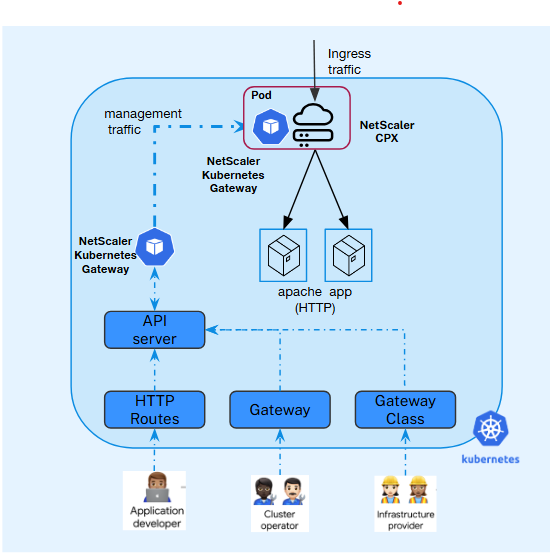
-
Deploy a sample application to get started.
apiVersion: apps/v1 kind: Deployment metadata: name: cnn-website labels: name: cnn-website app: cnn-website spec: selector: matchLabels: app: cnn-website replicas: 2 template: metadata: labels: name: cnn-website app: cnn-website spec: containers: - name: cnn-website image: quay.io/sample-apps/cnn-website:v1.0.0 ports: - name: http-80 containerPort: 80 - name: https-443 containerPort: 443 --- apiVersion: v1 kind: Service metadata: name: cnn-website labels: app: cnn-website spec: type: NodePort ports: - name: http-80 port: 80 targetPort: 80 - name: https-443 port: 443 targetPort: 443 selector: name: cnn-website <!--NeedCopy--> -
Install the Gateway API CRDs from the official standard channel if they are not already installed.
-
Generate
values.yamlbased on your use case. For information about the mandatory and optional parameters that you can configure during NetScaler Kubernetes Gateway Controller installation, see Configurations.gatewayController: entityPrefix: gwy gatewayControllerName: "citrix.com/nscpxgw-controller" license: accept: yes service: annotations: {} spec: type: NodePort ports: - port: 80 targetPort: 80 protocol: TCP name: http - port: 443 targetPort: 443 protocol: TCP name: https - port: 6379 targetPort: 6379 protocol: TCP name: tcp6379 - port: 5353 targetPort: 5353 protocol: UDP name: udp5353 <!--NeedCopy-->Note:
entityPrefixandgatewayControllerNameare mandatory and must be unique for every deployment of NetScaler CPX with Kubernetes Gateway Controller. -
Deploy NetScaler CPX with Kubernetes Gateway controller using the Helm charts and the
values.yamlgenerated in preceding step. For more information, see NetScaler CPX with Kubernetes Gateway Controller deployment using Helm Chart.helm repo add netscaler https://netscaler.github.io/netscaler-helm-charts/ helm install cpx-gateway-controller netscaler/netscaler-cpx-with-gateway-controller -f values.yaml <!--NeedCopy-->
Sample Gateway and HTTPRoute CRD
The following is an example of a GatewayClass, Gateway, and an HTTPRoute definition.
-
Create a GatewayClass resource to define the controller handling Gateway objects.
Sample GatewayClass
apiVersion: gateway.networking.k8s.io/v1 kind: GatewayClass metadata: name: example-gateway-class spec: controllerName: citrix.com/nscpxgw-controller <!--NeedCopy--> -
(Optional) Create a self-signed SSL certificate and a key to be used with the Gateway-Listener for TLS configuration.
The following command is just a sample command to create a self-signed certificate and assumes that the host name of the application is
example.com.openssl genrsa -out cnnwebsite_key.pem 2048 openssl req -new -key cnnwebsite_key.pem -out cnnwebsite_csr.pem -subj "/CN=example.com" openssl x509 -req -in cnnwebsite_csr.pem -sha256 -days 365 -extensions v3_ca -signkey cnnwebsite_key.pem -CAcreateserial -out cnnwebsite_cert.pem <!--NeedCopy-->Note:
If you already have an SSL certificate, you can create a Kubernetes secret using the same.
-
Create a Kubernetes Secret to store the SSL certificate and key (TLS pair).
kubectl create secret tls app1-secret --key cnnwebsite_key.pem --cert cnnwebsite_cert.pem <!--NeedCopy--> -
Define a Gateway resource to expose services based on defined listeners.
apiVersion: gateway.networking.k8s.io/v1
kind: Gateway
metadata:
  name: example-gateway
spec:
  gatewayClassName: example-gateway-class
  listeners:
  - name: http
    protocol: HTTP
    port: 80
  - name: https
    protocol: HTTPS
    port: 443
    tls:
      mode: Terminate
      certificateRefs:
      - kind: Secret
        name: app1-secret
        group: ""
<!--NeedCopy-->
Notes:
- Verify that the gatewayClassName defined in the Gateway matches the GatewayClass resource that is created in the preceding step.
-
Apply HTTPRoute or other route CRDs to route traffic to backend services.
apiVersion: gateway.networking.k8s.io/v1
kind: HTTPRoute
metadata:
  name: example-route
spec:
  parentRefs:
  - name: example-gateway
  hostnames:
    - "example.com"
  rules:
  - matches:
    - path:
        type: PathPrefix
        value: /
    backendRefs:
    - name: cnn-website
      namespace: default
      port: 80
<!--NeedCopy-->
Notes:
- Ensure that the gateway name specified in
parentRefsmatches with the Gateway CRD established in the preceding step. - Currently, the HTTPRoute CRD only supports a single
parentRef.
- Ensure that the gateway name specified in
-
Verify the gatewayClass status. If the status shows
ACCEPTED: True, then the controller has accepted the resource.kubectl get gatewayclass NAME CONTROLLER ACCEPTED AGE example-gateway-class citrix.com/nscpxgw-controller True 2d <!--NeedCopy-->kubectl describe gatewayclass ... Spec: Controller Name: citrix.com/nscpxgw-controller Status: Conditions: Last Transition Time: 2025-10-16T06:24:51Z Message: Accepted by the controller. Reason: Accepted Status: True Type: Accepted Events: <none> <!--NeedCopy-->Verify the Gateway resource status. If the status shows
PROGRAMMED : True, then controller has successfully pushed the configuration to NetScaler.kubectl get gateway example-gateway NAME CLASS ADDRESS PROGRAMMED AGE example-gateway example-gateway-class 10.244.2.28 True 14m <!--NeedCopy-->kubectl describe gateway example-gateway Status: Addresses: Type: IPAddress Value: 10.244.2.28 Conditions: Last Transition Time: 2025-10-16T06:24:53Z Message: Accepted by the controller. Reason: CreatedCRDInstance Status: True Type: Accepted Last Transition Time: 2025-10-16T06:25:01Z Message: Config pushed by the controller. Reason: ConfigPushedToNetscaler Status: True Type: Programmed Events: <none> <!--NeedCopy--> -
For traffic, as service of CPX is deployed as
nodePort, you can usenodeIP:NodePortto send the traffic.kubectl get svc -o wide NAME TYPE CLUSTER-IP EXTERNAL-IP PORT(S) AGE SELECTOR cpx-gateway-controller-cpx-service NodePort 10.104.175.74 <none> 80:31375/TCP,443:31994/TCP 11m app=cpx-gateway-controller-netscaler-cpx-with-gateway-controller <!--NeedCopy-->curl -vik --resolve example.com:<nodePort>:<nodeIP> https://example.com:<nodePort> curl -vik --resolve example.com:31994:<nodeIP> https://example.com:31994 <!--NeedCopy-->
Exposing a TCP application by using Gateway and TCPRoute CRDs
This section provides step-by-step instructions to expose a TCP-based application using the Kubernetes Gateway API with NetScaler.
Step 1: Deploy a sample TCP application
Deploy a sample TCP application (for example, a Redis server) in your Kubernetes cluster:
apiVersion: apps/v1
kind: Deployment
metadata:
  name: redis-server
  namespace: default
spec:
  replicas: 2
  selector:
    matchLabels:
      app: redis
  template:
    metadata:
      labels:
        app: redis
    spec:
      containers:
      - name: redis
        image: redis:7.0
        ports:
        - containerPort: 6379
---
apiVersion: v1
kind: Service
metadata:
  name: redis-service
  namespace: default
spec:
  selector:
    app: redis
  ports:
  - port: 6379
    targetPort: 6379
    protocol: TCP
<!--NeedCopy-->
Apply the configuration:
kubectl apply -f redis-deployment.yaml
<!--NeedCopy-->
Step 2: Create a GatewayClass
Create a GatewayClass resource that references NetScaler Gateway Controller:
apiVersion: gateway.networking.k8s.io/v1
kind: GatewayClass
metadata:
  name: netscaler-gateway-class
spec:
  controllerName: citrix.com/netscaler-gateway-controller
<!--NeedCopy-->
Apply the GatewayClass:
kubectl apply -f gateway-class.yaml
<!--NeedCopy-->
Step 3: Create a Gateway with a TCP listener
Create a Gateway resource with a TCP protocol listener. The addresses field specifies the VIP address on NetScaler:
apiVersion: gateway.networking.k8s.io/v1
kind: Gateway
metadata:
  name: tcp-gateway
  namespace: default
spec:
  gatewayClassName: netscaler-gateway-class
  addresses:
    - type: IPAddress
      value: "192.168.1.100"
  listeners:
    - name: redis-listener
      protocol: TCP
      port: 6379
      allowedRoutes:
        namespaces:
          from: Same
<!--NeedCopy-->
Apply the Gateway:
kubectl apply -f tcp-gateway.yaml
<!--NeedCopy-->
Step 4: Create a TCPRoute
Create a TCPRoute resource that attaches to the Gateway listener and routes traffic to the backend service:
apiVersion: gateway.networking.k8s.io/v1alpha2
kind: TCPRoute
metadata:
  name: redis-route
  namespace: default
spec:
  parentRefs:
    - name: tcp-gateway
      sectionName: redis-listener
  rules:
    - backendRefs:
        - name: redis-service
          port: 6379
<!--NeedCopy-->
Apply the TCPRoute:
kubectl apply -f tcp-route.yaml
<!--NeedCopy-->
Step 5: Verify the configuration
- Check the Gateway status:
   kubectl get gateway tcp-gateway -o yaml
   <!--NeedCopy-->
- Check the TCPRoute status:
   kubectl get tcproute redis-route -o yaml
   <!--NeedCopy-->
Verify that both Accepted and Programmed conditions show status: "True".
- Test the TCP connection:
   redis-cli -h 192.168.1.100 -p 6379 ping
   <!--NeedCopy-->
Expected output: PONG
Exposing a UDP Application Using Gateway and UDPRoute CRDs
This section provides step-by-step instructions to expose a UDP-based application (such as a DNS server) using the Kubernetes Gateway API with NetScaler.
Step 1: Deploy a sample UDP application
Deploy a sample DNS server (CoreDNS) in your Kubernetes cluster:
apiVersion: apps/v1
kind: Deployment
metadata:
  name: coredns-server
  namespace: default
spec:
  replicas: 2
  selector:
    matchLabels:
      app: coredns
  template:
    metadata:
      labels:
        app: coredns
    spec:
      containers:
      - name: coredns
        image: coredns/coredns:1.11.1
        args: ["-conf", "/etc/coredns/Corefile"]
        ports:
        - containerPort: 5353
          protocol: UDP
        volumeMounts:
        - name: config-volume
          mountPath: /etc/coredns
      volumes:
      - name: config-volume
        configMap:
          name: coredns-config
---
apiVersion: v1
kind: ConfigMap
metadata:
  name: coredns-config
  namespace: default
data:
  Corefile: |
    .:5353 {
        forward . 8.8.8.8
        log
        errors
    }
---
apiVersion: v1
kind: Service
metadata:
  name: dns-service
  namespace: default
spec:
  selector:
    app: coredns
  ports:
  - port: 5353
    targetPort: 5353
    protocol: UDP
<!--NeedCopy-->
Apply the configuration:
kubectl apply -f coredns-deployment.yaml
<!--NeedCopy-->
Step 2: Create a GatewayClass
If not already created, create a GatewayClass:
apiVersion: gateway.networking.k8s.io/v1
kind: GatewayClass
metadata:
  name: netscaler-gateway-class
spec:
  controllerName: citrix.com/netscaler-gateway-controller
<!--NeedCopy-->
Step 3: Create a Gateway with a UDP listener
Create a Gateway resource with a UDP protocol listener:
apiVersion: gateway.networking.k8s.io/v1
kind: Gateway
metadata:
  name: udp-gateway
  namespace: default
spec:
  gatewayClassName: netscaler-gateway-class
  addresses:
    - type: IPAddress
      value: "192.168.1.101"
  listeners:
    - name: dns-listener
      protocol: UDP
      port: 53
      allowedRoutes:
        namespaces:
          from: Same
<!--NeedCopy-->
Apply the Gateway:
kubectl apply -f udp-gateway.yaml
<!--NeedCopy-->
Step 4: Create a UDPRoute
Create a UDPRoute resource that attaches to the Gateway listener:
apiVersion: gateway.networking.k8s.io/v1alpha2
kind: UDPRoute
metadata:
  name: dns-route
  namespace: default
spec:
  parentRefs:
    - name: udp-gateway
      sectionName: dns-listener
  rules:
    - backendRefs:
        - name: dns-service
          port: 5353
<!--NeedCopy-->
Apply the UDPRoute:
kubectl apply -f udp-route.yaml
<!--NeedCopy-->
Step 5: Verify the configuration
- Check the Gateway status:
   kubectl get gateway udp-gateway -o yaml
   <!--NeedCopy-->
- Check the UDPRoute status:
   kubectl get udproute dns-route -o yaml
   <!--NeedCopy-->
- Test DNS resolution through the Gateway:
   dig @192.168.1.101 -p 53 example.com
   <!--NeedCopy-->