-
NetScaler MPX アプライアンスの Lights Out Management ポート
This content has been machine translated dynamically.
Dieser Inhalt ist eine maschinelle Übersetzung, die dynamisch erstellt wurde. (Haftungsausschluss)
Cet article a été traduit automatiquement de manière dynamique. (Clause de non responsabilité)
Este artículo lo ha traducido una máquina de forma dinámica. (Aviso legal)
此内容已经过机器动态翻译。 放弃
このコンテンツは動的に機械翻訳されています。免責事項
이 콘텐츠는 동적으로 기계 번역되었습니다. 책임 부인
Este texto foi traduzido automaticamente. (Aviso legal)
Questo contenuto è stato tradotto dinamicamente con traduzione automatica.(Esclusione di responsabilità))
This article has been machine translated.
Dieser Artikel wurde maschinell übersetzt. (Haftungsausschluss)
Ce article a été traduit automatiquement. (Clause de non responsabilité)
Este artículo ha sido traducido automáticamente. (Aviso legal)
この記事は機械翻訳されています.免責事項
이 기사는 기계 번역되었습니다.책임 부인
Este artigo foi traduzido automaticamente.(Aviso legal)
这篇文章已经过机器翻译.放弃
Questo articolo è stato tradotto automaticamente.(Esclusione di responsabilità))
Translation failed!
LOM GUIでRADIUS認証を有効にする
RADIUS (Remote Authentication Dial-In User Service) は、リモートユーザーの認証、認可、監査を管理できるネットワークプロトコルです。
LOM GUIでRADIUS認証を設定する
- LOM GUIにログオンします。
- Configuration > Radius に移動します。
- Enable RADIUS を選択します。
- RADIUSサーバーのポートとIPアドレスを指定します。
- ユーザーがRADIUSサーバーにアクセスするためのシークレット(パスワード)を指定します。
- Save をクリックします。
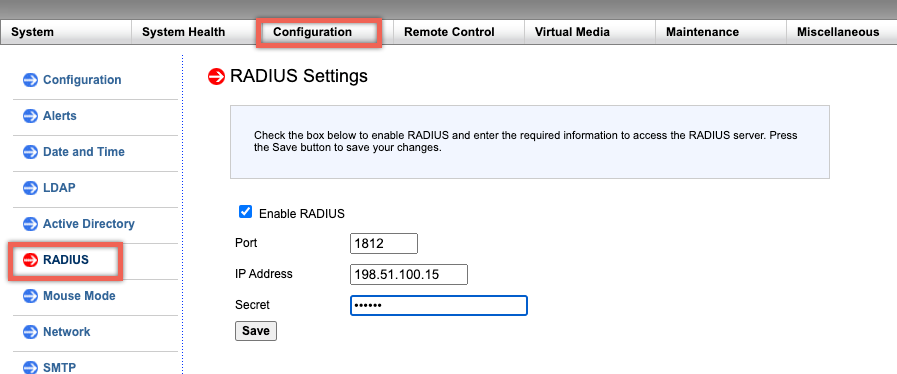
パラメータ:
RADIUSのユーザー名とパスワード:
LOMのパスワードの最大長は、LOMアカウントがユーザー認証にRADIUSを使用するかどうかによって異なります。
LOM 2.13.12の場合、RADIUSユーザーアカウントを使用してLOM GUIにログオンする場合、パスワードの最大長は16文字です。16文字を超えるパスワードの場合、「Invalid Username or Password」というメッセージが表示されます。
LOM 3.11.0の場合、RADIUSユーザーアカウントを使用してLOM GUIにログオンする場合、パスワードの最大長は45文字です。パスワードの長さが45文字を超える場合、LOM GUIはログインページをブロックし、「Your session has timed out. You will need to open a new session.」というメッセージが表示されることがあります。
RADIUS シークレット:
BMC の有効な文字は 0–9, a-z, A-Z,! @, +, -, /,: and _ です。
RADIUSサーバーとLOMデバイス間で共有される「シークレットパスワード」は、LOM 2.13.12と3.11.0の両方で31文字を超えることはできません。つまり、RADIUSサーバーが「シークレットパスワード」の長さを31文字より長く設定した場合、LOM GUIのシークレットパスワードに対するLOMのRADIUS設定は31文字に切り詰められます。
RADIUSのネットワークプロトコルを使用してLOMにアクセスするように、WindowsまたはUbuntu OSを実行している外部コンピューターを構成します
RADIUSは、Citrix® LOMにアクセスするために外部コンピューターで実行されるアプリケーションです。RADIUSを実行する前に、ユーザーアカウントとクライアント情報を構成する必要があります。
次の操作を実行します:
- Ubuntuでユーザーアカウントを構成します。
- Ubuntuでクライアント情報を構成します。
- UbuntuでRADIUSサーバーを起動します。
- Windowsサーバーで役割を追加します。
- オブジェクト – グループを追加します。
- オブジェクト – ユーザーを追加します。
- ネットワークポリシーを追加します。
- ベンダー固有の属性を追加します。
- RADIUSクライアントを構成します。
詳細については、Ubuntu のドキュメントを参照してください。
共有
共有
This Preview product documentation is Cloud Software Group Confidential.
You agree to hold this documentation confidential pursuant to the terms of your Cloud Software Group Beta/Tech Preview Agreement.
The development, release and timing of any features or functionality described in the Preview documentation remains at our sole discretion and are subject to change without notice or consultation.
The documentation is for informational purposes only and is not a commitment, promise or legal obligation to deliver any material, code or functionality and should not be relied upon in making Cloud Software Group product purchase decisions.
If you do not agree, select I DO NOT AGREE to exit.