
Rate Limiting for NetScaler Gateway
The rate limiting feature for NetScaler Gateway enables you to define the maximum load for a given network entity or virtual entity on the NetScaler Gateway appliance. Since the NetScaler Gateway appliance consumes all the unauthenticated traffic, the appliance is often exposed to process requests at a high rate. The rate limiting feature enables you to configure the NetScaler Gateway appliance to monitor the rate of traffic associated with an entity and take preventive action, in real time, based on the traffic. For more information about how rate limiting works in a NetScaler appliance, see Rate limiting.
NetScaler has the rate limiting feature that provides protection to back-end servers for an unforeseen rate. Since the feature for NetScaler did not serve the unauthenticated traffic that NetScaler Gateway handles, NetScaler Gateway needed its own rate limiting functionality. This is needed to check an unforeseen rate of requests from various sources the NetScaler Gateway appliance is exposed to. For example, unauthenticated/login/control requests and certain APIs exposed for end user or device validations.
Common use-cases for Rate limiting
-
Limit the number of requests per second from a URL.
-
Drop a connection based on cookies received in request from a particular host if the request exceeds the rate limit.
-
Limit the number of HTTP requests that arrive from the same host (with a particular subnet mask) and that have the same destination IP address.
Configure Rate Limiting for NetScaler Gateway
Prerequisites
A configured authentication virtual server.
Points to note
-
In the configuration steps, a sample limit identifier is configured. The same can be configured with all the supported parameters like stream selector, mode. For an exhaustive description of the rate limiting capabilities, see Rate limiting.
-
The policy can also be bound to a VPN virtual server as follows. You need a configured VPN virtual server to bind the policies using the following command.
bind vpn vserver -policy denylogin –pri 1 –type aaa_request -
AAA_REQUEST is a newly introduced bindpoint for responder policies. The policies configured at this bind point are applied to all the incoming request at the specified virtual server. The policies are processed for the unauthenticated/control traffic first before any other processing.
-
Binding the policy to the NetScaler Gateway virtual server enables rate limiting at the AAA_REQUEST bindpoint for all the traffic consumed by NetScaler Gateway including unauthenticated requests.
-
Binding the policy to an authentication virtual server rate limits the unauthenticated/control requests hitting the authentication virtual server.
To configure rate limiting by using the command line interface, at the command prompt, type the following commands:
add limitIdentifier <limitIdentifier name> -threshold <positive_integer> -timeslice <positive_integer> -mode <mode type>
Example:
add limitIdentifier limit_one_login -threshold 3 -timeslice 6000 -mode REQUEST_RATEadd responder action denylogin respondwith "\"HTTP/1.1 200 OK\r\n\r\nRequest is denied due to unusual rate\""add responder policy denylogin 'sys.check_limit("limit_one_login")' denyloginbind authentication vserver <vserver name> -policy denylogin -priority 1 –type aaa_request
Example:
bind authentication vserver authvserver -policy denylogin -priority 1 -type aaa_request
Parameter description
-
limitIdentifier - Name for a rate limit identifier. Must begin with an ASCII letter or underscore (_) character, and must consist only of ASCII alphanumeric or underscore characters. Reserved words must not be used. This is a mandatory argument. Maximum Length: 31
-
threshold - A maximum number of requests that are allowed in the given timeslice when requests (mode is set as REQUEST_RATE) are tracked per timeslice. When connections (mode is set as CONNECTION) are tracked, it is the total number of connections that would be let through. Default value: 1 Minimum value: 1 Maximum Value: 4294967295
-
timeSlice - Time interval, in milliseconds, specified in multiples of 10, during which requests are tracked to check if they cross the threshold. The argument is needed only when the mode is set to REQUEST_RATE. Default value: 1000 Minimum value: 10 Maximum Value: 4294967295
-
mode - Defines the type of traffic to be tracked.
-
REQUEST_RATE - Tracks requests/timeslice.
-
CONNECTION - Tracks active transactions.
-
To configure Rate Limiting using the NetScaler GUI:
-
Navigate to AppExpert > Rate Limiting > Limit Identifiers, click Add and specify the relevant details as specified in the CLI section.
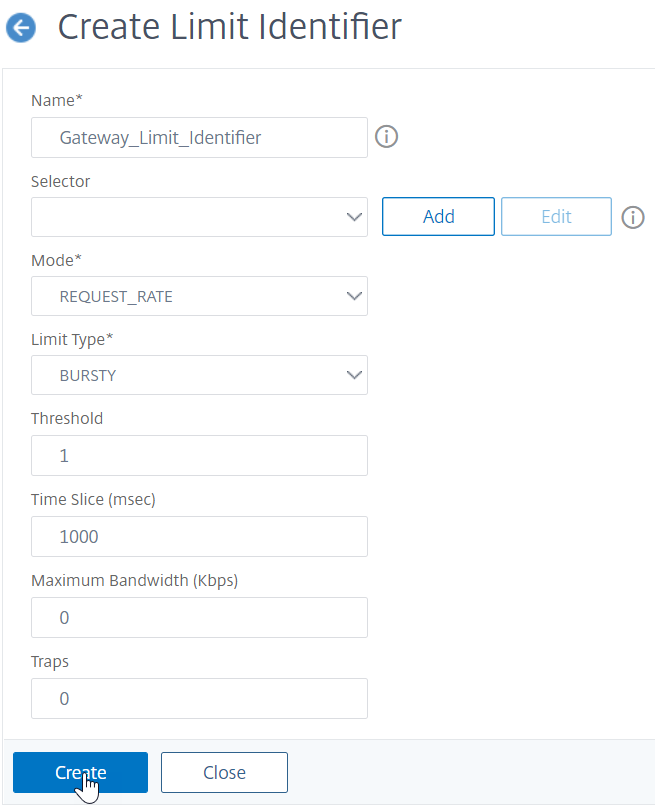
-
Navigate to AppExpert>Responder>Policies. On the Responder Policies page, click Add.
-
On the Create Responder Policy page, create a responder policy with a responder action which has the limit identifier.
-
To create a responder action, Click Add next to Action.
-
On the Create Responder Action page, enter a name for responder action.
-
Select the type as Respond with from the drop-down menu.
-
In the Expression editor, configure the response message. For example,
"HTTP/1.1 200 OK\r\n\r\n"+ "Request is denied due to unusual rate". -
Click Create.
-
To create a responder policy, on the Create Responder Policy page, enter a name for the responder policy.
-
In the Expression editor, configure the condition for the responder policy. For example,
'sys.check_limit("limit_one_login")'. -
Click Create.
-
Bind the responder policy to the authentication virtual server.
-
Go to Security>AAA-Application Traffic>Virtual server.
-
Select the virtual server.
-
Add a policy.
-
Choose the responder policy that you want to bind to the server, set the priority.
-
Choose the type as AAA-REQUEST and click Continue.
-
Note:
You can also enable rate limiting at the AAA_REQUEST bind point for the VPN virtual server.
Configuration for the common use cases for applying rate limiting to NetScaler Gateway
The following are the examples of commands to configure common use cases.
-
Limit the number of requests per second from a URL.
add stream selector ipStreamSelector http.req.url “client.ip.src”

 add ns limitIdentifier ipLimitIdentifier –threshold 4 –timeslice 1000 –mode request_rate –limitType smooth –selectorName ip StreamSelector

 add responder policy ipLimitResponderPolicy “http.req.url.contains(\”myasp.asp\”) && sys.check_limit(\”ipLimitIdentifier\”)” myWebSiteRedirectAction

bind authentication virtual server authvserver -policy denylogin –pri 1 –type aaa_request -
Drop a connection based on cookies received in request from
www.yourcompany.comif the request exceeds the rate limit.add stream selector cacheStreamSelector “http.req.cookie.value(\”mycookie\”)” “client.ip.src.subnet(24)”
add ns limitIdentifier myLimitIdentifier –Threshold 2 –timeSlice 3000 –selectorName reqCookieStreamSelector
add responder action sendRedirectURL redirect `"http://www.mycompany.com\"` + http.req.url'
add responder policy rateLimitCookiePolicy
“http.req.url.contains(\www.yourcompany.com\) && sys.check_limit(\”myLimitIdentifier\”)” sendRedirectUrl
-
Limit the number of HTTP requests that arrive from the same host (with a subnet mask of 32) and that have the same destination IP address.
add stream selector ipv6_sel “CLIENT.IPv6.src.subnet(32)”CLIENT.IPv6.dst

 add ns limitIdentifier ipv6_id –imeSlice 20000 –selectorName ipv6_sel

 add lb vserver ipv6_vip HTTP 3ffe:: 209 80 –persistenceType NONE –cltTime

 add responder action redirect_page redirect “\”`http://redirectpage.com/\”"`

 add responder policy ipv6_resp_pol “SYS.CHECK_LIMIT(\”ipv6_id\”)” redirect_page

bind responder global ipv6_resp_pol 5 END –type DEFAULT -
Limit the number of authentication attempts against an authentication, authorization, and auditing virtual server or Gateway virtual server
add stream selector URLStreamSelector HTTP.REQ.URL

 add ns limitldentifier Request_limit -threshold 3 -timeSlice 1000 -selectorName URLStreamSelector -mode REQUEST_RATE -limitType BURSTY

 add responder policy Rate_limit_pol "HTTP.REQ.URL.CONTAINS(\"doAuthentication.do\")&&SYS.CHECK_LIMIT(\"Request_limit\")" RESET

 bind vpn vserver <vserver_names> -policy Rate_limit_pol -priority 100 -gotoPriorityExpression END -type AAA_REQUEST
Bind responder policy for authentication, authorization, and auditing endpoints
To allow the packet engine to handle the requests, bind the responder policy to the authentication virtual server or the VPN virtual server by using the
AAA_REQUEST bindpoint.
-
Example for VPN virtual server:
bind vpn vserver vpnVs -policy resp_pol -priority 6 -type AAA_REQUEST -
Example for authentication virtual server:
bind authentication vserver av_vs -policy resp_pol -priority 6 -type AAA_REQUEST
To allow the Apache HTTP server to handle the requests, bind the responder policy to the authentication virtual server or the VPN virtual server by using the
REQUEST bindpoint.
For example,
-
Example for VPN virtual server:
bind vpn vserver vpnVs -policy resp_pol -priority 6 -type REQUEST -
Example for authentication virtual server:
bind authentication vserver av_vs -policy resp_pol -priority 6 -type REQUEST
For details about binding responder policies, see Bind a responder policy.
Troubleshooting responder action configuration
When users exceed the rate limit, the customized rate-limit message might fail to display, and a spinning cursor appears on the login screen. This issue occurs due to improper configuration of the responder action.
To resolve the issue, modify the responder action to use an HTML page that displays the customized rate-limit message using the following steps:
-
Create an HTML page with the customized message.
<?xml version="1.0" encoding="UTF-8"?>
 <AuthenticateResponse xmlns="http://citrix.com/authentication/response/1">
 <Status>success</Status>
 <Result>more-info</Result>
 <StateContext/>
 <AuthenticationRequirements>
     <PostBack>/nf/auth/doAuthentication.do</PostBack>
     <CancelPostBack>/nf/auth/doLogoff.do</CancelPostBack>
     <CancelButtonText>Cancel</CancelButtonText>
     <Requirements>
     <Requirement>
         <Credential>
         <Type>none</Type>
         </Credential>
         <Label>
         <Text>Request is denied due to rate limit violation</Text>
         <Type>error</Type>
         </Label>
         <Input/>
     </Requirement>
     <Requirement>
         <Credential>
         <ID>error_okBtn</ID>
         <Type>error_okBtn</Type>
         </Credential>
         <Label>
         <Type>none</Type>
         </Label>
     </Requirement>
     </Requirements>
 </AuthenticationRequirements>
</AuthenticateResponse> -
Import the customized HTML page into NetScaler.
import responder htmlpage local:test.html test -
Create or update the responder action to use the imported HTML page.
add responder action test123 respondwithhtmlpage test -
Bind the updated responder action to the existing responder policy.
set responder policy resp_pol_rate_limit -action test123 -
Ensure that the responder policy is bound to the authentication virtual server.
bind authentication vserver aaa_idp -policy resp_pol_rate_limit -priority 5 -gotoPriorityExpression END -type AAA_REQUEST
With the updated configuration, users can see the customized rate-limit message instead of a spinning cursor when the rate limit is exceeded.