-
Getting Started with NetScaler
-
Solutions for Telecom Service Providers
-
Load Balance Control-Plane Traffic that is based on Diameter, SIP, and SMPP Protocols
-
Provide Subscriber Load Distribution Using GSLB Across Core-Networks of a Telecom Service Provider
-
Authentication, authorization, and auditing application traffic
-
Basic components of authentication, authorization, and auditing configuration
-
Web Application Firewall protection for VPN virtual servers and authentication virtual servers
-
On-premises NetScaler Gateway as an identity provider to Citrix Cloud™
-
Configuration support for SameSite cookie attribute
-
Authentication, authorization, and auditing configuration for commonly used protocols
-
Troubleshoot authentication and authorization related issues
-
Troubleshoot authentication, authorization and auditing issues
-
Configure EULA as an authentication factor in NetScaler nFactor system
-
Configure periodic Endpoint Analysis scan as a factor in nFactor authentication
-
Configure post-authentication Endpoint Analysis scan as a factor in NetScaler nFactor authentication
-
Configure pre-authentication Endpoint Analysis scan as a factor in nFactor authentication
-
Configure pre-auth and post-auth EPA scan as a factor in nFactor authentication
-
Configure prefill user name from certificate in NetScaler nFactor authentication
-
Localize error messages generated by NetScaler nFactor system
-
Configure NetScaler Gateway preauthentication EPA scan for the domain check
-
-
-
-
-
-
Persistence and persistent connections
-
Advanced load balancing settings
-
Gradually stepping up the load on a new service with virtual server–level slow start
-
Protect applications on protected servers against traffic surges
-
Retrieve location details from user IP address using geolocation database
-
Use source IP address of the client when connecting to the server
-
Use client source IP address for backend communication in a v4-v6 load balancing configuration
-
Set a limit on number of requests per connection to the server
-
Configure automatic state transition based on percentage health of bound services
-
-
Use case 2: Configure rule based persistence based on a name-value pair in a TCP byte stream
-
Use case 3: Configure load balancing in direct server return mode
-
Use case 6: Configure load balancing in DSR mode for IPv6 networks by using the TOS field
-
Use case 7: Configure load balancing in DSR mode by using IP Over IP
-
Use case 10: Load balancing of intrusion detection system servers
-
Use case 11: Isolating network traffic using listen policies
-
Use case 12: Configure Citrix Virtual Desktops for load balancing
-
Use case 13: Configure Citrix Virtual Apps and Desktops for load balancing
-
Use case 14: ShareFile wizard for load balancing Citrix ShareFile
-
Use case 15: Configure layer 4 load balancing on the NetScaler appliance
-
-
-
-
Create a certificate signing request and use SSL certificates on a NetScaler appliance
-
Configure SSL acceleration with HTTP on the front end and SSL on the back end
-
Export certificates used on a NetScaler appliance as PFX file
-
Configure SSL monitoring when client authentication is enabled on the back-end service
-
Configure SSL action to forward client traffic if a cipher is not supported on the ADC
-
Configure synchronization of files in a high availability setup
-
-
-
Authentication and authorization for System Users
-
-
Configuring a CloudBridge Connector Tunnel between two Datacenters
-
Configuring CloudBridge Connector between Datacenter and AWS Cloud
-
Configuring a CloudBridge Connector Tunnel Between a Datacenter and Azure Cloud
-
Configuring CloudBridge Connector Tunnel between Datacenter and SoftLayer Enterprise Cloud
-
Configuring a CloudBridge Connector Tunnel Between a NetScaler Appliance and Cisco IOS Device
-
CloudBridge Connector Tunnel Diagnostics and Troubleshooting
This content has been machine translated dynamically.
Dieser Inhalt ist eine maschinelle Übersetzung, die dynamisch erstellt wurde. (Haftungsausschluss)
Cet article a été traduit automatiquement de manière dynamique. (Clause de non responsabilité)
Este artículo lo ha traducido una máquina de forma dinámica. (Aviso legal)
此内容已经过机器动态翻译。 放弃
このコンテンツは動的に機械翻訳されています。免責事項
이 콘텐츠는 동적으로 기계 번역되었습니다. 책임 부인
Este texto foi traduzido automaticamente. (Aviso legal)
Questo contenuto è stato tradotto dinamicamente con traduzione automatica.(Esclusione di responsabilità))
This article has been machine translated.
Dieser Artikel wurde maschinell übersetzt. (Haftungsausschluss)
Ce article a été traduit automatiquement. (Clause de non responsabilité)
Este artículo ha sido traducido automáticamente. (Aviso legal)
この記事は機械翻訳されています.免責事項
이 기사는 기계 번역되었습니다.책임 부인
Este artigo foi traduzido automaticamente.(Aviso legal)
这篇文章已经过机器翻译.放弃
Questo articolo è stato tradotto automaticamente.(Esclusione di responsabilità))
Translation failed!
Configuration support for SameSite cookie attribute
The SameSite attribute indicates the browser whether the cookie can be used for cross-site context or only for same-site context. Also, if an application intends to be accessed in a cross-site context then it can do so only via the HTTPS connection. For details, see RFC6265.
Until Feb 2020, the SameSite attribute was not explicitly set in NetScaler. The browser took the default value (None). Not setting the SameSite attribute did not impact the NetScaler Gateway and authentication, authorization, and auditing deployments.
With certain browsers upgrade, such as Google Chrome 80, there is a change in the default cross-domain behavior of cookies. The SameSite attribute can be set to one of the following values. Default value for Google Chrome is set to Lax. For certain version of other browsers, the default value for the SameSite attribute might still be set to None.
- None: Indicates the browser to use a cookie in cross-site context only on secure connections.
- Lax: Indicates the browser to use a cookie for requests on the same domain and for cross-sites. For cross-site, only safe HTTP methods like GET request can use the cookie. For example, a GET request of a one subdomain abc.example.com can read the cookie of another subdomain xyz.example.com using a GET. For cross site, only safe HTTP methods are used because Safe HTTP methods do not alter the server state. For more details, see https://developer.mozilla.org/en-US/docs/Web/HTTP/Headers/Set-Cookie/SameSite#lax
- Strict: Use the cookie only in the same site context.
If there is no SameSite attribute in the cookie, the Google Chrome assumes the functionality of SameSite = Lax. As a result, for deployments within an iframe with cross-site context that require cookies to be inserted by the browser, Google Chrome does not share cross-site cookies. As a result, the iframe within the website might not load.
Configure SameSite cookie attribute
A new cookie attribute named SameSite is added to the VPN and authentication, authorization, and auditing virtual servers. This attribute can be set at the global level and at the virtual server level.
To configure the SameSite attribute, you must do the following:
- Set the SameSite attribute for the virtual server
- Bind cookies to the patset (if the browser drops cross-site cookies)
Setting the SameSite attribute by using the CLI
To set the SameSite attribute at the virtual server level, use the following commands.
set vpn vserver VP1 -SameSite [STRICT | LAX | None]
set authentication vserver AV1 -SameSite [STRICT | LAX | None]
<!--NeedCopy-->
To set the SameSite attribute at the global level, use the following commands.
set aaa parameter -SameSite [STRICT | LAX | None]
set vpn parameter -SameSite [STRICT | LAX | None]
<!--NeedCopy-->
Note: The virtual server level setting takes preference over the global level setting. Citrix® recommends setting the SameSite cookie attribute at the virtual server level.
Binding cookies to the patset by using the CLI
If the browser drops cross-site cookies, you can bind that cookie string to the existing ns_cookies_SameSite patset so that the SameSite attribute is added to the cookie.
Example:
bind patset ns_cookies_SameSite "NSC_TASS"
bind patset ns_cookies_SameSite "NSC_TMAS"
<!--NeedCopy-->
Setting the SameSite attribute by using the GUI
To set the SameSite attribute at the virtual server level:
- Navigate to Security > AAA – Application Traffic > Virtual Servers.
- Select a virtual server and click Edit.
- Click the edit icon in the Basic Settings section and click More.
- In SameSite, select the option as required.
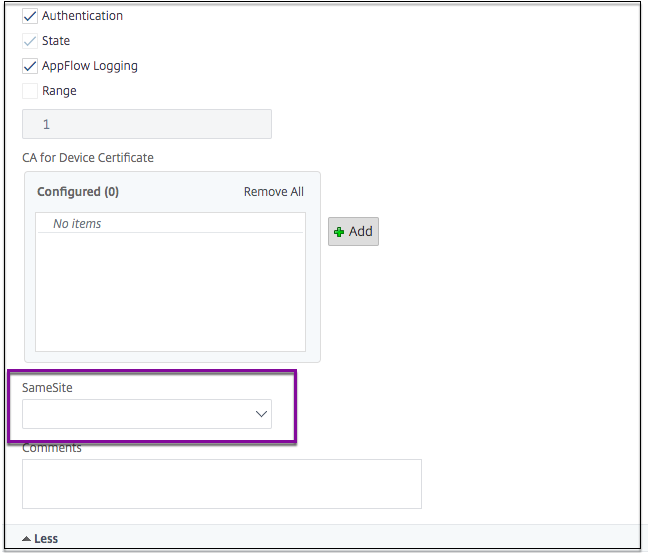
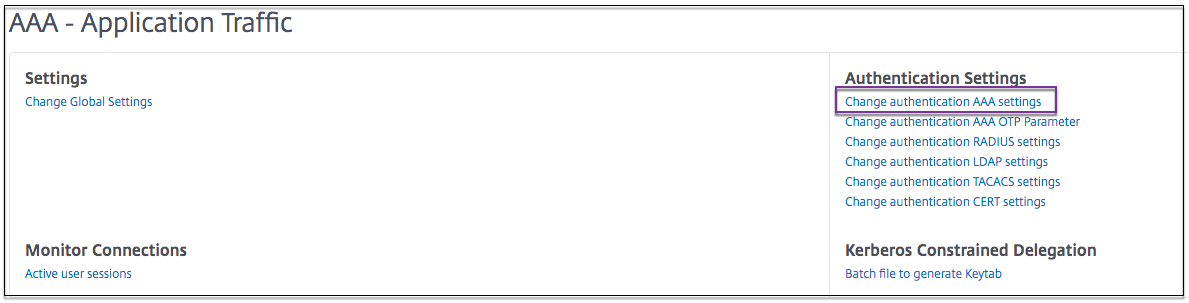
To set the SameSite attribute at the global level:
-
Navigate to Security > AAA – Application Traffic > Change Authentication Settings.
-
In the Configure AAA Parameter page, click the SameSite list, and select the option as required.
Share
Share
This Preview product documentation is Cloud Software Group Confidential.
You agree to hold this documentation confidential pursuant to the terms of your Cloud Software Group Beta/Tech Preview Agreement.
The development, release and timing of any features or functionality described in the Preview documentation remains at our sole discretion and are subject to change without notice or consultation.
The documentation is for informational purposes only and is not a commitment, promise or legal obligation to deliver any material, code or functionality and should not be relied upon in making Cloud Software Group product purchase decisions.
If you do not agree, select I DO NOT AGREE to exit.