Consolidation with dedicated interfaces for each instance
In the following example, the instances are part of multiple networks. Interface 0/1 is assigned to the Management Service, which is part of the internal 10.1.1.x network. NetScaler instances 2 and 3 are part of the 10.1.200.x network (VLAN 100). NetScaler instances 4 and 5 are part of the 10.1.3.x network (VLAN 200).
Optionally, you can configure an NSVLAN on all the instances.
The following figure illustrates the preceding use case.
Figure 1. Network topology of an SDX appliance with NetScaler instances in multiple networks
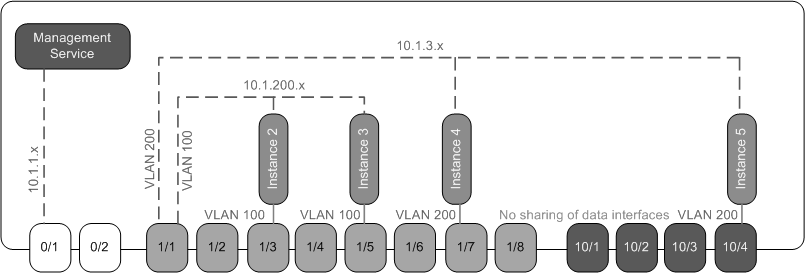
The SDX appliance is connected to a switch. Make sure that VLAN IDs 100 and 200 are configured on the switch port to which port 1/1 on the appliance is connected.
The following table lists the names and values of the parameters used for provisioning NetScaler instances 5 and 3 in this example.
| Parameter Name | Values for Instance 5 | Values for Instance 3 |
|---|---|---|
| Name | vpx5 | vpx3 |
| IP Address | 10.1.3.2 | 10.1.200.2 |
| Netmask | 255.255.255.0 | 255.255.255.240 |
| Gateway | 10.1.3.1 | 10.1.200.1 |
| XVA File | NS-VPX-XEN-10.0-51.308.a_nc.xva | NS-VPX-XEN-10.0-51.308.a_nc.xva |
| Feature License | Platinum | Platinum |
| Admin Profile | ns_nsroot_profile | ns_nsroot_profile |
| User Name | vpx5 | vpx3 |
| Password | Sdx1 | root |
| Confirm Password | Sdx1 | root |
| Shell/Sftp/Scp Access | True | True |
| Total Memory (MB) | 2048 | 2048 |
| #SSL Chips | 1 | 1 |
| Throughput (Mbps) | 1000 | 1000 |
| Packets per second | 1000000 | 1000000 |
| CPU | Shared | Shared |
| Interface | 1/1 and 10/4 | 1/1 and 1/5 |
| NSVLAN | 200 | 100 |
| Add (interface) | 1/1 | 1/1 |
| Tagged Interface | Select Tagged | Select Tagged |
To provision NetScaler instances 5 and 3 as shown in this example
- On the Configuration tab, in the navigation pane, expand NetScaler Configuration, and then click Instances.
- In the NetScaler instances pane, click Add.
- In the Provision NetScaler Wizard follow the instructions in the wizard to set the parameters to the values shown in the preceding table.
- Click Create, and then click Close. The NetScaler instance you provisioned appears in the NetScaler instances pane.