This content has been machine translated dynamically.
Dieser Inhalt ist eine maschinelle Übersetzung, die dynamisch erstellt wurde. (Haftungsausschluss)
Cet article a été traduit automatiquement de manière dynamique. (Clause de non responsabilité)
Este artículo lo ha traducido una máquina de forma dinámica. (Aviso legal)
此内容已经过机器动态翻译。 放弃
このコンテンツは動的に機械翻訳されています。免責事項
이 콘텐츠는 동적으로 기계 번역되었습니다. 책임 부인
Este texto foi traduzido automaticamente. (Aviso legal)
Questo contenuto è stato tradotto dinamicamente con traduzione automatica.(Esclusione di responsabilità))
This article has been machine translated.
Dieser Artikel wurde maschinell übersetzt. (Haftungsausschluss)
Ce article a été traduit automatiquement. (Clause de non responsabilité)
Este artículo ha sido traducido automáticamente. (Aviso legal)
この記事は機械翻訳されています.免責事項
이 기사는 기계 번역되었습니다.책임 부인
Este artigo foi traduzido automaticamente.(Aviso legal)
这篇文章已经过机器翻译.放弃
Questo articolo è stato tradotto automaticamente.(Esclusione di responsabilità))
Translation failed!
診断パッケージ
診断パッケージには、システムログファイル、システム情報、およびCitrix SD-WAN™サポートチームがシステムの診断と問題解決に役立つその他の必要な詳細がすべて含まれています。
パッケージを作成した後、それをコンピューターにダウンロードし、診断パッケージをCitrix®カスタマーサポートにメールで送信するか、Citrixカスタマーサポートサーバー(または別のサーバー)に直接アップロードできます。
注
Citrix SD-WAN Centerは、一度に最大5つの診断パッケージを保存できます。
診断パッケージの作成:
-
Citrix SD-WAN CenterのWebインターフェイスで、[監視] タブをクリックし、[診断] をクリックします。
-
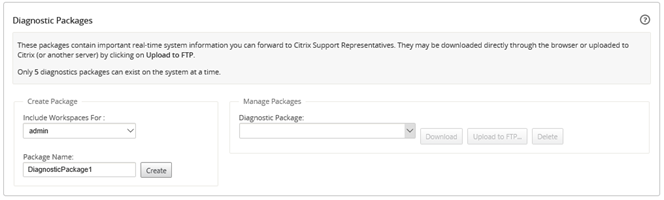
[診断パッケージ] セクションの [パッケージの作成] で、[ワークスペースを含めるユーザー] ドロップダウンリストから、ワークスペースが診断にコピーされるユーザーを選択します。
注
診断パッケージには、選択したユーザーによって最近変更された5つの構成が含まれます。
-
[パッケージ名] フィールドに、診断パッケージの名前を入力します。
-
[作成] をクリックします。これにより、システム診断が実行され、診断パッケージが生成されます。
診断パッケージのダウンロード:
-
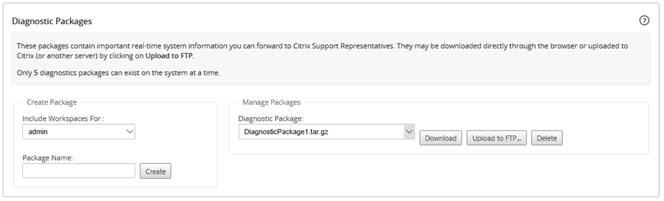
[診断パッケージ] セクションの [パッケージの管理] で、[診断パッケージ] ドロップダウンリストからダウンロードするパッケージを選択します。
-
[ダウンロード] をクリックします。診断パッケージがローカルコンピューターにダウンロードされます。
診断パッケージのFTPサーバーへのアップロード:
-
[診断パッケージ] セクションの [パッケージの管理] で、[診断パッケージ] ドロップダウンリストからアップロードするパッケージを選択します。
-
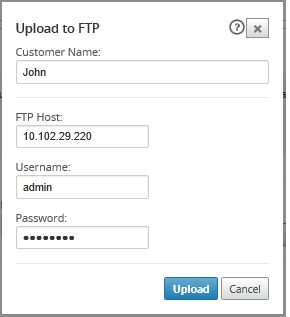
[FTPにアップロード] をクリックします。これにより、[FTPサーバーにアップロード] ダイアログボックスが開き、FTP認証情報を指定して、パッケージをCitrixカスタマーサポートFTPサーバーまたは別のFTPホストにアップロードできます。
-
[顧客名] フィールドに、Citrix SD-WANサポートが診断パッケージを識別するのに役立つ名前を入力します。この名前のディレクトリがCitrix FTPサーバーに作成され、ファイルはその場所にアップロードされます。
-
[FTPホスト] フィールドに、FTPサーバーのIPアドレスまたはホスト名(DNSが構成されている場合)を入力します。
-
[ユーザー名] フィールドに、FTPサーバーへのログインに使用するユーザー名を入力します。
-
[パスワード] フィールドに、ユーザー名に関連付けられているパスワードを入力します。
-
[アップロード] をクリックします。
注
許容される最大パッケージの制限を超えないように、古い診断パッケージを定期的に削除することをお勧めします。既存の診断パッケージを削除するには、[診断パッケージ] ドロップダウンリストから診断パッケージを選択し、[削除] をクリックします。
共有
共有
This Preview product documentation is Cloud Software Group Confidential.
You agree to hold this documentation confidential pursuant to the terms of your Cloud Software Group Beta/Tech Preview Agreement.
The development, release and timing of any features or functionality described in the Preview documentation remains at our sole discretion and are subject to change without notice or consultation.
The documentation is for informational purposes only and is not a commitment, promise or legal obligation to deliver any material, code or functionality and should not be relied upon in making Cloud Software Group product purchase decisions.
If you do not agree, select I DO NOT AGREE to exit.