This content has been machine translated dynamically.
Dieser Inhalt ist eine maschinelle Übersetzung, die dynamisch erstellt wurde. (Haftungsausschluss)
Cet article a été traduit automatiquement de manière dynamique. (Clause de non responsabilité)
Este artículo lo ha traducido una máquina de forma dinámica. (Aviso legal)
此内容已经过机器动态翻译。 放弃
このコンテンツは動的に機械翻訳されています。免責事項
이 콘텐츠는 동적으로 기계 번역되었습니다. 책임 부인
Este texto foi traduzido automaticamente. (Aviso legal)
Questo contenuto è stato tradotto dinamicamente con traduzione automatica.(Esclusione di responsabilità))
This article has been machine translated.
Dieser Artikel wurde maschinell übersetzt. (Haftungsausschluss)
Ce article a été traduit automatiquement. (Clause de non responsabilité)
Este artículo ha sido traducido automáticamente. (Aviso legal)
この記事は機械翻訳されています.免責事項
이 기사는 기계 번역되었습니다.책임 부인
Este artigo foi traduzido automaticamente.(Aviso legal)
这篇文章已经过机器翻译.放弃
Questo articolo è stato tradotto automaticamente.(Esclusione di responsabilità))
Translation failed!
IPsec トンネルレポート
IPセキュリティ (IPsec) プロトコルは、IPパケットに対して、機密データの暗号化、認証、リプレイ保護、データ機密性などのセキュリティサービスを提供します。これらのセキュリティサービスを提供するために使用される2つのIPsecセキュリティプロトコルは、Encapsulating Security Payload (ESP) と Authentication Header (AH) です。
IPsecトンネルモードでは、元のIPパケット全体がIPsecによって保護されます。元のIPパケットはカプセル化されて暗号化され、VPNトンネルを介してパケットを送信する前に新しいIPヘッダーが追加されます。
Citrix SD-WANアプライアンスでのIPsecトンネルの構成の詳細については、「IPsecトンネルの終端」を参照してください。
Citrix SD-WAN™ Centerでは、Citrix SD-WANネットワークで構成されているすべてのIPsecトンネルの状態を表示できます。
IPsecトンネルの統計を表示するには:
Citrix SD-WAN Centerで、レポート > IPsecトンネル に移動し、タイムラインコントロールで期間を選択します。
タイムラインコントロールを使用して、特定の期間のレポートを選択して表示できます。詳細については、「タイムラインコントロール」を参照してください。
レポートビューを作成、保存、開くこともできます。詳細については、「ビューの管理」を参照してください。
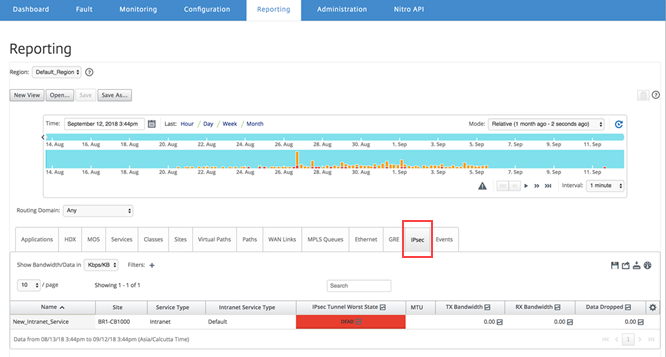
次のメトリックを表示できます。
- 名前: アプリケーション名
- サイト: サイトの名前
- サービスタイプ: サービスの種類
-
イントラネットサービスタイプ: IPsecトンネルに関連付けられているイントラネットサービスの種類。イントラネットサービスの種類は次のとおりです
- デフォルト
- Microsoft Azure Virtual WAN
- Zscaler
- Citrix® SaaS Gateway
- IPsecの最悪の状態: 選択した期間中に観測された最悪の状態
- MTU: 最大伝送単位 — 特定のリンクを介して転送できる最大のIPデータグラムのサイズ
- TX帯域幅: 送信された帯域幅
- RX帯域幅: 受信された帯域幅
- TXパケット: 送信されたパケット数
- RXパケット: 受信されたパケット数
- ドロップされたデータ: ドロップされたデータ (Kbps)
- ドロップされたパケット: ドロップされたパケット数
注
設定アイコンをクリックして、表示するメトリックを選択します。
共有
共有
This Preview product documentation is Cloud Software Group Confidential.
You agree to hold this documentation confidential pursuant to the terms of your Cloud Software Group Beta/Tech Preview Agreement.
The development, release and timing of any features or functionality described in the Preview documentation remains at our sole discretion and are subject to change without notice or consultation.
The documentation is for informational purposes only and is not a commitment, promise or legal obligation to deliver any material, code or functionality and should not be relied upon in making Cloud Software Group product purchase decisions.
If you do not agree, select I DO NOT AGREE to exit.