
Previous releases
This topic is the list of previous releases for NetScaler Application Delivery Management (NetScaler Console).
December 13, 2023
Infrastructure
NetScaler® ADM service rebranding
NetScaler Application Delivery Management service (ADM Service) is now rebranded to NetScaler Console service.
Other terminologies that have been rebranded are as follows:
-
ADM agent is now rebranded to NetScaler agent
-
ADM Service Connect is now rebranded to Console Advisory Connect
Note:
Our NetScaler Console service product UI and documentation are currently undergoing updates to reflect these changes. During this time, you may come across the earlier and rebranded names being referenced interchangeably. We thank you for your understanding during this transition.
Licensing
NetScaler Flexed licensing
NetScaler Flexed licensing is the new licensing framework aimed at simplifying the license management process. Your Flexed license includes software instance licenses (VPX/CPX/BLX, SDX, MPX, and VPX FIPS) and bandwidth capacity licenses. You must apply the Flexed licenses on NetScaler Console service or NetScaler ADM on-prem. You must also apply the MPX Z-Cap and SDX Z-Cap license on NetScaler MPX hardware and NetScaler SDX hardware, respectively. You can then allocate them across all NetScaler form factors deployed in cloud or on-prem.
Note:
Ensure that your NetScaler agents are running version 16.x or later.
For more information, see Flexed license.
Analytics
Flexed license - Metrics Collector disabled by default for the new NetScaler instances added in NetScaler Console
If you are using the Flexed license, the Metrics Collector is now disabled by default for the new NetScaler instances added in NetScaler Console. You must manually enable this option to push the NetScaler metrics and counters data to the Console. The metrics collector configuration for the existing managed instances remain unchanged.
Note:
The Metrics Collector must be enabled for the data to appear in the Application Dashboard and its related tabs such as Performance, SSL, and Key Metrics for all the licensed virtual servers on that instance.
For more information, see Configure Intelligent App Analytics.
Infrastructure
Download files for batch configuration jobs
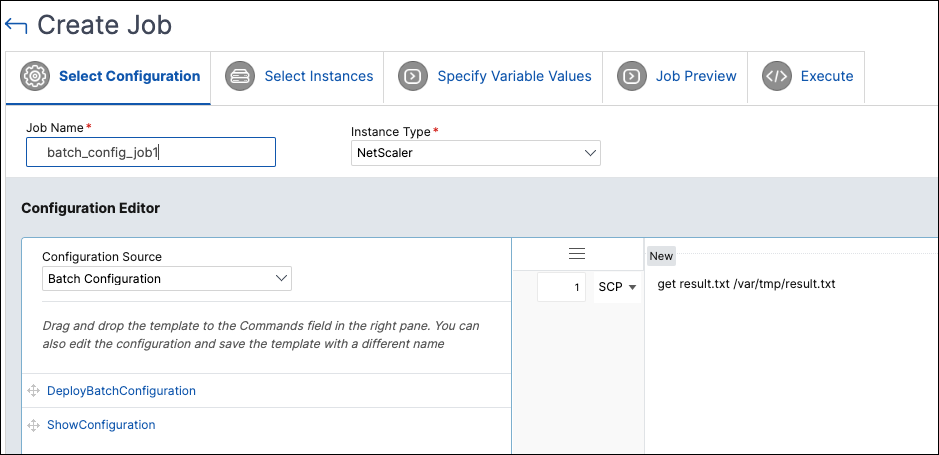
The configuration jobs now allow you to download files from a directory on a NetScaler instance to a directory on your local machine using the NetScaler ADM GUI.
To use this feature, navigate to Infrastructure > Configuration > Configuration Jobs, select a job and click Download Result Files.
The Download Result Files button is available only if the following conditions are met:
-
The configuration job that is created is a batch configuration job. To create a batch configuration job, go to Create Job > Select Configuration and in the Configuration Editor, select Configuration Source > Batch Configuration
-
A
scp getcommand is used in the Configuration Editor
For multiple NetScaler instances, the downloaded result files are available in separate folders, each corresponding to an individual instance.
Pause and resume a scheduled upgrade job
NetScaler ADM now offers the option to pause your scheduled upgrade job. To use this feature, navigate to Infrastructure > Upgrade Jobs, select an existing scheduled upgrade job, and click Stop to pause the job. To resume the scheduled upgrade job, click Resume.
Note:
If the scheduled time for the upgrade job has passed after you decided to resume it, you need to create the upgrade job again.
For more information, see Upgrade Jobs
Fixed Issues
The issues that are addressed in Build December 13, 2023.
Analytics
-
In Applications > Dashboard, the export of transaction log data to the tabular or CSV format does not display any data. This issue is noticed when NetScaler ADM is configured with non UTC time zones.
-
In Security > Security Violations > Violation Details, the search filter does not recognise the "Client-IP !=" query.
-
Scheduled snapshot reports exported from Security > Security Violations > Export Reports > Schedule Export with the file format selected as JPEG display the following error:"Please provide query parameters in the report context or csv_export_arr."
Infrastructure
Management and Monitoring
November 29, 2023
Infrastructure
November 09, 2023
Analytics
Configure Gateway session timeout
In Settings > Analytics Settings > Configure ICA/Gateway Session Timeout, you can now configure timeout session for Gateway Insight. By default, the value is 30 minutes. With this configuration, if NetScaler ADM does not receive session terminate record within the configured duration, then the session is recorded as terminated.
Update in NetScaler backup process and firewall access
Unified Security dashboard
In NetScaler ADM, you can now use a single-pane dashboard to configure protections, enable analytics, and deploy them on your applications. Navigate to Security > Security Dashboard and then click Manage Application to:
-
View all secured and unsecured applications.
-
Select a unsecured application, configure protections from various template options, enable analytics for the protections, and deploy them on your application to secure the application.
Earlier, you had to configure all protections in the NetScaler instances and you were able to view only analytics for the configured protections in NetScaler ADM. As an administrator, this single-pane dashboard enables you to configure protections for the application in a single workflow.
For more information, see Unified Security dashboard.
Fixed Issues
The issues that are addressed in Build Nov 09, 2023.
Infrastructure
StyleBooks
-
When config packs with special characters in their parameters are updated or deleted, NetScaler ADM displays a success message despite incomplete update or delete operations on NetScaler. With this fix, NetScaler ADM now accurately displays errors for any incomplete configurations resulting because of special characters in the configpack definition.
October 25, 2023
Analytics
Create custom dashboards to view instance key metric details
Similar to the unified dashboard (Overview > Dashboard), you can now view instance metric details based on your choice by creating custom dashboards. For example, if you want to monitor the key metrics for applications and application security, you can create a custom dashboard by selecting only those two categories. You can create up to 20 dashboards by using a unique name for each dashboard. As an administrator, this enhancement enables you to create multiple dashboards and monitor only the required instance insights.
To get started, navigate to Overview > Custom Dashboard.
For more information, see Create custom dashboards to view instance key metric details.
Actionable tasks and recommendations
The following enhancements are now added to the Tasks feature:
-
A new Tasks tab is introduced where you can view actionable tasks that need your immediate attention. These tasks are displayed based on your current utilization. As an administrator, completion of these actionable tasks ensure that your NetScaler deployment is secured, compliant, and efficient. You can also view these actionable tasks based on the severity of the issues (Critical and Medium).
-
The To Do tab is renamed as Recommendations. In Recommendations, you can continue to review the existing tasks and click Guide Me to complete the task.
-
The Archive tab is no longer available. Instead, you can choose to Dismiss a recommendation from the list.
For more information, see Actionable tasks and recommendations.
Infrastructure
Use certificate store to update SSL certificates
October 10, 2023
Management and Monitoring
Support for identification and remediation of CVE-2023-4966 and CVE-2023-4967
NetScaler Console Security Advisory now supports the identification and remediation of CVE-2023-4966 and CVE-2023-4967.
-
Identification requires a combination of version and configuration scan.
-
Remediation requires an upgrade of the vulnerable NetScaler instances to a recommended build that has the fix.
Note:
Security Advisory does not support NetScaler builds that have reached End of Life (EOL). We recommend you upgrade to the NetScaler supported builds or versions.
For more information on how to use NetScaler ADM to upgrade NetScaler instances, see Use jobs to upgrade NetScaler instances.
For more information, see Security Bulletin.
September 26, 2023
Analytics
Export data to Splunk and New Relic only from selected instances
When you create a subscription to export data to Splunk and New Relic, you can now select the NetScaler instances. If you create a subscription with specific instances, the data is exported to Splunk and New Relic only from the selected NetScaler instances.
For more information, see Integration with Splunk and Integration with New Relic.
Infrastructure
ADM on-prem instances connected with ADM Service using Cloud Connector
In Settings, you can now view a new option called ADM On-Prem. In this page, you can view details of the ADM on-prem instances that are connected with the ADM service tenant through ADM On-Prem Cloud Connector.
For more information, see ADM on-prem instances connected with ADM Service using Cloud Connector.
Fixed Issues
The issues that are addressed in Build Sep 26, 2023.
September 13, 2023
Infrastructure
Authentication token to upload technical support bundle
You now need an authentication token to upload the technical support bundle generated on your NetScaler to the Citrix technical support server. Previously, you uploaded the technical support bundle using Citrix user name and password. For more information, see How to generate a technical support bundle for a NetScaler instance.
Fixed Issues
The issues that are addressed in Build Sep 13, 2023.
Analytics
Infrastructure
August 31, 2023
Infrastructure
View the Certificate Store page under SSL Dashboard
Support for SNMP functionality for the agents
In Infrastructure > Agents > Actions > Manage SNMP, you can now create SNMP managers, SNMP users and SNMP views for agents.
For more information on SNMP managers and users, see Create SNMP managers and users for NetScaler ADM agent.
User experience and functionality improvements for the Data Storage Management dashboard
To improve the user experience and make the data storage management more efficient, the following improvements are now available for the Data Storage Management dashboard:
-
New UI design for the dashboard:
-
Added Data Ingestion, Storage Consumption, Data Pruning, and Actions tiles
-
Actions tile provides options to add more storage, review data retention policy, perform data pruning, and review your system notifications
-
-
Search functionality in Storage Consumption Trends section:In addition to viewing the storage trends, you can now search for specific features and trends.
-
Perform data pruning:
-
You can now select one or more features and prune their data to free up your storage
-
You are entitled to 10 data prunes each month
-
For more information on the Data Storage Management dashboard, see Data Storage Management.
Security
API Gateway renamed to API Security
API Gateway is now renamed to API Security. You can view the changes in the following pages:
-
Security > API Security
-
Security > API Security > API Analytics > Get help > API Security docs
-
Settings > Users & Roles > Groups > Authorization Settings > API Security
-
Settings > Users & Roles > Access Policies > Permissions > Security > API Security
Fixed Issues
The issues that are addressed in Build August 31, 2023.
August 11, 2023
Management and Monitoring
Security Advisory - File integrity monitoring
The NetScaler Console Security Advisory now enables you to scan the NetScaler build files and view results of any alterations or additions to the original NetScaler build files.
In Security Advisory (Infrastructure > Instance Advisory > Security Advisory), the Scan Now option enables you to select Scan CVEs, Scan Files, or Scan Both. After you select Scan Files or Scan both, NetScaler Console compares the binary hash for managed NetScaler build files with the original binary hash values and highlights if there are any file alterations or file additions under the File Integrity Monitoring tab.
The scan results showcase the NetScaler instances that have any potential changes to the original files and/or any other file additions. For further investigations on the scan results, you can contact your organization's digital forensics.
For more information, see Security Advisory.
August 09, 2023
Infrastructure
View virtualization platform details for NetScaler VPX™
Retry failed upgrade jobs
In Infrastructure > Upgrade Jobs, you can now select the failed upgrade job and do either of the following actions:
-
Click Retry next to the failed upgrade job
-
Go to Select Action > Retry Upgrade Job
For more information, see Retry failed upgrade jobs.
Security
Update an existing API definition
In Security > API Gateway > API Discovery, you can now update an existing API definition with selected API resources.
For more information, see Update an existing API definition with discovered API endpoints.
Fixed Issues
The issues that are addressed in Build August 09, 2023.
Provisioning
StyleBooks
-
When you try to migrate an ADC configuration from a source ADC instance to a target instance in Applications > Configuration > Config Packs > Migrate ADC > Get Started > Specify Configuration, and click Next, the following error message is displayed intermittently:No Job found.
-
If you create a configpack from a StyleBook definition that has an authentication virtual server and built-in cache policy bindings, and then you delete the configpack, the deletion is successful. However, if you try to create the configpack again with the same parameters, the following error message appears:Resource already exists.
July 26, 2023
Analytics
Support to configure the export of metrics from NetScaler to Prometheus through StyleBook
To export metrics from NetScaler to Prometheus, you must create an analytics profile in NetScaler and specify the schema file. For more information, see Monitoring NetScaler Console, applications, and application security using Prometheus.
In Applications > Configuration > Stylebooks > Default Stylebook, you can now use the Prometheus TimeSeries Analytics Configuration StyleBook and run the configuration to all managed instances.
For more information, see Prometheus analytics StyleBook.
Assign a Net Profile for the managed NetScaler instances from NetScaler Console
When you enable analytics for the virtual servers in NetScaler Console, the AppFlow data from the NetScaler is exported to NetScaler Console through the NetScaler subnet IP address (SNIP). In some scenarios, the SNIP might be blocked because of the firewall in the network. In such scenarios, you might have to use a different IP address than the SNIP. For more information about net profile, see Use a specified source IP for back-end communication.
You can now assign net profiles to a NetScaler instance through NetScaler Console. Navigate to Infrastructure > Instances > Citrix ADC, select the instance, and from the Select Action list, click Configure Net Profiles to assign a net profile for the instance.
Note:
Ensure that you have disabled analytics in all virtual servers before you assign a net profile for the instance.
With this enhancement, you can assign a net profile for exporting AppFlow data from NetScaler to NetScaler Console.
Infrastructure
Improved user experience when using CLI to configure NetScaler agent as a proxy
StyleBooks
Support for additional attributes in StyleBooks analytics
The StyleBooks analytics section is now enhanced to:
-
Accept parameters to configure Transport Mode (
transport-mode) -
Configure HDX Insight for different types of traffic(
enable-hdxinsight-for)-
Enable HTTP X-Forwarded-For option (
http-x-forwarded-for) -
Enable Client side Measurements (
client-side-measurements)
-
For more information, see StyleBooks Analytics.
July 18, 2023
Management and Monitoring
Support for identification and remediation of CVE-2023-3519, CVE-2023-3466, and CVE-2023-3467
NetScaler Console Security Advisory now supports the identification and remediation of CVE-2023-3519, CVE-2023-3466, and CVE-2023-3467.
Identification of:
-
CVE-2023-3519 requires a combination of version and config scan.
-
CVE-2023-3466 and CVE-2023-3467 requires a version scan.
The remediation for CVE-2023-3519, CVE-2023-3466, and CVE-2023-3467 requires an upgrade of the vulnerable NetScaler instance to a release and build that has the fix.
Note:
Security Advisory does not support NetScaler builds that have reached End of Life (EOL). We recommend you upgrade to the NetScaler supported builds or versions.
For more information on how to use NetScaler Console to upgrade NetScaler instances, see Use jobs to upgrade NetScaler instances.
For more information on how to remediate CVE-2023-3519, CVE-2023-3466, and CVE-2023-3467, see Security Bulletin.
Note:
It might take a couple of hours for the security advisory system scan to conclude and reflect the impact of CVE-2023-3519, CVE-2023-3466, and CVE-2023-3467 in the security advisory module. To see the impact sooner, you can start an on-demand scan by clicking Scan Now.
July 12, 2023
July 03, 2023
Analytics
Configuration Job - Support to create a job for configuring export of metrics from NetScaler to Prometheus
To export metrics from NetScaler to Prometheus, you must create an analytics profile in NetScaler and specify the schema file. For more information, see Monitoring NetScaler, applications, and application security using Prometheus.
In Configuration Job, you can now create a job using the
NSConfigurePrometheusAnalyticsProfile template from the Inbuilt Template, specify the required parameters, and run the job to all managed instances.
For more information, see Schedule a job for configuring export of metrics from NetScaler to Prometheus.
Infrastructure
NetScaler agent caches NetScaler images
The time taken for the NetScaler upgrade is now considerably reduced as the NetScaler images are cached in the NetScaler agent after they are downloaded. Hence, the images are not required to be downloaded for subsequent upgrade jobs.
Note:
This is applicable only for NetScalers that are added using the NetScaler agent.
For more information, see Create an ADC upgrade job.
Fixed issues
-
In Web Insight, when you drill down any metric to view details and then further drill down any metric, the graph remains in the previous view, but all other details appear as expected.As a result, this creates an assumption that the further drill down is not working as expected.
-
When you try to migrate an ADC configuration from a source ADC instance to a target instance in Applications > Configuration > Config Packs > Migrate ADC > Get Started > Specify Configuration, and click Next, the following error message is displayed intermittently:"No Job found".
-
In the App dashboard, when you select an application and navigate to the SSL tab to bind a certificate, an error message "Certificate not found in database" is displayed.
June 14, 2023
Security
Support to create API definition without selecting endpoints
In the Security > API Gateway > API Discovery > Vserver page, you can now create an API definition without selecting an endpoint. When you click Create API Definition, a pop-up window appears for you to confirm if an API definition must be created for all the discovered endpoints. Click Yes to create the API definition with all the endpoints, else click No.
For more information, see Discover API endpoints.
StyleBooks
Support for additional argument types in replace() function
The
replace() built-in function can also accept a list of the following built-in types:
-
string -
ipaddress -
tcp-port -
number -
boolean
For more information, see replace().
Fixed Issues
The issues that are addressed in Build June 14, 2023.
-
In Upgrade Jobs (Infrastructure > Upgrade Jobs), when you select the pre-upgrade validation failed instance and click Revalidate, an error message is displayed.
-
MPX instances are missing from the Infrastructure > Citrix ADC Inventory > Citrix ADC (MPX/VPX/CPX/BLX) page.
-
When you export the SSL expiry reports for weekly, 30 days or 90 days from Infrastructure > SSL Dashboard > SSL Certificates > Export Reports and select Tabular, the resulting report displays an empty Domain column.
-
In Infrastructure > SSL Dashboard > SSL Certificates, the NetScaler high-availability pair does not display the superscript of 'P' and 'S' for the primary and the secondary devices.
-
In NetScaler release 13.1 and above, the ISSU commands do not get executed during the NetScaler upgrade.
-
For multiple Cluster IP addresses (CLIPs) in a cluster, when you add a CLIP in brackets in Infrastructure > Instances > Citrix ADC > Add, the configuration fails and the CLIP does not get added to NetScaler Console.
May 31, 2023
Analytics
Pooled licensing recommendations in the Tasks feature
In Tasks, you can now view recommendations and Guide Me workflows for pooled licensing entitlements. As an administrator, these pooled licensing recommendations ensure that you are making use of all capabilities of NetScaler Console.
For more information, see View recommendations and manage your ADCs and applications efficiently.
Export SSL insights data to Splunk and New Relic
When you create a new subscription in Settings > Ecosystem Integration for the integration of Citrix ADM with Splunk and New Relic, you can now select the SSL Certificate Insights option. After you configure the subscription with the SSL Certificate Insights option, you can view the SSL data (SSL vserver and SSL certificate related data) in the Splunk and New Relic dashboard.
For more information, see Integration with Splunk and Integration with New Relic.
Fixed Issues
The issues that are addressed in Build May 31, 2023.
-
In Gateway > HDX Insight > Instances, when you select an instance and export the data, the user name information for Desktop Users was not available. With this fix, the user name information is also available in the report.
-
When you select Configure SNMP for an SDX instance in Infrastructure > Instances> Citrix ADC > SDX, an error message is displayed. This issue occurs if the SDX profile is configured with SNMP v3 and NoAuthNoPriv as the security level.
-
In Infrastructure > Configuration > Configuration Jobs > Create Job > Select Configuration, when you enter a password variable ($password$) and retain the Type as Text Field instead of Password Field, and click Next, the page does not load.
-
In Web Insight, when you export data using the snapshot option, the graphs in the report appear blank.
-
Analytics is not visible in HDX Insight. Even if Citrix ADM is rebooted, the analytics is visible only for a short duration and becomes invisible later.
-
For an SDX instance in Infrastructure > Instances > Citrix ADC > SDX > Dasboard, when the used and free values for a resource are zero, the System Resource Utilization chart displays a blank space and blank value fields.With this fix, the number zero is displayed next to the resource name if the used and free values are zero.
May 18, 2023
Analytics
Support to export from each widget in Web Insight
In Web Insight, the export option is now introduced in all widgets and it enables you to export data in tabular format. Using this enhancement, you can:
-
Export the required data individually from any widget.
-
Drill down any metric and also export the required data from any widget.
Earlier, the export data provided only the consolidated report.
Note
You can also continue to use the existing Export option to generate the consolidated report.
Infrastructure
View the complete certificate chain
Support to log events irrespective of event age
Fixed Issues
The issues that are addressed in Build May 18, 2023.
-
In Infrastructure > Upgrade Jobs> Add > Schedule Task, if you select Perform two stage upgrade for nodes in HA and select the same time in the two Start Time fields, the following error message appears when you proceed:"common.date_diff_error:There should be atleast 1 hour difference between upgrade time"Even if you change the start time in the fields, the Create Job tab displays an empty page.
-
In Infrastructure > Instance Advisory > Upgrade Advisory, the End of Maintenance (EOM) and End of Life (EOL) details for Release 13.0 is incorrect.
-
The email alert for any event was showing the region incorrectly. With this fix, the region is not shown in the email alerts for events.
May 09, 2023
Management and Monitoring
Support for identification and remediation of CVE-2023-24488 and CVE-2023-24487
NetScaler Console Security Advisory now supports the identification and remediation of CVE-2023-24488 and CVE-2023-24487.
Identification of:
-
CVE-2023-24488 requires a combination of version and config scan.
-
CVE-2023-24487 requires a version scan.
The remediation for CVE-2023-24487 and CVE-2023-24488 requires an upgrade of the vulnerable ADC instance to a release and build that has the fix.
For more information on the fixed build version details for CVE-2023-24487 and CVE-2023-24488, see Security Bulletin.
Note:
ADC build 13.1–45.63 replaces build 13.1–45.61.
For more information on how to use NetScaler Console to upgrade ADC instances, see Create an ADC upgrade job.
Note:
It might take a couple of hours for the security advisory system scan to conclude and reflect the impact of CVE-2023-24488 and CVE-2023-24487 in the security advisory module. To see the impact sooner, you can start an on-demand scan by clicking Scan Now.
April 25, 2023
The enhancements and changes that are available in Build April 25, 2023.
Analytics
Web Insight - Support to view nil values in graphs
In Web Insight, when you drill down any metric under Applications, Clients, URLs, or Instances, the analytics view now provides the visibility of nil values (for example, 0 ms and 0 request) in the graph for the selected duration.
Earlier, if there is no traffic or transactions received for the selected duration, Web Insight displayed the graphs by skipping those nil values. As an administrator, you can now view the complete graph with these nil values.
StyleBooks
Specify user group access to config packs
Fixed Issues
The issues that are addressed in Build April 25, 2023.
-
In Applications > Configuration > Config Packs, when you enter a search query using the search criteria of Properties > Display Key, the search result is displayed but the search bar displays the index number of the result.With this fix, the search bar displays the search query in text instead of a number.
April 13, 2023
The enhancements and changes that are available in Build April 13, 2023.
Analytics
Integrated Cache notification in Web Insight
After you enable Integrated Cache in the NetScaler instance, the eligible requests are processed without requiring a round trip to an origin server. In Web Insight, these Integrated Cache requests are currently visible under Servers with virtual server IP address instead of the actual server IP address.
For a better visibility of these Integrated Cache requests, you can now view an IC notification next to the ADC virtual server IP address under Servers.
For the requests that are not processed with Integrated Cache, the actual origin server IP address is visible.
As an administrator, this notification enables you to quickly identify that the ADC instance has processed the Integrated Cache requests.
Integrated Cache hits and misses graph in Web Insight
In Web Insight, when you drill down a server, the Server Metrics now display Integrated Cache Hits and Integrated Cache Misses tabs.
As an administrator, the graph view in:
-
The Integrated Cache Hits tab enables you to view the total responses that the NetScaler appliance serves from the cache.
-
The Integrated Cache Misses tab enables you to view the total responses that the NetScaler appliance serves from the origin server.
Web Insight - View both average and maximum values in graphs
Starting from 13.1 45.47 or later versions, the Web Insight in NetScaler Console is supported with the visibility of maximum latency values under Servers and Clients.
In addition to this support, when you drill down a server or a client, you can now view both average and maximum values in the summary panel, and also by hovering the mouse pointer on the time series analytics graph in Server Network Latency, Server Response Time, and Client Network Latency.
As an administrator, this enhancement enables you to visualize the maximum latency in graphs for the selected duration.
Infrastructure
View data storage trends in NetScaler Console GUI
In Settings > Data Storage, you can now view the data storage information across the different features in your current deployment. The Data Storage Management dashboard helps you visualize how the data is stored and if the features are operating within their storage entitlement.
Note
The data storage policies are expected to change in the upcoming releases. With these changes, you will not be able to store historical data after it exceeds the storage limit.
For more information, see Manage data storage.
Fixed Issues
The issues that are addressed in Build April 12, 2023.
Infrastructure
-
In high-availability deployments, there is no option to upload build image files only to the secondary node.As part of the fix, you can now upload build image files to the secondary node from Infrastructure > Upgrade Jobs > Create Job tab > Upload to secondary node only.
-
The reports exported from Infrastructure > Instances > NetScaler do not display the serial number of secondary nodes.The reports now display the serial numbers of both primary and secondary nodes of the NetScaler instances. You can also view the reports from Infrastructure > NetScaler Inventory.
April 05, 2023
The enhancements and changes that are available in Build April 05, 2023.
Security
Create API definitions from discovered API endpoints in NetScaler Console GUI
Unified dashboard - View API analytics key metrics
In the unified dashboard (Overview > Dashboard), you now view key metrics for the API endpoints configured through NetScaler Console.
For more information, see A unified dashboard to view instance key metric details.
Fixed Issues
The issues that are addressed in Build April 05, 2023.
-
The Choose Appliance option for Certificate File and Key File fields appears for the following pages:
-
Infrastructure > SSL Dashboard > Manage Certificate Store > Add
-
Infrastructure > SSL Dashboard > SSL Certificates > Update
As a fix, the Choose Appliance option is now removed. -
-
If NetScaler has an on-premises NetScaler Console as a licensing server and an agent is modified in Infrastructure > Instances > Agents, the following issue occurs:
The IP address of the license server on NetScaler changes from the IP address of the on-premises NetScaler Console to the IP address of one of the NetScaler agents. -
When you edit the password for an SDX admin profile configured with SNMPv3 from Infrastructure > Instances> NetScaler > SDX tab > Profile, the following error message appears:
Please provide valid authentication protocol. The possible values are MD5, SHA.
March 14, 2023
Fixed issues
The following issue is addressed in Build March 14, 2023:
In Infrastructure > SSL Dashboard > Install Certificates, when you upload a certificate chain that has the same root certificate as an existing certificate chain, the certificate installation fails. The following text is displayed in Infrastructure > SSL Dashboard > SSL Audit Logs > Device Log > Command Log:
Resource Already Exists
When you delete an email distribution list from Settings > Notifications > Email, the following error is seen:
Error: Bad Gateway
This issue occurs because the name of the email distribution list has a white space.
As part of the fix, NetScaler Console now allows you to delete email distribution lists with white spaces.
March 02, 2023
Analytics
Improvements to Web Insight
In Web Insight, you can now view the following enhancements under Application Metrics:
-
A new Summary tab is introduced that enables you to visualize an overview of the application performance such as Response Time, Requests, and Bandwidth. As an administrator, this enables you to get an insight of the application performance for the selected duration. You can use the toggle option and customize the view.
-
In the Requests tab, apart from the existing total requests, you can also view requests from the top 5 clients based on the total requests. As an administrator, this enables you to get an insight on the clients accessing the application for the selected duration.
-
In the Bandwidth tab, you can view the bandwidth consumption from the top 5 servers based on the total bandwidth consumption. As an administrator, this enables you to get an insight on the servers consuming more bandwidth for the selected duration.
-
In the Response Time tab, you can also view Client Network Latency, Server Network Latency, and Server Processing Time on the same graph. As an administrator, this enables you to get an insight on the latency that occurs from client, server, and application for the selected duration. You can use the toggle option and customize the view.
Management and Monitoring
Change in execution summary for NetScaler high availability upgrade
In NetScaler Console GUI, the execution summary in Infrastructure > Upgrade Jobs > Execution Summary no longer displays the high availability synchronization related commands.
This is because, during the NetScaler high availability upgrade, if the NetScaler primary and secondary nodes are in different versions, NetScaler performs the disabling of the high availability synchronization between the nodes. NetScaler Console does not perform this operation.
Set threshold for individual entities in Network Reports
In Infrastructure > Network Reporting > Thresholds, you can now set the threshold value for specific entities while configuring the threshold.
For more information, see Network Reporting.
Support for scheduling individual agent upgrade
In Infrastructure > Instances > Agents > Settings, you can now schedule the upgrade of each NetScaler agent. You can choose to either automatically upgrade an agent to the next build or specify a time and time zone to schedule an upgrade.
For more information, see Agent upgrade settings.
Improvements in NetScaler instance upgrade
The following changes are now available in the Pre-upgrade validation tab:
-
Instances blocked from upgrade section - This new section lists the instances that are blocked from upgrade because of pre-upgrade validation errors.
-
Quick Cleanup button - This button is available in the Disk Space Details pane and allows you to quickly free up the disk space from multiple folders.
For more information, see How to upgrade an ADC instance.
Security
View the versions of NetScaler Web App Firewall and bot signatures for a NetScaler instance
You can now view the versions of NetScaler Web App Firewall and bot signatures for a NetScaler instance. The latest signature versions protect your instance from the CVEs. For more information, see Signature Alert Articles and Bot signature alert articles.
Application Performance Analytics
Improvements to Web Insight
In Web Insight, you can now view the maximum network latency values in both Server and Client. As an administrator, this enhancement enables you to identify the exact server or client that is performing with maximum latency.
Earlier, Web Insight provided the maximum value only based on the average latency values across all servers and clients.
Miscellaneous
Create and apply filters in the unified dashboard
In the unified dashboard (Overview > Dashboard), you can now create and apply filters in:
-
Applications
-
ADC Infrastructure
-
Application Security
As an administrator, you can apply filters and view insights only for the selected instances or applications.
For more information, see A unified dashboard to view instance key metric details.
Fixed Issues
The issues that are addressed in Build Mar 02, 2023.
-
In Infrastructure > Upgrade Jobs, when you select a completed job that has the pre-upgrade or post-upgrade script file name with special characters and then download the output scripts from the Select Action list, the File not found error message is displayed.
February 07, 2023
Analytics
Management and Monitoring
Support for changing agent password without current password
As a super administrator, you can now allow agent passwords to be changed without their current passwords.
Navigate to Settings > Global Settings > System Configurations > Agent and Time Zone > Agent and select the Remove current password prerequisite for agent password change checkbox. The Change Agent Password page will no longer have the Current password field.
To display the Current password field again, clear the Remove current password prerequisite for agent password change checkbox.
Time series data visualization interval for NetScaler Console Express accounts is revised
For virtual servers managed with the Express account, the time series data visualization in analytics graphs and Network Reporting graphs for the Last 1 Hour duration is now revised.
| Feature | Existing data visualization interval | New data visualization interval |
|---|---|---|
| Application dashboard | 1 minute | 5 minutes |
| Network Reporting | 5 minutes | 10 minutes |
| Web Insight, HDX Insight, Gateway Insight, Security Insights, BOT Insights, Detailed Transactions | 1 minute | 5 minutes |
Fixed issues
The following issues are addressed in Build February 07, 2023.
When you enable or disable syslog settings for the ADC instance, ADM does not save configuration in the ADC instance. As a result, configuration changes events are not saved in NetScaler Console.
In Infrastructure > Instances > Agent, after you install the SSL certificate with a password encrypted key, the connection to agent on Port 443 fails.
January 24, 2023
January 10, 2023
Management and Monitoring
View recommendations and manage your ADCs and apps efficiently as actionable Tasks with Guide Me workflows
In the NetScaler Console GUI, a new Task option is introduced, where you can now view recommendations based on your subscription and current utilization. As an administrator, you can:
-
View To-Do tasks as actionable recommendations for licensing, analytics, events, SSL certificates, and many more
-
Complete the task using the Guide Me option that provides guidance tool tips to successfully complete the task
-
Acknowledge the tasks and move them to archive
-
Go to Archived tasks and use the guided tool tips for recurring needs
These recommendations ensure that you are utilizing all the capabilities of NetScaler Console, enable product discovery and functionalities recommended by the product for efficient administration of the deployment.
For more information, see View recommendations and manage your ADCs and applications efficiently.