
WAF learning
NetScaler Web App Firewall (WAF) protects your web applications from malicious attacks such as SQL injection and cross-site scripting. To prevent data breaches and provide the right security protection, you must monitor your traffic for threats and real-time actionable data on attacks. Sometimes, the attacks reported might be false-positive and those need to be provided as an exception.
The Learning engine on NetScaler Console is a repetitive pattern filter that enables WAF to learn the behavior (the normal activities) of your web applications. Based on monitoring, the engine generates a list of suggested rules or exceptions for each security check applied on the HTTP traffic.
It is much easier to deploy relaxation rules using the Learning engine than manually deploy it as necessary relaxations.
The following image explains the high-level information on how the WAF learning in NetScaler Console works:
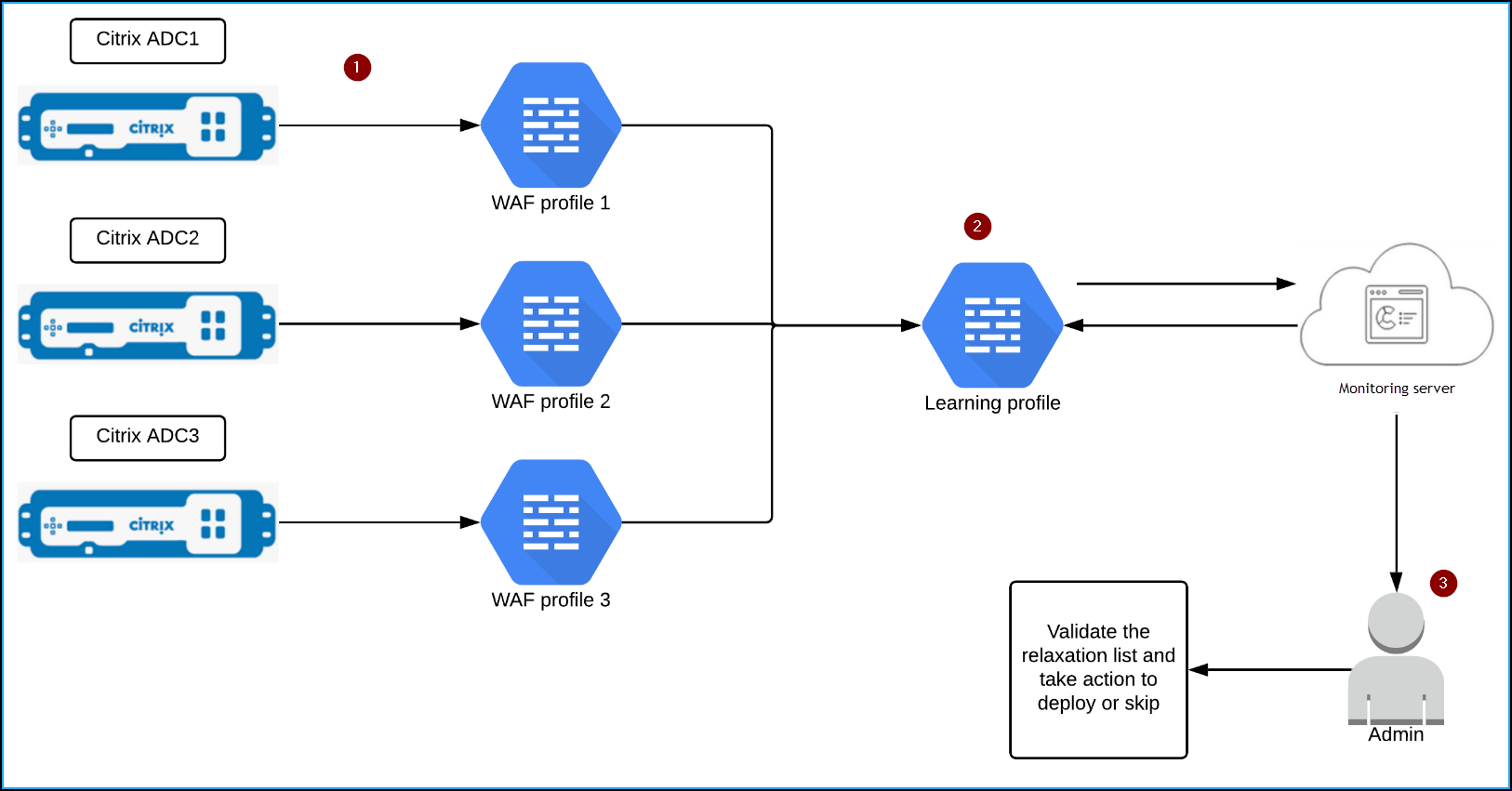
1 – NetScaler instances with its WAF profiles
2 – Configure a learning profile in NetScaler Console, add the WAF profiles, and select to auto deploy or manually deploy the relaxation rules
3 – Administrator can validate the relaxation rules in NetScaler Console and decide to deploy or skip
Get started
To deploy the learning feature, you must:
-
Enable the centralized learning in the NetScaler instance. Run the following command in the NetScaler instance:
set appfw settings -centralizedLearning ON -
Ensure that the NetScaler instance version is 13.0-76.6 or later.
-
Configure a Web App Firewall profile (set of security settings) on your NetScaler appliance. For more information, see Creating Web App Firewall profiles.
After you enable the centralized learning and configure the WAF profile, NetScaler Console generates a list of exceptions (relaxations) for the configured security check. As an administrator, you can review the list of exceptions in NetScaler Console and decide to deploy or skip.
Using the WAF learning feature in NetScaler Console, you can:
-
Configure a learning profile with the following security checks:
-
Start URL
-
Cookie Consistency
-
Credit CardNoteFor the credit card security check, you must configure the
doSecureCreditCardLoggingin NetScaler instance and ensure the setting is OFF. -
Content Type
-
Form Field Consistency
-
Field Formats
-
CSRF Form Tagging
-
HTML Cross-Site Scripting
-
HTML SQL InjectionNoteFor the HTML SQL Injection check, you must configure
set -sqlinjectionTransformSpecialChars ONandset -sqlinjectiontype sqlspclcharorkeywordsin NetScaler instance. -
HTML Command InjectionNoteSupported only in NetScaler instance 13.0-72.12 or later.
-
JSON SQLNoteSupported only in NetScaler instance 13.1-14.10 or later.
-
JSON Command InjectionNoteSupported only in NetScaler instance 13.1-14.10 or later.
-
JSON XSSNoteSupported only in NetScaler instance 13.1-14.10 or later.
-
-
Check the relaxation rules in NetScaler Console and decide to take necessary action (deploy or skip)
-
Get the notifications through email, slack, and ServiceNow
-
Use the Action Summary page to view relaxation details
To use the WAF learning in NetScaler Console: