
Deploy NetScaler cluster on Google Cloud Platform
You can deploy a NetScaler cluster on Google Cloud Platform (GCP) to use its cloud features and NetScaler’s load balancing to meet your business requirements.
Architecture overview
In a cluster-GCP setup, you can easily manage and direct network traffic to your apps on GCP using NetScaler’s clustering features. The traffic distributor is the entry point, the NetScaler cluster handles the traffic management, and the backplane lets the cluster nodes talk to each other.
The architecture diagram shows a NetScaler cluster with a traffic distributor (Google NLB or Cloud Router) positioned in front of the cluster. Clients connect to back-end servers in GCP by first reaching the traffic distributor over the Internet, Google Cloud VPN, or Google Cloud Interconnect. The traffic distributor then forwards the traffic to the active instances of the NetScaler cluster. Cluster nodes communicate with each other over the backplane.
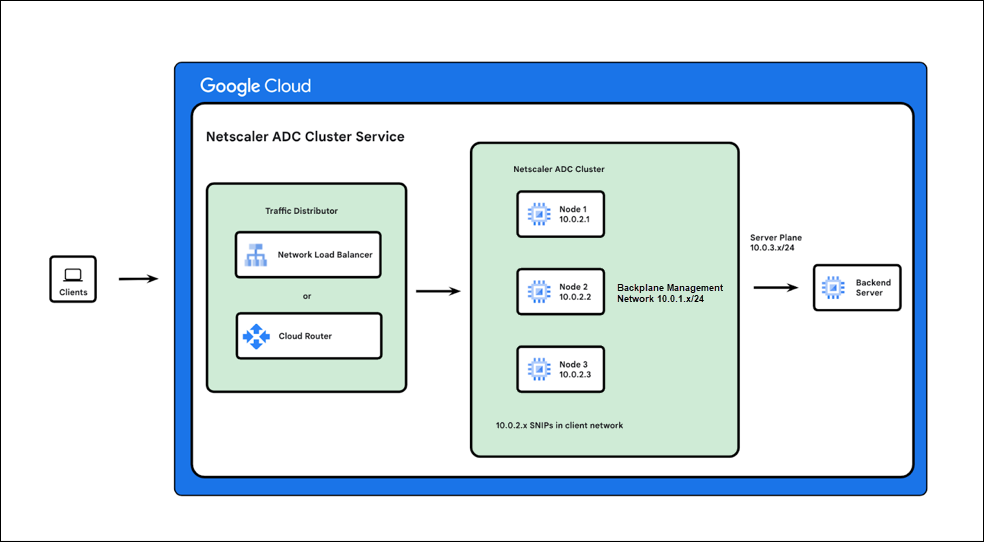
Cluster deployment methods on GCP
You can set up a cluster on GCP using the following two methods:
-
Google Network Load Balancer (NLB) as traffic distributor: In this deployment, Google NLB distributes traffic to the NetScaler cluster nodes. This method is typically used for clients accessing the cluster over the Internet.
-
Dynamic routing or ECMP using Google Cloud Router as traffic distributor: In this deployment, Google Cloud Router acts as the traffic distributor to the NetScaler cluster nodes. This method is suitable for clients accessing GCP using cloud VPN and interconnect.
Note:
It is recommended to use Google Network Load Balancer (NLB) as the traffic distributor for NetScaler. However, customers who want to avoid an extra layer of load balancer for reducing the cost or compliance issues, can use Google Cloud Router as a traffic distributor.