
GSLB overview and deployment topologies
Overview
For ensuring high availability, proximity-based load balancing, and scalability, you need to deploy an application in multiple distributed Kubernetes clusters. When an application is deployed in multiple Kubernetes clusters dispersed across geographically distributed locations, a load balancing decision has to be taken to distribute traffic among application instances.
NetScaler GSLB controller configures NetScaler (GSLB device) to load balance services among geographically distributed locations. GSLB solution ensures better performance and reliability for your Kubernetes services that are exposed using ingress or service type LoadBalancer. In the GSLB topology, a GSLB device is deployed in each region; one of the GSLB devices acts as the primary ADC and others act as the secondary ADCs. The GSLB primary ADC is configured by the GSLB controller deployed in each cluster deployed across sites. This GSLB device load balances services deployed in multiple clusters across sites.
For more information about GSLB, see Global Server Load Balancing.
Note:
The NetScaler GSLB controller image is the same as that of NetScaler Ingress Controller.
Deployment topologies
The components of GSLB deployment topology are described here:
-
GSLB device: NetScaler MPX or NetScaler VPX is used as a global server load balancing (GSLB) device. A GSLB device is configured for each data center. In each GSLB device, one site is configured as a local site representing the local data center. The other sites are configured as remote sites. NetScaler MPX or NetScaler VPX used as the GSLB device can also be used as the ingress device with NetScaler Ingress Controller.
-
Ingress load balancer: NetScaler CPX or any third-party application is deployed as the ingress load balancer in each Kubernetes cluster.
-
Ingress controller: The ingress controller can be a NetScaler Ingress Controller or any third-party ingress controller.
-
GSLB controller: Each cluster in the deployment runs a GSLB controller instance. Each GSLB controller configures the GSLB primary ADC for the applications deployed in its respective cluster. The global server load balancing (GSLB) configuration synchronization option is used to copy the GSLB configuration on the primary site to all the GSLB sites in the GSLB setup. The NetScaler on which you configure GSLB synchronization is referred as the primary site and the sites to which the configuration is copied are referred as the secondary sites.
The following deployment diagrams show sample topologies for NetScaler GSLB controller. Each sample topology contains two data centers (sites) in different regions and each data center contains a Kubernetes cluster.
Let's consider two sample deployment topologies based on the type of ingress controller used in the GSLB sites:
Note:
GSLB controller deployment is also supported with NetScaler Ingress Controller in one GSLB site and a third-party ingress controller in another GSLB site.
NetScaler Ingress Controller in both GSLB sites
Note:
NetScaler MPX or NetScaler VPX used for GSLB and ingress or service type LoadBalancer can be the same or different. In the following example, the same NetScaler is used for GSLB and ingress or service type LoadBalancer.
The following diagram explains the deployment topology for NetScaler GSLB controller in presence of NetScaler Ingress Controller.
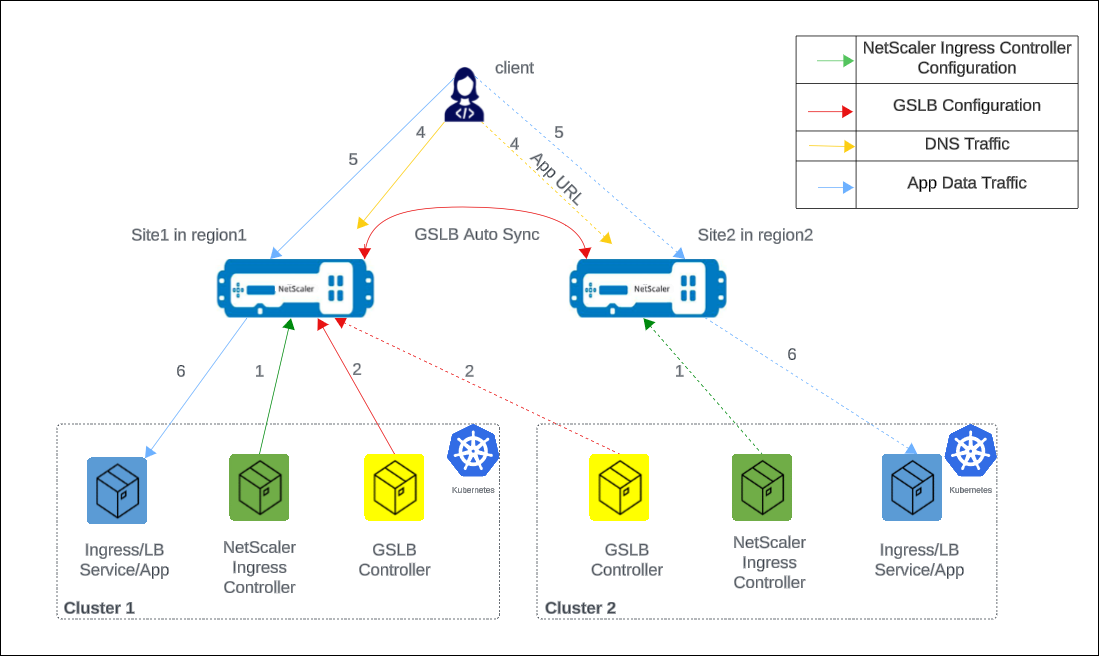
The numbers in the following steps map to the numbers in the earlier diagram.
-
In each cluster, NetScaler Ingress Controller configures NetScaler either using
ingressor using theservice of type LoadBalancerconfiguration. -
In each cluster, NetScaler GSLB controller configures the GSLB device in the primary site with the GSLB configuration.
-
GSLB configuration synchronizes automatically between the GSLB devices in different GSLB sites.
-
A DNS query for application host name or FQDN is sent to the GSLB virtual server configured on NetScaler. The DNS resolution on the GSLB virtual server resolves to an IP address on any one of the clusters based on the configured global traffic policy (GTP).
-
Based on the DNS resolution, data traffic lands on either the Ingress front-end IP address or service type LoadBalancer IP address of one of the clusters.
-
The required application is accessed through the GSLB device.
Any third-party ingress controller in both GSLB sites
The following diagram explains the deployment topology for NetScaler GSLB controller in the presence of any third-party ingress controller.
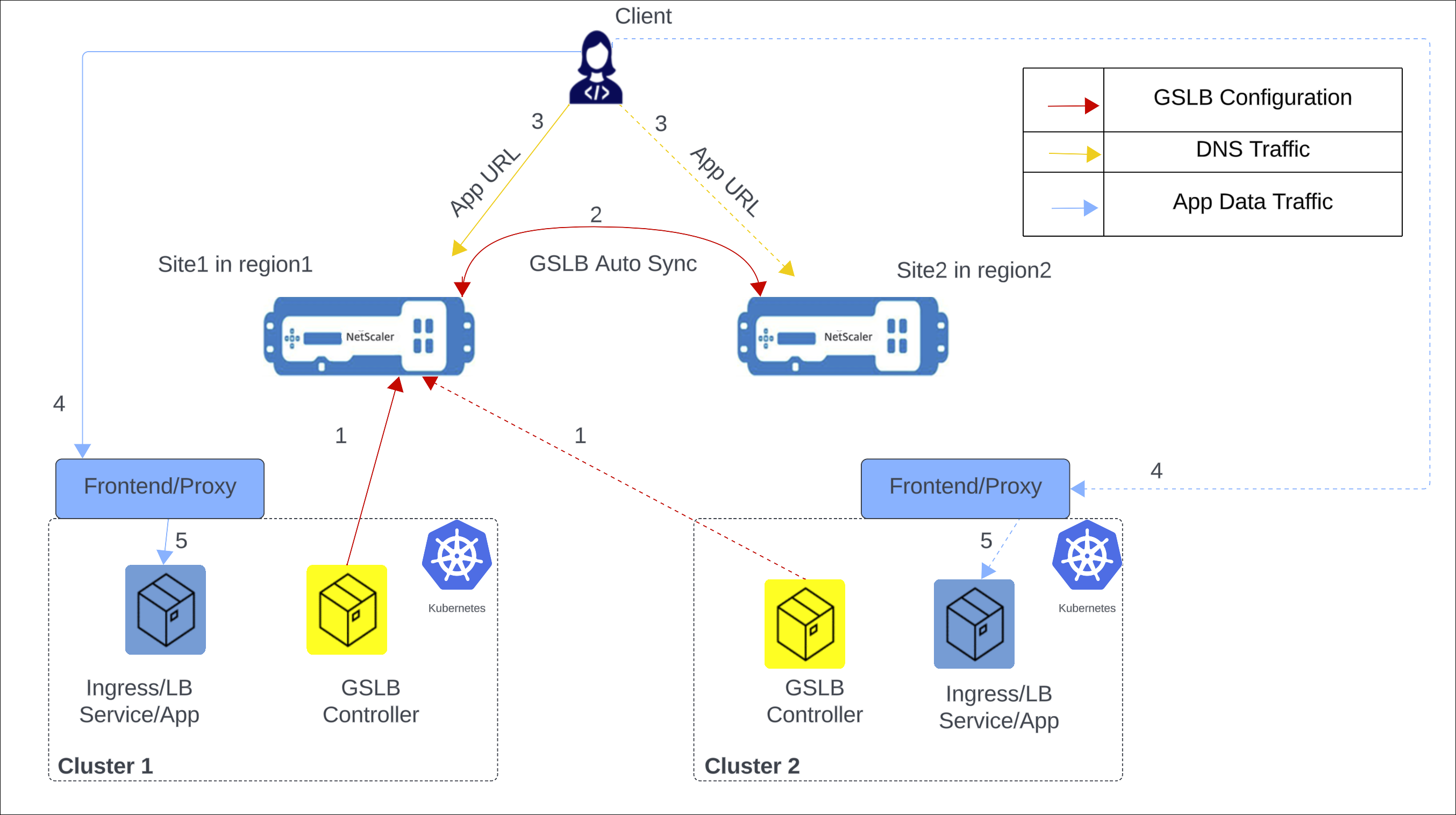
The following items explain the previous diagram:
-
NetScaler GSLB controller configures the GSLB primary ADC in the primary site with the GSLB configuration.
-
GSLB configuration synchronizes automatically between the GSLB devices in different GSLB sites.
-
A DNS query for application hostname or FQDN is sent to the GSLB virtual server configured on NetScaler. The DNS resolution on the GSLB virtual server resolves to an IP address on any one of the clusters based on the configured global traffic policy (GTP).
-
Based on the DNS resolution, data traffic lands on either the ingress front-end IP address or service type LoadBalancer front-end IP address of one of the clusters.
-
The required application is accessed through proxy.
GSLB methods and supported deployment types
The following global load balancing methods are supported:
The following deployment types are supported:
-
Local first: In a local first deployment, when an application wants to communicate with another application, it prefers a local application in the same cluster. When the application is not available locally, the request is directed to other clusters or regions.
-
Canary: Canary release is a technique to reduce the risk of introducing a new software version in production by first rolling out the change to a small subset of users. In this solution, canary deployment can be used when you want to roll out new versions of the application to selected clusters before moving it to production.
-
Failover: A failover deployment is used when you want to deploy applications in an active/passive configuration when they cannot be deployed in active/active mode.
-
Round trip time (RTT): In an RTT deployment, the real-time status of the network is monitored and dynamically directs the client request to the data center with the lowest RTT value.
-
Static proximity: In a static proximity deployment, an IP-address based static proximity database is used to determine the proximity between the client’s local DNS server and the GSLB sites. The requests are sent to the site that best matches the proximity criteria.
-
Round robin: In a round robin deployment, the GSLB device continuously rotates a list of the services that are bound to it. When it receives a request, it assigns the connection to the first service in the list, and then moves that service to the bottom of the list.
Note:
Currently, IPv6 is not supported.
CRDs for configuring NetScaler GSLB controller for applications deployed in distributed Kubernetes clusters
The following CRDs are introduced to support NetScaler configuration for performing GSLB of Kubernetes applications.
-
Global traffic policy (GTP)
-
Global service entry (GSE)
GTP CRD
GTP CRD accepts the parameters for configuring GSLB on NetScaler including deployment type (canary, failover), GSLB domain, health monitor for the ingress, and service type.
The GTP CRD spec is available at
<https://github.com/netscaler/netscaler-k8s-ingress-controller/blob/master/gslb/Manifest/gtp-crd.yaml>.
Note:
GTP CRD is the same across all the clusters for a given domain.
The following table explains the GTP CRD attributes.
| Field | Description |
|---|---|
ipType |
Specifies the DNS record type as A or AAAA. Currently, only A record type is supported |
serviceType |
Specifies the protocol to which GSLB support is applied. |
host |
Specifies the domain for which GSLB support is applied. |
trafficPolicy |
Specifies the traffic distribution policy supported in a GSLB deployment. |
sourceIpPersistenceId |
Specifies the unique source IP persistence ID. This attribute enables persistence based on the source IP address for the inbound packets. The sourceIpPersistenceId attribute should be a multiple of 100 and should be unique. |
secLbMethod |
Specifies the traffic distribution policy supported among clusters under a group in local-first, canary, or failover. |
destination |
Specifies the Ingress or LoadBalancer service endpoint in each cluster. The destination name should match with the name of GSE. |
weight |
Specifies the proportion of traffic to be distributed across clusters. For canary deployment, the proportion is specified as percentage. |
CIDR |
Specifies the CIDR to be used in local-first to determine the scope of the locality. |
primary |
Specifies whether the destination is a primary cluster or a backup cluster in the failover deployment. |
monType |
Specifies the type of probe to determine the health of the GSLB endpoint. When the monitor type is HTTPS, SNI is enabled by default during the TLS handshake. |
uri |
Specifies the path to be probed for the health of the GSLB endpoint for HTTP and HTTPS protocols. |
respCode |
Specifies the response code expected to mark the GSLB endpoint as healthy for HTTP and HTTPS protocols. |
customHeader |
Specifies the custom header that you want to add to the GSLB-endpoint monitoring traffic. |
ingressHostName |
Specifies the exact host value the GTP must match against an Ingress rule. Use this option when the GSLB FQDN differs from the in-cluster Ingress host name. |
multipleIPResponse |
When this option is enabled, GSLB DNS responds with all healthy backend IP addresses instead of one. |
emptyDownResponse |
When this option is enabled, GSLB returns an empty DNS response (instead of NXDOMAIN) when all members are down. |
servicePort |
Specifies which port of a multi-port backend GSLB uses for the GSLB service-group member and health monitor of the host. For more information, see Select the GSLB health-monitor port with servicePort. |
sslProfile |
Specifies SSL profile parameters for the SSL profile of an HTTPS monitor. For more information, see Configure the SSL profile and ciphers for an HTTPS monitor. |
ciphers |
Specifies the ciphers to add to the SSL profile of an HTTPS monitor. For more information, see Configure the SSL profile and ciphers for an HTTPS monitor. |
interval, respTimeout, retries, failureRetries, successRetries, downTime, deviation, reverse, secure, lrtm, netProfile, monState, advancedOptions |
Tune the health monitor. For more information, see Tune the GSLB health-monitor parameters. |
GSE CRD
GSE CRD dictates the endpoint information (any Kubernetes object which routes traffic into the cluster) in each cluster.
The GSE CRD spec is available in the NetScaler Ingress Controller GitHub repo at: gse-crd.yaml.
The following table explains the GSE CRD attributes.
| Field | Description |
|---|---|
| ipv4address | Local cluster ingress ipv4 address or service of type LoadBalancer endpoint ipv4 address |
| domainName | Local cluster ingress domain name or service of type LoadBalancer domain name |
| monitorPort | Listening port of local cluster ingress or Listening port of service of type LoadBalancer |
Note:
-
The GSE CRD is cluster-specific, and a separate GSE CRD is created for each cluster.
-
For auto-generation of GSE CRD with Ingress, the host name must match the host name specified in the GTP CRD instance (
ingressHostName, if it is set), or the Ingress must use the target service as its default backend. -
For both Ingress and Service of type
LoadBalancer, the GSE CRD is generated only for the first port specified. If a GTP host setsservicePort, that port is used instead. For more information, see Select the GSLB health-monitor port with servicePort. -
The GSE CRD is auto-generated only when the corresponding Service or Ingress has the
status.loadBalancer.ingress.ip/hostnamefield populated. -
The GSE CRD is auto-generated, updated, and deleted only when the
GSE_AUTOCREATIONenvironment variable of the GSLB controller istrue(the default). In that case, the controller also manages a GSE that you create yourself. For more information, see Turn off automatic GSE creation.
Turn off automatic GSE creation
By default, the GSLB controller manages the GSE of each local target of a GTP, even a GSE that you created yourself:
-
It creates the GSE and takes the endpoint from the Ingress, the Service of type
LoadBalancer, or the Gateway API route that backs the target. It updates the GSE when that Ingress or Service changes. For a Gateway API route, it creates or updates the GSE only when you create the GTP or change its spec, or when the controller restarts. Applying an unchanged GTP again does not update the GSE. If a GSE with that name already exists, the controller overwrites its endpoint. -
When you edit a GTP so that it no longer uses a target, for example, when you remove the target or change its destination, the controller deletes the GSE of that target. When you set
hoststo an empty list, it deletes the GSEs of all the targets of the GTP. This also applies to a GSE that you created yourself, such as one for a Service of typeClusterIP. -
The controller also deletes the GSE when you delete the Service of type
LoadBalanceror the last Ingress that backs the target, and when you delete a GTP whose target is backed by such a Service or Ingress. -
Use each GSE in only one GTP. When one GTP stops using a GSE, the controller deletes it, even if another GTP still uses it.
-
The controller does not delete the
.gwyGSE of a Gateway API route.
To find the Ingresses that back the targets, the controller lists and watches all the Ingresses in the cluster.
If you create all the GSEs yourself, set the
GSE_AUTOCREATION environment variable of the GSLB controller to false. The controller then does not manage any GSE and does not list or watch Ingresses, which saves CPU in a cluster with many Ingresses. This variable needs NetScaler GSLB controller 4.3.22 or later. Earlier versions ignore it.
| Value | Behavior |
|---|---|
true (default) |
The controller lists and watches Ingresses. It creates, updates, and deletes the GSEs of the local GTP targets, as described earlier. |
false |
The controller does not list or watch Ingresses, and never creates, updates, or deletes a GSE. Create, update, and delete each GSE yourself. The GSEs that you create work as usual. |
Set the value to
true or false. Letter case does not matter. If you do not set the variable, the value is true. Any other value, including an empty value, is rejected, and the controller does not start. The same applies to NetScaler Ingress Controller and NetScaler Kubernetes Gateway Controller pods where the variable is set.
When
GSE_AUTOCREATION is false, create the GSEs in each cluster for the GTP targets of that cluster, as shown in Example for global service entry (GSE):
-
Use the target destination as the GSE name, for example,
app1.default.east.cluster1. For a host that is backed by a Gateway API route, the name ends with.gwy, for example,app1.default.east.cluster1.gwy. -
Create the GSE in the namespace of the GTP.
-
Under
spec.endpoint, setmonitorPortand eitheripv4addressordomainName. For more information, see GSE CRD.
If you deploy the GSLB controller with the
netscaler-gslb-controller Helm chart, set the gseAutoCreation value. The chart sets GSE_AUTOCREATION from this value, and the default is true. The gseAutoCreation value needs the netscaler-gslb-controller Helm chart 4.3.22 or later, and an older chart ignores it without an error. For example, add the following line to your values file, or add --set gseAutoCreation=false to the helm install or helm upgrade command:
gseAutoCreation: false
If you create all the GSEs yourself, set
gseAutoCreation to false in the same helm upgrade that moves you to the 4.3.22 chart, so that the new controller starts with false.
If you deploy the GSLB controller using NetScaler Operator, see Deploy NetScaler GSLB Controller using NetScaler Operator.
Note:
-
The controller reads
GSE_AUTOCREATIONonly when it starts. When you change the value, the controller pod restarts with the new value. -
At startup, the GSLB controller logs the value that it uses, for example
GSLB controller GSE_AUTOCREATION: False. It logs this line at theINFOlog level, which is the default. If the controller has started without errors and this line is missing at that log level, the controller version does not support the variable. -
GSEs that the controller created before you set
falsestay in place, but the controller no longer updates or deletes them. Update or delete them yourself. -
When you set
GSE_AUTOCREATIONback totrue, the controller again manages every GSE that has the name of a local GTP target, including the GSEs that you created.
ConfigMap for configuring local site preference
When configuring GSLB devices, it's important to select the virtual IP addresses and applications deployed in the Kubernetes or OpenShift Cluster that is geographically closest to the ADNS IP address for efficient traffic routing and minimized latency.
You can use the local site preference configuration for GSLB devices to resolve to the local virtual IP address if the services are available. You can achieve this scenario by setting the priority order for GSLB services using load balancing policy commands. For more information, see Configure priority order for GSLB services using load balancing policy commands.
The priority order for services or service groups within GSLB devices enables effective network traffic management and optimization. It is typically configured when binding a service group to a GSLB virtual server. Prioritizing specific services or groups ensures that critical applications are given preference during load balancing, especially when demand is high or low-latency connections are required.
The
localSiteSelection parameter is added to the Netscaler-gslb-controller Helm chart to enable local site preference. Setting this parameter to true automatically adds the configuration to the GSLB device. The parameter creates a ConfigMap for the GSLB controller, which supports on-the-fly addition, modification, and deletion of the configuration.
Note:
-
For any configuration (addition or modification or deletion) for local site preference through the ConfigMap, traffic gets affected as priority order for service groups must be configured or unconfigured.
-
The ConfigMap must be configured in all clusters.
Sample local site priority configuration for the GSLB devices:
add lb action <site1-act> -type SELECTIONORDER -value 1 2 3
 add lb action <site2-act> -type SELECTIONORDER -value 2 3 1
 add lb action <site3-act> -type SELECTIONORDER -value 3 1 2
 add lb policy <site1-pol> -rule "CLIENT.IP.DST.EQ<site1_ip>" -action <site1-act>
 add lb policy <site2-pol> -rule "CLIENT.IP.DST.EQ<site2_ip>" -action <site2-act>
 add lb policy <site3-pol> -rule "CLIENT.IP.DST.EQ<site3_ip>" -action <site3-act>
 bind gslb vserver <gslb_name> -serviceGroupName <sg_name_1> -order 1
 bind gslb vserver <gslb_name> -serviceGroupName <sg_name_2> -order 2
 bind gslb vserver <gslb_name> -serviceGroupName <sg_name_3> -order 3
 bind gslb vserver <gslb_name> -policyName <site1-pol> -priority 1
 bind gslb vserver <gslb_name> -policyName <site2-pol> -priority 2
 bind gslb vserver <gslb_name> -policyName <site3-pol> -priority 3
For configuring ConfigMap using the Helm chart, see
<https://github.com/netscaler/netscaler-helm-charts/tree/master/netscaler-gslb-controller>.
For configuring ConfigMap using the OpenShift operator, see
<https://docs.netscaler.com/us/en/netscaler-k8s-ingress-controller/netscaler-operator-overview/gslb-openshift-operator.html>.
GSLB for Kubernetes Gateway API routes
The NetScaler GSLB Controller can create global server load balancing entries for applications exposed through a Kubernetes Gateway API
HTTPRoute, in addition to Ingress. A GlobalTrafficPolicy host is backed by a Gateway API route when it has a routeRef. When the GSLB controller processes such a GlobalTrafficPolicy, it reads the referenced HTTPRoute and its parent Gateway, and creates a GlobalServiceEntry that points to the Gateway address and the port of the matching listener. The GSLB domain is still the GlobalTrafficPolicy host; the Gateway API fields only select and validate the route that backs that host.
Enable Gateway API observation with the
gatewayAPI.enabled Helm value of the GSLB controller chart (enabled by default; set it to false to opt out on clusters that run a foreign Gateway API implementation). When it is enabled, the GSLB controller is granted read-only get, list, and watch access to gateway.networking.k8s.io resources. If you deploy the GSLB controller using NetScaler Operator, see Deploy NetScaler GSLB Controller using NetScaler Operator.
To opt out, set the value to
false in the Helm values of the netscaler-gslb-controller chart:
gatewayAPI:
   enabled: false
Use the following fields on a host entry of a GlobalTrafficPolicy to control how a GSLB domain maps to Gateway API resources.
| Field | Description |
|---|---|
routeHostName |
A host name matched against the host names of the referenced route and its Gateway listener. If it is not set, the controller uses host. It is used for selection and validation only; the host remains the GSLB domain. |
hostNameValidation |
The behavior when the effective route or listener host names do not cover the GSLB host. Supported values are Strict, Warn, and Ignore. When it is not set, Strict is used (the same behavior as the Ingress path); Warn and Ignore relax the check for this GlobalTrafficPolicy only. |
routeRef |
Required for a host that is backed by a Gateway API route. References the route by name, and optionally namespace (default: the namespace of the GlobalTrafficPolicy) and kind. Only HTTPRoute (the default) is supported. For the other kinds that the CRD accepts (GRPCRoute, TLSRoute, TCPRoute, and UDPRoute), no GlobalServiceEntry is created. |
For a host that is backed by a Gateway API route, each target in
policy.targets must use the destination format <service>.<namespace>.<region>.<cluster>.gwy. For the local target, the controller creates a GlobalServiceEntry with this name, alongside any GlobalServiceEntry created for an Ingress or a Service of type LoadBalancer.
The following snippet shows the Gateway API fields on a
GlobalTrafficPolicy host entry. For the complete GlobalTrafficPolicy structure, see GTP CRD.
spec:
   serviceType: 'HTTP'
   hosts:
   - host: app.example.com           # the GSLB domain (unchanged)
     routeHostName: app.example.com   # match against the route and listener host names
     hostNameValidation: Strict       # Strict (default), Warn, or Ignore
     routeRef:                        # required: the HTTPRoute that backs this host
       kind: HTTPRoute
       name: app-route
       namespace: default
     policy:
       trafficPolicy: 'ROUNDROBIN'
       targets:
       - destination: 'app.default.east.cluster1.gwy'   # <service>.<namespace>.<region>.<cluster>.gwy
         weight: 1
       - destination: 'app.default.west.cluster2.gwy'
         weight: 1
       monitor:
       - monType: TCP
Notes:
-
The GSLB controller does not watch Gateway API resources. It reads the route and its Gateway only when you create the
GlobalTrafficPolicyor change its spec, and when the controller restarts. Applying an unchangedGlobalTrafficPolicyagain has no effect. If the Gateway address or the route changes later, change theGlobalTrafficPolicyspec or restart the GSLB controller. -
A
GlobalServiceEntryis created only when the Gateway has an address (spec.addressesorstatus.addresses), the listener allows the route (allowedRoutes), and the host name check passes. -
The controller does not delete the
.gwyGlobalServiceEntry, even when you delete the route or theGlobalTrafficPolicy, or remove the target from theGlobalTrafficPolicy. Delete it manually. -
A wildcard host name matches a single label only. A host that matches only through a multi-label wildcard gets no
GlobalServiceEntry. -
When
gatewayAPI.enabledisfalse, the GSLB controller has no read access to Gateway API resources, so it cannot resolverouteRefand creates noGlobalServiceEntryfor Gateway API routes. -
When
GSE_AUTOCREATIONisfalse, the GSLB controller does not create or update the.gwyGlobalServiceEntryfor Gateway API routes. Create it yourself, and update it when the Gateway address or the listener port changes. For more information, see Turn off automatic GSE creation.
GSLB health-monitor configuration
For each host in a GlobalTrafficPolicy (GTP), the NetScaler GSLB controller binds a health monitor to the GSLB service group that represents the host's endpoints. The following sections describe how to tune that monitor: its probe parameters, the TLS settings it uses for HTTPS probes, and the backend port it checks.
Note:
The monitor tuning fields and the
sslProfile, ciphers, and servicePort fields need the GlobalTrafficPolicy CRD from the netscaler-gslb-controller Helm chart 4.3.22 or later. With an older CRD, Kubernetes drops these fields without an error, so they have no effect.
Tune the GSLB health-monitor parameters
Each entry under
policy.monitor in a GTP configures the health monitor that is bound to the host's GSLB service group. Along with the basic fields (monType, uri, respCode, customHeader, and destinationPort), you can set the common NetScaler monitor parameters as curated fields and use the advancedOptions map for any other NetScaler monitor parameter.
The GTP is the single source of truth for the monitor. When you set a parameter, the controller applies it. When you later remove a parameter, the controller resets it to the NetScaler default (except
lrtm, netProfile, and deviation, which keep their last value).
The following table describes the curated monitor fields.
| Field | Description |
|---|---|
interval |
How often the monitor probes the endpoint (1-20940, default 5). Must be greater than respTimeout. Set the unit with intervalUnits. |
intervalUnits |
Unit for interval: SEC, MSEC, or MIN (default SEC). |
respTimeout |
How long the monitor waits for a probe response before the probe fails (1-20939, default 2). Must be less than interval. Set the unit with respTimeoutUnits. |
respTimeoutUnits |
Unit for respTimeout: SEC, MSEC, or MIN (default SEC). |
downTime |
How long to wait before probing an endpoint that is marked DOWN (1-20939, default 30). Set the unit with downTimeUnits. |
downTimeUnits |
Unit for downTime: SEC, MSEC, or MIN (default SEC). Applied only when the monitor is created. A later change is not applied; the controller keeps the current unit and records a warning event on the GTP. |
retries |
Number of probe retries before the endpoint is marked DOWN (1-127, default 3). |
failureRetries |
Number of retries that must fail for the endpoint to be marked DOWN (0-32). |
successRetries |
Number of consecutive successful probes needed to mark an endpoint UP (1-32, default 1). |
deviation |
Allowed deviation from the expected response time, used with least-response-time (dynamic round-trip-time) probing. Set the unit with deviationUnits. |
deviationUnits |
Unit for deviation: SEC, MSEC, or MIN (default SEC). Applied only when the monitor is created. A later change is not applied; the controller keeps the current unit and records a warning event on the GTP. |
reverse |
true or false (default false). When true, the probe success condition is reversed. |
secure |
true or false (default false). Use a secure (TLS) probe. An HTTPS monitor always probes securely. |
lrtm |
true or false. Use the least-response-time method when making load-balancing decisions. |
netProfile |
Net profile that the monitor uses to source its probe traffic (up to 127 characters). |
monState |
true or false (default true). Set to false to disable the monitor on the GSLB service group binding. |
For any NetScaler monitor parameter that does not have a curated field, use
advancedOptions.
| Field | Description |
|---|---|
advancedOptions |
A map of extra NetScaler monitor parameters (name to value) forwarded as-is to NetScaler. Use the raw NetScaler parameter names and values (for example, tos: "YES", tosid: "3"). Up to 32 entries; each value up to 256 characters. |
Note:
-
Omitting a curated field or an
advancedOptionskey resets that parameter to its NetScaler default (exceptlrtm,netProfile, anddeviation, which keep their last value). -
The curated fields
reverse,secure,lrtm, andmonStatetaketrueorfalse. Values inadvancedOptionsare strings and follow the underlying NetScaler parameter (for example,tos: "YES"). -
downTimeUnitsanddeviationUnitsare applied only when the monitor is created. A later change is not applied; the controller keeps the current unit and records a warning event on the GTP. The other unit fields can change in place. -
If you set
respTimeoutand it isn't less thaninterval(after both are converted to the same unit), the controller skips that monitor and records a warning event on the GTP. -
The controller skips an
advancedOptionskey that a monitor field already covers (for example,interval,httpRequest,respCode,destPort, orsslProfile) or that isn't a NetScaler monitor parameter, and records a warning event on the GTP. -
To use two monitors of the same
monTypeon one host, setdestinationPorton both. Without it, the controller treats them as one monitor, keeps the first, and records a warning event on the GTP. -
The controller doesn't check values against the NetScaler limits in the preceding table. If NetScaler rejects a monitor value, the configuration push for the GTP fails. The controller records a warning event on the GTP, sets the GTP status to
Failed, and removes the GSLB configuration that it created for all the hosts of the GTP, including the configuration that was in place before your change. Correct the value and apply the GTP again.
The following example sets every curated field and two extra parameters through
advancedOptions. The monitor probes every 10 seconds and waits up to 3 seconds for a response. An endpoint is marked DOWN when at least 3 of 5 probes fail, and UP again after 2 successful probes in a row. A DOWN endpoint is probed again after 60 seconds. The monitor learns the response times of the endpoints (lrtm) and adds a 500-millisecond deviation to the learned average (deviation). reverse, secure, and monState are set to their default values.
apiVersion: "citrix.com/v1beta1"
 kind: globaltrafficpolicy
 metadata:
   name: gtp1
   namespace: default
 spec:
   serviceType: 'HTTP'
   hosts:
   - host: 'app1.com'
     policy:
       trafficPolicy: 'ROUNDROBIN'
       targets:
       - destination: 'app1.default.east.cluster1'
         weight: 1
       - destination: 'app1.default.west.cluster2'
         weight: 1
       monitor:
       - monType: HTTP
         uri: '/healthz'
         respCode: 200
         interval: 10
         intervalUnits: SEC
         respTimeout: 3
         respTimeoutUnits: SEC
         retries: 5
         failureRetries: 3
         successRetries: 2
         downTime: 60
         downTimeUnits: SEC
         deviation: 500
         deviationUnits: MSEC
         lrtm: true
         reverse: false
         secure: false
         monState: true
         advancedOptions:
           tos: "YES"
           tosid: "3"
To send the probes from a specific source IP address, create a net profile with the same name on each GSLB NetScaler, for example,
add netProfile gslb-monitor-np -srcIP <SNIP_address>, and add netProfile: 'gslb-monitor-np' to the monitor entry.
Configure the SSL profile and ciphers for an HTTPS monitor
An HTTPS health monitor (
monType: HTTPS) opens its own TLS connection to the GSLB endpoint in each cluster. For each HTTPS monitor, the GSLB controller creates a back-end SSL profile on NetScaler with the same name as the monitor and binds the profile to the monitor. By default, the profile turns on SNI, uses the GSLB host name as the common name, and uses the default back-end ciphers of NetScaler (the built-in DEFAULT_BACKEND cipher group).
To control how the monitor negotiates TLS, add the following optional fields to the HTTPS monitor entry under
policy.monitor.
| Field | Type | Description |
|---|---|---|
sslProfile |
Map | SSL profile parameters that the controller sets on the monitor's SSL profile. Use the parameter names of the NetScaler set ssl profile command, such as tls1, tls11, tls12, tls13, sessReuse, sessTimeout, or strictSigDigestCheck (letter case does not matter), with the values that NetScaler expects, such as ENABLED or DISABLED. The controller manages name and sslProfileType and ignores them if you set them. |
ciphers |
List of strings | Ciphers that the controller binds to the monitor's SSL profile, in the order listed. Each entry is the name of an individual cipher suite, a built-in cipher group, or a cipher group that you created on NetScaler. The listed ciphers are added to DEFAULT_BACKEND. They don't replace it. If you set ciphers, the list must have at least one entry. |
You can set
sslProfile, ciphers, or both. ciphers doesn't require sslProfile. The controller applies both fields to secure HTTP monitors, that is, monType: HTTPS or monType: HTTP with secure: true. It ignores them on all other monitors.
Before you begin
-
Update the GTP CRD on every cluster to a version that includes the
sslProfileandciphersfields. For example, apply thecrds/crds.yamlfile of the netscaler-gslb-controller Helm chart 4.3.22. Helm and NetScaler Operator don't update a CRD that already exists on the cluster. With an older CRD, the Kubernetes API server removes both fields from the GTP, and the controller never sees them. To check the CRD, runkubectl explain globaltrafficpolicy.spec.hosts.policy.monitorand look forsslProfileandciphersin the output. -
To use
ciphers, enable the default SSL profile feature on each GSLB NetScaler with theset ssl parameter -defaultProfile ENABLEDcommand. NetScaler binds ciphers to an SSL profile only when this feature is enabled. For more information, see the SSL profile documentation.
Important:
Enabling the default SSL profile feature attaches a default profile to every existing SSL entity on the NetScaler and is disruptive on a running NetScaler. Plan the change for a maintenance window. If you enable the feature after you apply a GTP that uses
ciphers, restart the GSLB controller so that it binds the ciphers.
Example: Set the TLS versions and add ciphers
The following GTP checks
app1.com in two clusters with an HTTPS monitor. The monitor's SSL profile allows only TLS 1.2 and TLS 1.3, reuses TLS sessions with a 600-second timeout, and adds two cipher suites to the default back-end ciphers. The example assumes that the application in each cluster accepts HTTPS on the monitored port. For an Ingress with a tls section, the GSLB controller monitors port 443.
apiVersion: "citrix.com/v1beta1"
 kind: globaltrafficpolicy
 metadata:
   name: gtp1
   namespace: default
 spec:
   serviceType: 'HTTP'
   hosts:
   - host: 'app1.com'
     policy:
       trafficPolicy: 'ROUNDROBIN'
       targets:
       - destination: 'app1.default.east.cluster1'
         weight: 1
       - destination: 'app1.default.west.cluster2'
         weight: 1
       monitor:
       - monType: HTTPS
         uri: '/'
         respCode: 200
         sslProfile:
           tls1: DISABLED
           tls11: DISABLED
           tls12: ENABLED
           tls13: ENABLED
           sessReuse: ENABLED
           sessTimeout: 600
         ciphers:
         - TLS1.3-AES256-GCM-SHA384
         - TLS1.2-ECDHE-RSA-AES256-GCM-SHA384
Save the GTP to a file, for example
gtp1.yaml, and apply the same GTP in every cluster:
kubectl apply -f gtp1.yaml
For this monitor, the result on NetScaler is equivalent to the following commands, where
<monitor_name> is the name that the controller generates for the monitor. Other monitor options are omitted.
add ssl profile <monitor_name> -sslProfileType BackEnd -sniEnable ENABLED -commonName app1.com
 set ssl profile <monitor_name> -tls1 DISABLED -tls11 DISABLED -tls12 ENABLED -tls13 ENABLED -sessReuse ENABLED -sessTimeout 600
 bind ssl profile <monitor_name> -cipherName TLS1.3-AES256-GCM-SHA384
 bind ssl profile <monitor_name> -cipherName TLS1.2-ECDHE-RSA-AES256-GCM-SHA384
 add lb monitor <monitor_name> HTTP -secure YES -sslProfile <monitor_name>
Example: Use cipher groups
A
ciphers entry can also be a built-in cipher group, such as SECURE, or a cipher group that you created. Before you reference your own cipher group, create it with the same name on each GSLB NetScaler. For example:
add ssl cipher GSLB-MONITOR-CIPHERS
 bind ssl cipher GSLB-MONITOR-CIPHERS -cipherName TLS1.2-ECDHE-RSA-AES256-GCM-SHA384
 bind ssl cipher GSLB-MONITOR-CIPHERS -cipherName TLS1.2-ECDHE-RSA-AES128-GCM-SHA256
For more information, see Configure a user-defined cipher group.
The following GTP binds the built-in
SECURE cipher group and the GSLB-MONITOR-CIPHERS cipher group to the monitor's SSL profile and doesn't change any other SSL profile parameter:
apiVersion: "citrix.com/v1beta1"
 kind: globaltrafficpolicy
 metadata:
   name: gtp1
   namespace: default
 spec:
   serviceType: 'HTTP'
   hosts:
   - host: 'app1.com'
     policy:
       trafficPolicy: 'ROUNDROBIN'
       targets:
       - destination: 'app1.default.east.cluster1'
         weight: 1
       - destination: 'app1.default.west.cluster2'
         weight: 1
       monitor:
       - monType: HTTPS
         uri: '/'
         respCode: 200
         ciphers:
         - SECURE
         - GSLB-MONITOR-CIPHERS
Choose the cipher values
-
Check which ciphers the application endpoints in your clusters accept. Use
ciphersfor the ciphers that the endpoints need and thatDEFAULT_BACKENDdoesn't include. To see the ciphers inDEFAULT_BACKEND, runshow ssl cipher DEFAULT_BACKENDon a GSLB NetScaler. -
Use names that exist on NetScaler. On a GSLB NetScaler:
-
Run
show ssl cipherSuiteto list the individual cipher suites, for example,TLS1.2-ECDHE-RSA-AES256-GCM-SHA384. -
Run
show ssl cipherto list the built-in and user-created cipher groups, for example,DEFAULT_BACKENDandSECURE. To see the ciphers in a group, runshow ssl cipher <group_name>.
-
-
Copy each name exactly as NetScaler shows it. The controller doesn't check the names before it binds them.
-
Create each user-created cipher group, with the same name, on every GSLB NetScaler before you reference it in a GTP.
-
Don't list
DEFAULT_BACKEND. NetScaler already binds it to the profile, and if you later remove it from the list, the controller unbinds it from the profile.
For the list of ciphers that NetScaler supports, see Ciphers available on the NetScaler appliances.
Choose the sslProfile values
-
Use parameters that apply to a back-end SSL profile, such as
tls1,tls11,tls12,tls13,sessReuse,sessTimeout, andstrictSigDigestCheck. -
Write on and off values as
ENABLEDorDISABLED, not astrueorfalse. Put quotes around values that YAML reads as Boolean values, such as"YES"and"NO". -
Set related parameters together in the same map. For example, NetScaler accepts
sessTimeoutonly together withsessReuse: ENABLED. -
Don't set
sniEnableorcommonNameinsslProfile. Use the monitor'ssniandcommonNamefields instead. Values insslProfileoverride those fields, and if you later remove them fromsslProfile, the profile doesn't return to the monitor's settings.
How the controller applies changes
-
ciphersadds ciphers to the monitor's SSL profile.DEFAULT_BACKENDstays bound, socipherscan't limit the monitor to a smaller set of ciphers. -
The controller binds each cipher without a priority, in the order listed. Changing only the order of the entries doesn't change the bindings on NetScaler. A name that is listed twice is bound once.
-
When you change an
sslProfilevalue or add a parameter, the controller applies it to the profile. -
When you remove the whole
sslProfilemap, the controller unsets its parameters, so they return to their NetScaler defaults. -
To return only some parameters to their defaults, set them to their default values explicitly, for example,
tls13: DISABLED, instead of removing them from the map. -
When you add a cipher, the controller binds it and leaves the other bindings as they are.
-
When you remove a cipher from
ciphers, the controller unbinds it. To remove all the ciphers that you added, delete theciphersfield. The Kubernetes API server rejects an empty list (ciphers: []). -
When you delete the GTP, the controller unbinds the ciphers and deletes the monitor and its SSL profile.
What happens when a setting isn't accepted
-
Unknown parameter in
sslProfile: The controller skips the parameter, logs a warning, and applies the rest of the map. -
nameorsslProfileTypeinsslProfile: The controller ignores the parameter and logs a warning. -
NetScaler rejects the
sslProfileparameters: The controller sends all thesslProfileparameters in oneset ssl profilecommand. If NetScaler rejects the command, for example, because a value isn't valid or a related parameter is missing, none of the parameters in the map are applied. The monitor keeps working with the current profile settings, and the GTP isn't affected. -
The default SSL profile feature is disabled: NetScaler refuses to bind the ciphers. The controller logs a warning, the monitor keeps working with the default ciphers, and the GTP isn't affected.
-
A cipher name doesn't exist on NetScaler: NetScaler rejects the binding, and the configuration push for the GTP fails. The controller records a warning event on the GTP, sets the GTP status to
Failed, and removes the GSLB configuration that it created for all the hosts of the GTP, including the configuration that was in place before your change. Correct the name and apply the GTP again.
To check a GTP, run
kubectl get globaltrafficpolicy <name> -n <namespace> and look at the Status and Message columns, and run kubectl describe globaltrafficpolicy <name> -n <namespace> to see its events. To check the monitor's SSL profile on NetScaler, find the monitor that is bound to the GSLB service group of the host with show gslb serviceGroup <service_group_name>, and then run show ssl profile <monitor_name>. The output lists the profile parameters and the bound ciphers.
Note:
-
NetScaler applies some SSL profile parameters without showing them in
show running config, for example,strictSigDigestCheck. They are still in effect. Check them withshow ssl profile <monitor_name>. -
advancedOptionscan't set the monitor's SSL profile. The controller skips ansslProfilekey inadvancedOptionsand records a warning event on the GTP.
Select the GSLB health-monitor port with servicePort
When a GTP host refers to a backend with more than one port, the controller picks one port for the host's GSLB service-group member and its health monitor: for a Service of type
LoadBalancer, the first service port; for an Ingress, 443 when the Ingress has TLS, otherwise 80; and for a Gateway API route, the port of the matching Gateway listener. The optional servicePort field lets you choose a different port. Set it at the host level, as a sibling of policy.
| Field | Description |
|---|---|
servicePort |
Optional per-host port (1-65535) that selects which backend port NetScaler uses for the host's GSLB service-group member and health monitor. For multi-port backends (Ingress, Service of type LoadBalancer, or Gateway), this overrides the default of using the first port. When omitted, the port is derived as before. |
servicePort sets the port on the auto-generated global service entry (GSE) monitorPort, which in turn sets the GSLB service-group member and monitor port. This is different from a monitor's destinationPort, which only changes the port a probe is sent to; servicePort sets the member port itself. Leaving servicePort out keeps the previous behavior, so existing policies are unaffected.
Note:
A GSLB service for one backend holds a single monitor port. If several hosts that resolve to the same backend set different
servicePort values, the first one in document order is used and the controller logs a warning. To health-check such hosts on distinct ports, see Monitor ports for dual-tier (shared-CPX) deployments.
The following example monitors
app1.com on port 8443. In each cluster, the app1 Service of type LoadBalancer exposes port 8080 first and port 8443 second, so without servicePort, GSLB uses port 8080.
apiVersion: v1
 kind: Service
 metadata:
   name: app1
   namespace: default
 spec:
   type: LoadBalancer
   selector:
     app: app1
   ports:
   - name: http
     port: 8080
     targetPort: 8080
   - name: https
     port: 8443
     targetPort: 8443
The GTP sets
servicePort: 8443 on the host and checks that port with an HTTPS monitor:
apiVersion: "citrix.com/v1beta1"
 kind: globaltrafficpolicy
 metadata:
   name: gtp1
   namespace: default
 spec:
   serviceType: 'HTTP'
   hosts:
   - host: 'app1.com'
     servicePort: 8443
     policy:
       trafficPolicy: 'ROUNDROBIN'
       targets:
       - destination: 'app1.default.east.cluster1'
         weight: 1
       - destination: 'app1.default.west.cluster2'
         weight: 1
       monitor:
       - monType: HTTPS
         uri: '/'
         respCode: 200