
Deploy NetScaler GSLB Controller in OpenShift using NetScaler Operator
NetScaler Operator enables you to deploy NetScaler GSLB Controller in an OpenShift cluster. For information about GSLB, see GSLB overview and deployment topologies.
Deploy NetScaler® GSLB Controller
Prerequisites
-
Red Hat OpenShift Cluster (version 4.11 or later).
-
Deploy NetScaler Operator. For information on how to deploy NetScaler Operator, see Deploy NetScaler Operator.
-
Create a secret for each GSLB site in the namespace where you create the NetScaler GSLB Controller instance. The secret must contain the keys
usernameandpasswordwith the credentials of that site's NetScaler, and can contain an optionalsitesyncpasswordkey for site-to-site communication (if it is omitted,passwordis used). For example:oc create secret generic secret-1 --from-literal=username=<username> --from-literal=password=<password> --from-literal=sitesyncpassword=<site-sync-password>.
Steps to deploy NetScaler GSLB Controller using NetScaler Operator
Do the following steps:
-
Navigate to Operators > Installed Operators and select NetScaler Operator.
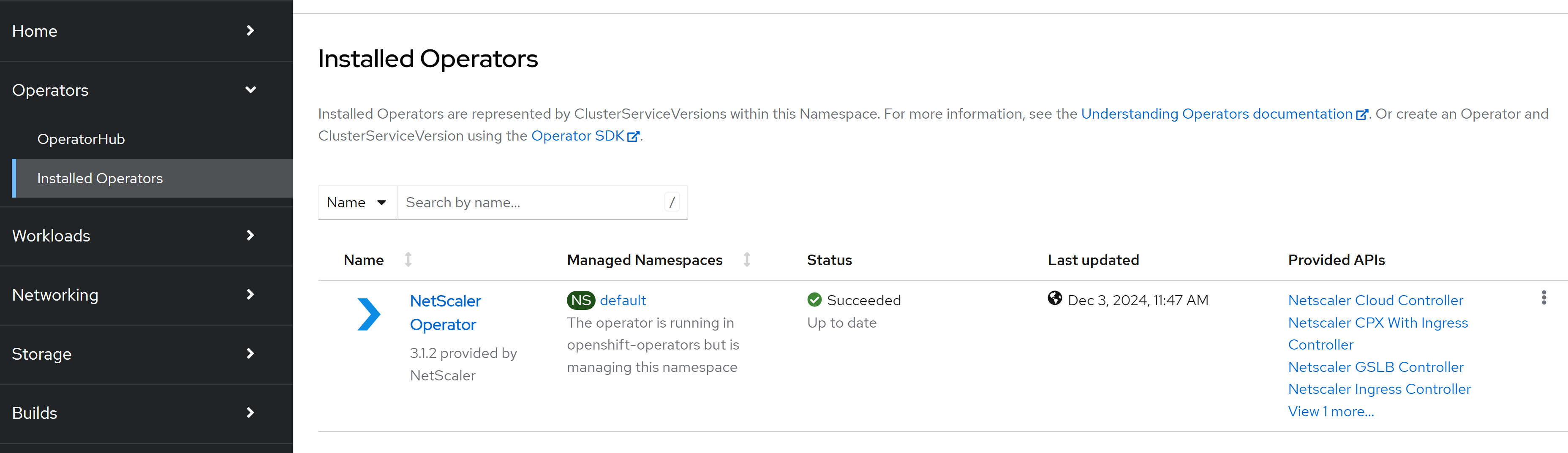
-
Click the NetScaler GSLB Controller tab and click Create NetscalerGslbController.
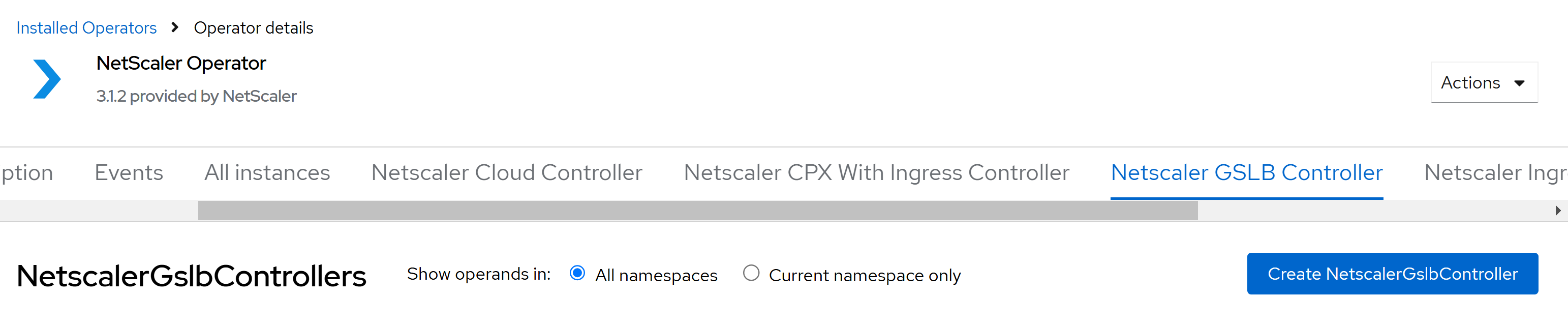 The NetScaler GSLB Controller instance YAML definition is displayed. Optionally, you can select
Form viewbutton and update the parameters in a form. -
Update the values for the required parameters in the displayed NetScaler GSLB Controller instance YAML and click Create. For information on the parameters that you need to configure, see the following table.
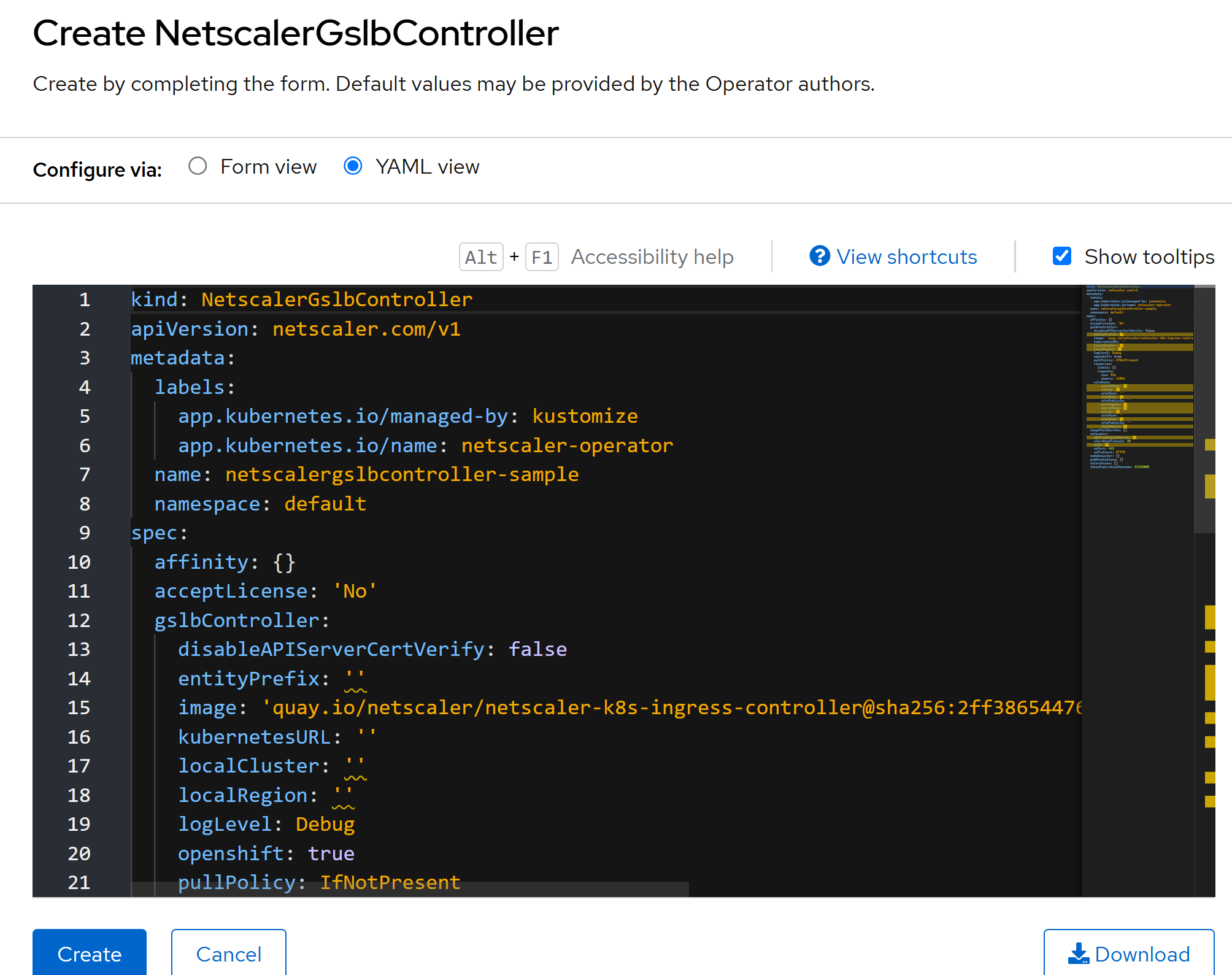
Parameter Description Mandatory/Optional :gslbController: image The NetScaler GSLB Controller image. Used only when upgradeImageAlwaysisfalse.Mandatory pullPolicy The NetScaler GSLB Controller image pull policy. Optional entityPrefix The prefixes for the resources on NetScaler VPX or NetScaler MPX. Mandatory logLevel The log level to control the logs generated by NetScaler GSLB Controller. The supported log levels are: DEBUG,INFO,WARNING, andERROR. The default value isINFO. For more information, see Logging.Optional openshift Set this argument if the OpenShift environment is being used. Mandatory disableAPIServerCertVerify Set this parameter to true for disabling API Server certificate verification. Optional kubernetesURL The kube-apiserver url that NetScaler GSLB Controller uses to register the events. If the value is not specified, NetScaler GSLB Controller uses the internal kube-apiserver IP address. Optional cleanupGSLBSiteConfig Set this parameter to true to clean up the GSLB site configuration. Optional gseAutoCreation Set to falseif you create all the global service entries (GSEs) yourself. The controller then does not create, update, or delete any GSE. The default istrue. Needs a NetScaler GSLB Controller image of version 4.3.22 or later. Do not add theGSE_AUTOCREATIONvariable to the controller deployment yourself, because the operator reverts changes to the deployment. For more information, see Turn off automatic GSE creation.Optional localRegion Local region where the GSLB controller is deployed. Mandatory localCluster The name of the cluster in which the GSLB controller is deployed. This value is unique for each OpenShift cluster. Mandatory siteData\[0].siteName The name of the first GSLB site configured in the GSLB device. Mandatory siteData\[0].secretName The name of the secret that contains the login credentials of the first GSLB site. Mandatory siteData\[0].siteIp The GSLB site IP address of the first site. For example, use a SNIP of the NetScaler in site1. Do not use the NetScaler management IP address (NSIP). Mandatory siteData\[0].siteRegion The region of the first site. Mandatory siteData\[0].siteMask The netmask of the first GSLB site IP address. Optional siteData\[0].sitePublicIp The public IP address of the first GSLB Site. Optional siteData\[1].siteName The name of the second GSLB site configured in the GSLB device. Mandatory siteData\[1].secretName The secret containing the login credentials of the second site. Mandatory siteData\[1].siteIp The GSLB site IP address of the second site. For example, use a SNIP of the NetScaler in site2. Do not use the NetScaler management IP address (NSIP). Mandatory siteData\[1].siteRegion The region of the second site. Mandatory siteData\[1].siteMask The netmask of the second GSLB site IP address. Optional siteData\[1].sitePublicIp The public IP address of the second GSLB Site. Optional resources The CPU and memory resource requests and limits for the NetScaler GSLB Controller container. Optional Parameter Description Mandatory/Optional : netscaler: nsIP The IP address of the NetScaler on which the GSLB controller creates the local GSLB site (site IP, ADNS service, and GSLB sites). Leave it empty if the GSLB sites are already configured; the controller then configures the sites in siteDatausing each site'ssecretName.Optional adcCredentialSecret The name of the secret (keys usernameandpassword) that holds the credentials of the NetScaler set in nsIP. Required when nsIP is set, unless you use secretStore or vaultCredentials. The credentials of each GSLB site come from siteData\[].secretName.Optional nsProtocol The protocol used by NetScaler GSLB Controller to communicate with NetScaler. You can also use HTTP on port 80. Optional nsPort The port used by NetScaler GSLB Controller to communicate with NetScaler. You can use port 80 for HTTP. Optional nitroReadTimeout The duration, in seconds, that NetScaler GSLB Controller has to wait to receive a response from NetScaler before terminating the connection. Optional localSiteSelection Set this parameter to prioritize the local site when configuring the order for GSLB services. When enabled, it creates a ConfigMap that applies the configuration on NetScaler. For more information, see ConfigMap for configuring local site preference. Takes effect only when nsIP is set. Optional secretStore Defines the NetScaler user name and password as references ( secretStore.usernameandsecretStore.password, each a secret key, ConfigMap key, or field reference) instead of adcCredentialSecret. Do not set both.Optional vaultCredentials Reads the NetScaler credentials from files that your Vault Agent sidecar writes to a shared in-memory volume mounted at vaultCredentials.mountPath(default/etc/citrix). Add the sidecar with extraContainers. WithsuppressEnvCredentials: true(default), the controller does not use adcCredentialSecret or the siteData\[].secretName secrets, so the agent must also write each site's credentials to<mountPath>/auth/<siteName>/(username,password, and optionallymep_password). Disabled by default. If you enable vaultCredentials and setupgradeImageAlwaystofalse,gslbController.imagemust be a NetScaler GSLB Controller 4.3.22 or later image, written with its version tag as<repository>:<tag>or<repository>:<tag>@sha256:<digest>. With an older image, or an image without a version tag (for example, only a digest,latest, or a build name), the operator does not deploy the controller and reportsVaultImageUnsupportedin the instance status. For more information, see Use NetScaler credentials stored in a Vault server with NetScaler GSLB controller.Optional Parameter Mandatory/Optional Description name Mandatory Name of the NetScaler GSLB Controller instance. acceptLicense Mandatory Set this value to Yesto accept the NetScaler GSLB Controller EULA.affinity Optional Affinity labels for pod assignment. nodeSelector Optional The node label key:value pair to be used for nodeSelector option in NetScaler GSLB Controller deployment. podAnnotations Optional Map of annotations to add to the pods. tolerations Optional The tolerations for the NetScaler GSLB Controller deployment. imagePullSecrets Optional List of names of secrets used to pull images from a private registry, for example ["my-registry-secret"]. The operator adds them to the service account that it creates; ifserviceAccount.createisfalse, add the pull secret to your own service account. For more information, see Pull an Image from a Private Registry.createClusterRoleAndBinding Optional Creates the ClusterRole and ClusterRoleBinding for the NetScaler GSLB Controller. The default value is true. Set it tofalseto skip creating them; you must then create them yourself.serviceAccount Optional Configuration for the service account used by the NetScaler GSLB Controller: whether to create it ( serviceAccount.create, defaulttrue) and its name (serviceAccount.name). IfserviceAccount.createisfalse,serviceAccount.nameis mandatory.tokenExpirationSeconds Optional The expiration time, in seconds, for the service account token mounted in the NetScaler GSLB Controller pod. The value must be from 600 to 31536000. The default value is 31536000. apiPriorityAndFairness Optional Configures API Priority and Fairness for the controller's requests to the Kubernetes API server, using apiPriorityAndFairness.enabled, flowSchema, and priorityLevelConfiguration. gatewayAPI Optional Gates read-only observation of Gateway API objects using gatewayAPI.enabled (default true). Disable it when another Gateway API implementation owns Gateways and HTTPRoutes on the cluster so the GSLB controller is not granted the gateway.networking.k8s.io RBAC. upgradeImageAlways Optional When true(the default), the operator deploys the image that is built into this operator release and ignores theimagevalue. Set it tofalseto deploy the image that you specify inimage.extraContainers / extraEnv / extraVolumes / extraVolumeMounts / initContainers Optional Extra pod-spec hooks to add sidecar containers, environment variables, volumes, and init containers to the pod. Notes:-
If you want to configure more than two GSLB sites, include the details of all the GSLB sites in the
siteDatalist as required. -
If you set nsIP, provide the credentials of that NetScaler with either adcCredentialSecret or secretStore (not both), or enable vaultCredentials. If nsIP is empty, these fields are not needed.
The following examples are complete NetscalerGslbController resources that show how to set some of these parameters. Update the values for your environment before you click Create.Example: Turn off Gateway API observation. If another Gateway API implementation owns the Gateways and HTTPRoutes in the cluster, set gatewayAPI.enabled tofalse. The GSLB controller then has no access to Gateway API resources and creates no global service entries for Gateway API routes.apiVersion: netscaler.com/v1
kind: NetscalerGslbController
metadata:
name: gslb
spec:
acceptLicense: 'Yes'
# Do not grant the GSLB controller read access to Gateway API resources.
gatewayAPI:
enabled: false
gslbController:
entityPrefix: gslb
localRegion: east
localCluster: cluster1
siteData:
- siteName: site1
siteIp: 10.0.0.20
siteRegion: east
secretName: secret-1
- siteName: site2
siteIp: 10.10.0.20
siteRegion: west
secretName: secret-2
netscaler:
nsIP: 10.0.0.10
adcCredentialSecret: secret-1Example: Read the NetScaler credentials from HashiCorp Vault. A Vault Agent sidecar writes the credentials to thecitrix-credsvolume that the operator adds: the credentials of the NetScaler in nsIP to/etc/citrix/usernameand/etc/citrix/password, and the credentials of each site to/etc/citrix/auth/<siteName>/usernameand/etc/citrix/auth/<siteName>/password(and optionallymep_password). Set up Vault, thegslb-vault-agent-configConfigMap with these templates, and a Vault role for the service account of the instance (by default, the instance name) as described in Use NetScaler credentials stored in a Vault server with NetScaler GSLB controller.apiVersion: netscaler.com/v1
kind: NetscalerGslbController
metadata:
name: gslb-vault
spec:
acceptLicense: 'Yes'
gslbController:
entityPrefix: gslb
localRegion: east
localCluster: cluster1
# With vaultCredentials, each site's credentials come from <mountPath>/auth/<siteName>/.
# secretName is still mandatory in the schema, but the controller does not use it.
siteData:
- siteName: site1
siteIp: 10.0.0.20
siteRegion: east
secretName: secret-1
- siteName: site2
siteIp: 10.10.0.20
siteRegion: west
secretName: secret-2
netscaler:
nsIP: 10.0.0.10
# No adcCredentialSecret: the Vault Agent sidecar supplies the credentials
vaultCredentials:
enabled: true
extraEnv:
# Optional: seconds between checks for new credentials (default 30)
- name: NS_CRED_RELOAD_INTERVAL
value: "60"
extraContainers:
- name: vault-agent
image: hashicorp/vault:<version>
args: ["agent", "-config=/etc/vault/vault-agent-config.hcl"]
env:
- name: VAULT_ADDR
value: "https://<vault-server>:8200"
# Needed when the container does not run as root, for example on OpenShift
- name: SKIP_SETCAP
value: "true"
volumeMounts:
# citrix-creds is the shared in-memory volume that the operator adds
- name: citrix-creds
mountPath: /etc/citrix
- name: vault-config
mountPath: /etc/vault
- name: vault-token
mountPath: /home/vault
- name: sa-token
mountPath: /var/run/secrets/kubernetes.io/serviceaccount
readOnly: true
extraVolumes:
- name: vault-config
configMap:
name: gslb-vault-agent-config
- name: vault-token
emptyDir:
medium: Memory
- name: sa-token
projected:
sources:
- serviceAccountToken:
path: token
expirationSeconds: 3600
audience: vault # the token works only for Vault, not for the Kubernetes API -
-
Navigate to the Workloads > Pods section and verify whether the NetScaler GSLB Controller pod is up and running.

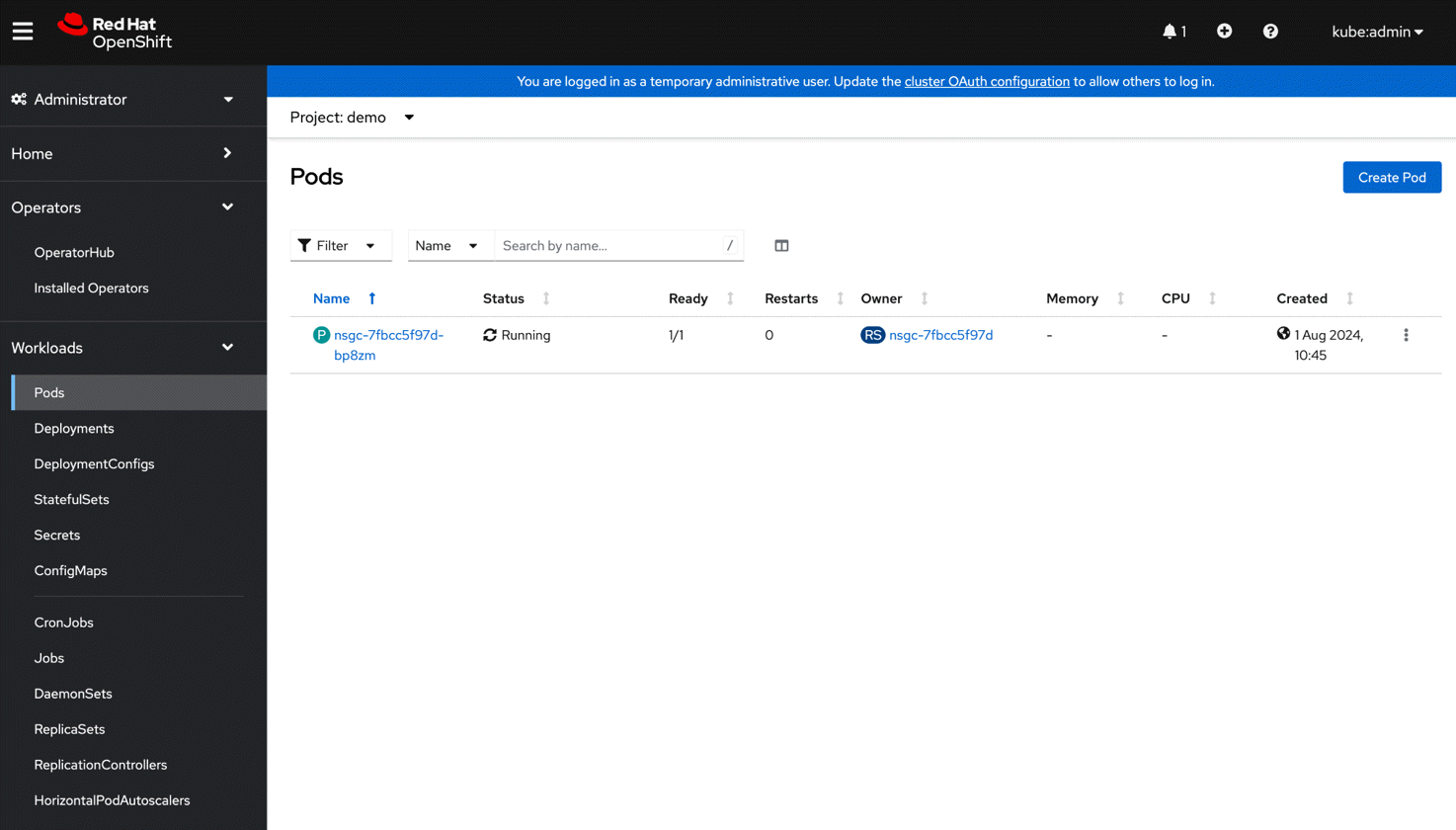 Skip to References.
References
-
For information about deploying global traffic policy (GTP) and global service entry (GSE), see GTP and GSE deployment.