
Upgrade NetScaler® Operator
Upgrade to NetScaler Operator 3.7.5
Operator Lifecycle Manager (OLM) upgrades NetScaler Operator 3.5.x or 3.6.0 to version 3.7.5 in place on the
stable channel. You do not need to uninstall the operator or delete any CRDs.
-
If you upgrade from 3.5.x, set
entityPrefixon every NetscalerIngressController (spec.ingressController.entityPrefix) and NetscalerK8sGatewayController (spec.gatewayController.entityPrefix) instance before you upgrade. Otherwise, the install plan fails. For an instance created without it, setk8s, which is the prefix that the controller already uses:oc get netscaleringresscontrollers.netscaler.com -A -o custom-columns='NAMESPACE:.metadata.namespace,NAME:.metadata.name,ENTITYPREFIX:.spec.ingressController.entityPrefix'
oc get netscalerk8sgatewaycontrollers.netscaler.com -A -o custom-columns='NAMESPACE:.metadata.namespace,NAME:.metadata.name,ENTITYPREFIX:.spec.gatewayController.entityPrefix'
oc patch netscaleringresscontroller <name> -n <namespace> --type=merge -p '{"spec":{"ingressController":{"entityPrefix":"k8s"}}}' -
Make sure that NetScaler Operator uses a supported installation mode. Version 3.7.5 supports only All namespaces on the cluster (AllNamespaces) and A specific namespace on the cluster (OwnNamespace). The SingleNamespace and MultiNamespace install modes, where the operator watches a namespace other than its own or more than one namespace, are no longer supported. For such an installation, the upgrade fails with the reason
UnsupportedOperatorGroup. After the upgrade, NetScaler Operator installed in a specific namespace manages only the instances in that namespace. -
If a NetscalerIngressController instance sets
ingressController.nsValidateCert.nsCertSecret, make sure that it also setshostAliasesto map the NetScaler management IP address to the host name in the NetScaler certificate. Otherwise, after the upgrade, the operator reports the instance as not available (reasonNSValidateCertHostAliasRequired) and does not deploy or update NetScaler Ingress Controller for it. -
If a NetscalerIpamController instance connects to an Infoblox server that uses a self-signed or private-CA certificate, create a secret with the CA certificate in the
ca.crtkey, in the namespace of the instance. After the upgrade, certificate verification (infoblox.sslVerify) is on by default, also for existing instances. The IPAM controller cannot connect to the server until you setinfoblox.caBundleSecretto the name of this secret. These fields are new in 3.7.5, so set them right after the upgrade. -
Plan for component upgrades. Instances with
upgradeImageAlwaysset totrue(the default) move to the component versions of 3.7.5, for example NetScaler Ingress Controller 4.3.22, and their pods restart. NetScaler Ingress Controller 4.3.x is supported with NetScaler 14.1-73.x and later. To control when the upgrade runs, set Update approval to Manual on the Subscription tab. -
If you create all the global service entries (GSEs) for your GlobalTrafficPolicies yourself, set the
gslbController.gseAutoCreationfield of the NetscalerGslbController instance tofalseright after the upgrade. This field is new in 3.7.5. WithupgradeImageAlwaysset totrue, the GSLB controller moves to 4.3.22 during the upgrade and runs with the default valuetrueuntil you set the field. Do not change or delete GlobalTrafficPolicies until the GSLB controller log showsGSLB controller GSE_AUTOCREATION: False. For more information, see Turn off automatic GSE creation. -
After the upgrade, apply the updated
citrix.comCRDs. For example, apply thecrds/crds.yamlfiles of the netscaler-ingress-controller Helm chart 4.3.22 and the netscaler-gslb-controller Helm chart 4.3.22. NetScaler Operator creates these CRDs only when they are missing and does not update existing ones. New CRD fields, such as the ListenerpreconfiguredBundlefield and the new GlobalTrafficPolicy monitor fields, are not available until you apply the 4.3.22 CRDs.
Upgrade from versions earlier than 3.1.2
To upgrade NetScaler Operator from a version earlier than 3.1.2, perform the following steps:
-
Back up YAMLs of all the installed controllers, such as NSIC, GSLB, and NSOE, by using the following command:
for crd in $(oc get crds -o jsonpath='{.items[*].metadata.name}' | tr ' ' '\n' | grep 'netscaler.com'); do echo "Getting instances for CRD: $crd"; oc get $crd --all-namespaces -o yaml >> "all_controller_crd_instances.yaml"; done -
Back up the
citrix.comCRD instances managed by NSIC and GSLB controller to a YMAL file by using the following command:for crd in $(oc get crds -o jsonpath='{.items[*].metadata.name}' | tr ' ' '\n' | grep 'citrix.com'); do echo "Getting instances for CRD: $crd"; kubectl get $crd --all-namespaces -o yaml >> "all_citrix_crd_instances.yaml"; done -
Remove
citrix.comCRDs by using the following command:$(oc get crds -o jsonpath='{.items[*].metadata.name}' | tr ' ' '\n' | grep 'citrix.com'); do oc delete crd $crd; done -
Delete all the controller instances within NetScaler Operator.ImportantThe Delete all operand instances for this operator option displayed as part of the Operator deletion workflow might not work sometimes and some residual components are not deleted. Follow the steps mentioned here to avoid conflicts.
-
Navigate to Operators > Installed Operators and click NetScaler Operator.

-
Click All instances to list all the controller instances.
-
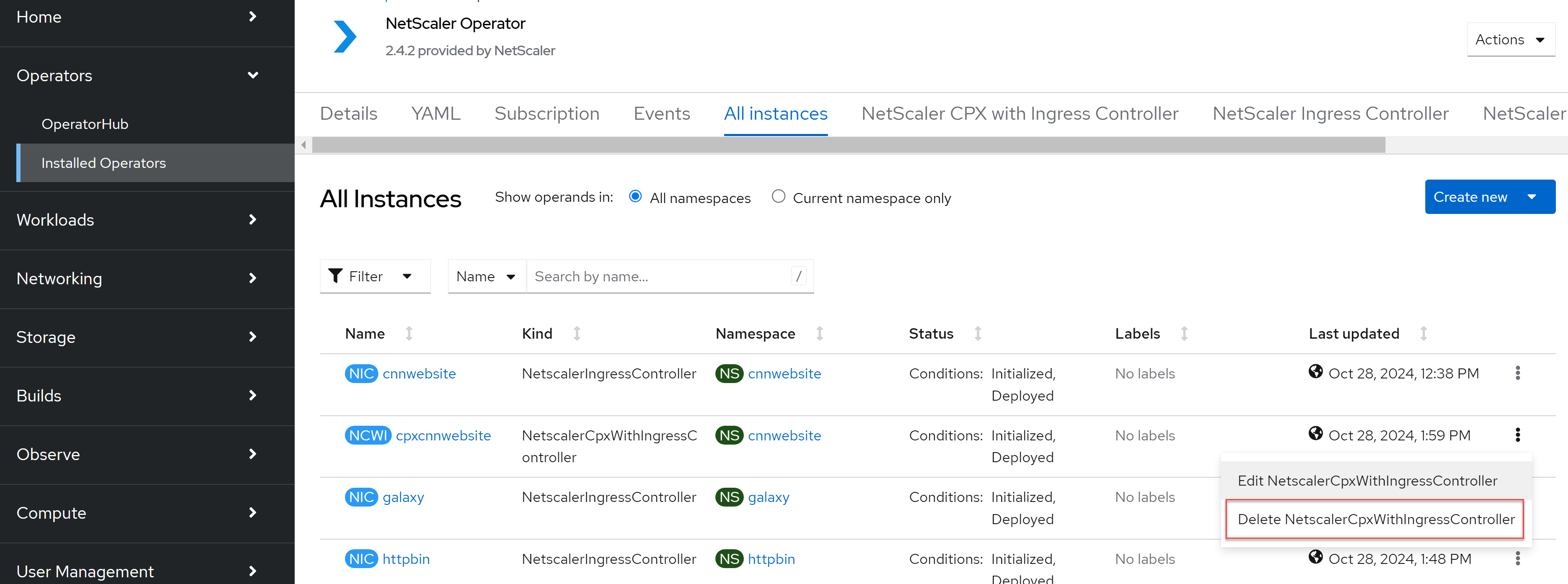
To delete each controller instance, click the ellipses icon next to a controller and then click Delete.In the following example, a NetScaler CPX with NetScaler Ingress Controller instance is deleted.
-
Click Delete to confirm deleteion.
-
-
Remove netscaler.com CRDs of NetScaler Operator (NSIC, NSIC+CPX, and NSOE) by using the following command:
for crd in $(oc get crds -o jsonpath='{.items[*].metadata.name}' | tr ' ' '\n' | grep 'netscaler.com'); do echo "Deleting CRD: $crd" oc delete crd $crd done -
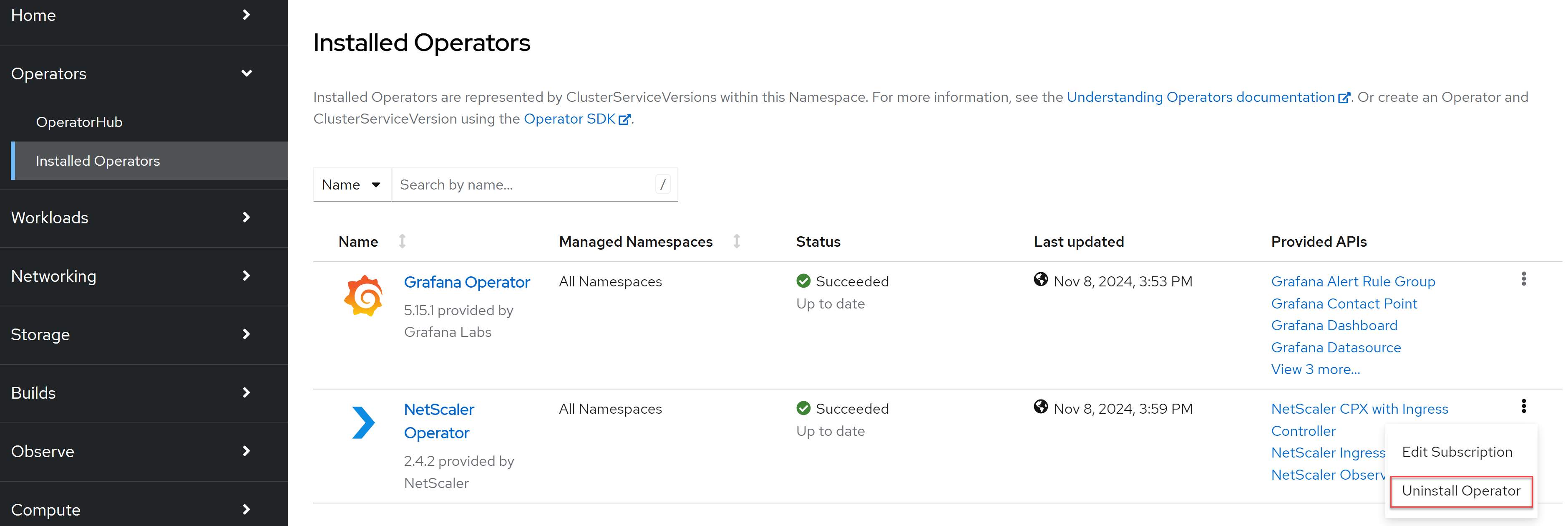
To uninstall NetScaler Operator, navigate to Operators > Installed Operators, click the ellipses icon next to NetScaler Ingress Controller Operator, and then click Uninstall Operator.
-
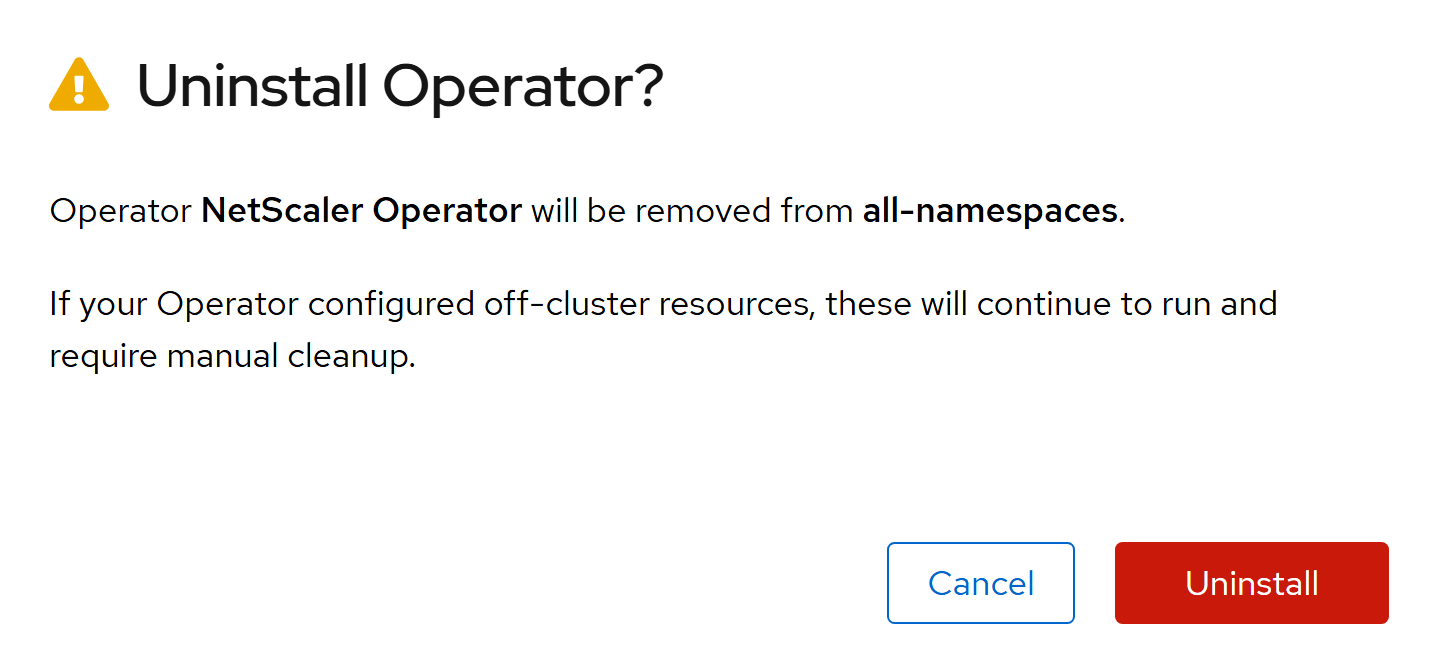
Click Uninstall to confirm uninstallation.
-
Convert the controller YAMLs you backed up in step 1 to the new schema introduced in NetScaler Operator 3.1.2. To do so, for each parameter in the controller YAML, check the respective modified parameter in the new schema and update the YAMLs accordingly. For information on parameters in NetScaler Operator version 3.1.2, see NetScaler Operator.
-
Deploy NetScaler Operator. For information on deploying NetScaler Operator, see Deploy NetScaler Operator.
-
Install the controllers one after the other with the YAMLs updated in step 8. For more information, see NetScaler Operator.
-
Install the CRDs backed up in step 2 by using the following command:
oc apply -f all_citrix_crd_instances.yaml