
Deploy NetScaler Node Controller in OpenShift using NetScaler Operator
NetScaler Operator enables you to deploy the NetScaler Node Controller in an OpenShift cluster. The NetScaler Node Controller builds a Virtual Extensible LAN (VXLAN) based overlay network between the Kubernetes nodes and NetScaler. For more information, see Establish a network between Kubernetes nodes and NetScaler using the node controller.
Deploy NetScaler® Node Controller
Prerequisites
-
Red Hat OpenShift Cluster (version 4.11 or later).
-
Deploy NetScaler Operator. For information on how to deploy NetScaler Operator, see Deploy NetScaler Operator.
-
A NetScaler system user account with a command policy that allows the node controller to configure
vxlan,bridgetable,route,arp, andns ipon NetScaler (and alsons pbr,ns pbrs, andnetprofileif you set clusterName), and a Kubernetes secret that holds its credentials. For more information, see Create a system user account for the node controller in NetScaler. -
On OpenShift, the router pods that the node controller creates on each node run as privileged pods. Attach the privileged security context constraint (SCC) to the router service account:
oc adm policy add-scc-to-user privileged system:serviceaccount:<namespace>:<router-service-account>The router service account is<instance-name>-kube-nsnc-router, or the value of nsncRouterName if you set it. NetScaler Operator creates this service account but does not grant it an SCC.
Steps to deploy NetScaler Node Controller using NetScaler Operator
Do the following steps:
-
Navigate to Operators > Installed Operators and select NetScaler Operator.
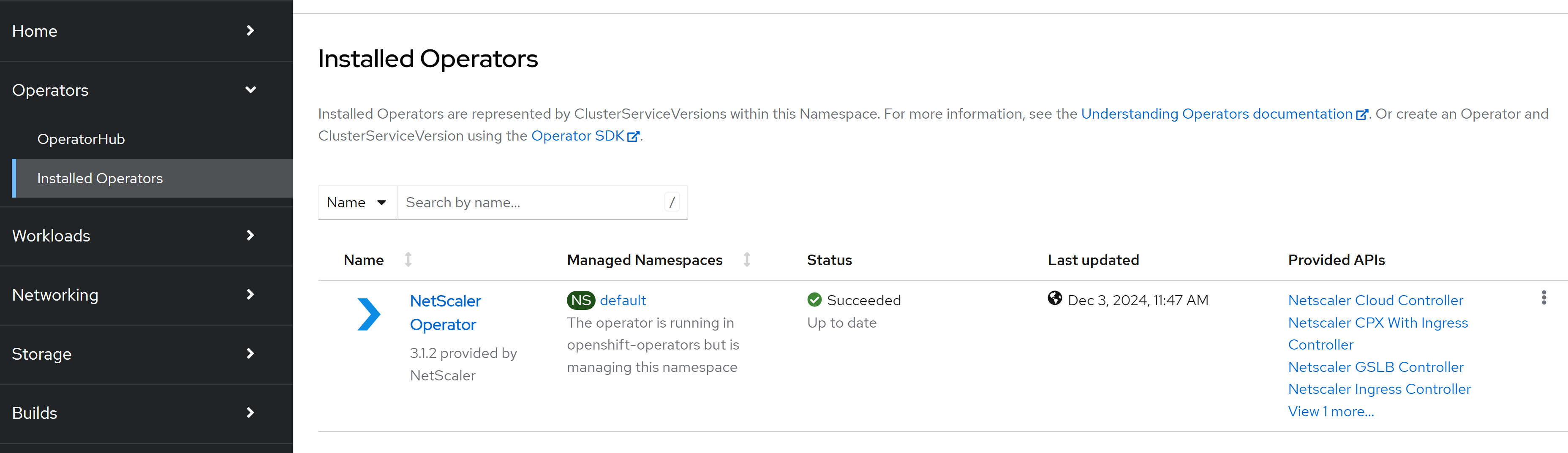
-
Click the NetScaler Node Controller tab and click Create NetscalerNodeController.The NetScaler Node Controller instance YAML definition is displayed. Optionally, you can select the
Form viewbutton and update the parameters in a form. -
Update the values for the required parameters in the displayed NetScaler Node Controller instance YAML and click Create. For information on the parameters that you need to configure, see the following table.
Parameter Description Mandatory/Optional acceptLicense Set to Yesto accept the NetScaler Node Controller end user license agreement.Mandatory image The NetScaler Node Controller image. It is used only when upgradeImageAlways is false. Default:quay.io/netscaler/netscaler-k8s-node-controller:3.2.13.Optional pullPolicy The image pull policy. Optional imagePullSecrets List of OpenShift secrets used to pull the node controller image from a private registry. The operator adds them to the node controller service account that it creates (serviceAccount.create is true). They are not used for thekube-cnc-routerpods. For more information, see Pull an Image from a Private Registry.Optional nsIP The NetScaler VPX or MPX management IP address. Mandatory adcCredentialSecret The Kubernetes secret that holds the NetScaler user name and password that the node controller uses to configure NetScaler. Not required if vaultCredentials supplies the credentials (see the following note). Mandatory vaultCredentials Reads the NetScaler user name and password from files that a Vault Agent sidecar (added through extraContainers) renders into a shared in-memory volume. Disabled by default; set vaultCredentials.enabled to trueto use it. Requires NetScaler Node Controller 3.2.13 or later: if the default image is older, set image to a 3.2.13 or later image and upgradeImageAlways tofalse. Otherwise, the operator does not deploy the node controller and reportsVaultImageUnsupportedin the instance status. The node controller re-checks the files on a periodic poll (default 30 seconds,NS_CRED_RELOAD_INTERVAL, which you can set in extraEnv) and picks up rotated credentials without a restart. The other settings are mountPath (default/etc/citrix), credentialWaitSeconds (default120), and suppressEnvCredentials (defaulttrue). For more information, see Use NetScaler credentials stored in a Vault server with NetScaler Node Controller.Optional network The IP address range (VTEP overlay subnet) used to build the VXLAN overlay between the Kubernetes nodes and NetScaler. Mandatory vtepIP The NetScaler SNIP used as the VXLAN tunnel end point (VTEP). Mandatory vxlan.id The VXLAN VNID that the node controller programs on NetScaler. Mandatory vxlan.port The VXLAN port that the node controller programs on NetScaler. Mandatory cniType The cluster CNI. Supported values are flannel,calico,canal,weave,cilium, andovn.Mandatory nsncRouterImage The kube-cnc-routerhelper-pod image. Set it to an internal-registry path to run the node controller without internet access. Default:quay.io/netscaler/nsnc-router:2.2.9.Optional nsncRouterName A unique router name. Set a different value to run more than one node controller in the same cluster. Optional clusterName The cluster name. When it is set, the node controller adds policy-based routes ( cnc-<clusterName>_<pod-range>) and thecnc-<clusterName>_netprofnet profile on NetScaler instead of static routes. Use the same value as the clusterName of the NetScaler Ingress Controller that has nsncPbr set totrue.Optional dsrIPRange The IP address range used for Direct Server Return (DSR). Optional healthProbes Liveness and readiness probes for the node controller pod, enabled by default. Use healthProbes.enabled to turn them off, and healthProbes.liveness and healthProbes.readiness to tune the timings. The probes need node controller image 3.1.0 or later; if you deploy an earlier image, set healthProbes.enabled to false. The probes of thekube-cnc-routerpods are set by the node controller and cannot be changed.Optional nsncConfigMap The ConfigMap that the node controller watches for the tolerations of the kube-cnc-routerpods. The operator creates it. name sets the ConfigMap name (default: the instance name), and tolerationsInJson sets the tolerations that are applied to the router pods. When you change the tolerations, the node controller re-creates the router pods.Optional resources The CPU and memory resource requests and limits for the node controller pod. Optional serviceAccount Whether a ServiceAccount is created ( create) and the name to use. If serviceAccount.create isfalse, set serviceAccount.name to an existing service account. The operator then also does not create the service account of thekube-cnc-routerpods. Create it yourself in the same namespace, with the nsncRouterName value as its name (default<instance-name>-kube-nsnc-router).Optional createClusterRoleAndBinding Creates the ClusterRoles and ClusterRoleBindings for the node controller and the kube-cnc-routerpods. The default value istrue. Set it tofalseto skip creating them; you must then create them yourself.Optional upgradeImageAlways When true(the default), the operator deploys the image that is built into this operator release and ignores theimagevalue. Set it tofalseto deploy the image that you specify inimage.Optional tokenExpirationSeconds The expiration, in seconds, of the projected ServiceAccount token. Optional extraContainers / extraEnv / extraVolumes / extraVolumeMounts / initContainers Extra pod-spec hooks to add sidecar containers, environment variables, volumes, volume mounts, and init containers to the node controller pod. Optional affinity Affinity labels for pod assignment. Optional nodeSelector The node label key:value pair to be used for the nodeSelector option in the node controller deployment. Optional podAnnotations Map of annotations to add to the pods. Optional tolerations The tolerations for the node controller deployment. Optional Note:You must specify adcCredentialSecret, unless you set vaultCredentials.enabled totrueand leave vaultCredentials.suppressEnvCredentials set totrue(the default). In that case, the node controller reads the NetScaler credentials from the files that the Vault Agent sidecar renders. If neither is set, the operator does not deploy the node controller and reportsCredentialSourceMissingin the instance status.The following examples are complete NetscalerNodeController resources. Replace the IP addresses, the overlay network, the VXLAN ID and port, and the CNI with the values for your environment.Example: Minimal NetscalerNodeController resource. This resource sets only the mandatory parameters.apiVersion: netscaler.com/v1
kind: NetscalerNodeController
metadata:
name: nsnc
spec:
acceptLicense: 'Yes'
# NetScaler management IP and the secret with its user name and password
nsIP: 10.0.0.10
adcCredentialSecret: nslogin
# Overlay subnet. It must not overlap the pod, service, or node networks.
network: 172.16.3.0/24
# NetScaler SNIP used as the VXLAN tunnel end point
vtepIP: 10.0.0.11
# VXLAN ID and UDP port. Do not use a port that the cluster network already uses.
vxlan:
id: 500
port: 9090
cniType: ovnExample: Use policy-based routes. Set clusterName to add policy-based routes instead of static routes, and set a unique nsncRouterName if more than one node controller runs in the cluster.apiVersion: netscaler.com/v1
kind: NetscalerNodeController
metadata:
name: nsnc
spec:
acceptLicense: 'Yes'
nsIP: 10.0.0.10
adcCredentialSecret: nslogin
network: 172.16.3.0/24
vtepIP: 10.0.0.11
vxlan:
id: 500
port: 9090
cniType: ovn
# Add policy-based routes instead of static routes. Use the same clusterName in the
# NetscalerIngressController that has nsncPbr set to true.
clusterName: cluster1
# Unique router name, so that you can run more than one node controller in the cluster
nsncRouterName: cluster1-nsnc-routerExample: Run the router pods on tainted nodes. The operator writes nsncConfigMap.tolerationsInJson to the ConfigMap that the node controller watches, and the node controller applies these tolerations to thekube-cnc-routerpods.apiVersion: netscaler.com/v1
kind: NetscalerNodeController
metadata:
name: nsnc
spec:
acceptLicense: 'Yes'
nsIP: 10.0.0.10
adcCredentialSecret: nslogin
network: 172.16.3.0/24
vtepIP: 10.0.0.11
vxlan:
id: 500
port: 9090
cniType: ovn
nsncConfigMap:
# Tolerations for the kube-cnc-router pods, for example for tainted infra nodes
tolerationsInJson:
- key: node-role.kubernetes.io/infra
operator: Exists
effect: NoScheduleExample: Tune the health probes. The following resource gives the node controller more time to start, and more time between heartbeats before Kubernetes restarts it.apiVersion: netscaler.com/v1
kind: NetscalerNodeController
metadata:
name: nsnc
spec:
acceptLicense: 'Yes'
nsIP: 10.0.0.10
adcCredentialSecret: nslogin
network: 172.16.3.0/24
vtepIP: 10.0.0.11
vxlan:
id: 500
port: 9090
cniType: ovn
healthProbes:
enabled: true
liveness:
initialDelaySeconds: 60
# Restart the node controller if its heartbeat is older than this
stalenessThresholdSeconds: 90
readiness:
periodSeconds: 15Example: Use existing service accounts. When serviceAccount.create isfalse, the operator creates neither service account. Create both in the namespace of the instance first: the node controller service account (serviceAccount.name) and the router service account, which is named after nsncRouterName.apiVersion: netscaler.com/v1
kind: NetscalerNodeController
metadata:
name: nsnc
spec:
acceptLicense: 'Yes'
nsIP: 10.0.0.10
adcCredentialSecret: nslogin
network: 172.16.3.0/24
vtepIP: 10.0.0.11
vxlan:
id: 500
port: 9090
cniType: ovn
# Use existing service accounts: nsnc-controller for the node controller and
# nsnc-router (the nsncRouterName value) for the kube-cnc-router pods.
serviceAccount:
create: false
name: nsnc-controller
nsncRouterName: nsnc-router
# The operator still creates the cluster roles and bindings for these service accounts.
createClusterRoleAndBinding: true
# Lifetime, in seconds, of the projected service account token (600 to 31536000)
tokenExpirationSeconds: 86400Example: Deploy the images from a private registry. Set upgradeImageAlways tofalseand point image and nsncRouterImage to your registry. Thekube-cnc-routerpods do not use imagePullSecrets, so make the router image available to the nodes in another way, for example through the cluster-wide pull secret.apiVersion: netscaler.com/v1
kind: NetscalerNodeController
metadata:
name: nsnc
spec:
acceptLicense: 'Yes'
nsIP: 10.0.0.10
adcCredentialSecret: nslogin
network: 172.16.3.0/24
vtepIP: 10.0.0.11
vxlan:
id: 500
port: 9090
cniType: ovn
# Deploy the images from your registry instead of the images built into the operator
upgradeImageAlways: false
image: <registry>/netscaler-k8s-node-controller:<tag>
nsncRouterImage: <registry>/nsnc-router:<tag>
pullPolicy: IfNotPresent
# Used for the node controller pod only, not for the kube-cnc-router pods
imagePullSecrets:
- my-registry-secretExample: Read the NetScaler credentials from HashiCorp Vault. A Vault Agent sidecar writes the NetScaler user name and password to thecitrix-credsvolume that the operator adds, so adcCredentialSecret is not needed. Set up Vault, thensnc-vault-agent-configConfigMap, and a Vault role for the service account of the instance (by default, the instance name) as described in Use NetScaler credentials stored in a Vault server with NetScaler Node Controller.apiVersion: netscaler.com/v1
kind: NetscalerNodeController
metadata:
name: nsnc-vault
spec:
acceptLicense: 'Yes'
# Vault credentials need NetScaler Node Controller 3.2.13 or later.
# upgradeImageAlways: false makes the operator deploy this image, not its default image.
upgradeImageAlways: false
image: quay.io/netscaler/netscaler-k8s-node-controller:3.2.13
nsIP: 10.0.0.10
network: 172.16.3.0/24
vtepIP: 10.0.0.11
vxlan:
id: 500
port: 9090
cniType: ovn
# No adcCredentialSecret: the Vault Agent sidecar supplies the credentials
vaultCredentials:
enabled: true
extraEnv:
# Optional: seconds between checks for new credentials (default 30)
- name: NS_CRED_RELOAD_INTERVAL
value: "60"
extraContainers:
- name: vault-agent
image: hashicorp/vault:<version>
args: ["agent", "-config=/etc/vault/vault-agent-config.hcl"]
env:
- name: VAULT_ADDR
value: "https://<vault-server>:8200"
# Needed when the container does not run as root, for example on OpenShift
- name: SKIP_SETCAP
value: "true"
volumeMounts:
# citrix-creds is the shared in-memory volume that the operator adds
- name: citrix-creds
mountPath: /etc/citrix
- name: vault-config
mountPath: /etc/vault
- name: vault-token
mountPath: /home/vault
- name: sa-token
mountPath: /var/run/secrets/kubernetes.io/serviceaccount
readOnly: true
extraVolumes:
- name: vault-config
configMap:
name: nsnc-vault-agent-config
- name: vault-token
emptyDir:
medium: Memory
- name: sa-token
projected:
sources:
- serviceAccountToken:
path: token
expirationSeconds: 3600
audience: vault # the token works only for Vault, not for the Kubernetes API -
Navigate to the Workloads > Pods section and verify whether the NetScaler Node Controller pod is up and running.For each node, the node controller creates a router pod named
<nsncRouterName>-<node-name>that runs thekube-cnc-routercontainer. If you did not set nsncRouterName, it is<instance-name>-kube-nsnc-router. It also creates a router ConfigMap named<nsncRouterName>that holds the overlay details of each node, and a<nsncRouterName>-vtepConfigMap that records the overlay IP address of each node. Each router pod creates acncvxlan<hash>interface andiptablesrules on its node. On NetScaler, the node controller adds an overlay SNIP from the network range, creates the VXLAN (VNID and port) with the vtepIP SNIP as its source IP, adds a bridgetable entry for each node, and adds a route to the pod subnet of each node (or, if you set clusterName, a policy-based route and thecnc-<clusterName>_netprofnet profile). To verify, log on to NetScaler and runshow vxlan,show bridgetable,show ns ip, andshow route(orshow ns pbr).
Delete NetScaler Node Controller
To remove the node controller, delete its
NetscalerNodeController instance:
-
Navigate to Operators > Installed Operators > NetScaler Operator, open the NetScaler Node Controller tab, and delete the
NetscalerNodeControllerinstance. Alternatively, runkubectl delete netscalernodecontroller <name> -n <namespace>.
Deleting the instance is the only action that removes the node controller and its configuration. Upgrading NetScaler Operator, or restarting or upgrading the node controller, does not remove anything.
When you delete the instance, NetScaler Operator removes the node controller in an order that lets the node controller clean up after itself:
-
The operator deletes the router ConfigMap
<nsncRouterName>. The node controller, which is still running, then removes the overlay configuration that it added to NetScaler: the routes to the pod subnets (or, if you set clusterName, thecnc-<clusterName>_*policy-based routes), the VXLAN<vxlan.id>(its bridgetable entries go with it), and the overlay SNIP. The operator gives the node controller 30 seconds from this delete before it stops the node controller. -
The operator deletes the node controller deployment and waits for its pod to stop. While it stops, the node controller deletes its router pods.
-
The operator deletes any router pod that is still left (
<nsncRouterName>-<node>). As each router pod stops, it removes itscncvxlan<hash>interface andiptablesrules from its node. -
The operator deletes the router ConfigMap again, the
<nsncRouterName>-vtepConfigMap, the service accounts and the ConfigMap that it created for the instance, and the cluster roles and cluster role bindings.
If you did not set nsncRouterName, it is
<instance-name>-kube-nsnc-router.
The operator waits at most 3 minutes in total. After that, it still sends every delete but does not wait, so the instance does not stay in the
Terminating state. Deleting the instance can take up to 3 minutes.
Clean up after deletion
After you delete the instance, clean up the following:
-
If you set clusterName, the node controller does not delete the net profile
cnc-<clusterName>_netprof. It only removes its source IP, so that a restart or upgrade of the node controller does not break traffic. When you remove the node controller for good, delete the net profile on NetScaler once no NetScaler Ingress Controller uses it:show netprofile cnc-<clusterName>_netprof
rm netprofile cnc-<clusterName>_netprof -
Check that nothing else of the overlay is left on NetScaler. If the node controller stopped before it finished, remove what these commands still show:
show route                 # routes to the pod subnets            ->  rm route <network> <netmask> <gateway>
 show ns pbr                # with clusterName: cnc-<clusterName>_* ->  rm ns pbr <name>, then apply ns pbrs
 show bridgetable           # entries with VXLAN <vxlan.id>        ->  rm bridgetable -mac 00:00:00:00:00:00 -vxlan <vxlan.id> -vtep <node IP>
 show vxlan <vxlan.id>      #                                      ->  rm vxlan <vxlan.id>
 show ns ip                 # the overlay SNIP in the network range ->  rm ns ip <overlay SNIP>
Do not remove the vtepIP SNIP. It is your existing NetScaler SNIP, which the node controller only uses as the VXLAN source IP. -
If a router pod could not shut down cleanly (for example, because its node was down), remove the
cncvxlan<hash>interface and theiptablesrules that the router pod added from that node manually.
Note:
Before you redeploy the node controller with a different
vxlan.id, vtepIP, or network, make sure that no overlay entries of the old deployment are left on NetScaler.