
Web Services Federation protocol
Web Services Federation (WS-Federation) is an identity protocol that allows a Security Token Service (STS) in one trust domain to provide authentication information to an STS in another trust domain when there is a trust relationship between the two domains.
Advantages of WS-Federation
WS-Federation supports both active and passive clients whereas SAML IdP supports only passive clients.
-
Active clients are Microsoft native clients such as, Outlook, and Office clients (Word, PowerPoint, Excel, and OneNote).
-
Passive clients are browser-based clients such as, Google Chrome, Mozilla Firefox, and Internet Explorer.
Prerequisites for using NetScaler as WS-Federation
Before you configure the NetScaler appliance as the ADFS proxy, review the following:
-
Active Directory.
-
Domain SSL certificate.
-
NetScaler SSL certificate and ADFS token signing certificate on ADFS server must be the same.
Important
SAML IdP is now capable of handling the WS-Federation protocol. Therefore, to configure the WS-Federation IdP, you must actually configure the SAML IdP. You do not see any user interface explicitly mentioning WS-Federation.
Features supported by NetScaler when configured as ADFS proxy and WS-Federation IdP
The following table lists the features supported by the NetScaler appliance when configured as an ADFS proxy and WS-Federation IdP.
| Features | Configure NetScaler appliance as ADFS proxy | NetScaler as WS-Federation IdP | NetScaler as ADFSPIP |
|---|---|---|---|
| Load Balancing | Yes | Yes | Yes |
| SSL Termination | Yes | Yes | Yes |
| Rate Limiting | Yes | Yes | Yes |
| Consolidation (reduces DMZ server footprint and saves public IP) | Yes | Yes | Yes |
| Web Application Firewall (WAF) | Yes | Yes | Yes |
| Authentication Offload to NetScaler appliance | Yes | Yes (Active and Passive clients) | Yes |
| Single sign-on (SSO) | Yes | Yes (Active and Passive clients) | Yes |
| Multi-Factor (nFactor) authentication | No | Yes (Active and Passive clients) | Yes |
| Azure multifactor authentication | No | Yes (Active and Passive clients) | Yes |
| ADFS server farm can be avoided | No | Yes | Yes |
Configure NetScaler appliance as WS-Federation IdP
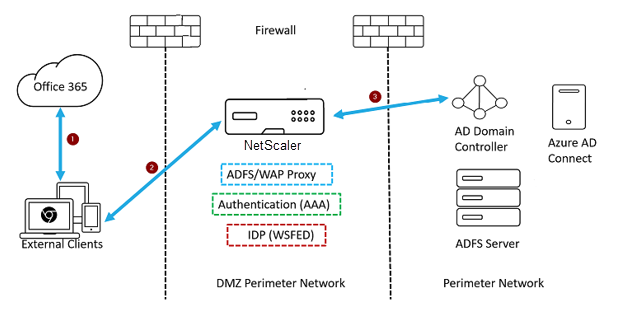
Configure NetScaler as WS-Federation IdP (SAML IdP) in a DMZ zone. The ADFS server is configured along with the AD domain controller in the back-end.
-
The client request to Microsoft Office365 gets redirected to the NetScaler appliance.
-
The user enters the credentials for multifactor authentication.
-
NetScaler validates the credentials with AD and generates a token natively on the NetScaler appliance. The credentials are passed to Office365 for access.
Note
WS-Federation IdP support is done natively through the NetScaler appliance when compared to the F5 Networks load balancer.
Configure NetScaler appliance as WS-Federation IdP (SAML IdP) using the CLI
The following sections are categorized based on the requirement to complete the configuration steps.
To configure LDAP authentication and add policy
Important
For domain users, to log on to the NetScaler appliance by using their corporate email addresses, you must configure the following:
-
Configure LDAP authentication server and policy on the NetScaler appliance.
-
Bind it to your authentication, authorization, and auditing virtual IP address (use of an existing LDAP configuration is also supported).
add authentication ldapAction <Domain_LDAP_Action> -serverIP <Active Directory IP> -serverPort 636 -ldapBase "cn=Users,dc=domain,dc=com" -ldapBindDn "cn=administrator,cn=Users,dc=domain,dc=com" -ldapBindDnPassword <administrator password> -encrypted -encryptmethod ENCMTHD_3 -ldapLoginName sAMAccountName -groupAttrName memberOf -subAttributeName cn -secType SSL -ssoNameAttribute UserPrincipalName -followReferrals ON -Attribute1 mail -Attribute2 objectGUID

 add authentication Policy <Domain_LDAP_Policy> -rule true -action <Domain_LDAP_Action>
Example
add authentication ldapAction CTXTEST_LDAP_Action -serverIP 3.3.3.3 -serverPort 636 -ldapBase "cn=Users,dc=ctxtest,dc=com" -ldapBindDn "cn=administrator,cn=Users,dc=ctxtest,dc=com" -ldapBindDnPassword xxxxxxxxxxx -encrypted -encryptmethod ENCMTHD_3 -ldapLoginName sAMAccountName -groupAttrName memberOf -subAttributeName cn -secType SSL -ssoNameAttribute UserPrincipalName -followReferrals ON -Attribute1 mail -Attribute2 objectGUID

 add authentication Policy CTXTEST_LDAP_Policy -rule true -action CTXTEST_LDAP_Action
To configure NetScaler as WS-Federation IdP or SAML IdP
Create WS-Federation IdP (SAML IdP) action and policy for token generation. Bind it to the authentication, authorization, and auditing virtual server later.
add authentication samlIdPProfile <Domain_SAMLIDP_Profile> -samlIdPCertName <SSL_CERT> -assertionConsumerServiceURL "https://login.microsoftonline.com/login.srf" -samlIssuerName <Issuer Name for Office 365 in ADFS Server> -rejectUnsignedRequests OFF -audience urn:federation:MicrosoftOnline -NameIDFormat persistent -NameIDExpr "HTTP.REQ.USER.ATTRIBUTE(2).B64ENCODE" -Attribute1 IDPEmail -Attribute1Expr "HTTP.REQ.USER.ATTRIBUTE(1)"

 add authentication samlIdPPolicy <Domain_SAMLIDP_Policy> -rule "HTTP.REQ.HEADER(\"referer\").CONTAINS(\"microsoft\") || true" -action <Domain_SAMLIDP_Profile>
Example
add authentication samlIdPProfile CTXTEST_SAMLIDP_Profile -samlIdPCertName ctxtest_newcert_2019 -assertionConsumerServiceURL "https://login.microsoftonline.com/login.srf" -samlIssuerName "http://ctxtest.com/adfs/services/trust/" -rejectUnsignedRequests OFF -audience urn:federation:MicrosoftOnline -NameIDFormat persistent -NameIDExpr "HTTP.REQ.USER.ATTRIBUTE(2).B64ENCODE" -Attribute1 IDPEmail -Attribute1Expr "HTTP.REQ.USER.ATTRIBUTE(1)"

 add authentication samlIdPPolicy CTXTEST_SAMLIDP_Policy -rule "HTTP.REQ.HEADER(\"referer\").CONTAINS(\"microsoft\") || true" -action CTXTEST_SAMLIDP_Profile
To bind authentication virtual server and policy
bind authentication vserver <Domain_AAA_VS> -policy <Domain_SAMLIDP_Policy> -priority 100 -gotoPriorityExpression NEXT

 bind authentication vserver <Domain_AAA_VS> -policy <Domain_LDAP_Policy> -priority 100 -gotoPriorityExpression NEXT
Example
bind authentication vserver CTXTEST_AAA_VS -policy CTXTEST_SAMLIDP_Policy -priority 100 -gotoPriorityExpression NEXT

 bind authentication vserver CTXTEST_AAA_VS -policy CTXTEST_LDAP_Policy -priority 100 -gotoPriorityExpression NEXT

 bind ssl vserver CTXTEST_AAA_VS -certkeyName ctxtest_newcert_2019
To configure content switching
add cs action <Domain_CS_Action> -targetVserver <Domain_AAA_VS>

 add cs policy <Domain_CS_Policy> -rule "is_vpn_url || http.req.url.contains(\"/adfs/ls\") || http.req.url.contains(\"/adfs/services/trust\") || -action <Domain_CS_Action>
Example
add cs action CTXTEST_CS_Action -targetVserver CTXTEST_AAA_VS

 add cs policy CTXTEST_CS_Policy -rule "is_vpn_url || http.req.url.contains(\"/adfs/ls\") || http.req.url.contains(\"/adfs/services/trust\") || -action CTXTEST_CS_Action
To bind content switching virtual server to policy
bind cs vserver CTXTEST_CSVS -policyName CTXTEST_CS_Policy -priority 100