
NetScaler configurations support in admin partition
NetScaler configurations can be categorized into the following three types of configurations. It depends on the Citrix configuration and the partition in which the configuration is performed.
Note
-
Admin partitions cannot be set up on a NetScaler cluster. It means that a NetScaler cluster cannot be partitioned.
-
Admin partitions are not supported on a NetScaler 14000 FIPS appliance.
-
Case 3 lists the NetScaler features that are not supported in admin partitions.
-
Load balancing templates are not supported in admin partitions.
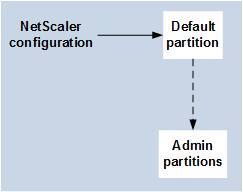
Case 1 (global configurations)
Configurations that can be performed ONLY in the default partition and which are available or impact all the admin partitions.
-
Updates to built-in entities for monitors, TCP profiles, HTTP profiles, and so on.
-
Updates to global parameters for syslog, NSLOG, weblog, content switching, IPSEC, SIP, DHCP, Surge protection, TCP buffering, and system collection.
-
High availability (HA) configurations
-
Interface and VLAN changes
-
User configurations
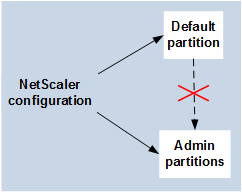
Case 2 (partition-specific configurations)
Configurations that can be performed independently in default and admin partitions. These configurations are applicable only to the partition in which they are performed.
-
Getting traffic level statistics for a partition.
-
Partition admin can update IP bindings for VLAN which is bound to that partition. But cannot update the interface bindings.
-
Clearing NetScaler configurations.
-
Feature-specific parameters for the following features: AppFlow®, AppQoE, HTTP compression, DNS, TCP, HTTP, encryption, responder, rewrite, and SSL.
-
Feature-specific configurations such as virtual servers, services, monitors.
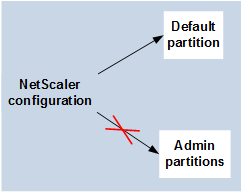
Case 3
Configurations that cannot be performed on admin partitions. These features can be configured in the default partition, but there is no impact on admin partitions.
Note:
Configurations that are supported on admin partitions for a particular release are marked as Yes.
| Feature Component | NetScaler Feature | NetScaler 12.1 | NetScaler 13.0 | NetScaler 13.1 | NetScaler 14.1 |
|---|---|---|---|---|---|
| Networking | Traffic Domain | No | No | No | No |
| Policy | Extensibility | Yes | Yes | Yes | Yes |
| Load Balancing | DBS Autoscale | Yes | Yes | Yes | Yes |
| Load Balancing | DNSSEC | Yes | Yes | Yes | Yes |
| Load Balancing | Diameter | Yes | Yes | Yes | Yes |
| Load Balancing | RTSP | No | No | No | No |
| Load Balancing | Sure Connect | Deprecated | Deprecated | Removed | Removed |
| Load Balancing | Autoscale Service Group | Yes | Yes | Yes | Yes |
| Manageability | RBA External Authentication | Yes | Yes | Yes | Yes |
| Manageability | RISE Cisco | No | Yes | Yes | Yes |
| Manageability | AppExpert | Yes | Yes | Yes | Yes |
| Manageability | HDX Insight | No | No | No | No |
| Manageability | Insight | No | No | No | No |
| VPN | Citrix CloudBridge Connector | No | No | No | No |
| VPN | NetScaler Gateway or SSL VPN | No | No | No | No |
| VPN | SSL VPN ICA Proxy | No | No | No | No |
| VPN | Web Interface on NetScaler | No | No | No | No |
| SSL | SSL Profile | Yes | Yes | Yes | Yes |
| SSL | SSL-FIPS | No | No | No | No |
| SSL | External-HSM | No | No | No | No |
| Infra | Cache Redirection | No | No | No | No |
| Infra | Integrated Caching | Yes | Yes | Yes | Yes |
| Network | VXLAN | Yes | Yes | Yes | Yes |
| Network | Graceful Shutdown | Yes | Yes | Yes | Yes |
| Network | LSN | No | No | No | No |
| Network | IPv6 Ready Logo | Yes | Yes | Yes | Yes |
| Network | vPath | Yes | Yes | Yes | Yes |
| Load Balancing | Datastream | Yes | Yes | Yes | Yes |
| Logging | Web logging | Yes | Yes | Yes | Yes |
| Network | L2 Param/L3 Param | Yes | Yes | Yes | Yes |
| Network | GRE Tunnel | Yes | Yes | Yes | Yes |
| Loading Balancing | Scriptable Monitoring | Yes | Yes | Yes | Yes |
| Load Balancing | GSLB | Yes | Yes | Yes | Yes |
| Infra | Connection Mirroring | Yes | Yes | Yes | Yes |
| Infra | FEO | Yes | Yes | Yes | Yes |
| Infra | Ns trace | Yes | Yes | Yes | Yes |
| Load Balancing | Priority Queuing | Deprecated | Deprecated | Removed | Removed |
| Network | HDOSP | Deprecated | Deprecated | Removed | Removed |
| Network | Net profile | Yes | Yes | Yes | Yes |
| Network | Networking (Restricted Feature) | Yes | Yes | Yes | Yes |
| Network | VRRP (Restricted Feature) | Yes | Yes | Yes | Yes |
| Logging | Audit Logging (SYSLOG-TCP, LB of syslog servers, SNIP support, and FQDN support for syslog) | Yes | Yes | Yes | Yes |
| VPN | NetScaler Gateway | No | No | No | No |
| VPN | AAA-TM | Yes | Yes | Yes | Yes |
| AppFlow | AppFlow | Yes (IPFIX only) | Yes | Yes | Yes |
| AppFw | Application Firewall | No | No | No | No |
| URL transformation | URL transformation | No | No | No | No |
| Load Balancing | TCP Buffering | No | No | No | No |
| Policies | OCSP Responder | Yes | Yes | Yes | Yes |
| Audit Log | SYSLOG-TCP | Yes | Yes | Yes | Yes |
| Optimization | Front-end-optimization | Yes | Yes | Yes | Yes |
| AppQoE | AppQoE | Yes | Yes | Yes | Yes |
The preceding table lists some of the features as Restricted Features in the admin partition setup. The following section provides the reason why some of the features are mentioned as Restricted Features.
-
VRRP. The VRRP is Restricted Feature in the admin partition because of the following:
-
VRID addition or deletion can be done only from the default partition context. However, once a VRID is created, it can be used within non-default partitions.
-
VRRP functionality is supported only over the dedicated VLANs.
-
VRRP functionality is not supported on shared VLANs, used by the admin partition. It is blocked internally. No error message is shown during configuration. The protocol is blocked on a shared VLAN (tagged or untagged) bound to a default or any administrative partition.
-
Important
To support active-active deployment using VRRP, main and backup VIP must use the same VRID. Different VRIDs cannot be used.
-
Networking. Some of the networking configurations (L2 Param and L3 Param) are not supported or valid in the partition context. If you come across any such configurations, the following error message is displayed. "ERROR: This configuration option is not supported on the non-default partition."