
gRPC with rewrite policy
The gRPC with rewrite policy use case explains how NetScaler appliance works in rewriting some information in the gRPC requests or responses. The following diagram shows the components interact.
The following diagram shows how components interact with each other in a gRPC with rewrite policy configuration. 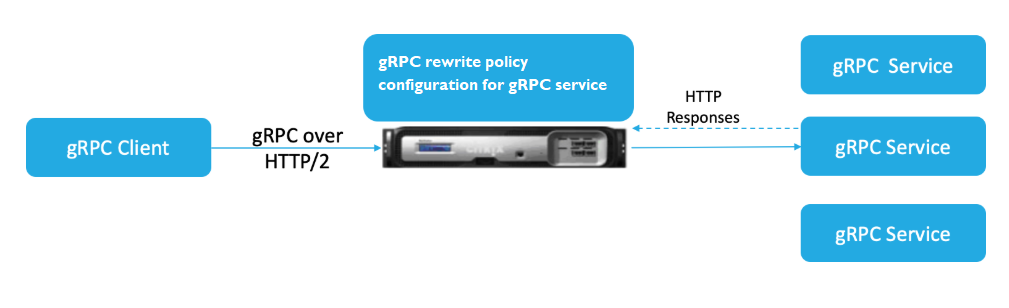
-
Enable rewrite feature on the appliance.
-
Configure rewrite action to modify, add, or delete gRPC headers.
-
Configure rewrite policy for determining the gRPC requests (traffic) on which an action has to be taken.
-
Bind the rewrite policy to the load balancing virtual server to examine if the traffic matches the policy expression.
-
By using a rewrite policy, you can perform the following based on gRPC status code.
-
Modify responses from gRPC web server.
-
Modify, add, or delete gRPC headers.
-
Modify the URL of the request to the gRRC server.
-
Configure gRPC call termination with rewrite policy
To configure gRPC call termination with rewrite policy, you must complete the following steps:
-
Enable rewrite feature
-
Add rewrite policy
-
Bind rewrite policy to load balancing virtual server
Enable rewrite feature
To use the rewrite feature, you must first enable it.
At the command prompt, type:
enable ns rewrite
Add rewrite policy
After you configure a rewrite action, you must next configure a rewrite policy to select the gRPC requests to which the NetScaler appliance must rewrite.
At the command prompt, type:
add rewrite policy <name> <expression> <action> [<undefaction>]-appFlowaction <actionName>
Example:
add rewrite policy grpc-rewr_pol1 "http.res.header(\"grpc-status\").NE(\"0\")" RESET
Bind rewrite policy to load balancing virtual server
To put a policy into effect, you must bind it to the load balancing virtual server with the gRPC service.
At the command prompt, type:
bind rewrite global <policyName> <priority> [<gotoPriorityExpression> [-type <type>] [-invoke (<labelType> <labelName>)]
Example:
bind lb vserver lb-grpc –policyName grpc-rewr_pol1 –priority 100