
Configuring MAC-Based Forwarding
With MAC-based forwarding (MBF) enabled, when a request reaches the NetScaler appliance, the appliance remembers the source MAC address of the frame and uses it as the destination MAC address for the resulting replies. MAC-based forwarding can be used to avoid multiple-route/ARP lookups and to avoid asymmetrical packet flows. MAC-based forwarding may be required when the NetScaler is connected to multiple stateful devices, such as VPNs or firewalls, because it ensures that the return traffic is sent to the same device that the initial traffic came from.
MAC-based forwarding is useful when you use VPN devices, because it guarantees that all traffic flowing through a VPN passes back through the same VPN device.
The following topology diagram illustrates the process of MAC-based forwarding.
Figure 1. MAC-Based Forwarding Mode
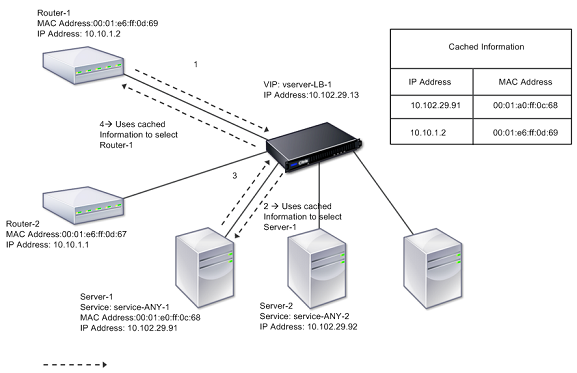
When MAC-based forwarding (MBF) is enabled, the NetScaler caches the MAC address of:
-
The source (a transmitting device such as router, firewall, or VPN device) of the inbound connection.
-
The server that responds to the requests.
When a server replies through the NetScaler appliance, the appliance sets the destination MAC address of the response packet to the cached address, ensuring that the traffic flows in a symmetric manner, and then forwards the response to the client. The process bypasses the route table lookup and ARP lookup functions. However, when the NetScaler initiates a connection, it uses the route and ARP tables for the lookup function.
For more information about direct server return configurations, see Load Balancing.
Some deployment topologies may require the incoming and outgoing paths to flow through different routers. MAC-based forwarding would break this topology design.
MBF should be disabled in the following situations:
-
When a server uses network interface card (NIC) teaming without using LACP (802.1ad Link Aggregation). To enable MAC-based forwarding in this situation, you must use a layer 3 device between the NetScaler and server. Note: MBF can be enabled when the server uses NIC teaming with LACP, because the virtual interface uses one MAC address.
-
When firewall clustering is used. Firewall clustering assumes that ARP is used to resolve the MAC address for inbound traffic. Sometimes the inbound MAC address can be a non-clustered MAC address and should not be used for inbound packet processing.
When MBF is disabled, the appliance uses L2 or L3 connectivity to forward the responses from servers to the clients. Depending on the route table, the routers used for outgoing connection and incoming connection can be different. In the case of reverse traffic (response from the server):
-
If the source and destination are on different IP subnets, the appliance uses the route lookup to locate the destination.
-
If the source is on the same subnet as the destination, the NetScaler looks up the ARP table to locate the network interface and forwards the traffic to it. If the ARP table does not exist, the NetScaler requests the ARP entries.
To enable or disable MAC-based forwarding by using the CLI:
At the command prompt, type:
-
enable ns mode MBF
-
disable ns mode MBF
To enable or disable MAC-based forwarding by using the GUI:
-
Navigate to System > Settings, in the Modes and Features group, click Configure modes.
-
Select or clear the MAC-based forwarding option.
MAC based forwarding for a load balancing setup
Some load balancing setups require that the NetScaler appliance bypasses the global MBF (if enabled) for these setups and instead use the route/ARP lookups for sending packets to the destination.
The MBF parameter of a net profile is used to enable or disable MBF for a specific load balancing configuration. MBF can be set for the client side as well as the server side of a load balancing configuration by binding net profiles (MBF enabled or disabled) to the virtual server and the services.
For example, if a net profile with MBF disabled is bound to the virtual server of a load balancing configuration, the NetScaler appliance bypasses the global MBF (if enabled) and instead use the route/ARP lookups for sending response packets to clients.
Before you begin
Before you begin configuring MBF for a load balancing configuration, note the following points:
-
In a load balancing configuration, the client side (virtual server) and the server side (service/service groups) can have different MBF settings.
-
A load balancing configuration inherits global MBF setting if MBF is not set explicitly in the net profiles bound to the virtual server and the services.
-
In a load balancing configuration, server side (service) inherits client side MBF setting of net profile bound to the virtual server if no net profile is bound to the service.
-
In a load balancing configuration with direct server return mode, client side inherits the MBF setting in the net profile bound to the service.
-
In a content switching configuration, client side takes the MBF setting in the net profile bound to the content switching virtual server instead of from the target load balancing virtual server.
Limitations
Before you begin configuring MBF for a load balancing configuration, note the following limitations:
-
MBF setting for load balancing configurations is not supported in a cluster setup.
-
For a load balancing virtual server with MAC mode or L2Conn settings, MBF is enabled irrespective of the MBF setting in the bound net profile to the virtual server.
-
The NetScaler appliance does not support setting MBF for load balancing monitors using net profile. In other words, the MBF setting of a net profile is not applied to the monitors to which the net profile is bound. The global MBF setting is applied to monitors irrespective of the MBF setting of the bound net profile.
Configure MBF for load balancing configuration
Configuring MBF for a load balancing configuration consists of the following tasks:
-
Enable MBF parameter in a net profile.
-
Bind the net profile to a load balancing virtual server or services.
To enable MBF in a net profile by using the CLI:
-
To enable MBF while adding a net profile, at the command prompt, type:
-
add netProfile \<name> -MBF ( ENABLED | DISABLED )
-
show netprofile \<name>
-
-
To enable MBF in an existing net profile, at the command prompt, type:
-
set netProfile \<name> -MBF ( ENABLED | DISABLED )
-
show netprofile \<name>
-
To enable MBF in a net profile by using GUI**
-
Navigate to System > Network > Net Profiles.
-
Enable the MBF parameter while adding or modifying a net profile.
In the following sample configuration, net profile NETPROFILE-MBF-LBVS has MBF enabled and is bound to load balancing virtual server LBVS-1. Also, net profile NETPROFILE-MBF-SVC has MBF enabled and is bound to a load balancing service SVC-1.
> add netprofile NETPROFILE-MBF-LBVS -MBF ENABLED

 Done

 > add netprofile NETPROFILE-MBF-SVC -MBF ENABLED

 Done

 > set lb vserver LBVS-1 -netprofile NETPROFILE-MBF-LBVS

 Done

 > set service SVC-1 -netprofile NETPROFILE-MBF-SVC

 Done