
More features supported for SAML
The following features are supported for SAML.
Metadata reading and generation support for SAML SP and IdP configuration
NetScaler appliance now supports metadata files as means of configuration entities for both SAML Service Provider (SP) and Identity Provider (IdP). The metadata file is a structured XML file that describes the configuration of an entity. The metadata files for SP and IdP are separate. Based on deployment, and at times, one SP, or IdP entity can have multiple metadata files. As an administrator, you can export and import (SAML SP and IdP) metadata files on NetScaler. The functionality of metadata export and import for SAML SP and IdP is explained in the following sections.
Metadata export for SAML SP
Consider an example where the NetScaler is configured as SAML SP and an SAML IdP would like to import metadata that contains the NetScaler SP configuration. Assume that the NetScaler appliance is already configured with a "samlAction" attribute that specifies SAML SP configuration.
To export metadata from users or administrator, query the NetScaler Gateway or authentication virtual server in the following format:
https://vserver.company.com/metadata/samlsp/<action-name>
Starting from 14.1-29.x, NetScaler as a SAML SP can support multiple certificates from the same IdP. This functionality allows the SP to select the correct certificate and validate SAML assertions from the IdP by using that certificate. The SP can store up to 4 certificates.
The following command displays the configuration of the SAML action:
show authentication samlaction SAMLSPAct1
    Name: SamlSPAct1
     User field:
     IdPCert:
     SigningCert : ns-sftrust-certificate
     IssuerName :
     Redirect Url:
     Single Logout Url:
     Reject unsigned assertion: ON
     Two factor: OFF
     Signature Method: RSA-SHA256
     Digest Method: SHA256
     SAML Binding: POST
     Send Thumbprint: OFF
     Enforce Username: ON
     Skew Time: 5
     Requested Authentication Context: exact
     Authentication Class Reference: None
     Logout Binding: POST
     Force Authentication: OFF
     Metadata Import URL: https://<idp meta-data url>
     Metadata Import Refresh Interval: 3600
     Preferred bind type: SSOREDIRECT
     Store SAML Response: OFF
Metadata import for SAML SP
Currently, the SAML Action configuration on the NetScaler appliance takes various parameters. The administrator manually specifies these parameters. However, administrators are often unaware of nomenclature if it comes to interop with different SAML systems. If metadata of IdP is available, then a bulk of the configuration in the 'samlAction' entity can be avoided. In fact, the entire IdP specific configuration might be omitted if IdP metadata file is given. The 'samlAction' entity now takes an extra parameter to read configuration from metadata file.
When you import a metadata in a NetScaler appliance, the metadata does not contain any signature algorithms to be used, it contains the endpoint details. A metadata can be signed with certain algorithms which can be used to verify the metadata itself. The algorithms are not stored in the 'samlAction' entity.
Therefore, what you specify in the 'samlAction' entity are the ones used when sending the data out. An incoming data can contain a different algorithm for a NetScaler appliance to process.
You can import a maximum size of 64 K bytes of metadata.
To fetch the metadata files by using command line interface.
set samlAction <name> [-metadataUrl <url> [-metadataRefreshInterval <int>] https://idp.citrix.com/samlidp/metadata.xml
Note
The metadataRefreshInterval parameter is the interval in minutes for fetching metadata information from the specified metadata URL. Default value 36000.
Metadata import for SAML IdP
The "samlIdPProfile" parameter takes a new argument to read the entire configuration that is specific to SP. SAML IdP configuration can be simplified by replacing SP specific properties with an SP metadata file. This file is queried through HTTP.
To read from metadata file using command line interface:
set samlIdPProfile <name> [-metadataUrl <url>] [-metadataRefreshInterval <int>]
Name-value attribute support for SAML authentication
You can now configure SAML authentication attributes with a unique name along with values. The names are configured in the SAML action parameter and the values are obtained by querying for the names. By specifying the name attribute value, admins can easily search for the attribute value associated with the attribute name. Also, admins no longer have to remember the attribute by its value alone.
Important
-
In samlAction command, you can configure a maximum of 64 attributes separated by comma with total size less than 2048 bytes.
-
Citrix® recommends that you use the attributes list. Use of "attribute 1 to attribute 16" will cause session failure if the extracted attribute size is large.
To configure the name-value attributes by using the CLI
At the command prompt, type:
add authentication samlAction <name> [-Attributes <string>]
Example:
add authentication samlAction samlAct1 -attributes “mail,sn,userprincipalName”
Assertion Consumer Service URL support for SAML IdP
A NetScaler appliance configured as a SAML Identity Provider (IdP) now supports Assertion Consumer Service (ACS) indexing to process SAML Service Provider (SP) request. The SAML IdP imports ACS indexing configuration from SP metadata or allows for entering ACS indexes information manually. The following table lists some articles that are specific to deployments where the NetScaler appliance is used as a SAML SP or a SAML IdP.
Some information on other specific deployments:
Increase of SessionIndex size in SAML SP
The SessionIndex size of the SAML Service Provider (SP) is increased to 96 bytes. Previously, the default maximum size of SessionIndex was 63 bytes.
Note
Support introduced in NetScaler 13.0 Build 36.x
Custom authentication class reference support for SAML SP
You can configure custom authentication class reference attribute in the SAML action command. Using the custom authentication class reference attribute, you can customize the class names in the appropriate SAML tags. The custom authentication class reference attribute along with namespace is sent to the SAML IdP as part of SAML SP authentication request.
Previously, using SAML action command, you might configure only a set of predefined classes defined in authnCtxClassRef attribute.
Important
While configuring customAuthnCtxClassRef attribute, ensure the following:
-
The names of the classes must include alphanumeric characters or a valid URL with proper XML tags.
-
If you have to configure multiple custom classes, each class must be separated by commas
To configure the customAuthnCtxClassRef attributes by using the CLI
At the command prompt, type:
Example:
-
add authentication samlAction samlact1 –customAuthnCtxClassRef http://www.class1.com/LoA1,http://www.class2.com/LoA2 -
set authentication samlAction samlact2 –customAuthnCtxClassRef http://www.class3.com/LoA1,http://www.class4.com/LoA2
To configure the customAuthnCtxClassRef attributes by using the GUI
-
Navigate to Security > AAA - Application Traffic > Policies > Authentication > Advanced Policies > Actions > SAML.
-
On the SAML page, select Servers tab and Click Add.
-
On the Create Authentication SAML Server page, enter the name for SAML action.
-
Scroll down to configure the class types in Custom Authentication Class Types section.
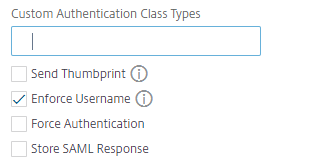
Support for artifact binding in SAML IdP
NetScaler appliance configured as SAML Identity Provider (IdP) supports artifact binding. The artifact binding enhances the security of SAML IdP and restricts the malicious users from inspecting the assertion.
Assertion Consumer Service URL support for SAML IdP
A NetScaler appliance configured as a SAML Identity Provider (IdP) now supports Assertion Consumer Service (ACS) indexing to process SAML Service Provider (SP) request. The SAML IdP imports ACS indexing configuration from SP metadata or allows for entering ACS indexes information manually.
FIPS offload support
A NetScaler MPX FIPS appliance used as a SAML service provider now supports encrypted assertions. Also, a NetScaler MPX FIPS appliance functioning as a SAML service provider or a SAML identity provider can now be configured to use the SHA2 algorithms on FIPS hardware.
Note
In FIPS mode, only the RSA-V1_5 algorithm is supported as key transport algorithm.
Configuring FIPS offload support using the command line interface:
-
Add SSL FIPSadd ssl fipsKey fips-key
-
Create a CSR and use it at CA server to generate a certificate. You can then copy the certificate in /nsconfig/ssl. Let's assume that the file is fips3cert.cer.
add ssl certKey fips-cert -cert fips3cert.cer -fipsKey fips-key -
Specify this certificate in the SAML action for SAML SP module
set samlAction <name> -samlSigningCertName fips-cert -
Use the certificate in samlIdpProfile for SAML IdP module
set samlidpprofile fipstest –samlIdpCertName fips-cert
Common SAML terminologies
The following are some common SAML terminologies:
-
Assertion: A SAML assertion is an XML document returned by the Identity Provider to the Service Provider after authentication of the user. The assertion has a specific structure, as defined by the SAML standard.
-
Types of Assertions: The following are the types of assertion.
-
Authentication - the user is authenticated by a particular means at a particular time
-
Authorization - the user was granted or denied access to a specified resource
-
Attributes - the user is associated with the supplied attributes
-
-
Assertion Consumer Service (ACS): The service provider's endpoint (URL) that is responsible for receiving and parsing a SAML assertion
-
Audience Restriction: A value within the SAML assertion that specifies who (and only who) the assertion is intended for. The "audience" will be the service provider and is typically a URL but can technically be formatted as any string of data.
-
Identity Provider (IdP): In terms of SAML, the Identity Provider is the entity that verifies the identity of the user, in response to a request by the Service Provider.The Identity Provider is responsible for maintaining and authenticating the user's identity
-
Service Provider (SP): In terms of SAML, the Service Provider (SP) offers a service to the user and allows the user to sign in by using SAML. When the user attempts to sign in, the SP sends a SAML authentication request to the Identity Provider (IdP)
-
SAML Binding: SAML requestors and responders communicate by exchanging messages. The mechanism to transport these messages is called a SAML binding.
-
HTTP Artifact: One of the binding options supported by the SAML protocol. HTTP Artifact is useful in scenarios where the SAML requester and responder are using an HTTP User-Agent and do not want to transmit the entire message, either for technical or security reasons. Instead, a SAML Artifact is sent, which is a unique ID for the full information. The IdP can then use the Artifact to retrieve the full information. The artifact issuer must maintain state while the artifact is pending. An Artifact Resolution Service (ARS) must be set up.HTTP Artifact sends the artifact as a query parameter.
-
HTTP POST: One of the binding options supported by the SAML protocol.HTTP POST sends the message content as a POST parameter, in the payload.
-
HTTP Redirect: One of the binding options supported by the SAML protocol.When HTTP Redirect is used, the Service Provider redirects the user to the Identity Provider where the login happens, and the Identity Provider redirects the user back to the Service Provider. HTTP Redirect requires intervention by the User-Agent (the browser).HTTP Redirect sends the message content in the URL. Because of this, it cannot be used for the SAML response, because the size of the response will typically exceed the URL length allowed by most browsers.Notes:
-
The NetScaler appliance supports POST and Redirect bindings during logout.
-
The
ns_aaa_trusted_redirect_hostsis a pattern set allow list used for SAML logout redirect validation before redirecting the user to the unknown hosts. During SAML logout, theRelayStateparameter might contain a redirect URL where the user must be sent after logout completes. For enhanced security, the admins can use the ns_aaa_trusted_redirect_hosts pattern set to validate the redirect URL.
-
-
Metadata: Metadata is the configuration data in SP and IdP to know how to communicate to each other which will be in XML standards
Other useful Citrix articles related to SAML authentication
You might find the following articles related to SAML authentication useful.