
Add RADIUS authentication server
-
Navigate to Settings > Authentication.
-
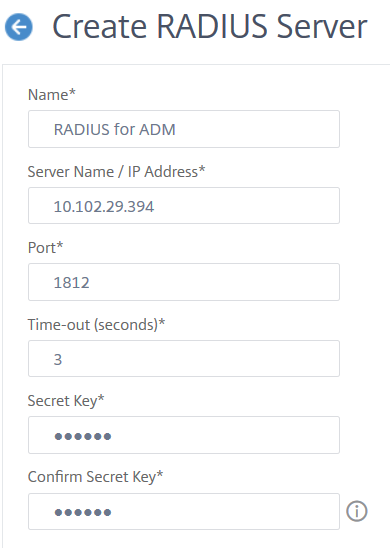
Select the RADIUS tab and then click Add.On the Create RADIUS Server page, specify the following parameters:
-
Name – Specify a RADIUS server name
-
Server Name / IP address – Specify the RADIUS server IP address
-
Port – Specify the port number on which the RADIUS server is hosted. The default port is 1812
-
Time-out (seconds) – Time in seconds for which the NetScaler® ADM system waits for a response from the RADIUS server
-
Secret Key – Specify the RADIUS secret key for authentication
-
Confirm Secret Key – Specify the key again for confirmation
 Under Details, specify the following parameters:
-
NAS ID – Specify the ID to send the identifier to RADIUS server
-
Group Vendor Identifier – Specify the vendor ID for using RADIUS group extraction
-
Group Prefix - A string that precedes group names within a RADIUS attribute for RADIUS group extraction
-
Group Attribute Type – Specify the attribute type for RADIUS group extraction
-
Group Separator – A string that delimits group names within a RADIUS attribute for RADIUS group extraction
-
IP Address Vendor Identifier – Vendor ID in RADIUS denotes the intranet IP. A value of 0 denotes that the attribute is not vendor encoded
-
Password Vendor Identifier – Vendor ID password in RADIUS response to extract the user password
-
IP Address Attribute Type – Remote IP address attribute for the RADIUS to respond
-
Password Attribute Type – The password attribute for the RADIUS to respond
-
Password encoding – Select pap, chap, mschapv1, or mschapv2 from the list. This denotes how passwords should be encoded in the RADIUS packets traveling from the system to the RADIUS server.
-
Default Authentication Group – Default group to choose when the authentication succeeds in addition to extracted groupsSelect Accounting if you want the appliance to log audit information with RADIUS server.
-
-
-
Click Create.The RADIUS server is now configured.
-
Enable the external authentication servers.For more information about enabling external authentication servers, see Enable external authentication servers and fallback options.