
Configure sites for geomaps
A NetScaler Console site is a logical grouping of the NetScaler instances in a specific geographical location. You can have several NetScaler instances within a site that can be monitored and managed by the NetScaler Console server. You can use the NetScaler Console server to manage data such as syslog, AppFlow, and SNMP, and others from the managed instances.
To create a Site:
-
Navigate to Infrastructure > Instances > Sites, and then click Add.
-
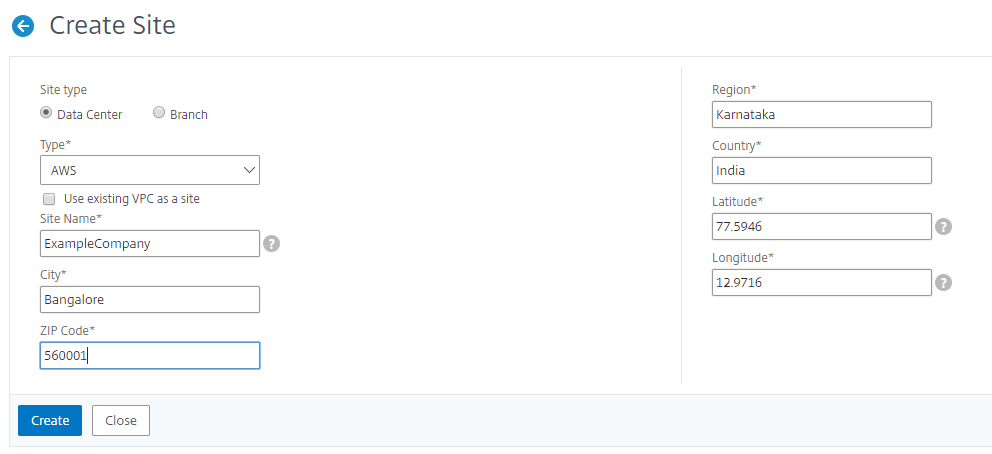
In the Create Site page, specify the following information:
-
Site Type: Select Data Center.NoteThe site can function as the primary data center or as a branch. Choose accordingly.
-
Type: Select AWS as the cloud provider from the list.NoteCheck the Use existing VPC as a site box accordingly.
-
Site Name: Type the name of the site.
-
City: Type the city.
-
Zip Code: Type the Zip Code.
-
Region: Type the Region.
-
Country: Type the Country
-
Latitude: Type the latitude of the location.
-
Longitude: Type the longitude of the location.
-
-
Click Create.
For more information on adding NetScaler instances to NetScaler Console, see Adding an Instance to NetScaler Console.