-
Install and configure the NetScaler Gateway appliance
-
Maintain and monitor NetScaler Gateway systems
-
Configure DTLS VPN virtual server using SSL VPN virtual server
-
Integrate NetScaler Gateway with Citrix products
-
Integrate NetScaler Gateway with Citrix Virtual Apps and Desktops™
-
Configure settings for your Citrix Endpoint Management Environment
-
Configure load balancing servers for Citrix Endpoint Management
-
Configure load balancing servers for Microsoft Exchange with Email Security Filtering
-
Configure Citrix Endpoint Management NetScaler Connector (XNC) ActiveSync Filtering
-
Allow Access from mobile devices with Citrix Mobile Productivity Apps
-
Configure domain and security token authentication for Citrix Endpoint Management
-
Configure client certificate or client certificate and domain authentication
-
-
NetScaler Gateway Enabled PCoIP Proxy Support for VMware Horizon View
-
Proxy Auto Configuration for Outbound Proxy support for NetScaler Gateway
This content has been machine translated dynamically.
Dieser Inhalt ist eine maschinelle Übersetzung, die dynamisch erstellt wurde. (Haftungsausschluss)
Cet article a été traduit automatiquement de manière dynamique. (Clause de non responsabilité)
Este artículo lo ha traducido una máquina de forma dinámica. (Aviso legal)
此内容已经过机器动态翻译。 放弃
このコンテンツは動的に機械翻訳されています。免責事項
이 콘텐츠는 동적으로 기계 번역되었습니다. 책임 부인
Este texto foi traduzido automaticamente. (Aviso legal)
Questo contenuto è stato tradotto dinamicamente con traduzione automatica.(Esclusione di responsabilità))
This article has been machine translated.
Dieser Artikel wurde maschinell übersetzt. (Haftungsausschluss)
Ce article a été traduit automatiquement. (Clause de non responsabilité)
Este artículo ha sido traducido automáticamente. (Aviso legal)
この記事は機械翻訳されています.免責事項
이 기사는 기계 번역되었습니다.책임 부인
Este artigo foi traduzido automaticamente.(Aviso legal)
这篇文章已经过机器翻译.放弃
Questo articolo è stato tradotto automaticamente.(Esclusione di responsabilità))
Translation failed!
Examples of the session profile settings created by the Quick Configuration wizard
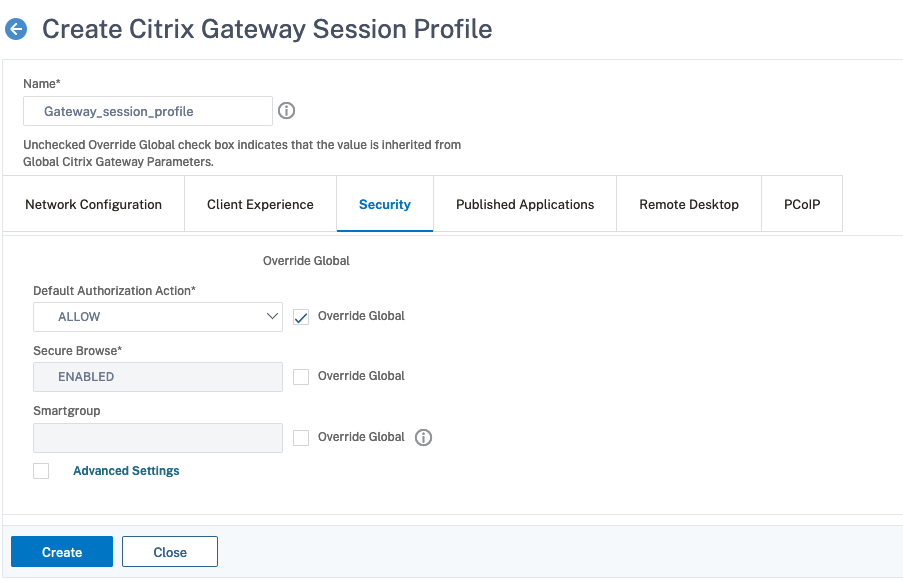
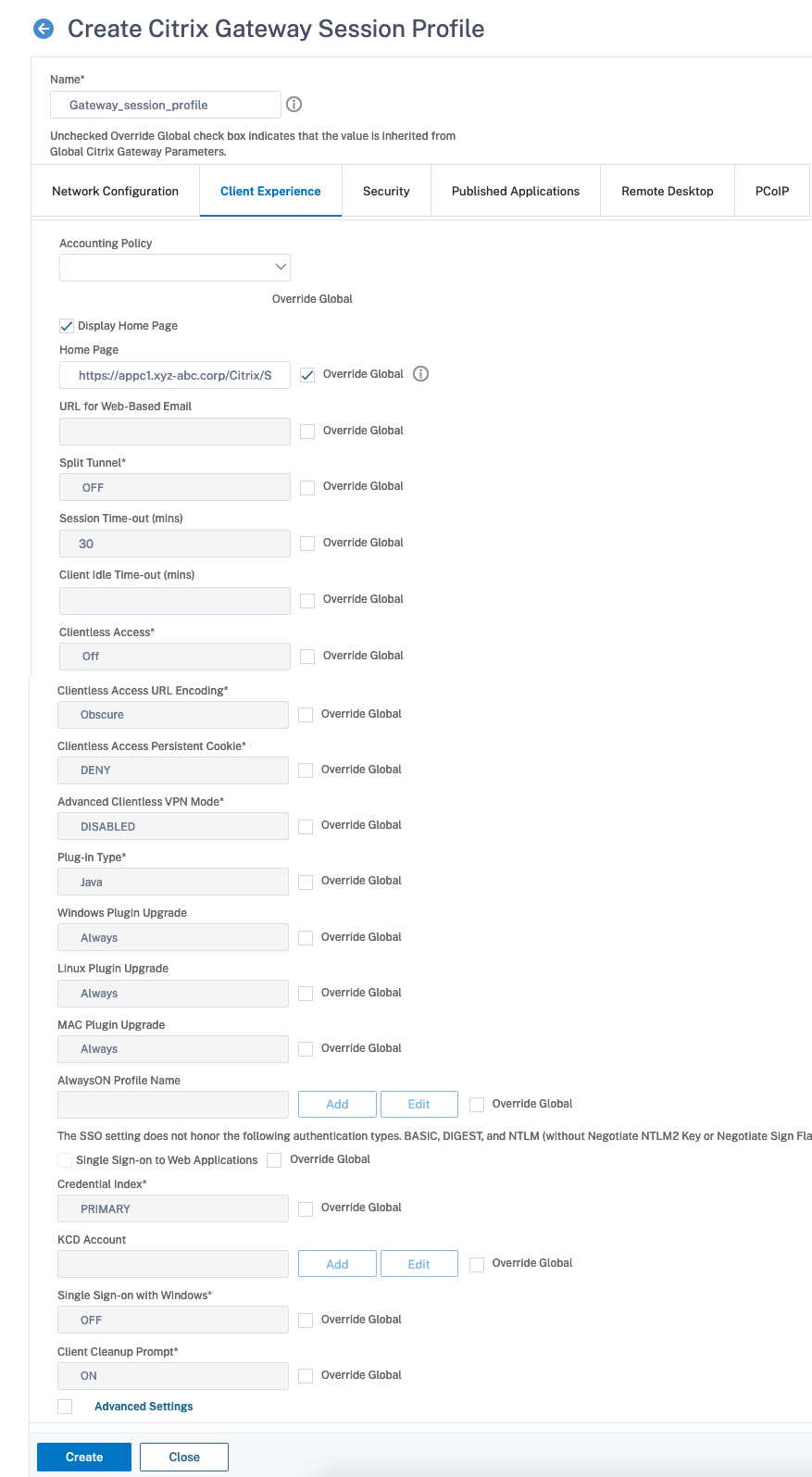
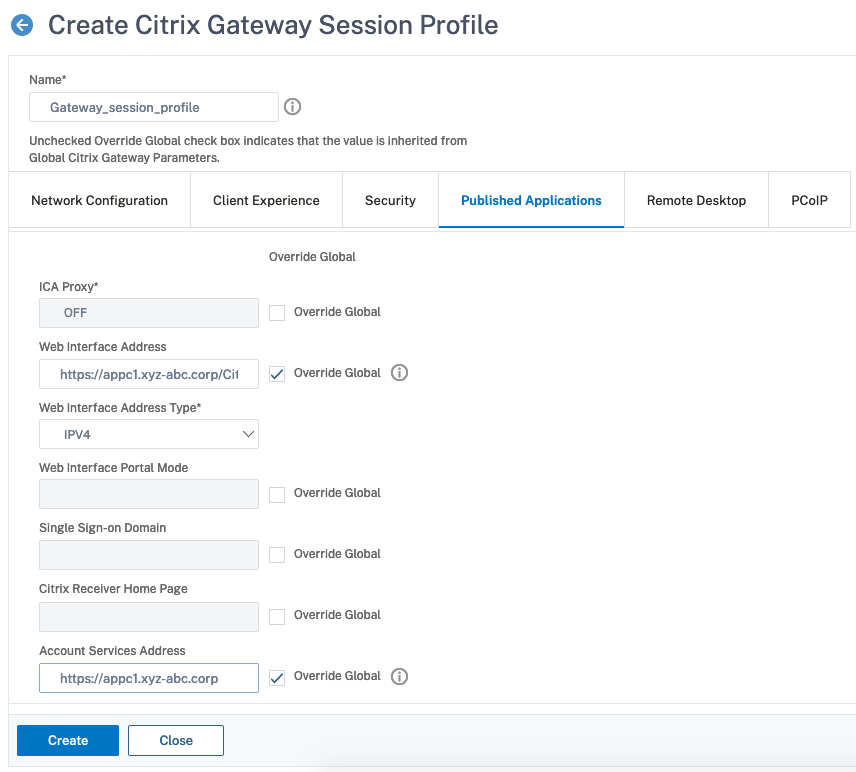
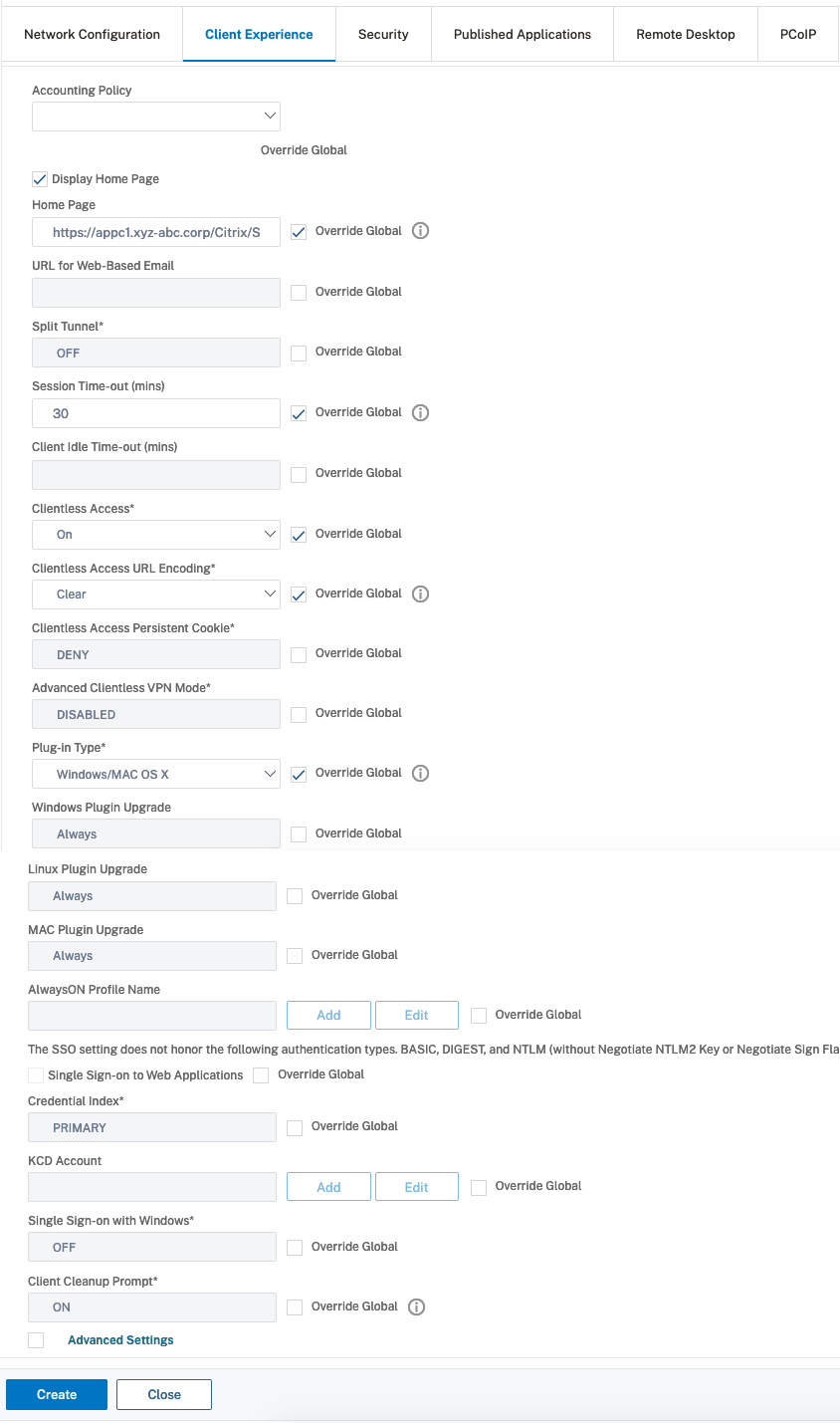
The following figures show examples of session profiles created by the Quick Configuration wizard. If you run the Quick Configuration wizard, NetScaler Gateway creates these profile settings automatically. You can also use these examples to configure the policies manually by using the configuration utility.
Note:
When you configure the StoreFront URL in NetScaler Gateway, such as
https://\<SFLite-FQDN\>/Citrix/StoreWeb, the text StoreWeb is case sensitive.
Each profile contains the same setting on the Security tab, as shown in the following figure:
To configure the session profile by using the CLI, see add vpn sessionAction.
The following table lists the CLI parameters and their corresponding GUI labels that do not match:
| CLI parameter | GUI label | Description |
|---|---|---|
| userAccounting
|
Accounting Policy
|
The name of the RADIUS policy to use for RADIUS user accounting info on the session.
Maximum length: 31 |
| winsIP | WINS Server IP | WINS server IP address to add to NetScaler Gateway for name resolution. |
| dnsVserverName
|
DNS Virtual Server
|
Name of the DNS virtual server for the user session.
Maximum length: 127 |
| sessTimeout
|
Session Time-out (mins)
|
Number of minutes after which the session times out.
Minimum value: 1 |
| clientSecurity
|
Client Security Check String
|
Specify the client security check for the user device to permit a NetScaler Gateway session.
Maximum length: 1499 |
| clientSecurityGroup
|
Quarantine Group
|
The client security group that is assigned on failure of the client security check.
Maximum length: 63 |
| clientSecurityMessage
|
Error Message
|
The client security message that is displayed on failure of the client security check.
Maximum length: 127 |
| clientSecurityLog
|
Enable Client Security Logging
|
Set the logging of client security checks.
Possible values: ON, OFF
|
| rfc1918
|
Allow access to private network IP addresses only
|
Allow only the following LAN addresses to bypass the VPN tunnel when the local LAN access feature is enabled: 10.*.*.*, 172.16.*.*, 192.168.*.*Possible values: ON, OFF
|
| transparentInterception
|
Plug-in Type
|
Allow access to network resources by using a single IP address and subnet mask or a range of IP addresses.
Possible values: ON, OFF
|
| httpProxy
|
HTTP
|
The IP address of the proxy server to be used for HTTP access for all subsequent connections to the internal network.
Maximum length: 255 |
| ftpProxy
|
FTP
|
The IP address of the proxy server to be used for FTP access for all subsequent connections to the internal network.
Maximum length: 31 |
| socksProxy
|
Socks
|
The IP address of the proxy server to be used for SOCKS access for all subsequent connections to the internal network.
Maximum length: 31 |
| gopherProxy
|
Gopher
|
The IP address of the proxy server to be used for GOPHER access for all subsequent connections to the internal network.
Maximum length: 31 |
| sslProxy
|
HTTPS
|
The IP address of the proxy server to be used for SSL access for all subsequent connections to the internal network.
Maximum length: 255 |
| proxyLocalBypass
|
Bypass proxy server for local addresses
|
Bypass proxy server for local addresses option in the Internet Explorer and Firefox proxy server settings.
Possible values: ENABLED, DISABLED
|
| clientConfiguration
|
Allow Users to Change Log Levels
|
Allow users to change client Debug logging level in the Configuration tab of the NetScaler Gateway plug-in for Windows.
Possible values: none, trace
|
| SSO
|
Single Sign-on to Web Applications
|
Set the Single sign-on (SSO) for the session.
Possible values: ON, OFF
|
| ssoCredential
|
Credential Index
|
Specify whether to use the primary or secondary authentication credentials for SSO to the server.
Possible values: PRIMARY, SECONDARY
|
| windowsAutoLogon
|
Single Sign-on with Windows
|
Enable or disable the Windows auto logon for the session.
Possible values: ON, OFF
|
| useMIP
|
Use Mapped IP
|
Enable or disable the use of a unique IP address alias, or a mapped IP address, as the client IP address for each client session.
Possible values: NS, OFF
|
| useIIP
|
Use Intranet IP
|
Define IP address pool options.
Possible values: NOSPILLOVER, SPILLOVER, OFF
|
| wihome
|
Web Interface Address
|
Web address of the web interface server.
Maximum length: 255 |
| wihomeAddressType
|
Web Interface Address Type
|
Type of the wihome address (IPV4/V6).
Possible values: IPV4, IPV6
|
| citrixReceiverHome
|
Citrix Receiver Home Page
|
The web address for the Citrix Receiver home page.
Maximum length: 255 |
| wiPortalMode
|
Web Interface Portal Mode
|
Layout on the access interface.
Possible values: NORMAL, COMPACT
|
| iipDnsSuffix
|
Intranet IP DNS Suffix
|
An intranet IP DNS suffix.
Maximum length: 63 |
| ntDomain
|
Single Sign-on Domain
|
Single sign-on domain to use for single sign-on to applications in the internal network.
Maximum length: 31 |
| clientlessVpnMode
|
Clientless Access
|
Enable clientless access for web, XenApp or XenDesktop, and FileShare resources without installing the NetScaler Gateway plug-in.
Possible values: ON, OFF, DISABLED
|
| emailHome
|
URL for Web-Based Email
|
Web address for the web-based email, such as Outlook Web Access.
Maximum length: 255 |
| clientlessModeUrlEncoding
|
Clientless Access URL Encoding
|
When clientless access is enabled, you can choose to encode the addresses of internal web applications or leave them as clear text.
Possible values: TRANSPARENT, OPAQUE, ENCRYPT
|
| clientlessPersistentCookie
|
Clientless Access Persistent Cookie
|
State of persistent cookies in clientless access mode.
Possible values: ALLOW, DENY, PROMPT
|
| allowedLoginGroups
|
Groups Allowed To Login
|
Specify groups that have permission to log on to NetScaler Gateway.
Maximum length: 511 |
| storefronturl
|
Account Services Address
|
Web address for StoreFront to be used in this session for enumeration of resources from XenApp or XenDesktop.
Maximum length: 255 |
| sfGatewayAuthType
|
-
|
The authentication type configured for NetScaler Gateway on StoreFront.
Possible values: domain, RSA, domainAndRSA, SMS, smartCard, sfAuth, sfAuthAndRSA
|
| iconWithReceiver
|
Show VPN Plug-in icon with Receiver
|
Option to decide whether to show the plug-in icon along with the receiver.
Possible values: ON, OFF
|
| autoProxyUrl
|
Use Automatic Configuration
|
URL to auto proxy config file.
Maximum length: 255 |
| fqdnSpoofedIP | Spoofed IP Address | Spoofed IP address range that can be used by the client for FQDN-based split tunneling. |
Examples of profile settings for the Citrix Secure Access™ client
The following examples show the session profile settings on the Client Experience and Published Applications tabs for the Citrix Secure Access client.
By using the GUI:
By using the CLI:
add vpn sessionAction sess_act -homePage "https://appc1.xyz-abc/Citrix/Store" -wihome "https://sf1.example.com/Citrix/StoreWeb" -storefronturl "https://appc1.xyz-abc.corp"
<!--NeedCopy-->
Examples of profile settings for the app or Secure Hub
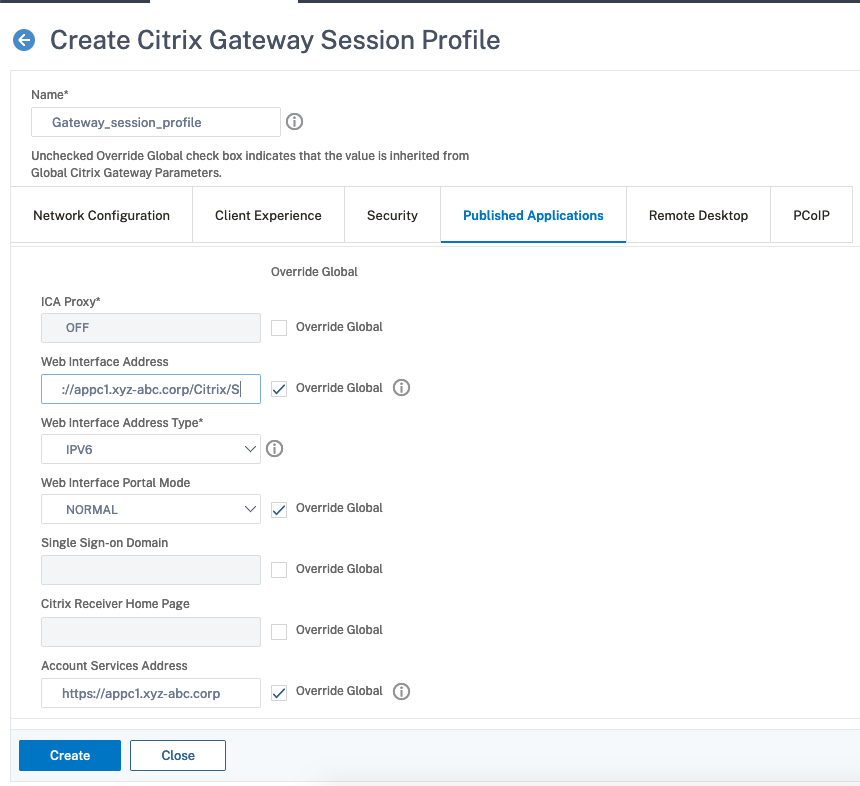
The following examples show the session profile settings on the Client Experience and Published Applications tabs for the Citrix Workspace app or Secure Hub.
By using the GUI:
By using the CLI:
add vpn sessionAction sess_act -sessTimeout 30 -homePage "https://appc1.xyz-abc/Citrix/Store" -wihome "https://sf1.example.com/Citrix/StoreWeb" -wiPortalMode NORMAL -clientlessVpnMode ON -clientlessModeUrlEncoding TRANSPARENT -storefronturl "https://appc1.xyz-abc.corp"
<!--NeedCopy-->
Examples of profile settings for the Citrix Workspace app for Web
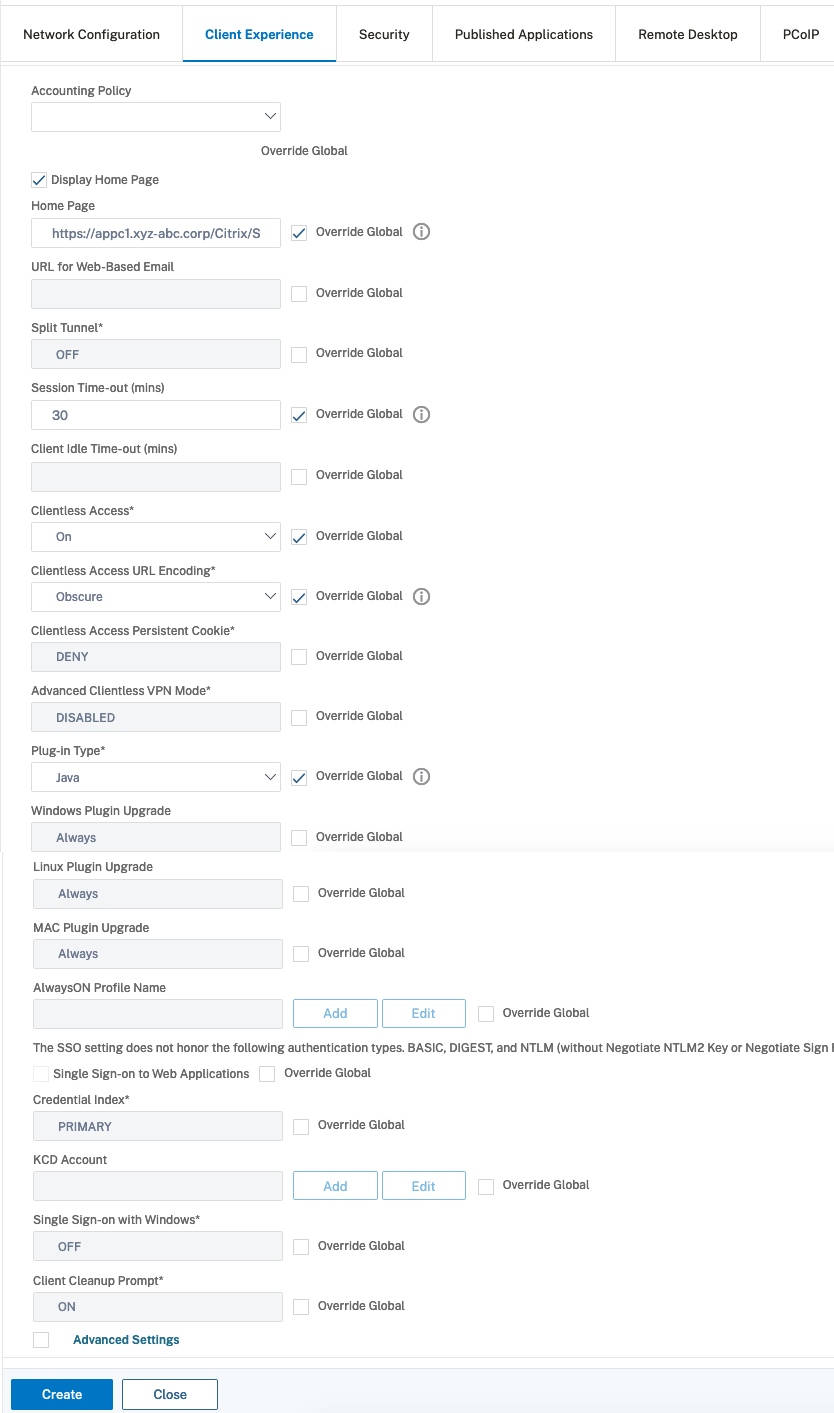
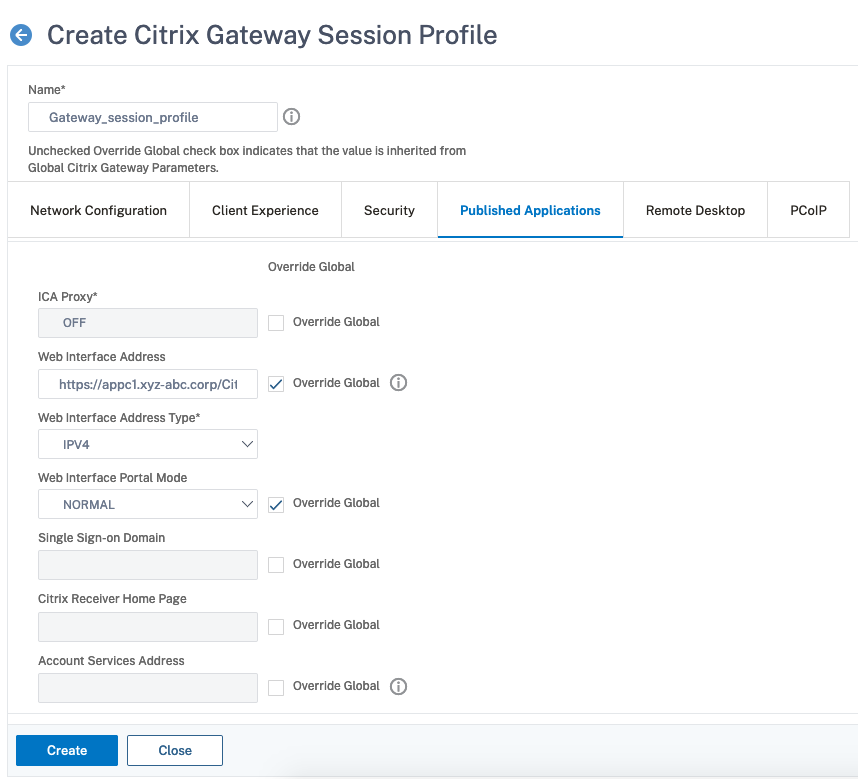
The following examples show the session profile settings on the Client Experience and Published Applications tabs for the Citrix Workspace app for Web.
By using the GUI:
By using the CLI:
add vpn sessionAction sess_act -sessTimeout 30 -transparentInterception OFF -homePage "https://appc1.xyz-abc/Citrix/Store" -wihome "https://sf1.example.com/Citrix/StoreWeb" -wiPortalMode NORMAL -clientlessVpnMode ON -clientlessModeUrlEncoding OPAQUE
<!--NeedCopy-->
Share
Share
This Preview product documentation is Cloud Software Group Confidential.
You agree to hold this documentation confidential pursuant to the terms of your Cloud Software Group Beta/Tech Preview Agreement.
The development, release and timing of any features or functionality described in the Preview documentation remains at our sole discretion and are subject to change without notice or consultation.
The documentation is for informational purposes only and is not a commitment, promise or legal obligation to deliver any material, code or functionality and should not be relied upon in making Cloud Software Group product purchase decisions.
If you do not agree, select I DO NOT AGREE to exit.