NetScaler on vSphere Kubernetes Service on VMware Cloud Foundation
NetScaler integrates with VMware vSphere Kubernetes Service (VKS) on VMware Cloud Foundation (VCF) through the NetScaler Ingress Controller and NetScaler Kubernetes Gateway Controller. Both controllers watch Kubernetes resources and automatically program NetScaler VPX to handle north-south application traffic, without any manual configuration on the NetScaler.
Platform teams get load balancing, TLS offload, WAF, rate limiting, and rewrite policies all managed through Kubernetes manifests. This paper covers the validated deployment architecture for the joint solution.
vSphere Kubernetes Service
vSphere Kubernetes Service (VKS) is the Kubernetes runtime built into VMware Cloud Foundation (VCF). It ships a CNCF-certified Kubernetes distribution that platform engineers can deploy and manage alongside the full set of VCF cloud services. Cloud admins get N-2 Kubernetes version support, automated upgrades, and a single lifecycle management plane across compute, storage, and networking.
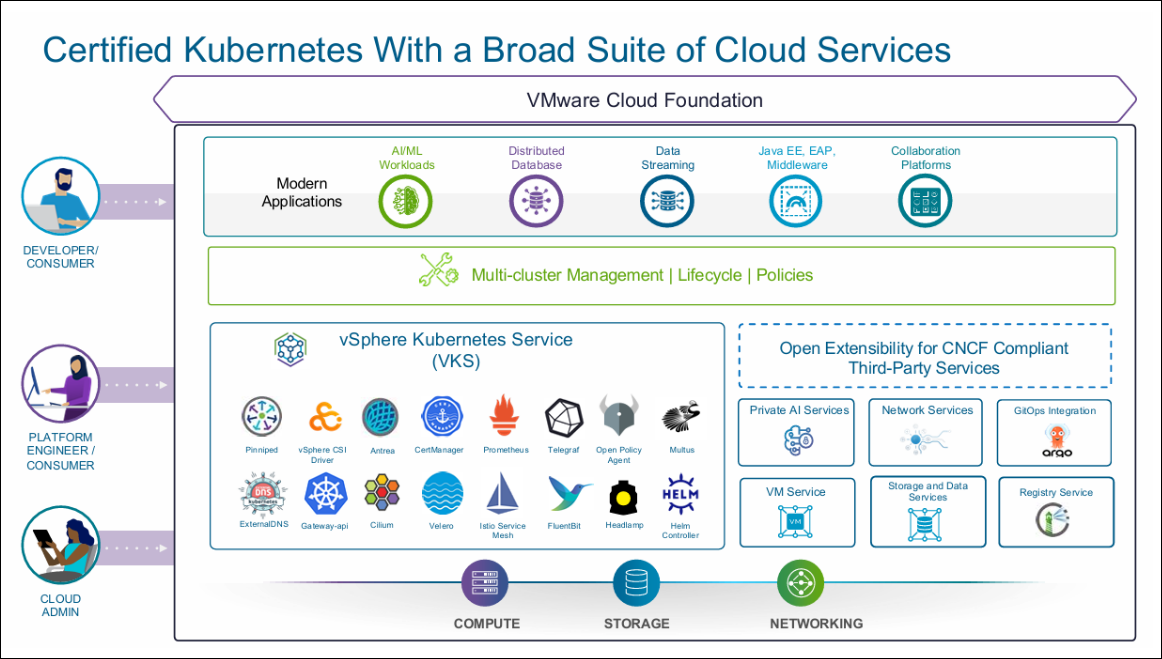
Lower TCO. VKS reduces infrastructure silos by reusing existing vSphere tools, skills, and operational processes. Unified lifecycle management keeps clusters current with minimal manual effort.
Operational Simplicity. Automated cluster provisioning, upgrades, and lifecycle management reduce day-2 overhead and let teams focus on applications rather than infrastructure upkeep.
Kubernetes at Scale. VKS handles the full lifecycle of running multiple clusters in production, from initial provisioning through ongoing upgrades, without the operational burden of self-managed Kubernetes.
NetScaler for Kubernetes
NetScaler acts as the ingress proxy for VKS workloads, handling north-south application traffic with SSL offload, load balancing, and L7 policy enforcement. NetScaler supports both the Kubernetes Ingress API and the Kubernetes Gateway API, so teams can pick the model that fits their environment.
| Controller | API | Use When |
|---|---|---|
| NetScaler Kubernetes Gateway Controller | Kubernetes Gateway API | New deployments; platform teams manage Gateway resources, application teams manage HTTPRoute rules |
| NetScaler Ingress Controller | Kubernetes Ingress API | Existing Ingress-based workloads; HTTP and TCP/SSL traffic |
NetScaler provides both controllers, and you need only one. If you are already running Kubernetes Ingress resources, NetScaler Ingress Controller works with your existing manifests without changes. If you are starting fresh, NetScaler Kubernetes Gateway Controller is the recommended choice. It implements the Kubernetes Gateway API, a standard defined by the Kubernetes project, giving platform and application teams a clean separation of responsibilities through standard Gateway and HTTPRoute resources.
Both controllers use NetScaler VPX as an external load balancer. Application pods are reached by using NodePort on VKS worker nodes. If the NetScaler and your Kubernetes cluster nodes share an L2 network, set nodeWatch=true on the NetScaler Ingress Controller and it programs static routes to each node’s pod CIDR for you. If they’re separated by L3, use NetScaler Node Controller, which builds a VXLAN overlay so pod IPs become reachable.
Everything is configured through Kubernetes manifests: load balancing, TLS offload, WAF, responder and rewrite policies, rate limiting, and observability.
Solution Architecture
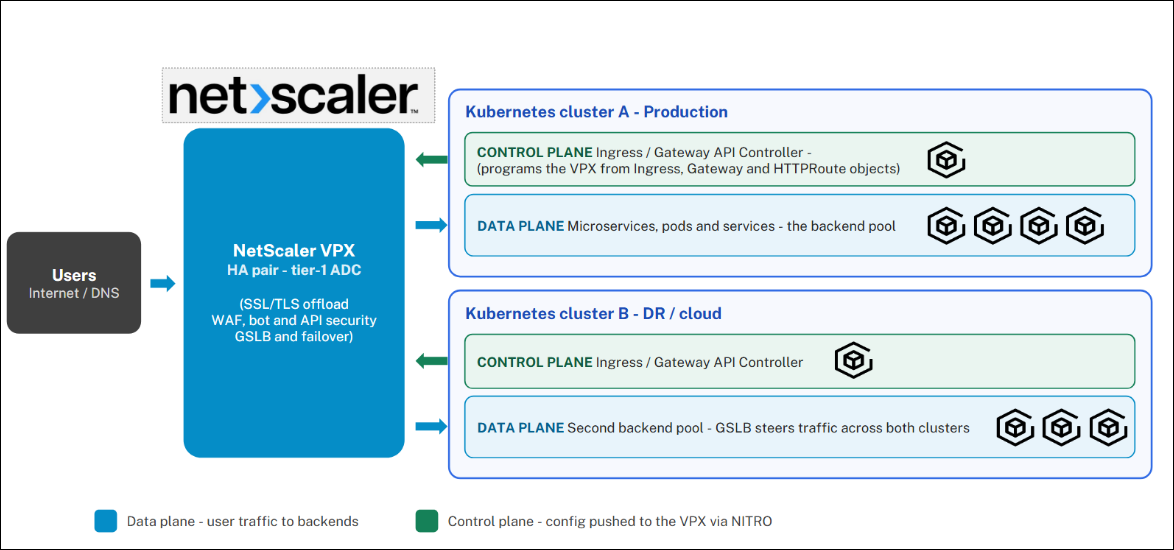
NetScaler VPX sits outside the VKS cluster as a virtual machine on VCF. It handles all north-south traffic: SSL termination, routing, and load balancing to application pods. This works with both validated VKS networking topologies.
The NetScaler Ingress Controller and NetScaler Kubernetes Gateway Controller run inside the VKS cluster and are not in the traffic path. They watch Kubernetes resources, compute the desired NetScaler configuration, and push changes through the NITRO REST API. When a developer applies a new Ingress or Gateway API resource, the NetScaler is updated within seconds with no manual intervention.
Validated VKS networking topologies:
- Supervisor with VCF Networking (VPC / NSX). Reference: Supervisor Architecture with VPC Networking
- Supervisor with Foundation Load Balancer (vSphere Distributed Switch). Reference: Supervisor with Foundation Load Balancer
Solution Validation
Software versions:
| Component | Version |
|---|---|
| VMware Cloud Foundation | 9.0 |
| vSphere Kubernetes Service (VKS) | 3.6 |
| vSphere Kubernetes release (VKr) | 1.35 |
| NetScaler VPX | 14.1 |
| NetScaler Kubernetes Gateway Controller | 2.1.0 |
| NetScaler Ingress Controller | 4.1.17 |
Validated configurations:
| Configuration | Result |
|---|---|
| Gateway Controller / Gateway API | VPC / NSX — NodePort validated |
| Gateway Controller / Gateway API | Foundation LB / vDS — NodePort validated |
| Ingress Controller / HTTP | VPC / NSX — NodePort validated |
| Ingress Controller / HTTP | Foundation LB / vDS — NodePort validated |
| Ingress Controller / TCP/SSL | VPC / NSX — NodePort validated |
| Ingress Controller / TCP/SSL | Foundation LB / vDS — NodePort validated |
The Ingress resource or Gateway/HTTPRoute definition is identical across both networking topologies.
Deploy NetScaler on a VKS
Prerequisites
VKS Cluster
- VKS workload cluster on VCF 9.0 or later (either networking topology)
-
kubectlaccess with cluster-admin permissions - HELM 3 on your workstation.
NetScaler VPX
- The VPX must be reachable from VKS worker nodes with a SNIP configured in the same subnet as the nodes
- At least one free VIP for the ingress front-end
- The NetScaler account must have write access. The controller creates and updates virtual server and service groups through the NITRO API, so a read-only account will not work.
Networking
- VKS nodes must reach the NetScaler NSIP on port 443. The NetScaler SNIP must reach VKS nodes on the NodePort range (30000–32767).
Note:
This guide walks through both deployment options. Part I covers the Gateway Controller (Gateway API), and Part II covers the Ingress Controller (Ingress API). For production, you only need one. If you want to evaluate both before deciding, you can run through both parts on the same cluster.
Part I: Gateway API — NetScaler Kubernetes Gateway Controller
The Gateway Controller implements the Kubernetes Gateway API. Platform teams manage Gateway resources and security policies. Application teams manage HTTPRoute rules. All configurations in Kubernetes manifest. No one logs into the NetScaler.
Step 1: Create a GatewayClass
apiVersion: gateway.networking.k8s.io/v1
kind: GatewayClass
metadata:
  name: gateway-class
spec:
  controllerName: citrix.com/nsgw-controller
<!--NeedCopy-->
kubectl apply -f gatewayclass.yaml
<!--NeedCopy-->
Step 2: Deploy a Sample Application
apiVersion: apps/v1
kind: Deployment
metadata:
  name: webapp
  labels:
    name: webapp
    app: webapp
spec:
  selector:
    matchLabels:
      app: webapp
  replicas: 2
  template:
    metadata:
      labels:
        name: webapp
        app: webapp
    spec:
      containers:
      - name: webapp
        image: quay.io/sample-apps/cnn-website:v1.0.0
        ports:
        - name: http-80
          containerPort: 80
        - name: https-443
          containerPort: 443
---
apiVersion: v1
kind: Service
metadata:
  name: webapp
  labels:
    app: webapp
spec:
  type: NodePort
  ports:
  - name: http-80
    port: 80
    targetPort: 80
  - name: https-443
    port: 443
    targetPort: 443
    appProtocol: ssl
  selector:
    name: webapp
<!--NeedCopy-->
kubectl apply -f webapp.yaml
<!--NeedCopy-->
Step 3: Create a TLS Secret
openssl genrsa -out webapp_key.pem 2048
openssl req -new -key webapp_key.pem -out webapp_csr.pem \
  -subj "/CN=webapp.demonetscaler.com"
openssl x509 -req -in webapp_csr.pem -sha256 -days 365 \
  -extensions v3_ca -signkey webapp_key.pem \
  -CAcreateserial -out webapp_cert.pem
kubectl create secret tls webapp-secret \
  --key webapp_key.pem --cert webapp_cert.pem
<!--NeedCopy-->
For production, replace the self-signed certificate with one from your CA. The remaining steps are identical.
Step 4: Create the NetScaler Credential Secret
kubectl create secret generic nslogin \
  --from-literal=username=<username> \
  --from-literal=password=<password>
<!--NeedCopy-->
For instructions on creating a dedicated system user account, see Create a system user account for NetScaler Ingress Controller.
Step 5: Deploy the Gateway Controller
values.yaml:
netscaler:
 adcCredentialSecret: "nslogin"
 nsIP: "<NSIP/SNIP/CLIP>" #NSIP for standalone VPX, SNIP with management access enabled for HA VPX or CLIP for VPX cluster mode

gatewayController:
 entityPrefix: gwy
 gatewayControllerName: "citrix.com/nsgw-controller"

license:
 accept: yes

nodeWatch: true
<!--NeedCopy-->
helm repo add netscaler https://netscaler.github.io/netscaler-helm-charts/
helm install gateway-controller \
  netscaler/netscaler-kubernetes-gateway-controller \
  -f values.yaml
kubectl get pods -l app=gateway-controller
<!--NeedCopy-->
Step 6: Deploy Gateway and HTTPRoute
Replace <VIP_ADDRESS> with the free Virtual IP on your NetScaler:
apiVersion: gateway.networking.k8s.io/v1
kind: Gateway
metadata:
  name: vpx-gateway
spec:
  gatewayClassName: gateway-class
  listeners:
  - name: https
    protocol: HTTPS
    port: 443
    tls:
      mode: Terminate
      certificateRefs:
      - kind: Secret
        name: webapp-secret
  addresses:
  - type: IPAddress
    value: <VIP_ADDRESS>
---
apiVersion: gateway.networking.k8s.io/v1
kind: HTTPRoute
metadata:
  name: http-route
spec:
  parentRefs:
  - name: vpx-gateway
  hostnames:
  - "webapp.demonetscaler.com"
  rules:
  - matches:
    - path:
        type: PathPrefix
        value: /
    backendRefs:
    - name: webapp
      namespace: default
      port: 443
<!--NeedCopy-->
kubectl apply -f gateway.yaml
kubectl get gateway vpx-gateway
kubectl get httproute http-route
<!--NeedCopy-->
Step 7: Test
curl -vik --resolve webapp.demonetscaler.com:443:<VIP_ADDRESS> \
  https://webapp.demonetscaler.com
<!--NeedCopy-->
Expected: HTTP/2 200 served over HTTPS from the NetScaler VIP.
Security Use Case: Block Unauthorized URL Paths
Apply a NetScaler Responder policy using a rewritepolicy CRD and attach it to the HTTPRoute using an ExtensionRef filter. No application changes are required.
apiVersion: citrix.com/v1
kind: rewritepolicy
metadata:
  name: blacklisturls
spec:
  responder-policies:
  - responder-policy:
      respondwith:
        http-payload-string: >
          "HTTP/1.1 403 Forbidden\r\n\r\n" +
          "Client: " + CLIENT.IP.SRC +
          " is not authorized to access URL:" +
          HTTP.REQ.URL.HTTP_URL_SAFE + "\n"
      respond-criteria: 'http.req.url.equals_any("blacklistUrls")'
      comment: 'Blacklist certain URLs'
    patset:
    - name: blacklistUrls
      values:
      - '/.hidden'
      - '/.password'
<!--NeedCopy-->
Update the HTTPRoute to reference the policy:
    filters:
    - type: ExtensionRef
      extensionRef:
        group: citrix.com
        kind: rewritepolicy
        name: blacklisturls
<!--NeedCopy-->
Test that blocked paths return 403 Forbidden:
curl -vik --resolve webapp.demonetscaler.com:443:<VIP_ADDRESS> \
  https://webapp.demonetscaler.com/.hidden
<!--NeedCopy-->
Part II: Ingress API — NetScaler Ingress Controller
This section covers two service types on the same cluster: an HTTP application (Apache) and a TCP/SSL application (tcp-echo), both exposed through NetScaler VPX using standard Kubernetes Ingress resources.
Step 1: Deploy Applications
Apache HTTP:
apiVersion: apps/v1
kind: Deployment
metadata:
  name: apache
  labels:
    name: apache
spec:
  selector:
    matchLabels:
      app: apache
  replicas: 2
  template:
    metadata:
      labels:
        app: apache
    spec:
      containers:
      - name: apache
        image: httpd:latest
        ports:
        - containerPort: 80
---
apiVersion: v1
kind: Service
metadata:
  name: apache
spec:
  ports:
  - port: 80
    targetPort: 80
  selector:
    app: apache
<!--NeedCopy-->
TCP-echo (TCP/SSL):
apiVersion: v1
kind: Service
metadata:
  name: tcp-echo
  labels:
    app: tcp-echo
spec:
  type: NodePort
  ports:
  - name: tcp
    port: 9000
  - name: tcp-other
    port: 9001
  selector:
    app: tcp-echo
---
apiVersion: apps/v1
kind: Deployment
metadata:
  name: tcp-echo
spec:
  replicas: 1
  selector:
    matchLabels:
      app: tcp-echo
      version: v1
  template:
    metadata:
      labels:
        app: tcp-echo
        version: v1
    spec:
      containers:
      - name: tcp-echo
        image: docker.io/istio/tcp-echo-server:1.3
        args: ["9000,9001,9002", "hello"]
        ports:
        - containerPort: 9000
        - containerPort: 9001
<!--NeedCopy-->
kubectl apply -f apache.yaml
kubectl apply -f tcp-echo.yaml
<!--NeedCopy-->
Step 2: Create TLS Secrets
# TCP-echo cert
openssl genrsa -out tcp_key.pem 2048
openssl req -new -key tcp_key.pem -out tcp_csr.pem -subj "/CN=*.tcp-echo.com"
openssl x509 -req -in tcp_csr.pem -sha256 -days 365 \
  -extensions v3_ca -signkey tcp_key.pem -CAcreateserial -out tcp_cert.pem
kubectl create secret tls tcp-ssl-cert --key tcp_key.pem --cert tcp_cert.pem

# Apache cert
openssl genrsa -out apache_key.pem 2048
openssl req -new -key apache_key.pem -out apache_csr.pem -subj "/CN=*.demonetscaler.com"
openssl x509 -req -in apache_csr.pem -sha256 -days 365 \
  -extensions v3_ca -signkey apache_key.pem -CAcreateserial -out apache_cert.pem
kubectl create secret tls apache-secret --key apache_key.pem --cert apache_cert.pem
<!--NeedCopy-->
Step 3: Create the NetScaler Credential Secret
Skip this step if you already created nslogin in Part I.
kubectl create secret generic nslogin \
 --from-literal=username=<username> \
 --from-literal=password=<password>
<!--NeedCopy-->
Step 4: Deploy the Ingress Controller
values.yaml:
adcCredentialSecret: nslogin
entityPrefix: unified
ingressClass: ['vpx']
serviceClass: ['vpx']
license:
 accept: yes
nsIP: <NSIP/SNIP/CLIP> #NSIP for standalone VPX, SNIP with management access enabled for HA VPX or CLIP for VPX cluster mode
nodeWatch: true
<!--NeedCopy-->
helm install nsic netscaler/netscaler-ingress-controller \
 -f values.yaml
kubectl get pods
<!--NeedCopy-->
Reference: netscaler-helm-charts / netscaler-ingress-controller
Step 5: Create Ingress Resources
TCP/SSL Ingress — replace <VIP_ADDRESS>:
apiVersion: networking.k8s.io/v1
kind: Ingress
metadata:
  name: vpx-tcp-ssl
  annotations:
    ingress.citrix.com/secure-service-type: ssl_tcp
    ingress.citrix.com/frontend-ip: "<VIP_ADDRESS>"
    ingress.citrix.com/secure-port: "6379"
spec:
  tls:
  - secretName: tcp-ssl-cert
  ingressClassName: vpx
  defaultBackend:
    service:
      name: tcp-echo
      port:
        number: 9000
<!--NeedCopy-->
HTTPS Ingress for Apache — replace <VIP_ADDRESS>:
apiVersion: networking.k8s.io/v1
kind: Ingress
metadata:
  name: vpx-ingress-apache
  annotations:
    ingress.citrix.com/frontend-ip: <VIP_ADDRESS>
    ingress.citrix.com/secure-port: '8443'
spec:
  tls:
  - secretName: "apache-secret"
  ingressClassName: vpx
  rules:
  - host: apache.demonetscaler.com
    http:
      paths:
      - backend:
          service:
            name: apache
            port:
              number: 80
        path: /
        pathType: Prefix
<!--NeedCopy-->
kubectl apply -f vpx-tcp-ssl-ingress.yaml
kubectl apply -f vpx-apache-ingress.yaml
kubectl get ingress
<!--NeedCopy-->
Step 6: Test
# TCP/SSL
openssl s_client -connect <VIP_ADDRESS>:6379 \
  -cert tcp_cert.pem -key tcp_key.pem

# Apache HTTPS
curl -vik --resolve apache.demonetscaler.com:8443:<VIP_ADDRESS> \
  https://apache.demonetscaler.com:8443
<!--NeedCopy-->
Expected: HTTP/2 200 from Apache, successful TLS handshake, and echo response from tcp-echo.
Troubleshooting
Start with controller logs. They explain most failures.
# Gateway Controller
kubectl logs -l app=gateway-controller --tail=100

# Ingress Controller
kubectl logs -l app=nsic --tail=100
<!--NeedCopy-->
| Symptom | Most likely cause | Check |
|---|---|---|
| Controller pod CrashLoopBackOff | Bad credentials or NSIP unreachable | Logs; test telnet <NSIP> 443 from inside the cluster |
| Nothing created on NetScaler | IngressClass or GatewayClass name mismatch |
kubectl get ingress -o yaml vs Helm ingressClass value |
| Content switching virtual server is DOWN or 503 | NetScaler cannot reach NodePort on VKS nodes |
curl http://<node-ip>:<nodeport>; check firewall on port range 30000–32767 |
| TLS handshake fails | Secret in wrong namespace | Secret must be in the same namespace as the Ingress or Gateway, not the controller namespace |
| 404 from VIP | Host header not matched | Verify --resolve is used in cURL; check host names in HTTPRoute or host in Ingress rules |
| 403 on specific paths | Responder policy working as expected | Test non-blocked path to confirm base routing is healthy |
NetScaler on VMware VKS gives teams a practical path to enterprise application delivery on Kubernetes without adding operational complexity. Platform teams keep using NetScaler policies they already know. Developers work in Kubernetes manifests. VKS handles the cluster lifecycle and NetScaler handles the traffic, and the controller keeps the two in sync automatically.
Conclusion
NetScaler on VMware VKS gives teams a practical path to enterprise application delivery on Kubernetes without adding operational complexity. Platform teams keep using NetScaler policies they already know. Developers work in Kubernetes manifests. VKS handles the cluster lifecycle and NetScaler handles the traffic, and the controller keeps the two in sync automatically.