
Content switching-based model routing
Content switching-based model routing enables the NetScaler AI gateway to send the incoming chat requests from AI agents and applications to different models. This feature uses the NetScaler Content switching feature to forward the requests to different AI Models. When a request reaches the content switching virtual server, the virtual server applies the associated content switching policy to that request. The priority of the policy defines the order in which the policies bound to the content switching virtual server are evaluated.
NetScaler content switching inspects the content in the HTTP headers, HTTP body, or any Layer 3 or Layer 4 data to decide which AI model to use.
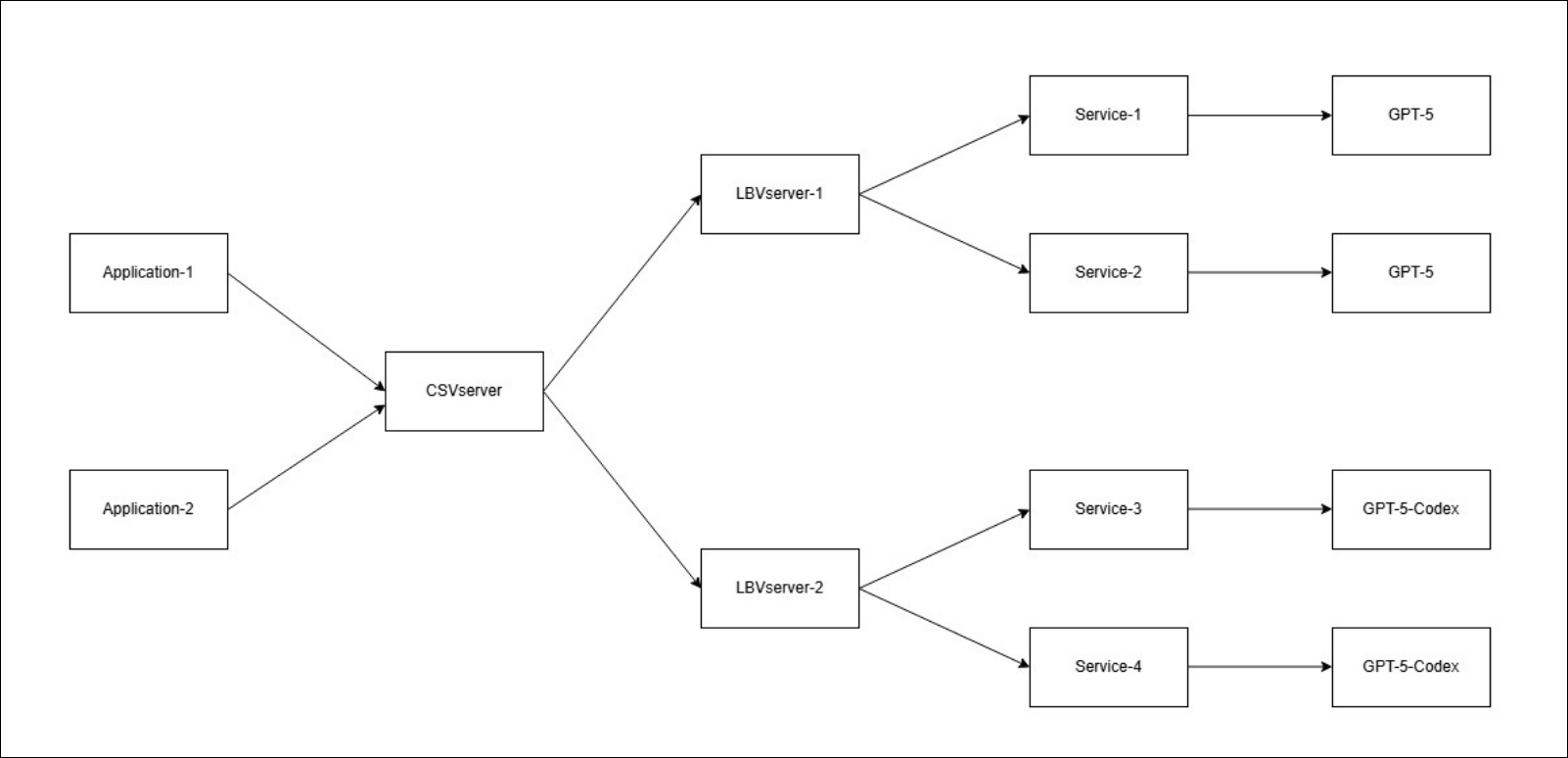
The following is a sample topology where 2 applications are using AI Gateway. One application is a coding application that uses GPT-5-Codex as a model while the other is a general chat bot that uses GPT-5 as the model.
To configure content switching-based model routing, perform the following steps:
Prerequisite:
-
Before configuring content switching, ensure that your target load balancing virtual servers are configured as described in Configure load balancing for AI models.
-
Add an AI gateway profile of type
frontendfor endpoint type Azure OpenAI.add aigwprofile <aigwprofileName> -endpointType <type> -profileType frontendExample:add aigwprofile frontend-profile -endpointType azureopenai -profileType frontend -
Create a content switching virtual server to perform model routing and set the frontend AI gateway profile to the virtual server.
add cs vserver <csVserverName> <protocol> <ip> <port> -aigwProfileName <aigwprofileName>Example:add cs vserver cs_vs SSL 192.0.2.10 443 -aigwProfileName frontend-profileNote:If the content switching virtual server protocol is SSL, bind an SSL certificate to the virtual server to enable SSL termination for production traffic.bind ssl vserver cs_vs -certkeyName <certKeyName> -
Create a content switching policy that inspects the model in the URL of the request sent to the Azure OpenAI deployment.
add cs policy <csPolicyName> -rule <rule>Example:add cs policy pol_gpt5-codex -rule "HTTP.REQ.URL.PATH.AFTER_STR(\"/openai/deployments/\").BEFORE_STR(\"/\") == \"gpt-5-codex\""
add cs policy pol_gpt5 -rule "HTTP.REQ.URL.PATH.AFTER_STR(\"/openai/deployments/\").BEFORE_STR(\"/\") == \"gpt-5\""
add cs policy pol_any -rule true -
Bind the content switching policies to the content switching virtual server and set the target as the destination load balancing virtual server. If no policy matches, the last rule applies and the request is forwarded to the GPT-5 load balancing virtual server.
bind cs vserver <csVserverName> -policyName <csPolicyName> -targetLBVserver <targetLBVserver> -priority <priority>Example:bind cs vserver cs_vs -policyName pol_gpt5 -targetLBVserver Lb-Gpt-5 -priority 10
bind cs vserver cs_vs -policyName pol_gpt5-codex -targetLBVserver Lb-Gpt-5-Codex -priority 12
bind cs vserver cs_vs -policyName pol_any -targetLBVserver Lb-Gpt-5 -priority 13 -
Save the configuration.
save ns config