
Configuring VLANs on Multiple Subnets
To configure a single VLAN across multiple subnets, you must add a VIP for the VLAN and configure the routing appropriately. The following figure shows a single VLAN configured across multiple subnets.
Figure 1. Multiple Subnets in a Single VLAN
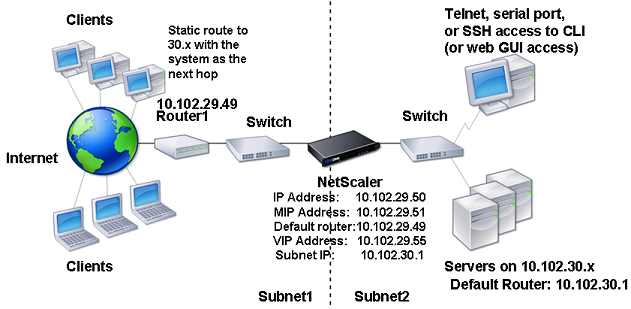
To configure a single VLAN across multiple subnets, perform the following tasks:
-
Disable Layer 2 mode. For the procedure to disable Layer 2 mode, see Packet forwarding modes.
-
Add a VIP address. For the procedure to add a VIP address, see Configuring and Managing Virtual IP Addresses (VIPs).
-
Configure RNAT rule. For the procedure to configure the RNAT ID, see Configuring RNAT.