
Configure RNAT with LLB
You can configure an LLB setup for reverse network address translation (RNAT) for outbound traffic. It ensures that the return network traffic for a specific flow is routed through the same path. First configure basic LLB, as described in Configuring a Basic LLB Setup, and then configure RNAT as described in Configure RNAT. Then enable "use subnet IP (USNIP)" mode.
In the following diagram, the NetScaler appliance uses LLB to route outbound traffic to different links. During the RNAT operation, the ADC appliance replaces the source IP addresses of the outbound traffic with the public NAT IP address (198.141.23.1) to route the traffic through ISP-1. Similarly, the ADC appliance replaces the source IP addresses with 198.140.23.1 to route the traffic through ISP-2.
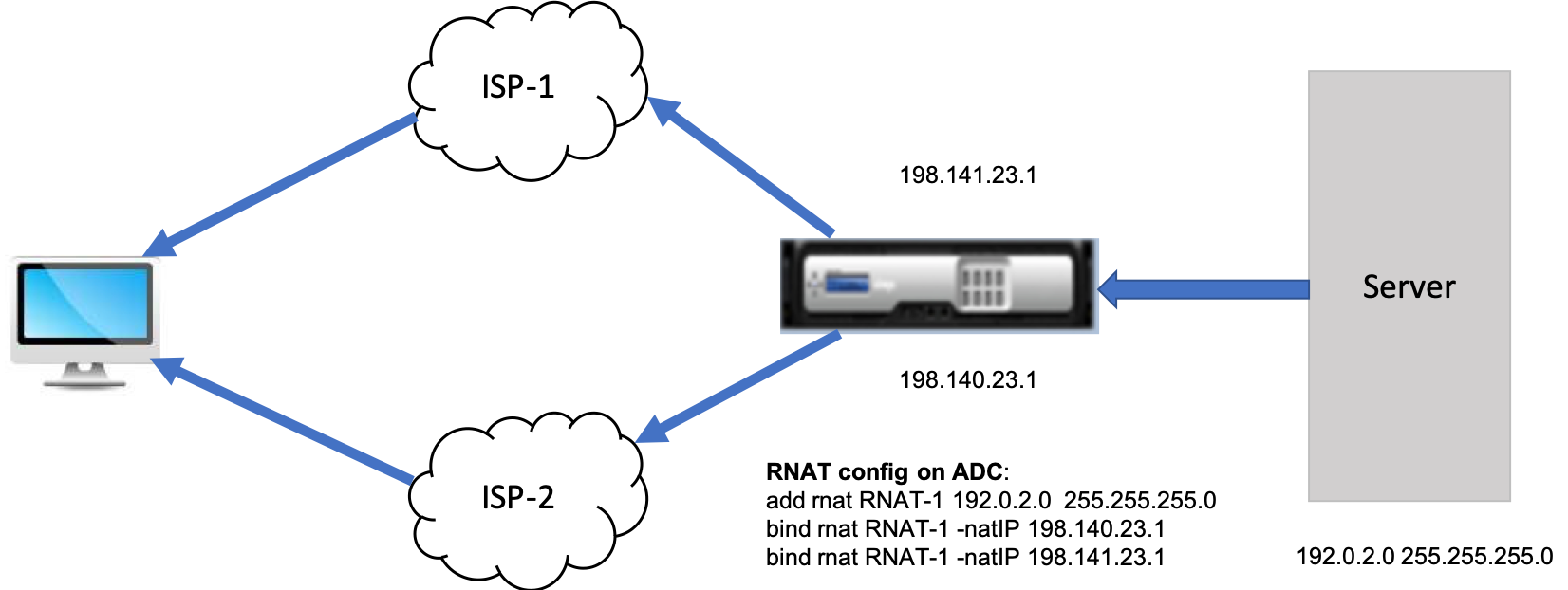
To add SNIPs for ISP routers by using the CLI
At the command prompt, type:
add NS IP <subnet of first ISP in the IP router> <subnet mask> -type SNIP

 add NS IP <subnet of second ISP in the IP router> <subnet mask> -type SNIP
Example:
add ns ip 198.140.23.1 255.255.255.0 -type snip

 add ns ip 198.141.23.1 255.255.255.0 -type snip
To configure RNAT by using the CLI
At the command prompt, type:
add rnat <name> (<network> | (<aclname> [-redirectPort <port>]))

 bind rnat <name> <natIP>@ …

 show rnat <name>
Example:
add rnat RNAT-1 192.0.2.0 255.255.255.0
 bind rnat RNAT-1 -natIP 198.140.23.1
 bind rnat RNAT-1 -natIP 198.141.23.1

 > show rnat RNAT-1
     1) RNAT Name: RNAT-1     Network: 192.0.2.0      Netmask: 255.255.255.0     Traffic Domain: 0
         UseProxyPort: ENABLED

         NatIP: 198.140.23.1
         NatIP: 198.141.23.1
To configure RNAT by using the GUI
-
Navigate to System > Network > NATs.
-
On the RNAT tab, click Configure RNAT.
-
Specify the network on which to perform RNAT.
Note
You can also configure RNAT by using Access Control Lists (ACLs). Refer Configuring RNAT for details.
To enable Use Subnet IP mode by using the CLI
At the command prompt, type:
enable ns mode USNIP

 show ns mode
Example:
enable ns mode USNIP

 show ns mode
         Mode                           Acronym              Status
         -------                        -------              ------
  1)     Fast Ramp                      FR                   ON
  2)     ….
  8)     Use Subnet IP                  USNIP                ON
  9)     …
To enable Use Subnet IP mode by using the GUI
-
Navigate to System > Settings and, under Modes and Features, click Configure Modes.
-
In the Configure Modes dialog box, select Use Subnet IP, and then click OK.