SameSite cookie attribute
For secure web communication, Google has mandated the usage of the
SameSite cookie attribute. By complying with Google Chrome’s new SameSite policy, the NetScaler appliance can manage third-party cookies with the SameSite attribute set in the set-cookie header. The cookie setting mitigates attacks and provides a secured web communication.
Until February 2020, the
SameSite attribute was not explicitly set in the cookie. The browser took the default value as “None.” However, with certain browser upgrade, such as Google Chrome 80, there is a change in the default cross-domain behavior in cookies.
Setting cookie attribute value
The
SameSite attribute is set to one of the following values and for the Google Chrome browser, the default value is set as “Lax.”
None. Indicates the browser to use the cookie for requests in the cross-site context only on secure connections.
Lax. Indicates the browser to use the cookie for requests in the same-site context. In the cross-site context, only safe HTTP methods like GET request can use the cookie.
Strict. Use the cookie only when the user is requesting for the domain explicitly.
Note:
If set-cookies (including firewall session cookies) have the
SameSite attribute and if the addcookiesamesite attribute flag is enabled in the Web Application Firewall profile, then the SameSite attribute is overwritten according to the value configured in the profile.
Configure the SameSite attribute in the Web App Firewall profile by using the CLI
To configure the
SameSite attribute, you must complete the following steps:
-
Enable the
SameSitecookie attribute. -
Set the cookie attribute for the appfw session cookies.
Configure the SameSite cookie attribute in the Web App Firewall profile by using the GUI
-
Navigate to Security > NetScaler Web App Firewall > Profiles.
-
In the details pane, select a profile and click Edit.
-
In the NetScaler Web App Firewall Profile page, click Profile Settings under Advanced Settings.
-
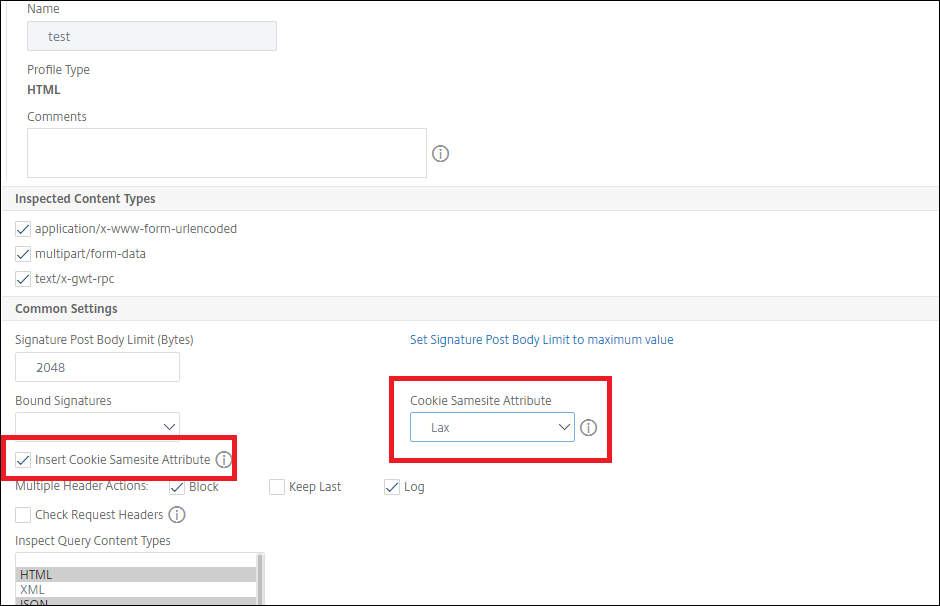
In Profile Settings section set the following parameters:a. Insert the cookie
Samesiteattribute. Select the check box to enable the cookieSamesiteattribute. b. Cookie Samesite Attribute. Select an option from the drop-down list to set theSamesitecookie value. -
Click OK and Done.