
Backplane on LA channel
In this deployment, LA channels are used for the cluster backplane.
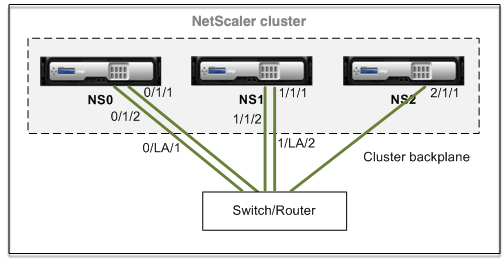
-
NS0 - nodeId: 0, NSIP: 10.102.29.60
-
NS1 - nodeId: 1, NSIP: 10.102.29.70
-
NS2 - nodeId: 2, NSIP: 10.102.29.80
To deploy a cluster with the backplane interfaces as LA channels
-
Create a cluster of nodes NS0, NS1, and NS2.
-
Log on to the first node that you want to add to the cluster and do the following:
> create cluster instance 1
 > add cluster node 0 10.102.29.60 -state ACTIVE
 > enable cluster instance 1
 > add ns ip 10.102.29.61 255.255.255.255 -type CLIP
 > save ns config
> reboot -warm -
Log on to the cluster IP address and do the following:
> add cluster node 1 10.102.29.70 -state ACTIVE
> add cluster node 2 10.102.29.80 -state ACTIVE -
Log on to the nodes 10.102.29.70 and 10.102.29.80 to join the nodes to the cluster.
> join cluster -clip 10.102.29.61 -password nsroot
 > save ns config
 > reboot -warm
As seen in the preceding commands, the interfaces 0/1/1, 1/1/1, and 2/1/1 are configured as the backplane interfaces of the three cluster nodes. -
-
Log on to the cluster IP address and do the following:
-
Create the LA channels for nodes NS0 and NS1.
> add channel 0/LA/1 -ifnum 0/1/1 0/1/2
> add channel 1/LA/2 -ifnum 1/1/1 1/1/2 -
Configure the backplane for the cluster nodes.
> set cluster node 0 -backplane 0/LA/1
 > set cluster node 1 -backplane 1/LA/2
 > set cluster node 2 -backplane 2/1/1
-