
Configuring high availability nodes in different subnets
The following figure shows an HA deployment with the two systems in different subnets:
Figure 1. High Availability over a Routed Network
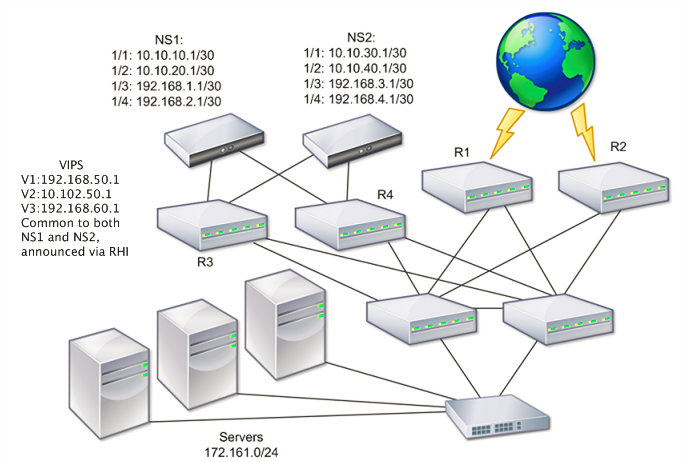
In the figure, the systems NS1 and NS2 are connected to two separate routers, R3 and R4, on two different subnets. The NetScaler appliances exchange heartbeat packets through the routers. This configuration can be expanded to accommodate deployments involving any number of interfaces.
Note:
-
If you use static routing on your network, add static routes between all the systems to ensure that heartbeat packets are sent and received successfully.
-
If you use dynamic routing on your systems, static routes are unnecessary.
If the nodes in an HA pair are on two separate networks, the primary and secondary node must have independent network configurations. That is, nodes on different networks cannot share entities such as SNIP address, VLANs, and routes.
The configuration, where the nodes in an HA pair have different configurable parameters, is known as Independent Network Configuration (INC) or Symmetric Network Configuration (SNC).
The following table summarizes the configurable entities and options for an INC, and shows how they must be set on each node.
| NetScaler entities | Options |
|---|---|
| IPs (NSIP/SNIPs) | Node-specific. Active only on that node. |
| VIPs | Floating. |
| VLANs | Node-specific. Active only on that node. |
| Routes | Node-specific. Active only on that node. Link load balancing routes are floating. |
| ACLs | Floating (Common). Active on both nodes. |
| Dynamic routing | Node-specific. Active only on that node. The secondary node must run the routing protocols and peer with upstream routers. |
| L2 mode | Floating (Common). Active on both nodes. |
| L3 mode | Floating (Common). Active on both nodes. |
| Reverse NAT (RNAT) | RNAT configuration with the NAT IP address set to a virtual server IP address (VIP) because the VIP address is floating (common). |
| Policy Based Routing (PBR) | In an HA -INC mode, it is node-specific. In an HA non-INC mode, it is propagated to the secondary node. |
As in configuring HA nodes in the same subnet, to configure HA nodes in different subnets, you log on to each of the two NetScaler appliances and add a remote node representing the other appliance.
Adding a Remote Node
When two nodes of an HA pair reside on different subnets, each node must have a different network configuration. Therefore, to configure two independent systems to function as an HA pair, you must specify INC mode during the configuration process.
When you add an HA node, you must disable the HA monitor for each interface that is not connected or not being used for traffic.
For more information, see To disable an HA monitor by using the CLI.
To add a node by using the CLI
At the command prompt, type:
-
add ha node <id> <IPAddress> -inc ENABLED -
show ha node
Example
> add ha node 3 10.102.29.170 -inc ENABLED
  Done
 > add ha node 3 1000:0000:0000:0000:0005:0600:700a:888b
   Done
To disable an HA monitor by using the CLI
At the command prompt, type:
-
set interface <ifNum> [-haMonitor ( **ON** | **OFF** )] -
show interface <ifNum>
Example
> set interface 1/3 -haMonitor OFF
  Done
To add a remote node by using the GUI
-
Navigate to System > High Availability and, on the Nodes tab, add a new remote node.
-
Make sure to select the Turn off HA monitor on interfaces/channels that are down and Turn on INC (Independent Network Configuration) mode on self mode options.
Removing a Node
If you remove a node, the nodes are no longer in high availability configuration.
To remove a node by using the CLI
At the command prompt, type:
rm ha node <id>
Example
> rm ha node 2
   Done
To remove a node by using the GUI
Navigate to System > High Availability and on the Nodes tab, delete the node.
Note:
You can use the Network Visualizer to view the NetScaler appliances that are configured as a high availability (HA) pair and do high availability configuration tasks.