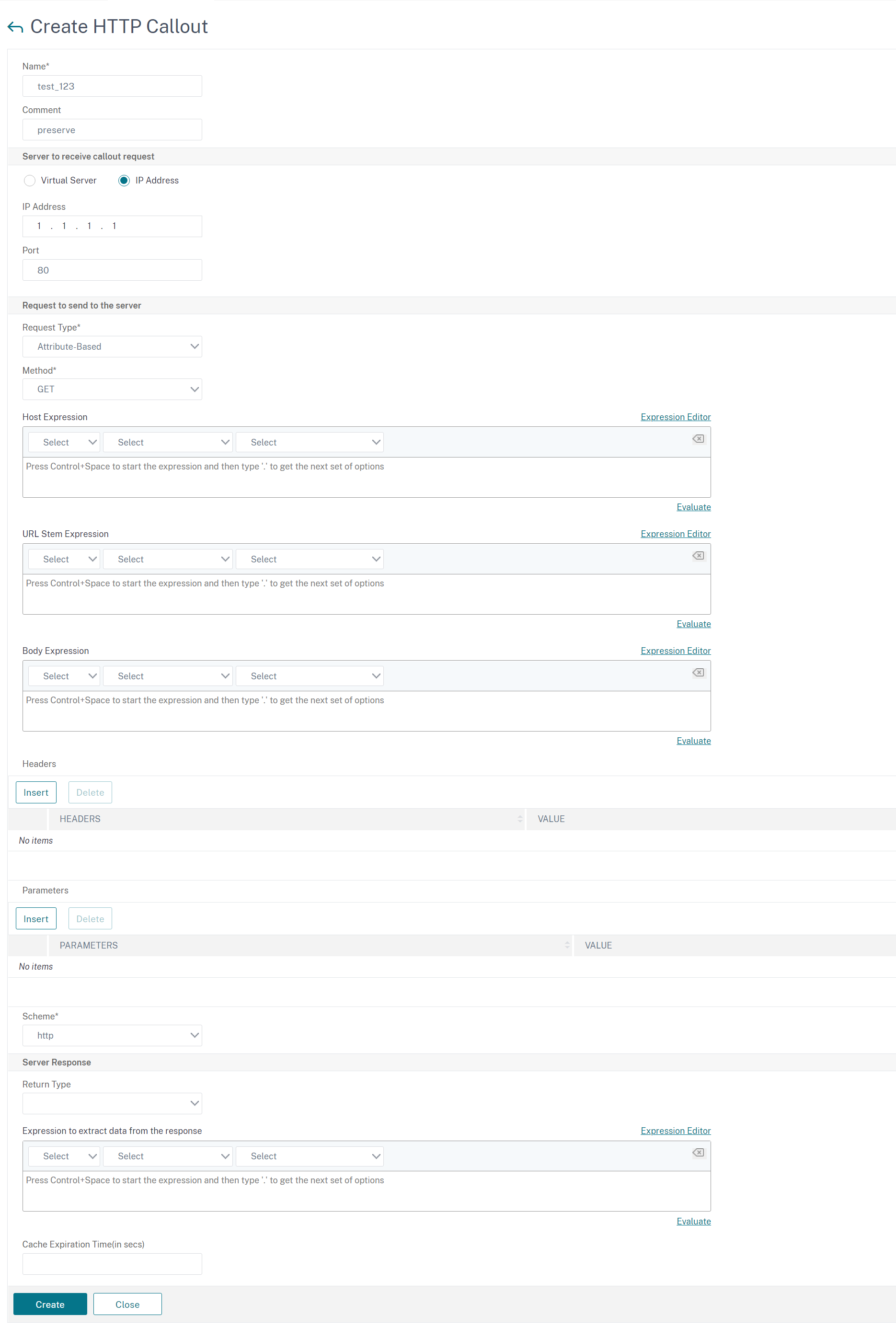
Configure an HTTP callout
When configuring an HTTP callout, you specify the type of request (HTTP or HTTPS), destination, and format of the request. The expected format of the response, and, finally, the portion of the response that you want to analyze.
For the destination, you either specify the IP address and port of the HTTP callout agent. Or engage a load balancing, content switching, or cache redirection virtual server, to manage the HTTP callout requests.
In the first case, the HTTP callout requests are sent directly to the HTTP callout agent. In the second case, the HTTP callout requests are sent to the virtual IP address (VIP) of the specified virtual server. The virtual server processes the request in the same way as it processes a client request. For example, if you expect many callouts to be generated, you can configure instances of the HTTP callout agent on multiple servers, bind these instances (as services) to a load balancing virtual server, and then specify the load balancing virtual server in the HTTP callout configuration. The load balancing virtual server then balances the load on those configured instances as determined by the load balancing algorithm.
For the format of the HTTP callout request, you can specify the individual attributes of the HTTP callout request (an attribute-based HTTP callout), or you can specify the entire HTTP callout request as a advanced policy expression (an expression-based HTTP callout).
For the format of the HTTP callout request, you can specify the individual attributes of the HTTP callout request (an attribute-based HTTP callout), or you can specify the entire HTTP callout request as a Advanced policy expression (an expression-based HTTP callout).
For more information, see policy-httpCallout.
| Parameter | Description |
|---|---|
| Name | Name of the callout, 127 character maximum |
| IP address and port (ip-address / port) or Virtual server name (vserver) | IPv4 or IPv6 address of the server to which the callout is sent, or a wildcard, and the port on the server to which the callout is sent, or a wildcard. Or, the name of a load balancing, content switching, or cache redirection virtual server with a service type of HTTP. |
| HTTP Method (httpMethod) | HTTP Method (httpMethod). Method used in the HTTP request that this callout sends. Valid values: GET or POST. Default: GET. |
| Host expression (hostExpr) | Host expression (hostExpr). Advanced text expression to configure the Host header. Maximum length: 255. The expression can be a literal value or it can be an advanced expression that derives the value. Examples: "10.101.10.11" , "http.req.header("Host")" |
| URL stem expression (urlStemExpr) | URL stem expression (urlStemExpr) An advanced string expression for generating the URL stem. Maximum length: 8191. The expression can be a literal string or an expression that derives the value. Examples: ""/mysite/index.html"" "http.req.url" |
| HTTP Headers (headers) | HTTP Headers (headers). Advanced text expression to insert HTTP headers and their values in the HTTP callout request. Specify a value for every header. You specify the header name as a string and the header value as an advanced expression. Specify the headers separated by space. Such as -headers cip(client.ip.src) hdr(http.req.header("HDR")). The number of headers can be 8 |
| Expression-based request to send to the server (fullReqExpr) | Exact HTTP request that the NetScaler is to send as an advanced expression to 8191 characters. If you specify this parameter, you must omit the httpMethod, hostExpr, urlStemExpr, headers, and parameters arguments. The request expression is constrained by the feature where the callout is used. For example, an HTTP.RES expression cannot be used in a request-time policy bank or in a TCP content switching policy bank. |
| Expression-based request to send to the server (bodyExpr) | An advanced string expression for generating the body of the request. The expression can contain a literal string or an expression that derives the value (for example, client.ip.src). Mutually exclusive with -fullReqExpr. |
| Parameters | Advanced expression to insert query parameters in the HTTP request that the callout sends. Specify a value for every parameter that you configure. If the callout request uses the GET method, these parameters are inserted in the URL. If the callout request uses the POST method, these parameters are inserted in the POST body. You configure the query parameter name as a string and the value as an advanced expression. The parameter values are URL encoded. Specify the parameters separated by space like: -parameters name1("name1") name2(http.req.header("hdr")). The maximum 8 parameters can be configured. |
| Return type (returnType) | Type of data that the target application returns in the response to the callout. Valid values: TEXT: Treat the returned value as a text string. NUM: Treat the returned value as a number. BOOL: Treat the returned value as a Boolean value. Note: You cannot change the return type after it is set. |
| Expression to extract data from the response (resultExpr) | Advanced expression that extracts HTTP.RES objects from the response to the HTTP callout. The maximum length is 8191. The operations in this expression must match the return type. For example, if you configure a return type of text, the result expression must be a text-based expression. If the return type is num, the result expression (resultExpr) must return a numeric value similar to the following: "http.res.body(10000).length" Note: Sometimes, if you set a return type of TEXT and the result sent from the server exceeds 16 KB, the result expression can return NULL. For example, when the result is a concatenated string that exceeds 16 KB. |
| Scheme | The type of scheme for the callout server. Example: HTTP, https |
| cacheForSecs | Duration, in seconds, for which the callout response is cached. The cached responses are stored in an integrated caching content group named "calloutContentGroup". If no duration is configured, the callout responses are not cached unless a normal caching configuration is used to cache them. This parameter takes precedence over any normal caching configuration that would otherwise apply to these responses. |
Note: The appliance does not check for the validity of the request. You must make sure that the request is a valid request and doesn't contain any confidential information. An incorrect or incomplete HTTP callout configuration results in a runtime UNDEF condition that is not associated with an action. The UNDEF condition merely updates the Undefined Hits counter, which enables you to troubleshoot an incorrectly configured HTTP callout. However, the appliance parses the HTTP callout request to enable you to configure certain NetScaler features for the callout. This can lead to an HTTP callout invoking itself. For information about callout recursion and how you can avoid it, see Avoiding HTTP Callout Recursion.
Finally, regardless of whether you use HTTP request attributes or an expression to define the format of the HTTP callout request, you must specify the format of the response from the HTTP callout agent and the portion of the response that you want to evaluate. The response type can be a Boolean value, a number, or text. Based on this return type only, you can use the further expression methods on the callout response. If the return type is a number, then you can use the number based expression on the callout response. The portion of the response that you want to evaluate is specified by an expression. For example, if you specify that the response contains text, you can use
HTTP.RES.BODY(<unit>) to specify that the appliance must evaluate only the first \<unit> bytes of the response from the callout agent.
At the command line, you first create an HTTP callout by using the add command. When you add a callout, all parameters are set to a default value of NONE, except the HTTP method, which is set to a default value of GET. You then configure the callout's parameters by using the set command. The set command is used to configure both types of callouts (attribute-based and expression-based). The difference lies in the parameters that are used for configuring the two types of callouts. So, the command-line instructions that follow include a set command for configuring an attribute-based callout and a set command for configuring an expression-based callout. In the configuration utility, all of these configuration tasks are performed in a single dialog box.
Note: Before you put an HTTP callout into a policy, you can modify all configured parameters except the return type. Once an HTTP callout is in a policy, you cannot completely modify an expression that is configured in the callout. For example, you cannot change HTTP.REQ.HEADER("myval") to CLIENT.IP.SRC. You can modify the operators and arguments that are passed to the expression. For example, you can change
HTTP.REQ.HEADER("myVal1") to HTTP.REQ.HEADER("myVal2"), or HTTP.REQ.HEADER("myVal") to HTTP.REQ.HEADER("myVal").AFTER_STR(<string>). If the set command fails, create an HTTP callout.
HTTP callout configuration involves configuring Advanced policy expressions. For more information about configuring Advanced policy expressions, see Configuring Advanced policy Expressions: Getting Started.
To configure an HTTP callout by using the command line interface
At the command prompt, do the following:
Create an HTTP callout.
add policy httpCallout <name> [-IPAddress <ip_addr|ipv6_addr>] [-port<port>] [-vServer <string>] [-returnType <returnType>] [-httpMethod (GET | POST )] [-hostExpr <expression>] [-urlStemExpr <expression>] [-headers <name(value)> ...] [-parameters <name(value)> ...] [-bodyExpr <expression>] [-fullReqExpr <expression>] [-scheme ( http | https )] [-resultExpr <expression>] [-cacheForSecs <secs>] [-comment <string>]
Example:
add policy httpCallout mycallout -vserver lbv1 -returnType num -httpMethod GET -hostExpr 'http.req.header("Host")'-urlStemExpr "http.req.url" -parameters Name("My Name") -headers Name("MyHeader")-resultExpr "http.res.body(10000).length"
Modify the HTTP callout configuration.
set policy httpCallout <name> [-IPAddress <ip_addr|ipv6_addr|*>] [-port <port|*>] [-vServer <string>] [-returnType <returnType>] [-httpMethod ( GET | POST )] [-hostExpr <string>] [-urlStemExpr <string>] [-headers <name(value)> ...] [-parameters <name(value)> ...] [-resultExpr <string>]
Example:
> set policy httpCallout mycallout -vserver lbv1 -returnType num -httpMethod GET -hostExpr 'http.req.header("Host")'-urlStemExpr "http.req.url" -parameters Name("My Name") -headers Name("MyHeader") -resultExpr "http.res.body(10000).length"
Configure HTTP callout using fullReqExpr parameter.
set policy httpCallout <name> [-vServer <string>] [-returnType <returnType>] [-fullReqExpr <string>] [-resultExpr <string>]
Example:
> set policy httpCallout mycallout1 -vserver lbv1 -returnType num fullReqExpr q{"GET " + http.req.url + "HTTP/" + http.req.version.major + "." + http.req.version.minor.sub(1) + "r\nHost:10.101.10.10\r\nAccept: */*\r\n\r\n"}
Verify the configurations of the HTTP callout.
 show policy httpCallout `<name>`

 sh policy httpCallout mycallout1
 > Name: mycallout1
 >Vserver: lbv1 (UP)
 Effective Vserver state: UP
 Return type: TEXT
 Scheme: HTTP
 Full REQ expr: "GET " + http.req.url + "HTTP/" + http.req.version.major + "." + http.req.version.minor.sub(1)+ "r\nHost:10.101.10.10\r\nAccept: */*\r\n\r\n"
 Result expr: http.res.body(100)
 Hits: 0
 Undef Hits: 0
 Done
 >
To configure an HTTP callout by using the configuration utility
-
Navigate to AppExpert > HTTP Callouts.
-
In the details pane, click Add.
-
In the Create HTTP Callout dialog box, configure the parameters of the HTTP callout. For a description of the parameter, hover the mouse cursor over the check box.
-
Click Create and then click Close.