This content has been machine translated dynamically.
Dieser Inhalt ist eine maschinelle Übersetzung, die dynamisch erstellt wurde. (Haftungsausschluss)
Cet article a été traduit automatiquement de manière dynamique. (Clause de non responsabilité)
Este artículo lo ha traducido una máquina de forma dinámica. (Aviso legal)
此内容已经过机器动态翻译。 放弃
このコンテンツは動的に機械翻訳されています。免責事項
이 콘텐츠는 동적으로 기계 번역되었습니다. 책임 부인
Este texto foi traduzido automaticamente. (Aviso legal)
Questo contenuto è stato tradotto dinamicamente con traduzione automatica.(Esclusione di responsabilità))
This article has been machine translated.
Dieser Artikel wurde maschinell übersetzt. (Haftungsausschluss)
Ce article a été traduit automatiquement. (Clause de non responsabilité)
Este artículo ha sido traducido automáticamente. (Aviso legal)
この記事は機械翻訳されています.免責事項
이 기사는 기계 번역되었습니다.책임 부인
Este artigo foi traduzido automaticamente.(Aviso legal)
这篇文章已经过机器翻译.放弃
Questo articolo è stato tradotto automaticamente.(Esclusione di responsabilità))
Translation failed!
仮想サーバーでアナリティクスを有効にする統合プロセス
アナリティクスを有効にする既存のプロセスとは別に、単一ペインのワークフローを使用して、次の仮想サーバーでアナリティクスを設定することもできます。
-
既存のすべてのライセンス済み仮想サーバー
-
後続のライセンス済み仮想サーバー
設定後、この機能により、既存および後続の仮想サーバーでアナリティクスを手動で有効にする必要がなくなります。
注意点:
アナリティクスを設定する前に、NetScaler® ADM の以下の動作を理解しておく必要があります。
-
この機能を初めて設定する場合は、このドキュメントに記載されている前提条件が満たされていることを確認する必要があります。
-
後でアナリティクス設定を変更する
Webインサイト、HDX™インサイト、およびGatewayインサイトを選択して、アナリティクス設定を初めて構成したとします。後でアナリティクス設定を変更し、Gatewayインサイトの選択を解除しても、その変更はすでにアナリティクスが有効になっている仮想サーバーには影響しません。
-
すでにアナリティクスが有効になっている仮想サーバー
10台のライセンス済み仮想サーバーがあり、そのうち2台でアナリティクスがすでに有効になっているとします。このシナリオでは、この機能は残りの8台の仮想サーバーに対してのみアナリティクスを有効にします。
-
アナリティクスが手動で無効になっている仮想サーバー
10台のライセンス済み仮想サーバーがあり、そのうち2台の仮想サーバーでアナリティクスを手動で無効にしたとします。このシナリオでは、この機能は残りの8台の仮想サーバーに対してのみアナリティクスを有効にし、アナリティクスが手動で無効になっている仮想サーバーはスキップします。
-
ボットセキュリティ違反およびWAFセキュリティ違反オプションは、プレミアムライセンス済み仮想サーバーでのみサポートされます。仮想サーバーがプレミアムライセンスされていない場合、ボットセキュリティ違反およびWAFセキュリティ違反は有効になりません。
前提条件
以下を確認してください。
-
既存のすべての仮想サーバーがライセンスされていること
-
後続のすべての仮想サーバーをライセンスするために、自動ライセンスオプションが有効になっていること。[設定 > ライセンスとアナリティクス設定] に移動し、[仮想サーバーライセンス割り当て] で [自動ライセンス済み仮想サーバー] オプションをオンにします。
アナリティクスを有効にする
-
[設定 > ライセンスとアナリティクス設定] に移動します。
-
[アナリティクス概要] で、[グローバルアナリティクス設定] をクリックします。
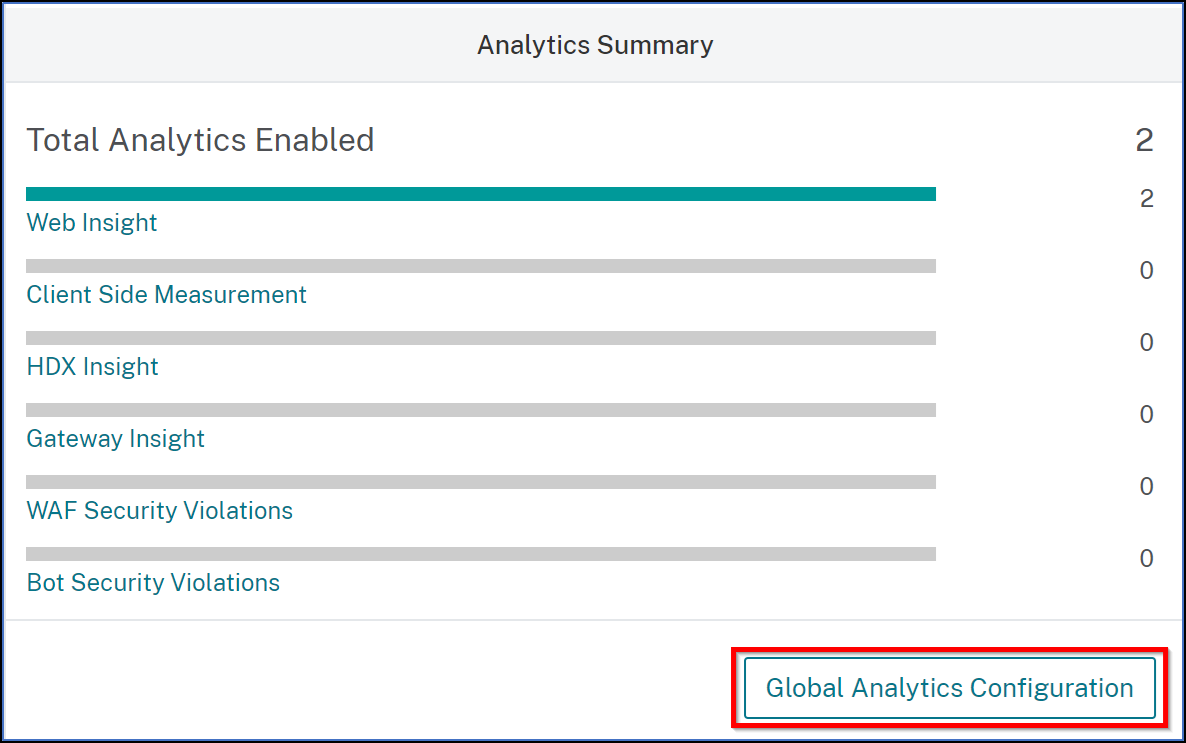
-
仮想サーバーでアナリティクスを有効にするアナリティクス機能を選択します。
-
後続の仮想サーバーでアナリティクスを有効にするには、[このアナリティクス設定を後続のライセンス済み仮想サーバーに適用する] チェックボックスをオンにします。
-
[送信] をクリックします。
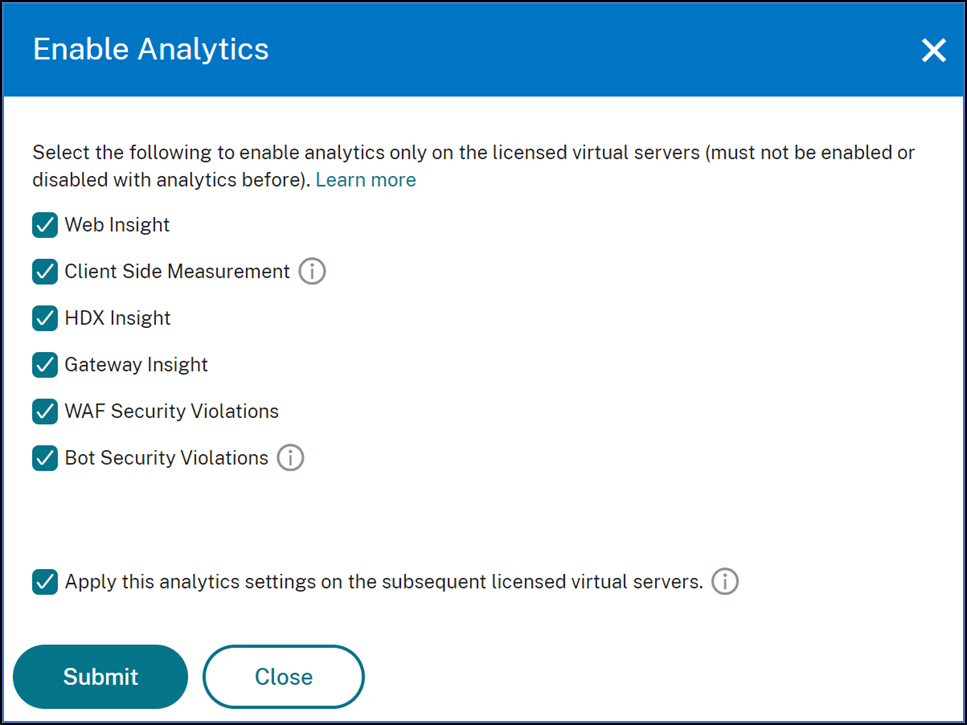
共有
共有
This Preview product documentation is Cloud Software Group Confidential.
You agree to hold this documentation confidential pursuant to the terms of your Cloud Software Group Beta/Tech Preview Agreement.
The development, release and timing of any features or functionality described in the Preview documentation remains at our sole discretion and are subject to change without notice or consultation.
The documentation is for informational purposes only and is not a commitment, promise or legal obligation to deliver any material, code or functionality and should not be relied upon in making Cloud Software Group product purchase decisions.
If you do not agree, select I DO NOT AGREE to exit.