This content has been machine translated dynamically.
Dieser Inhalt ist eine maschinelle Übersetzung, die dynamisch erstellt wurde. (Haftungsausschluss)
Cet article a été traduit automatiquement de manière dynamique. (Clause de non responsabilité)
Este artículo lo ha traducido una máquina de forma dinámica. (Aviso legal)
此内容已经过机器动态翻译。 放弃
このコンテンツは動的に機械翻訳されています。免責事項
이 콘텐츠는 동적으로 기계 번역되었습니다. 책임 부인
Este texto foi traduzido automaticamente. (Aviso legal)
Questo contenuto è stato tradotto dinamicamente con traduzione automatica.(Esclusione di responsabilità))
This article has been machine translated.
Dieser Artikel wurde maschinell übersetzt. (Haftungsausschluss)
Ce article a été traduit automatiquement. (Clause de non responsabilité)
Este artículo ha sido traducido automáticamente. (Aviso legal)
この記事は機械翻訳されています.免責事項
이 기사는 기계 번역되었습니다.책임 부인
Este artigo foi traduzido automaticamente.(Aviso legal)
这篇文章已经过机器翻译.放弃
Questo articolo è stato tradotto automaticamente.(Esclusione di responsabilità))
Translation failed!
LDAP認証サーバーの追加
LDAPプロトコルをRADIUSおよびTACAS認証サーバーと統合すると、ADMを使用して分散ディレクトリからユーザー資格情報を検索および認証できます。
-
設定 > 認証に移動します。
-
LDAPタブを選択し、追加をクリックします。
-
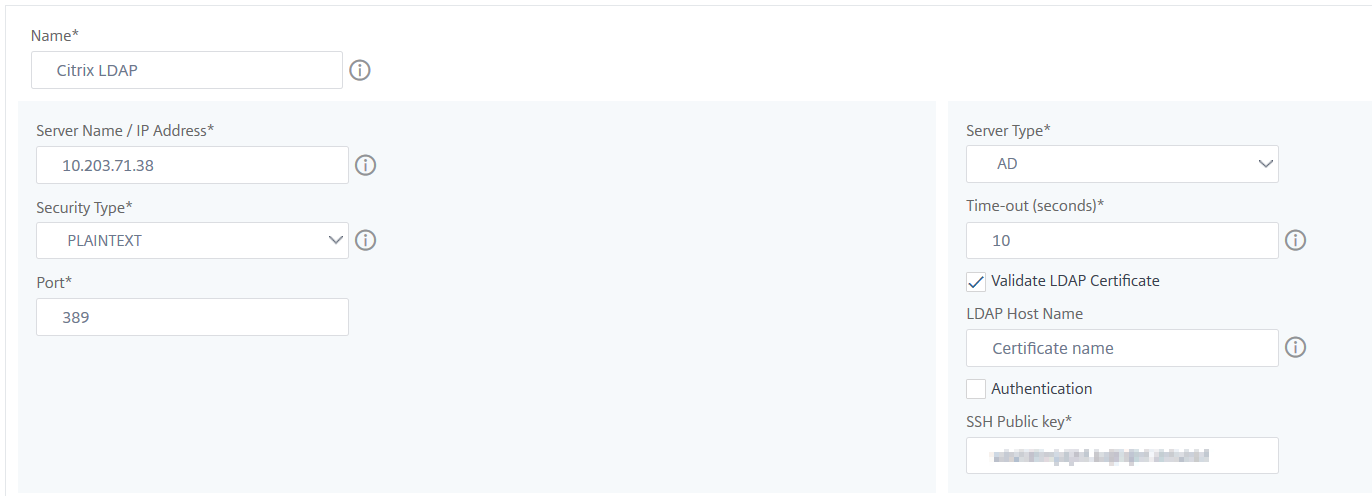
LDAPサーバーの作成ページで、次のパラメーターを指定します。
-
名前 – LDAPサーバー名を指定します。
-
サーバー名/IPアドレス – LDAP IPアドレスまたはサーバー名を指定します。
-
セキュリティの種類 – システムとLDAPサーバー間で必要な通信の種類です。リストから選択します。プレーンテキスト通信が不十分な場合は、Transport Layer Security (TLS) またはSSLのいずれかを選択して暗号化された通信を選択できます。
-
ポート – デフォルトでは、プレーンテキストにはポート389が使用されます。SSL/TLSにはポート636も指定できます。
-
サーバーの種類 – LDAPサーバーの種類としてActive Directory (AD) またはNovell Directory Service (NDS) を選択します。
-
タイムアウト (秒) – NetScaler® ADMシステムがLDAPサーバーからの応答を待機する時間(秒単位)。
-
LDAPホスト名 – LDAP証明書の検証チェックボックスを選択し、証明書に入力するホスト名を指定します。
認証オプションをクリアし、SSH公開鍵を指定します。鍵ベースの認証を使用すると、SSHを介してLDAPサーバーのユーザーオブジェクトに保存されている公開鍵のリストを取得できるようになります。
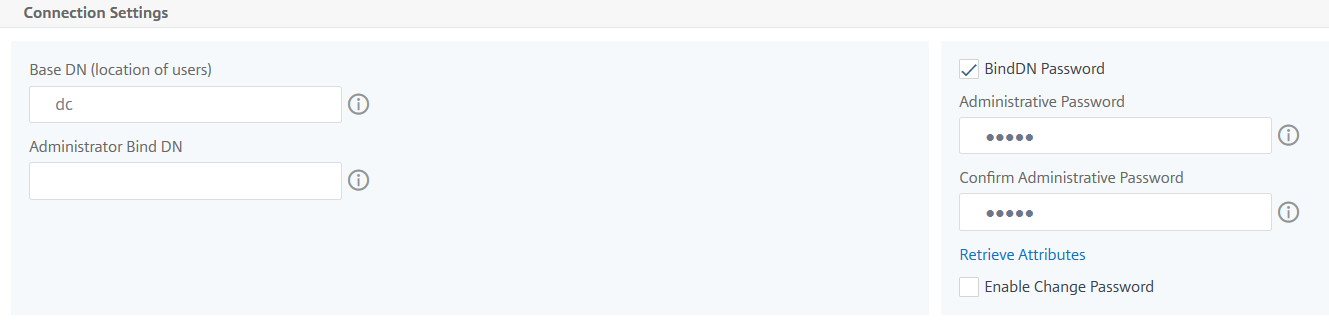
接続設定で、次のパラメーターを指定します。
-
ベースDN – LDAPサーバーが検索を開始するベースノード。
-
管理者バインドDN – LDAPサーバーにバインドするためのユーザー名。例: admin@aaa.local。
-
バインドDNパスワード – 認証用のパスワードを提供するには、このオプションを選択します。
-
パスワード変更を有効にする – パスワード変更を有効にするには、このオプションを選択します。
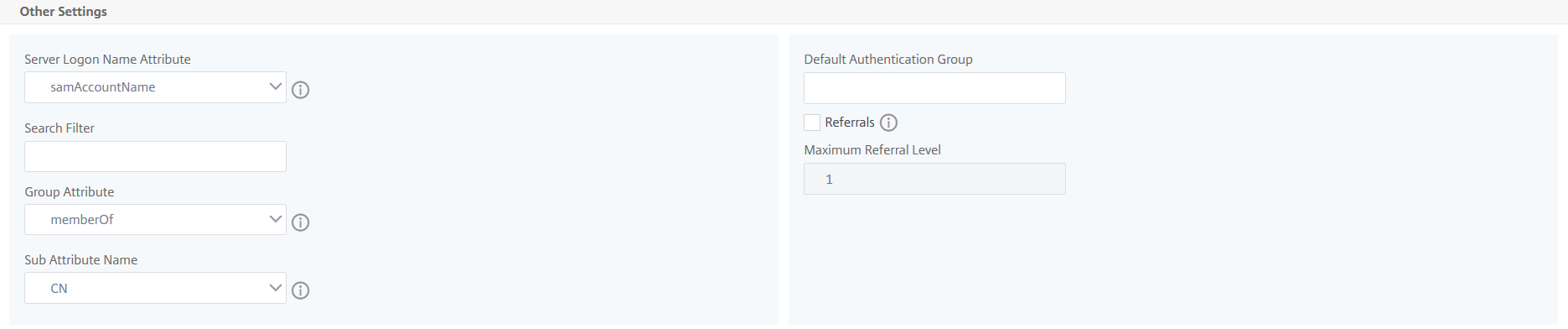
その他の設定で、次のパラメーターを指定します。
-
サーバーログオン名属性 – 外部LDAPサーバーまたはActive Directoryを照会するためにシステムが使用する名前属性。リストからsamAccountnameを選択します。
-
検索フィルター – LDAPサーバーで構成された検索フィルターに従って、2要素認証用の外部ユーザーを構成します。たとえば、
ldaploginameがsamaccountで、ユーザーが提供するユーザー名がbobの場合、vpnallowed=trueはLDAP検索文字列&(vpnallowed=true)(samaccount=bob)を生成します。注
デフォルトでは、検索フィルターの値は角括弧で囲まれています。
-
グループ属性 – リストからmemberOfを選択します。
-
サブ属性名 – LDAPサーバーからのグループ抽出用のサブ属性名。
-
デフォルト認証グループ – 抽出されたグループに加えて、認証が成功したときに選択するデフォルトグループ。
-
-
-
作成をクリックします。
LDAPサーバーが構成されました。
注:
ユーザーがActive Directoryグループのメンバーである場合、NetScaler ADM上のグループ名とユーザー名はActive Directoryグループメンバーと同じ名前である必要があります。
-
外部認証サーバーを有効にします。
外部認証サーバーの有効化の詳細については、「外部認証サーバーとフォールバックオプションを有効にする」を参照してください。
共有
共有
This Preview product documentation is Cloud Software Group Confidential.
You agree to hold this documentation confidential pursuant to the terms of your Cloud Software Group Beta/Tech Preview Agreement.
The development, release and timing of any features or functionality described in the Preview documentation remains at our sole discretion and are subject to change without notice or consultation.
The documentation is for informational purposes only and is not a commitment, promise or legal obligation to deliver any material, code or functionality and should not be relied upon in making Cloud Software Group product purchase decisions.
If you do not agree, select I DO NOT AGREE to exit.