-
-
マイクロサービスとしてのNetScalerエージェントの構成
-
-
-
This content has been machine translated dynamically.
Dieser Inhalt ist eine maschinelle Übersetzung, die dynamisch erstellt wurde. (Haftungsausschluss)
Cet article a été traduit automatiquement de manière dynamique. (Clause de non responsabilité)
Este artículo lo ha traducido una máquina de forma dinámica. (Aviso legal)
此内容已经过机器动态翻译。 放弃
このコンテンツは動的に機械翻訳されています。免責事項
이 콘텐츠는 동적으로 기계 번역되었습니다. 책임 부인
Este texto foi traduzido automaticamente. (Aviso legal)
Questo contenuto è stato tradotto dinamicamente con traduzione automatica.(Esclusione di responsabilità))
This article has been machine translated.
Dieser Artikel wurde maschinell übersetzt. (Haftungsausschluss)
Ce article a été traduit automatiquement. (Clause de non responsabilité)
Este artículo ha sido traducido automáticamente. (Aviso legal)
この記事は機械翻訳されています.免責事項
이 기사는 기계 번역되었습니다.책임 부인
Este artigo foi traduzido automaticamente.(Aviso legal)
这篇文章已经过机器翻译.放弃
Questo articolo è stato tradotto automaticamente.(Esclusione di responsabilità))
Translation failed!
NetScaler® エージェントを Kubernetes クラスターにマイクロサービスとしてインストールする
オンプレミスの NetScaler Console を使用している場合、コンテナエージェントはいくつかの特定の戦略的および技術的な理由で使用されます。重要な理由のいくつかを以下に示します。
- クラウドネイティブワークロードのシームレスな管理 - コンテナエージェントを使用する主な理由は、NetScaler CPX (NetScaler のコンテナ化されたバージョン) を管理することです。
- ローカライズされた制御: エージェントは、オンプレミスの Console と Kubernetes クラスター内で実行されている NetScaler CPX インスタンス間のライセンスプロキシとして機能します。
- 簡素化された接続 (マイクロサービスアーキテクチャ) - NetScaler Console と Kubernetes クラスターが異なるネットワーク上にある場合、コンテナエージェントは安全な「クラスター内」ゲートウェイとして機能します。
注:
- オンプレミスエージェントを構成し、Kubernetes クラスターがホストされているネットワークにエージェントを登録することもできます。
- NetScaler Console リリース 14.1 ビルド 60.x 以降、NetScaler Console はコンテナ化されたコンソールエージェントの使用をサポートしています。コンテナ化されたコンソールエージェントを使用すると、Kubernetes または OpenShift プラットフォーム上の管理対象インスタンスの接続と監視が合理化されます。
はじめに
-
NetScaler Console で、インフラストラクチャ > インスタンス > エージェントに移動します。
-
アクションの選択リストから、エージェントマイクロサービスのダウンロードオプションを選択します。
-
エージェントマイクロサービスのダウンロードページで、次のパラメータを指定します。
-
アプリケーションID – Kubernetes クラスター内のエージェントのサービスを定義し、同じクラスター内の他のエージェントとこのエージェントを区別するための文字列ID。
-
パスワード – NetScaler CPX がエージェントを介して NetScaler CPX を NetScaler Console にオンボーディングするために使用するパスワードを指定します。
-
パスワードの確認 – 確認のため、同じパスワードを指定します。
注記:
- デフォルトのパスワード (
nsroot) を使用してはいけません。
- デフォルトのパスワード (
-
-
「YAMLファイルをダウンロード」をクリックします。
KubernetesクラスターにNetScalerエージェントをインストールする
Kubernetesメインノードで次の手順を実行します。
-
ダウンロードしたYAMLファイルを保存します。
-
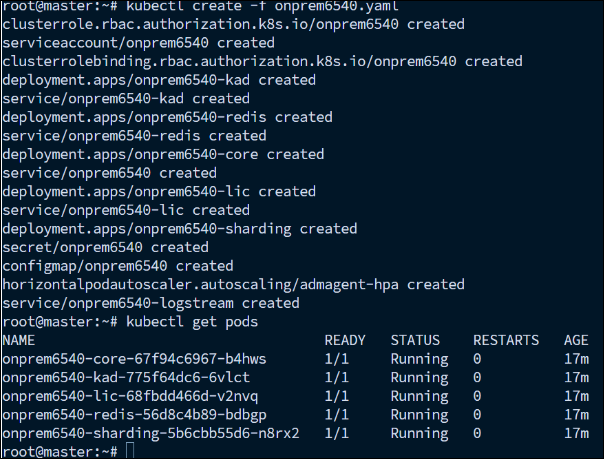
次のコマンドを実行します。
kubectl create -f <yaml file> <!--NeedCopy-->例:
kubectl create -f onprem6540.yaml <!--NeedCopy-->
エージェントが正常に作成されました。

NetScaler Consoleで、「インフラストラクチャ > インスタンス > エージェント」に移動してエージェントのステータスを確認します。
NetScaler コンソール GUI を使用して Kubernetes クラスターに作成された NetScaler エージェント(/ja-jp/netscaler-application-delivery-management-software/media/kubernetes-agent-creation-gui.png)
エージェントを設定した後、NetScaler CPXインスタンスを追加し、サービスグラフで分析を表示できます。詳細については、以下を参照してください。
共有
共有
This Preview product documentation is Cloud Software Group Confidential.
You agree to hold this documentation confidential pursuant to the terms of your Cloud Software Group Beta/Tech Preview Agreement.
The development, release and timing of any features or functionality described in the Preview documentation remains at our sole discretion and are subject to change without notice or consultation.
The documentation is for informational purposes only and is not a commitment, promise or legal obligation to deliver any material, code or functionality and should not be relied upon in making Cloud Software Group product purchase decisions.
If you do not agree, select I DO NOT AGREE to exit.