
DNSドメイン名を使用したGSLB構成の展開
NetScaler Consoleの新しいRBAC機能強化により、承認されたアプリケーション所有者のみがNetScaler Consoleで独自のDNSドメインを作成および管理できるようになります。特定のStyleBookを使用して、アプリケーション所有者が所有するDNSドメインからGSLB構成を作成することを承認できるようになりました。選択したDNSドメイン名がユーザーによって所有されている場合、NetScaler ConsoleアプリケーションダッシュボードでGSLB StyleBookを使用してGSLB構成を作成する際に使用できます。 NetScaler Consoleには、GSLB構成を構成するための2つのワークフローがあります。
-
管理者向けのワークフロー。NetScaler ConsoleでRBAC環境をセットアップします。つまり、GSLB StyleBookを作成およびインポートするには、ユーザーグループ、ポリシー、ロールを作成し、ユーザーをグループに割り当てる必要があります。管理者として、このワークフローを実行する必要があります。
-
アプリケーション所有者向けのワークフロー。アプリケーション所有者は、自身が所有するドメイン名を使用してGSLB構成を作成する必要があります。
次のフローチャートは、両方のワークフローを示しています。
GSLBワークフロー構成(/en-us/netscaler-console-service/media/rbac-on-gslb-domain-dns-names-workflow-1.png)
管理者向けのワークフロー
管理者として、NetScaler ConsoleでRBAC環境を作成するためのワークフローは、次の手順で構成されます。
まず、NetScalerインスタンスにGSLB構成を展開するためのStyleBookを作成します。このドキュメントでは、独自のStyleBookを作成するのに役立つYAMLコンテンツのサンプルを提供しています - StyleBookの構築。
カスタムStyleBookの作成方法の詳細については、「カスタムStyleBookの作成と使用」を参照してください。
注:
NetScaler Consoleは、StyleBookで「allowed-dynamic-values」という新しいコンストラクトをサポートしています。このコンストラクトを使用すると、ユーザーはNetScaler Consoleに存在するDNSドメイン値からリスト表示および選択でき、NetScaler Console GUIのStyleBookで「domain-name」パラメーターが自動的に入力されます。
参考として、「domain-name」パラメーターセクションの例を示します。
ここで使用されている「domain-name」パラメーターは単なる例です。このパラメーターは、カスタムStyleBookでは異なる場合があります。
-
   name: domain-name
    label: DNS Domain Name
    description: GSLB DNS Domain Name
    type: string
    required: true
    allowed-dynamic-values:
       source: local
       resource-type: dns_domain_entry
注:
現在、NetScaler Consoleでは、「allowed-dynamic-values」コンストラクトはどのデフォルトStyleBookでも使用されていません。デフォルトのGSLB StyleBookを使用して、新しいカスタムGSLB StyleBookを作成します。ドメイン名パラメータの部分を、上記で提供されているサンプルに置き換えます。任意のテキストエディタを使用して、新しいStyleBookを作成できます。
-
管理者としてNetScaler Consoleにログオンします。
-
Applications > Configurations > StyleBooks の順に移動します。
-
Import New StyleBook をクリックし、新しいGSLB StyleBookをNetScaler Consoleにアップロードします。
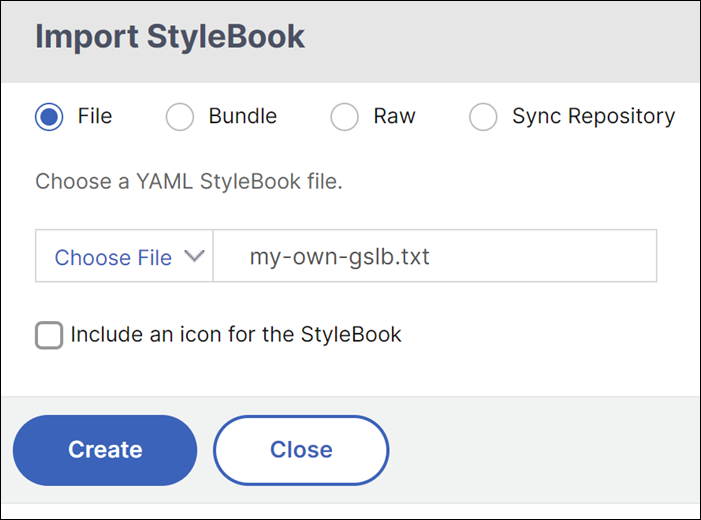 NetScaler ConsoleでStyleBookをインポートする方法の詳細については、カスタムStyleBookを使用する を参照してください。
 -
System > Users > Policies の順に移動し、Add をクリックして、以下に示すようにアプリケーション所有者のアクセスポリシーを設定します。Citrixでは、アプリケーション所有者が設定したRBACルールを回避しないように、アクセスポリシーを作成することをお勧めします。
-
-
Applications > ダッシュボード
-
アプリケーション > 構成
-
Infrastructure > インスタンス
-
Infrastructure > ライセンス管理
-
Settings > ドメイン名
必要に応じて他の権限を付与し、Create をクリックします。ダッシュボード、構成、インスタンス、ライセンス管理、およびDNSドメイン名のアクセスポリシーを作成します。(/en-us/netscaler-console-service/media/rbac-on-gslb-domain-dns-names-3.png) -
-
System > Users > Roles に移動し、ロールを作成して、前の手順で作成したポリシーを割り当てます。
-
ロールの名前を入力し、簡単な説明を入力します。「Policies」セクションで、AppOwnerExampleAccessPolicy を選択します。アプリケーション所有者ロールを作成します。(/en-us/netscaler-console-service/media/rbac-on-gslb-domain-dns-names-4.png)
-
System > Users > Groups に移動し、グループを作成して、前の手順で作成したロールを関連付けます。
-
名前と説明を入力し、「Roles」セクションで AppOwnerExampleRole を選択します。システムグループを作成します。(/en-us/netscaler-console-service/media/rbac-on-gslb-domain-dns-names-5.png)
-
Next をクリックします。
-
Authorization Settings タブで、アプリケーション所有者がアクセスできるNetScalerインスタンスと新しいGSLB StyleBookを選択します。認証設定(/en-us/netscaler-console-service/media/rbac-on-gslb-domain-dns-names-6.png)この手順を繰り返して、組織に必要な数のユーザーグループを作成します。Create Group をクリックします。
-
システムユーザーを作成し、そのユーザーをユーザーグループに割り当てます。このドキュメントは、ローカルで作成されたユーザーのみを指します。NetScaler Consoleが外部認証(LDAPなど)を使用するように設定されている場合、ユーザーグループにユーザーを作成する必要はありません。グループへのユーザーマッピングは、外部認証ディレクトリから取得されます。
-
System > Users > User に移動します。
-
システムユーザーのユーザー名とパスワードを入力し、そのユーザーをグループに割り当てます。
ユーザーを作成します。(/en-us/netscaler-console-service/media/rbac-on-gslb-domain-dns-names-7.png)注:ステップ12はオプションであり、LDAPなどの外部認証が使用される場合は必須ではありません。 -
管理ワークフロー用のNetScaler Console REST API
NetScaler ConsoleにログオンするためのREST API
URL: http: //<MAS_IP>/nitro/v2/config/login
 HTTPMETHOD: POST

 Body Payload:
 {
   "login": {
     "username": "<USER_NAME>",
     "password": "<PASSWORD>",
     "session_timeout": 1800
   }
 }

 The response results in a session cookie header, that can be sent with the rest of the API requests below.

 Set-Cookie: SESSID=##ED31F7C886E248CCDCA8F0E0AD2AA511ACCC5F46C48D6D2BCAA719A9DE62;path=/;secure;HttpOnly
アクセス ポリシーを作成するためのREST API
URL: https://<MAS_IP>/nitro/v2/config/rba_policy
 HTTP METHOD: POST

 {
   "rba_policy": {
     "name": " AppOwnerAccessPolicy",
     "description": " ExampleCompany AppOwner Access Policy",
     "tenant_id": "7c12ec97-1472-4096-97e7-a5acb453cc5c",
     "statement": [
       {
         "access_type": true,
         "resource_type": "application",
         "operation_name": "add",
         "dependent_resources": "mail_profile,slack_profile,smtp_server,app_category"
       },
       {
         "access_type": true,
         "resource_type": "application",
         "operation_name": "get",
         "dependent_resources": "download,smtp_server,ns_vserver_license,app_category,app_summary,app_health_dashboard_details,haproxy_frontend,haproxy_backend,haproxy_frontend_stats"
       },
       {
         "access_type": true,
         "resource_type": "si_app_unit",
         "operation_name": "get",
         "dependent_resources": "download,smtp_server,app_summary,si_app_summary,si_device,security_app_dashboard_details,si_geo_location,si_safety_app_firewall,si_safety_overview,si_safety_security_check,si_safety_system_security,si_safety_signature"
       },
       {
         "access_type": true,
         "resource_type": "stylebooks",
         "operation_name": "get",
         "dependent_resources": "download,smtp_server,ns_vserver_license"
       },
       {
         "access_type": true,
         "resource_type": "stylebooks",
         "operation_name": "add",
         "dependent_resources": "mail_profile,slack_profile,smtp_server"
       },
       {
         "access_type": true,
         "resource_type": "configpacks",
         "operation_name": "get",
         "dependent_resources": "download,smtp_server,stylebooks,ns_vserver_license"
       },
       {
         "access_type": true,
         "resource_type": "configpacks",
         "operation_name": "add",
         "dependent_resources": "mail_profile,slack_profile,smtp_server"
       },
       {
         "access_type": true,
         "resource_type": "stylebooks_system_settings",
         "operation_name": "get",
         "dependent_resources": "download,smtp_server"
       },
       {
         "access_type": true,
         "resource_type": "stylebooks_system_settings",
         "operation_name": "add",
         "dependent_resources": "mail_profile,slack_profile,smtp_server"
       },
       {
         "access_type": true,
         "resource_type": "ns_crvserver",
         "operation_name": "get",
         "dependent_resources": "download,DeviceAPIProxy,smtp_server,perf_cache_redirection_report,poll_activity_status,ns_emon_poll_policy,lb_export_report"
       },
       {
         "access_type": true,
         "resource_type": "ns_crvserver",
         "operation_name": "add",
         "dependent_resources": "DeviceAPIProxy,mail_profile,slack_profile,smtp_server,poll_activity_status,ns_emon_poll_policy,lb_export_report"
       },
       {
         "access_type": true,
         "resource_type": "haproxy_frontend",
         "operation_name": "get",
         "dependent_resources": "download,DeviceAPIProxy,smtp_server,haproxy_backend,haproxy_server"
       },
       {
         "access_type": true,
         "resource_type": "haproxy_frontend",
         "operation_name": "add",
         "dependent_resources": "DeviceAPIProxy,mail_profile,slack_profile,smtp_server"
       },
       {
         "access_type": true,
         "resource_type": "ns_server",
         "operation_name": "get",
         "dependent_resources": "download,DeviceAPIProxy,smtp_server,ns_emon_poll_policy,poll_activity_status,ns_server,lb_export_report"
       },
       {
         "access_type": true,
         "resource_type": "ns_server",
         "operation_name": "add",
         "dependent_resources": "DeviceAPIProxy,mail_profile,slack_profile,smtp_server,ns_emon_poll_policy,poll_activity_status,lb_export_report"
       },
       {
         "access_type": true,
         "resource_type": "ns_lbvserver",
         "operation_name": "get",
         "dependent_resources": "download,DeviceAPIProxy,smtp_server,perf_lb_vserver_report,ns_emon_poll_policy,poll_activity_status,lb_export_report"
       },
       {
         "access_type": true,
         "resource_type": "ns_lbvserver",
         "operation_name": "add",
         "dependent_resources": "DeviceAPIProxy,mail_profile,slack_profile,smtp_server,ns_emon_poll_policy,poll_activity_status,lb_export_report"
       },
       {
         "access_type": true,
         "resource_type": "ns_service",
         "operation_name": "get",
         "dependent_resources": "download,DeviceAPIProxy,smtp_server,ns_emon_poll_policy,poll_activity_status,ns_visualizer_lb_bindings,lb_export_report"
       },
       {
         "access_type": true,
         "resource_type": "ns_service",
         "operation_name": "add",
         "dependent_resources": "DeviceAPIProxy,mail_profile,slack_profile,smtp_server,ns_emon_poll_policy,poll_activity_status,ns_visualizer_lb_bindings,lb_export_report"
       },
       {
         "access_type": true,
         "resource_type": "ns_servicegroup",
         "operation_name": "get",
         "dependent_resources": "download,DeviceAPIProxy,smtp_server,ns_emon_poll_policy,poll_activity_status,ns_servicegroupmember_binding,ns_visualizer_lb_bindings,lb_export_report"
       },
       {
         "access_type": true,
         "resource_type": "ns_servicegroup",
         "operation_name": "add",
         "dependent_resources": "DeviceAPIProxy,mail_profile,slack_profile,smtp_server,ns_emon_poll_policy,poll_activity_status,ns_servicegroupmember_binding,ns_visualizer_lb_bindings,lb_export_report"
       },
       {
         "access_type": true,
         "resource_type": "ns_authenticationvserver",
         "operation_name": "get",
         "dependent_resources": "download,DeviceAPIProxy,smtp_server,perf_authentication_report,poll_activity_status,ns_emon_poll_policy,lb_export_report"
       },
       {
         "access_type": true,
         "resource_type": "ns_authenticationvserver",
         "operation_name": "add",
         "dependent_resources": "DeviceAPIProxy,mail_profile,slack_profile,smtp_server,poll_activity_status,ns_emon_poll_policy,lb_export_report"
       },
       {
         "access_type": true,
         "resource_type": "syslog_messages",
         "operation_name": "get",
         "dependent_resources": "download,smtp_server"
       },
       {
         "access_type": true,
         "resource_type": "ns_emon_poll_policy",
         "operation_name": "get",
         "dependent_resources": "download,poll_activity_status,smtp_server"
       },
       {
         "access_type": true,
         "resource_type": "ns_emon_poll_policy",
         "operation_name": "add",
         "dependent_resources": "download,poll_activity_status,mail_profile,slack_profile,smtp_server"
       },
       {
         "access_type": true,
         "resource_type": "ns_visualizer_gslb_bindings",
         "operation_name": "add",
         "dependent_resources": "DeviceAPIProxy,mail_profile,slack_profile,smtp_server,poll_activity_status,ns_emon_poll_policy,ns_gslbvserver_domain,lb_export_report"
       },
       {
         "access_type": true,
         "resource_type": "ns_visualizer_gslb_bindings",
         "operation_name": "get",
         "dependent_resources": "download,DeviceAPIProxy,smtp_server,poll_activity_status,ns_emon_poll_policy,ns_gslbvserver_domain,lb_export_report"
       },
       {
         "access_type": true,
         "resource_type": "ns_gslbservice",
         "operation_name": "add",
         "dependent_resources": "DeviceAPIProxy,mail_profile,slack_profile,smtp_server,poll_activity_status,ns_emon_poll_policy,lb_export_report"
       },
       {
         "access_type": true,
         "resource_type": "ns_gslbservice",
         "operation_name": "get",
         "dependent_resources": "download,DeviceAPIProxy,smtp_server,poll_activity_status,ns_emon_poll_policy,lb_export_report"
       },
       {
         "access_type": true,
         "resource_type": "ns_gslbvserver",
         "operation_name": "get",
         "dependent_resources": "download,DeviceAPIProxy,smtp_server,perf_global_server_load_balancing_report,poll_activity_status,ns_emon_poll_policy,lb_export_report"
       },
       {
         "access_type": true,
         "resource_type": "ns_gslbvserver",
         "operation_name": "add",
         "dependent_resources": "DeviceAPIProxy,mail_profile,slack_profile,smtp_server,poll_activity_status,ns_emon_poll_policy,lb_export_report"
      },
       {
         "access_type": true,
         "resource_type": "ns_vpnvserver",
         "operation_name": "add",
         "dependent_resources": "DeviceAPIProxy,mail_profile,slack_profile,smtp_server,poll_activity_status,ns_emon_poll_policy,lb_export_report"
       },
       {
         "access_type": true,
         "resource_type": "ns_vpnvserver",
         "operation_name": "get",
         "dependent_resources": "download,DeviceAPIProxy,smtp_server,perf_ssl_vpn_report,poll_activity_status,ns_emon_poll_policy,lb_export_report"
       },
       {
         "access_type": true,
         "resource_type": "ns_csvserver",
         "operation_name": "get",
         "dependent_resources": "download,DeviceAPIProxy,smtp_server,perf_content_switching_report,ns_emon_poll_policy,poll_activity_status,ns_visualizer_cs_bindings,lb_export_report"
       },
       {
         "access_type": true,
         "resource_type": "ns_csvserver",
         "operation_name": "add",
         "dependent_resources": "DeviceAPIProxy,mail_profile,slack_profile,smtp_server,ns_emon_poll_policy,poll_activity_status,ns_visualizer_cs_bindings,lb_export_report"
       },
       {
         "access_type": true,
         "resource_type": "dns_domain_entry",
         "operation_name": "get",
         "dependent_resources": ""
       },
       {
         "access_type": true,
         "resource_type": "dns_domain_entry",
         "operation_name": "add",
         "dependent_resources": ""
       },
       {
         "access_type": true,
         "resource_type": "devicewise_detail_summary",
         "operation_name": "get",
         "dependent_resources": "download,mps_user_heatmap,ns_event,mps_agent,active_event,smtp_server,mps_datacenter,event_severity_report,event_device_report,ns_conf,device_event_summary"
       },
       {
         "access_type": true,
         "resource_type": "devicewise_detail_summary",
         "operation_name": "add",
         "dependent_resources": "mail_profile,slack_profile,smtp_server"
       },
       {
         "access_type": true,
         "resource_type": "cbwanopt",
         "operation_name": "get",
         "dependent_resources": "download,device_backup,traceroute,inventory,inventory_status,ping,mps_datacenter,cbwanopt_device_profile,sdwanvw_device_profile,sdwanvw_snmp_config,sdwanvw_appflowconfig,smtp_server,cbwanopt_snmp_config,cbwanopt_appflowconfig,sdwanvw,tag"
       },
       {
         "access_type": true,
         "resource_type": "cbwanopt",
         "operation_name": "add",
         "dependent_resources": "inventory,managed_device,device_backup,upload,cbwanopt_device_profile,mps_datacenter,mail_profile,slack_profile,smtp_server,sdwanvw_device_profile,sdwanvw_snmp_config,sdwanvw_appflowconfig,cbwanopt_snmp_config,cbwanopt_appflowconfig,sdwanvw,tag"
       },
       {
         "access_type": true,
         "resource_type": "device_login",
         "operation_name": "get",
         "dependent_resources": ""
       },
       {
         "access_type": true,
         "resource_type": "ns",
         "operation_name": "get",
         "dependent_resources": "download,ns_config_replicate,ns_conf,ns_ns_runningconfig,ns_ns_savedconfig,active_event,device_backup,traceroute,inventory,inventory_status,ping,ns_device_profile,nssdx_device_profile,sdx_snmp_config,sdx_syslog_config,smtp_server,ns_cluster,ns_snmp_config,ns_syslog_config,ns_l7_latency_config,ica_l7_latency_update,af_vserver_policy,ns_vserver_appflow_config,mps_datacenter,ns_appflow_param_config,ns_ns_license,ns_ns_mode,ns_network_interface,advanced_analytics_config,tag"
       },
       {
         "access_type": true,
         "resource_type": "ns",
         "operation_name": "add",
         "dependent_resources": "inventory,ns_l7_latency_config,ica_l7_latency_update,af_vserver_policy,ns_config_replicate,managed_device,device_backup,upload,ns_device_profile,nssdx_device_profile,mps_datacenter,sdx_snmp_config,sdx_syslog_config,mail_profile,slack_profile,smtp_server,ns_cluster,ns_snmp_config,ns_syslog_config,ns_vserver_appflow_config,ns_appflow_param_config,advanced_analytics_config,tag"
       },
       {
         "access_type": true,
         "resource_type": "haproxyhost",
         "operation_name": "get",
         "dependent_resources": "download,traceroute,inventory,inventory_status,ping,mps_datacenter,smtp_server,haproxy_device_profile,device_backup,tag"
       },
       {
         "access_type": true,
         "resource_type": "haproxyhost",
         "operation_name": "add",
         "dependent_resources": "inventory,managed_device,mail_profile,slack_profile,smtp_server,mps_datacenter,haproxy_device_profile,haproxy,device_backup,tag"
       },
       {
         "access_type": true,
         "resource_type": "docker_host",
         "operation_name": "add",
         "dependent_resources": "inventory,ns_snmp_config,managed_device,ns,upload,mail_profile,slack_profile,smtp_server,mps_datacenter,ns_device_profile,docker_nscpx_image"
       },
       {
         "access_type": true,
         "resource_type": "docker_host",
         "operation_name": "get",
         "dependent_resources": "download,ns_snmp_config,ns_conf,ns_ns_runningconfig,ns_ns_savedconfig,smtp_server,mps_datacenter,ns_device_profile,traceroute,inventory,inventory_status,ping,active_event,ns_ns_license,ns_ns_mode,ns_network_interface"
       },
       {
         "access_type": true,
         "resource_type": "perf_reports",
         "operation_name": "add",
         "dependent_resources": "mail_profile,slack_profile,smtp_server,perf_custom_dashboard"
       },
       {
         "access_type": true,
         "resource_type": "perf_reports",
         "operation_name": "get",
         "dependent_resources": "download,smtp_server,perf_report_counters,perf_res_util_report,perf_http_req_tcp_conn_report,perf_lb_ssl_traffic_report,perf_ip_bytes_rxtx_report,perf_ip_pkt_rxtx_report,perf_icmp_pkt_rxtx_report,perf_icmp_bytes_rxtx_report,perf_icmpv6_pkt_rxtx_report,perf_icmpv6_bytes_rxtx_report,perf_ipv6_bytes_rxtx_report,perf_ipv6_pkt_rxtx_report,perf_udp_bytes_rxtx_report,perf_udp_packets_rxtx_report,perf_cmp_bytes_rxtx_report,perf_cmp_tcp_bytes_rxtx_report,perf_cmp_tcp_ratiosaving_report,perf_cmp_decmp_bytes_rxtx_report,perf_cmp_decmp_ratiosaving_report,perf_tcp_server_conn_report,perf_tcp_surgelen_spareconn_report,perf_http_bytes_rx_report,perf_http_gets_posts_report,perf_ssl_transactions_hits_report,perf_ssl_client_auth_report,perf_ssl_rsa_dhkey_report,perf_ssl_frontend_ciphers_report,perf_ssl_backend_ciphers_report,perf_wsdevice_cpu_utilization_report,perf_wsdevice_send_compression_ratio_report,perf_wsdevice_connected_plugins_report,perf_wsdevice_data_reduction_report,perf_wsdevice_link_utilization_report,perf_wsserviceclassstatstable_pass_through_connection_report,perf_wsserviceclassstatstable_service_class_report,perf_wsserviceclassstatstable_acceleration_report,perf_wslinkstatstable_throughput_report,perf_wslinkstatstable_packet_loss_report,perf_wsappstatstable_application_report,perf_wsqosstatstable_qos_report,perf_ssl_cpu_keyexchange_report,perf_ssl_be_rsa_dhkey_report,perf_custom_dashboard,perf_ns_throughput_report,perf_network_interface_report"
       },
       {
         "access_type": true,
         "resource_type": "perf_threshold",
         "operation_name": "get",
         "dependent_resources": "download,perf_reports,perf_report_counters,smtp_server,sms_server,sms_profile"
       },
       {
         "access_type": true,
         "resource_type": "perf_threshold",
         "operation_name": "add",
         "dependent_resources": "mail_profile,slack_profile,smtp_server,sms_server,sms_profile"
       },
       {
         "access_type": true,
         "resource_type": "perf_poll_config",
         "operation_name": "add",
         "dependent_resources": "mail_profile,slack_profile,smtp_server"
       },
       {
         "access_type": true,
         "resource_type": "perf_poll_config",
         "operation_name": "get",
         "dependent_resources": "smtp_server,download"
       },
       {
         "access_type": true,
         "resource_type": "license_server_info",
         "operation_name": "get",
         "dependent_resources": "sms_server,license_proxy_server,jazz_license,download,sms_profile,smtp_server,user_managed_tp_vserver,managed_vserver,user_managed_vserver,haproxy_frontend,haproxy_backend,license_file,device_license_info,license_info,ns_authenticationvserver,ns_gslbvserver,ns_vpnvserver,ns_csvserver,ns_crvserver,ns_lbvserver,autoselection_preference,license_threshold,license_expiry_info"
       },
       {
         "access_type": true,
         "resource_type": "license_server_info",
         "operation_name": "add",
         "dependent_resources": "sms_server,license_proxy_server,jazz_license,sms_profile,mail_profile,slack_profile,smtp_server,user_managed_tp_vserver,managed_vserver,upload,license_file,license_info,license_threshold,mas_license,user_managed_vserver,autoselection_preference,license_expiry_info"
       }
     ],
     "ui": [
       {
         "access_type": true,
         "name": "ApplicationsDashboard",
         "display_name": "Dashboard"
       },
       {
         "access_type": true,
         "name": "SecurityDashboard",
         "display_name": "App Security Dashboard"
       },
       {
         "access_type": true,
         "name": "Stylebooks",
         "display_name": "StyleBooks"
       },
       {
         "access_type": true,
         "name": "Stylebooks",
         "display_name": "Configpacks"
       },
       {
         "access_type": true,
         "name": "StylebooksSettings",
         "display_name": "Settings"
       },
       {
         "access_type": true,
         "name": "CacheRedirection",
         "display_name": "Cache Redirection"
       },
       {
         "access_type": true,
         "name": "Servers",
         "display_name": "Servers"
       },
       {
         "access_type": true,
         "name": "VirtualServers",
         "display_name": "Virtual Servers"
       },
       {
         "access_type": true,
         "name": "Services",
         "display_name": "Services"
       },
       {
         "access_type": true,
         "name": "ServiceGroups",
         "display_name": "Service Groups"
       },
       {
         "access_type": true,
        "name": "Authentication",
         "display_name": "Authentication"
       },
       {
         "access_type": true,
         "name": "MonitoringAuditing",
         "display_name": "Auditing"
       },
       {
         "access_type": true,
         "name": "MonitoringSettings",
         "display_name": "Settings"
       },
       {
         "access_type": true,
         "name": "GSLBDomains",
         "display_name": "Domains"
       },
       {
         "access_type": true,
         "name": "GSLBServices",
         "display_name": "Services"
       },
       {
         "access_type": true,
         "name": "GSLBVirtualServer",
         "display_name": "Virtual Server"
       },
       {
         "access_type": true,
         "name": "NetScalerGateway",
         "display_name": "NetScaler Gateway"
       },
       {
         "access_type": true,
         "name": "ContentSwitching",
         "display_name": "Content Switching"
       },
       {
         "access_type": true,
         "name": "DNSDomainNames",
         "display_name": "DNS Domain Names"
       },
       {
         "access_type": true,
         "name": "NetworkDashboard",
         "display_name": "Instances Dashboard"
       },
       {
         "access_type": true,
         "name": "NetScalerSDWANWOInstances",
         "display_name": "NetScaler SD-WAN"
       },
       {
         "access_type": true,
         "name": "InstanceOperations",
         "display_name": "Instance Operations"
       },
       {
         "access_type": true,
         "name": "NetScalerInstances",
         "display_name": "NetScaler ADC"
       },
       {
         "access_type": true,
         "name": "NetScalerCPXDockerHost",
         "display_name": "Docker Hosts"
       },
       {
         "access_type": true,
         "name": "Reports",
         "display_name": "Reports"
       },
       {
         "access_type": true,
         "name": "Thresholds",
         "display_name": "Thresholds"
       },
       {
         "access_type": true,
         "name": "ReportingSettings",
         "display_name": "Settings"
       },
       {
         "access_type": true,
         "name": "Licenses",
         "display_name": "License Management"
       }
     ]
   }
 }
アクセス ロールを作成するためのREST API
URL: https://<MAS_IP>/nitro/v2/config/rba_role
 HTTPMETHOD: POST

 Payload:
 {
   "rba_role": {
     "name": "AppOwnerRole",
     "description": "ExampleCompany App Owner Role",
     "policies": [
       "AppOwnerAccessPolicy"
     ]
   }
新しいGSLB StyleBookをアップロードするためのREST API
URL: https://<MAS_IP>/stylebook/nitro/v2/config/stylebooks
 HTTPMETHOD: POST

 Payload:
 {
     "stylebook": {
       "file_name": "my-own-gslb.yaml",
       "source": "bmFtZTogZ3NsYi1kbnMtZG9tYW...aXRvcm5hbWU=",
       "encoding": "base64"
     }
   }
注:
StyleBookの名前は、お使いのシステムで変更される可能性があります。
グループを作成し、選択したインスタンスとStyleBookを割り当てるためのREST API
URL: https://<MAS_IP>/nitro/v2/config/mpsgroup
 HTTPMETHOD: POST

 Payload:
 {
   "mpsgroup": {
     "id": "",
     "name": "AppOwnerGroup1",
     "description": "ExampleCompany App Owner Group",
     "roles": [
       "AppOwnerRole"
     ],
     "enable_session_timeout": false,
     "assign_all_devices": false,
     "ass ign_all_apps": false,
     "application_names_with_regex": [

     ],
     "standalone_instances_id": [
       "72c178da-47df-4426-9acc-cd6316f92506",
       "c948061e-6240-4062-931c-f6988ef36e3b"
     ],
     "application_list": [

     ],
     "permission": "none",
     "application_names": [

     ],
     "authscope_props": [
       {
         "propname": "configuration_template_id",
         "propvalues": [
           "NONE"
         ]
       },
       {
         "propname": "dns_domain_entry_id",
         "propvalues": [
           "cf6631e5-2f56-4bb1-b0a5-90fabfc0e3e2",
           "b268905c-522d-47e3-a2ca-3f8d8a754373"
         ]
       },
       {
         "propname": "stylebook_id",
         "propvalues": [
           "gslbbb963abe85936913035e1d4dd14b56f7",
           "moni72fad4494466d102b19c18ac329fa9f3"
         ]
       }
     ],
     "tenant_id": "6d024111-6636-4571-a250-d47b31aba7a8"
   }
 }
注:
上記のAPIペイロードで使用するDNSドメイン名およびGSLB StyleBookのIDを取得するには、エンティティ名に対応するIDを照会するために、通常のNetScaler Console APIを使用できます。たとえば、「app1.acme.com」というDNSドメインのIDを取得するには、次のNetScaler Console REST APIを使用できます。
URL: https://<MAS_IP>/nitro/v2/config/dns_domain_entry?filter=name: app1.acme.com
 HTTPMETHOD: GET

 The ID of this domain can be extracted from the following response.
 {
   "errorcode": 0,
   "message": "Done",
   "operation": "get",
   "resourceType": "dns_domain_entry",
   "username": "nsroot",
   "tenant_name": "Owner",
   "tenant_id": "568d8e12-1d88-42b2-8943-cbaa04826fd1",
   "resourceName": "",
   "dns_domain_entry": [
     {
       "tenant_id": "568d8e12-1d88-42b2-8943-cbaa04826fd1",
       "name": "app1.acme.com",
       "id": "3e3d85ea-1c21-49b2-97f4-60fccdbae2e0",
       "description": "app1 domain name"
     }
   ]
 }
同様に、名前空間がcom.citrix.adc.stylebook、バージョンが1.0、名前が
my-own-gslbであるStyleBookのStyleBook IDを取得するには、次のAPIを使用できます。
URL: https://<MAS_IP>/stylebook/nitro/v1/config/stylebooks?filter=name:my-own-gslb,namespace:com.citrix.adc.stylebooks,version:1.0
 HTTPMETHOD: GET
応答には、StyleBookの詳細とそのID属性が含まれています。
{
   "stylebooks": [
     {
       "author": null,
       "builtin": "false",
       "builtins": "{"netscaler.nitro.config": "10.5"}",
       "deprecate": "false",
       "description": " This StyleBook is used to configure one or a number of NetScalers in different sites into a GSLB setup. It is assumed that the SNIP IP on each NetScaler to be used by this StyleBook as the Site IP is already configured on the appliance.",
       "display_name": "HTTP/SSL LoadBalancing StyleBook",
       "filename": "my-own-gslb.yaml",
       "hide": null,
       "id": "gslb5a748d8b7684846cf6c409ad7dea8ccf",
       "imported_by": "",
       "imported_datetime": "2018-05-25 17:20:32.848902",
       "name": "my-own-gslb",
       "namespace": "com.citrix.adc.stylebooks",
       "pkg_id": "gslb5a748d8b7684846cf6c409ad7dea8ccf",
       "primary_keys": "["name"]",
       "private": "false",
       "recompile": "false",
       "schema_version": "1.0",
       "source": "LS0tIApuYW1lOiBsYgpuYW1lc…",
       "system": null,
       "tags": "",
       "tenant_id": null,
       "user_sb": "false",
       "version": "1.0"
     },
     {
       …
     }
   ]
 }
注:
上記のAPIは、フィルターに一致するStyleBookのリストを返します。IDを取得するには、応答から正しいStyleBookを選択していることを確認してください。
システムユーザーを作成するためのREST API
注:
この手順はオプションです。
URL: https://<MAS_IP>/nitro/v2/config/mpsuser
 HTTPMETHOD: POST

 Payload:
 {
   "mpsuser": {
     "name": "John",
     "password": "welcome",
     "external_authentication": false,
     "enable_session_timeout": false,
     "groups": [
       "AppOwnerGroup1"
     ]
   }
 }
アプリケーション所有者向けのワークフロー
ユーザーは、資格情報を使用してアプリケーションユーザーとしてログオンする必要があります。ユーザーは、独自のDNSドメイン名を作成し、新しいGSLB StyleBookを使用するために、このタスクに従う必要があります。
-
NetScaler Consoleで、設定 > ドメイン名に移動します。
-
追加をクリックして新しいDNSドメインを作成します。NetScaler ConsoleでDNSドメインを作成します。DNSドメイン名を作成する(/en-us/netscaler-console-service/media/rbac-on-gslb-domain-dns-names-8.png)注:管理者として、これらのドメイン名を作成し、ユーザーグループに割り当てることもできます。
-
アプリケーション > ダッシュボードに移動し、カスタムアプリの定義をクリックします。
-
アプリケーションの名前を入力し、カテゴリを選択します。StyleBookから新しいアプリケーションを作成を選択し、OKをクリックします。選択したインスタンスに構成を展開するには、自分のGSLB StyleBookを選択します。アプリケーションを定義する(/en-us/netscaler-console-service/media/rbac-on-gslb-domain-dns-names-10.png)
-
StyleBook内のすべてのパラメーターに必要な値を入力します。
-
リストからドメイン名を選択します。
-
必要に応じて、アプリケーションのGSLBサイトを追加します。
-
すべてのGSLBサイトでターゲットのNetScalerインスタンスを選択します。
-
GSLB構成を作成するには、作成をクリックします。GSLB構成を作成(/en-us/netscaler-console-service/media/rbac-on-gslb-domain-dns-names-11.png)
注:StyleBookパラメーター「DNS Domain Name」には、NetScaler Consoleでユーザーに属するDNSドメインのリストのみが表示されます。 -
アプリケーション所有者ワークフロー用のNetScaler Console REST API
NetScaler ConsoleにログオンするためのREST API
URL: http: //<MAS_IP>/nitro/v2/config/login
 HTTPMETHOD: POST

 Payload:
 {
   "login": {
     "username": "<USER_NAME>",
     "password": "<PASSWORD>",
     "session_timeout": 1800
   }
 }
DNSドメイン名を作成するためのREST API
URL: https://<MAS_IP>/nitro/v2/config/dns_domain_entry
 HTTP METHOD: POST
 PAYLOAD: {"dns_domain_entry":{"name":"app1.acme.com","description":"app1 acme domain"
 }
 }
StyleBookを使用してアプリケーションを作成するためのREST API
URL: https://<MAS_IP>/nitro/v2/config/application
 HTTPMETHOD: POST

 Payload:
 {
   "params": {
     "action": "app_discovery"
   },
   "application": {
     "id": "",
     "name": "app1",
     "app_c ategory": "ITOps",
     "stylebook_params": "{"name":"my-own-gslb","namespace":"com.citrix.adc.stylebooks","version":"1.0","configpack_payload":{"parameters":{"name":"app1","domain-name":"app1.acme.com",]"ttl":"30","algorithm":"ROUNDROBIN","protocol":"HTTP","sites":[{"name":"site1","ipaddress":"6.5.6.77","virtual-ip":"88.6.5.44","virtual-port":"80"}]},"targets":[ {"id":"72c178da-47df-4426-9acc-cd6316f92506"}, {"id":"0e4d0789-bffe-4266-ba1c-09adfc61db4e"}, {"id":"b5af4455-3f06-4f56-b0cb-3d9f868c1f94"}]}}"
   }
 }
上記のペイロードでは:
-
「stylebook_params」には、使用するStyleBookの名前、名前空間、およびバージョンが含まれています。
-
「configpack_payload」には、上記の同等のGUIフォームに示されているStyleBookの入力済みパラメーターが含まれています。NetScaler Consoleは、ユーザーがアクセスできるDNSドメイン名のみがパラメーター「domain-name」の値として使用できることを保証します。
-
「targets」には、GSLB構成が展開されるNetScaler IDのリスト(GSLBサイト上のNetScalerインスタンス)が含まれています。
NetScalerの管理IPアドレスが与えられた場合にNetScaler IDを取得するには、以下のNetScaler Console APIを使用できます。
URL: https://<MAS_IP>/nitro/v2/config/ns?filter=ip_address: 192.168.153.162
 HTTPMETHOD: GET
応答ペイロードには、このNetScaler®に関する情報(そのIDを含む)が含まれています。
{
   "errorcode": 0,
   "message": "Done",
   ….."tenant_id": "ec0eb868-0d6b-4729-bfbd-3005dd2694c1",
   "resourceName": "",
   "ns": [
     {
       "manufacturedate": "9/30/2009",
       "is_grace": "false",
       "hostname": "youcef-ns",
       "std_bw_config": "0",
       "gateway_deployment": "false",
       "gateway_ipv6": "",
       "ha_master_state": "Primary",
       "instance_available": "0",
       "device_finger_print": "",
       "instance_state": "Down",
       "reason": "Device not reachable",
       "name": "",
       "ent_bw_available": "0",
       "description": "",
       "id": "da9ffff2-c100-45f1-a913-c542718338b2",
       "mgmt_ip_address": "192.168.153.162",
       ….
     }
   ]
 }
StyleBookを作成する
ファイル「my-own-gslb.yaml」のStyleBookの全内容は以下のとおりです。 このカスタムStyleBookはそのまま使用することも、必要に応じてカスタマイズして、必要なGSLB構成を生成することもできます。DNS名機能を利用するには、このStyleBookの重要なパラメータである「domain-name」がどのStyleBookにも存在している必要があります。
name: my-own-gslb
 namespace: com.citrix.adc.stylebooks
 version: "1.0"
 display-name: My own GSLB StyleBook
 description: This StyleBook is used to configure one or a number of NetScalers in different sites into a GSLB setup. It is assumed that the SNIP IP on each NetScaler to be used by this StyleBook as the Site IP is already configured on the appliance.
 schema-version: "1.0"
 import-stylebooks:
   -
     namespace: netscaler.nitro.config
     version: "10.5"
     prefix: ns
   -
     namespace: com.citrix.adc.commontypes
     version: "1.0"
     prefix: cmtypes
 parameters:
   -
     name: name
     label: Application Name
     type: string
     required: true
     key: true

   -
     name: domain-name
     label: DNS Domain Name
     description: GSLB DNS Domain Name
     type: string
     required: true
     allowed-dynamic-values:
       source: local
       resource-type: dns_domain_entry

   -
     name: ttl
     label: TTL for the Domain
     description: Time-To-Live value (number of seconds) for the Domain
     type: number
     default: 30

   -
     name: algorithm
     label: LB Algorithm
     description: Global Load Balancing Algorithm
     type: string
     default: ROUNDROBIN
     allowed-values:
       - ROUNDROBIN
       - STATICPROXIMITY
       - SOURCEIPHASH

   -
     name: protocol
     label: Protocol
     description: The protocol of the GSLB VIP
     type: string
     default: HTTP
     allowed-values:
       - HTTP
       - FTP
       - TCP
       - UDP
       - SSL
       - SSL_BRIDGE
       - SSL_TCP
       - NNTP
       - ANY
       - SIP_UDP
       - SIP_TCP
       - SIP_SSL
       - RADIUS
       - RDP
       - RTSP
       - MYSQL
       - MSSQL
       - ORACLE

   -
     name: monitor
     label: LB Monitor
     description: Monitor to be bound to the GSLB service
     type: cmtypes::monitor

   -
     name: sites
     label: GSLB Sites
     description: Provide information about the GSLB Sites
     type: object[]
     required: true
     parameters:
       -
         name: name
         label: Site Name
         type: string
         required: true
       -
         name: ipaddress
         label: Site IP Address
         description: The IP Address of this Site. Use a SNIP IP address on the site's appliance.
         type: ipaddress
         required: true
       -
         name: public-ipaddress
         label: Site Public IP Address
         description: The Public IP Address of this Site. It NATs to the Site's IP address
         type: ipaddress
       -
         name: virtual-ip
         label: Site VIP IP
         description: The IP Address for the GSLB Service on this site (The VIP on this Site)
         type: ipaddress
         required: true
       -
         name: virtual-port
         label: Site VIP Port
         description: The port number for the GSLB Service (VIP) on this site
         type: tcp-port
         default: 80

 components:
   -
     name: enable-gslb-comp
     type: ns::nsfeature
     description: Enables the GSLB feature
     meta-properties:
       action: enable
     properties:
       feature: ["GSLB", "LB"]
   -
     name: gslb-monitor-comp
     type: cmtypes::monitor
     condition: $parameters.monitor
     properties:
       monitorname: $parameters.name + "-" + $parameters.monitor.monitorname + "-gslbmon"
       type: $parameters.monitor.type
       destip?: $parameters.monitor.destip
       destport?: $parameters.monitor.destport
       httprequest?: $parameters.monitor.httprequest
       send?: $parameters.monitor.send
       customheaders?: $parameters.monitor.customheaders
       respcodes?: $parameters.monitor.respcodes
       recv?: $parameters.monitor.recv
       lrtm?: $parameters.monitor.lrtm
       secure?: $parameters.monitor.secure
       interval?: $parameters.monitor.interval
       interval_units?: $parameters.monitor.interval_units
       resptimeout?: $parameters.monitor.resptimeout
       retries?: $parameters.monitor.retries
       downtime?: $parameters.monitor.downtime
   -
     name: gslb-vserver-comp
     type: ns::gslbvserver
     description: Creates a GSLB VServer config object
     properties:
       name: $parameters.name + "-gslbvserver"
       servicetype: $parameters.protocol
       lbmethod: $parameters.algorithm
     components:
       -
         name: gslb-domain-comp
         type: ns::gslbvserver_domain_binding
         properties:
           name: $parent.properties.name
           domainname: $parameters.domain-name
           ttl: $parameters.ttl
   -
     name: gslb-site-comp
     type: ns::gslbsite
     description: Creates a GSLB Site config object
     repeat: $parameters.sites
     repeat-item: site
     properties:
       sitename: $parameters.name + "-" + $site.name + "-gslbsite"
       siteipaddress: $site.ipaddress
       publicip?: $site.public-ipaddress
     components:
       -
         name: gslb-service-comp
         type: ns::gslbservice
         description: Creates a GSLB Service
         properties:
           servicename: $parameters.name + "-" + $site.name + "-gslbservice"
           ip: $site.virtual-ip
           servicetype: $parameters.protocol
           port: $site.virtual-port
           sitename: $parent.properties.sitename
         components:
           -
             name: gslb-vserver-service-binding-comp
             type: ns::gslbvserver_gslbservice_binding
             description: Creates a Binding between the GSLB vserver and the GSLB Service
             properties:
               name: $components.gslb-vserver-comp.properties.name
               servicename: $parent.properties.servicename
           -
             name: gslb-service-monitor-binding-comp
             type: ns::gslbservice_lbmonitor_binding
             description: Creates a Binding between the GSLB service and the GSLB monitor
             condition: $parameters.monitor
             properties:
               servicename: $parent.properties.servicename
               monitor_name: $components.gslb-monitor-comp.properties.monitorname