
NetScaler as an MCP Gateway
NetScaler® is deployed as a centralized MCP Gateway in either forward-proxy (client-side) or reverse-proxy (server-side) mode. By directing clients to a single NetScaler virtual IP (VIP) address rather than multiple individual endpoints, routing, and backend management are fully consolidated.
Using content switching and load balancing, NetScaler intercepts traffic from a single client-facing endpoint and dynamically routes requests to the appropriate backend MCP server based on the
x-netscaler-mcp-server header. This architecture simplifies client integration, ensures consistent policy enforcement, and allows you to apply uniform operational controls, such as traffic monitoring, session persistence, and rate limiting, across all MCP traffic.
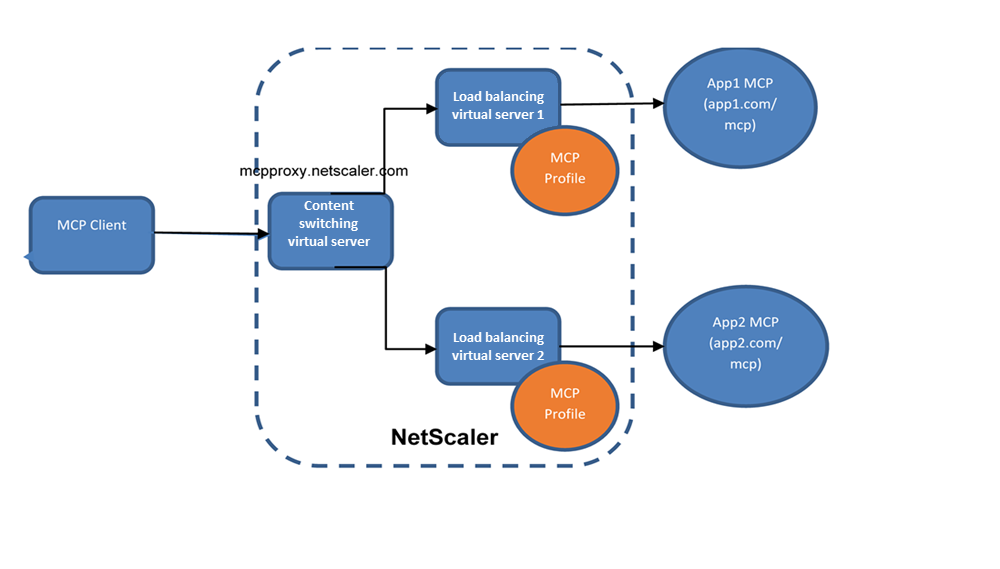
Understanding the MCP profile
The MCP profile is a configuration entity designed to standardize MCP backend integration. It provides a centralized mechanism to handle authentication, header injection, and protocol-specific transformations required for MCP traffic, eliminating the need for complex rewrite policies and custom configurations.
By abstracting backend-specific requirements such as token management, host and URL rewriting, and deployment mode handling, the MCP profile enables consistent and scalable MCP Gateway deployments.
The following parameters control the behavior across different deployment and authentication scenarios:
| Parameter | Values | Default | Description |
|---|---|---|---|
-comment |
<string> |
-- | Optional description for the MCP profile. |
-insertHeaderInClientRequest |
ENABLED / DISABLED | DISABLED | Inserts an authorization header (token) into requests sent to the backend MCP server. |
-mcpProtocolVersion |
<string> |
-- | Specifies the MCP protocol version used in communication. |
-mcpTokenOrApi |
<token> |
-- | Token (PAT/API key) used for backend authentication. |
-proxyMode |
FORWARD / REVERSE | FORWARD | Defines the deployment model of the NetScaler MCP Gateway. |
-hostReplacement |
ENABLED / DISABLED | ENABLED | Rewrites the host header to match the backend MCP server FQDN. |
-urlReplacement |
ENABLED / DISABLED | ENABLED | Rewrites the request URL or path for backend compatibility. |
-mcpCounterStatistics |
ENABLED / DISABLED | ENABLED | Enables MCP-specific statistics counters. |
-mcpprofileType |
FRONTEND / BACKEND | BACKEND | Defines whether the profile is applied at the front end or the back end. |
Points to note
-
In forward-proxy mode, client requests are sent to a single gateway URL, and NetScaler routes traffic to different backend MCP servers based on a custom header.
-
Session stickiness is required for stateful MCP servers. Subsequent requests for a session must reach the same backend server to avoid session-not-found errors.
-
If backend MCP servers expect a specific host header and backend URL path, use MCP profile host or URL replacement, or equivalent rewrite policies.
Use case
This feature can be used to expose a single MCP endpoint for clients while routing requests to multiple backend MCP servers based on a target-server header.
Prerequisites
Ensure that the following requirements are met:
-
Deploy a content switching virtual server to act as the primary MCP Gateway entry point.
-
Create load balancing virtual servers or services for backend MCP servers and verify that their FQDNs and paths are reachable.
-
Configure clients to send the target backend identifier using the
x-netscaler-target-mcp-serverheader. -
Set up token insertion in the MCP profile, or ensure clients pass tokens using the
X-Netscaler-Backend-Auth-Tokenheader. -
Verify administrative privileges to create and bind content switching, load balancing, rewrite, responder, and authentication configurations.
Configure NetScaler as an MCP Gateway
The following sample configuration shows how to deploy NetScaler as an MCP Gateway using content switching and load balancing through header-based routing and optional request or response rewrites.
A. Configure a content switching gateway virtual server
Create a content switching virtual server as the single MCP Gateway endpoint and bind routing policies that select a backend based on the MCP server header.
add cs vserver cs1 SSL <IP address> 80 -cltTimeout 180 -persistenceType NONE

 add lb vserver lb_app1_mcp SSL 0.0.0.0 0
 add lb vserver lb_app2_mcp SSL 0.0.0.0 0

 add serviceGroup sg_app1 SSL
 bind serviceGroup sg_app1 <server_ip> 443
 bind lb vserver lb_app1_mcp sg_app1

 add serviceGroup sg_app2 SSL
 bind serviceGroup sg_app2 <server_ip> 443
 bind lb vserver lb_app2_mcp sg_app2

 add cs action cs_act_app1 -targetLBVserver lb_app1_mcp
 add cs action cs_act_app2 -targetLBVserver lb_app2_mcp

 add cs policy new-pol-app1 -rule "HTTP.REQ.HEADER(\"x-netscaler-target-mcp-server\").BEFORE_STR(\"/\").CONTAINS(\"app1.com\")" -action cs_act_app1
 add cs policy new-pol-app2 -rule "HTTP.REQ.HEADER(\"x-netscaler-target-mcp-server\").BEFORE_STR(\"/\").CONTAINS(\"app2.com\")" -action cs_act_app2

 bind cs vserver cs1 -policyName new-pol-app1 -priority 10
 bind cs vserver cs1 -policyName new-pol-app2 -priority 15
B. Optional response-side rewrites for authentication flows
If the backend server returns a
WWW-Authenticate challenge containing resource metadata, apply response-side rewrites so that the client continues to interact safely through the gateway.
Note:
This section is applicable only if NetScaler is not acting as an authentication proxy and the backend server requires a per-user authentication token. For a service-level PAT, the token is configured directly on the MCP profile without the following rewrite policies.
add rewrite action resp_act1 replace q{http.res.header("www-authenticate").After_str("resource_metadata=\"").before_str(":/")} "\"http\""
 add rewrite action resp_act replace q{http.res.header("www-authenticate").After_str("resource_metadata=\"https://").before_str("/")} http.req.hostname

 add rewrite action rw_act1 replace_all "HTTP.RES.BODY(10000)" q{CLIENT.SSL.IS_SSL.IF(",\"resource\":\"https://" + http.req.hostname + "/mcp\"", ",\"resource\":\"http://" + http.req.hostname + "/mcp\"")} -search "xpath_json(xp%/resource%)"

 add rewrite policy rw_pol2 "http.req.url.eq(\"/mcp\") && CLIENT.SSL.IS_SSL.NOT" resp_act1
 add rewrite policy rw_pol1 true resp_act
 add rewrite policy rw_pol3 true rw_act1

 # Bind the response-side rewrite policies to the backend LB vserver (example shown for App1 vserver)
 bind lb vserver lb_app1_mcp -policyName rw_pol2 -priority 6 -gotoPriorityExpression next -type RESPONSE
 bind lb vserver lb_app1_mcp -policyName rw_pol1 -priority 7 -gotoPriorityExpression next -type RESPONSE
 bind lb vserver lb_app1_mcp -policyName rw_pol3 -priority 8 -gotoPriorityExpression next -type RESPONSE
C. Use the MCP profile to reduce rewrite overhead
Enable
hostReplacement and urlReplacement in the MCP profile and bind it to the backend service or service group to eliminate complex manual rewrites.
add mcpprofile m1 -hostReplacement ENABLED -urlReplacement ENABLED
 set service mcp -mcpProfileName m1
 set servicegroup sg1 -mcpProfileName m1
D. Sample client configuration
Configure the MCP client to point to the NetScaler Gateway URL and provide the target backend MCP server inside the custom header block.
{
   "servers": {
      "proxy-server": {
         "url": "https://proxy.aaanetscaler.local/mcp",
         "type": "http",
         "headers": {
           "x-netscaler-target-mcp-server": "api.githubcopilot.com/mcp/",
           "X-MCP-TOOLSETS": "all"
         }
      }
   },
   "inputs": []
 }
Troubleshooting
Routing goes to the wrong backend MCP server
Cause: The header value does not match content switching policy rules (domain or prefix).
Workaround: Verify the client header (
x-netscaler-mcp-server) and content switching policy expressions.
Backend MCP server returns session errors
Cause: Stateful MCP servers require stickiness. Requests for the same session must land on the same backend.
Workaround: Ensure session ID-based persistence is configured and validate by repeating tool calls.
Authentication challenges redirect clients away from the gateway
Cause:
WWW-Authenticate resource metadata points to backend URLs.
Workaround: Apply response-side rewrite policies for resource metadata and payload replacement.