-
Getting Started with NetScaler
-
Upgrade and downgrade a NetScaler appliance
-
Pre-upgrade validation checks for NetScaler
-
Upgrade considerations for configurations with classic policies
-
Solutions for Telecom Service Providers
-
Load Balance Control-Plane Traffic that is based on Diameter, SIP, and SMPP Protocols
-
Provide Subscriber Load Distribution Using GSLB Across Core-Networks of a Telecom Service Provider
-
Authentication, authorization, and auditing application traffic
-
Basic components of authentication, authorization, and auditing configuration
-
-
Web proxy support for outbound calls to IDP or third party endpoints
-
Web Application Firewall protection for VPN virtual servers and authentication virtual servers
-
On-premises NetScaler Gateway as an identity provider to Citrix Cloud™
-
Authentication, authorization, and auditing configuration for commonly used protocols
-
Troubleshoot authentication and authorization related issues
-
Troubleshoot authentication, authorization and auditing issues
-
Configure EULA as an authentication factor in NetScaler nFactor system
-
Configure periodic Endpoint Analysis scan as a factor in nFactor authentication
-
Configure post-authentication Endpoint Analysis scan as a factor in NetScaler nFactor authentication
-
Configure pre-authentication Endpoint Analysis scan as a factor in nFactor authentication
-
Configure pre-auth and post-auth EPA scan as a factor in nFactor authentication
-
Configure prefill user name from certificate in NetScaler nFactor authentication
-
Configure protected user as an authentication factor in NetScaler nFactor authentication
-
Localize error messages generated by NetScaler nFactor system
-
Configure NetScaler Gateway preauthentication EPA scan for the domain check
-
-
-
-
-
-
-
Configure DNS resource records
-
Configure NetScaler as a non-validating security aware stub-resolver
-
Jumbo frames support for DNS to handle responses of large sizes
-
Caching of EDNS0 client subnet data when the NetScaler appliance is in proxy mode
-
Use case - configure the automatic DNSSEC key management feature
-
Use Case - configure the automatic DNSSEC key management on GSLB deployment
-
-
-
Source IP address whitelisting for GSLB communication channels
-
Use case: Deployment of domain name based autoscale service group
-
Use case: Deployment of IP address based autoscale service group
-
-
Persistence and persistent connections
-
Advanced load balancing settings
-
Gradually stepping up the load on a new service with virtual server–level slow start
-
Protect applications on protected servers against traffic surges
-
Retrieve location details from user IP address using geolocation database
-
Use source IP address of the client when connecting to the server
-
Use client source IP address for backend communication in a v4-v6 load balancing configuration
-
Set a limit on number of requests per connection to the server
-
Configure automatic state transition based on percentage health of bound services
-
-
Use case 2: Configure rule based persistence based on a name-value pair in a TCP byte stream
-
Use case 3: Configure load balancing in direct server return mode
-
Use case 6: Configure load balancing in DSR mode for IPv6 networks by using the TOS field
-
Use case 7: Configure load balancing in DSR mode by using IP Over IP
-
Use case 10: Load balancing of intrusion detection system servers
-
Use case 11: Isolating network traffic using listen policies
-
Use case 12: Configure Citrix Virtual Desktops for load balancing
-
Use case 13: Configure Citrix Virtual Apps and Desktops for load balancing
-
Use case 14: ShareFile wizard for load balancing Citrix ShareFile
-
Use case 15: Configure layer 4 load balancing on the NetScaler appliance
-
-
-
-
Support for hybrid Post Quantum cryptography on the frontend
-
-
Create a certificate signing request and use SSL certificates on a NetScaler appliance
-
Configure SSL acceleration with HTTP on the front end and SSL on the back end
-
Export certificates used on a NetScaler appliance as PFX file
-
Configure SSL monitoring when client authentication is enabled on the back-end service
-
Configure SSL action to forward client traffic if a cipher is not supported on the ADC
-
Configure synchronization of files in a high availability setup
-
-
-
Authentication and authorization for System Users
-
-
-
Configuring a CloudBridge Connector Tunnel between two Datacenters
-
Configuring CloudBridge Connector between Datacenter and AWS Cloud
-
Configuring a CloudBridge Connector Tunnel Between a Datacenter and Azure Cloud
-
Configuring CloudBridge Connector Tunnel between Datacenter and SoftLayer Enterprise Cloud
-
Configuring a CloudBridge Connector Tunnel Between a NetScaler Appliance and Cisco IOS Device
-
CloudBridge Connector Tunnel Diagnostics and Troubleshooting
This content has been machine translated dynamically.
Dieser Inhalt ist eine maschinelle Übersetzung, die dynamisch erstellt wurde. (Haftungsausschluss)
Cet article a été traduit automatiquement de manière dynamique. (Clause de non responsabilité)
Este artículo lo ha traducido una máquina de forma dinámica. (Aviso legal)
此内容已经过机器动态翻译。 放弃
このコンテンツは動的に機械翻訳されています。免責事項
이 콘텐츠는 동적으로 기계 번역되었습니다. 책임 부인
Este texto foi traduzido automaticamente. (Aviso legal)
Questo contenuto è stato tradotto dinamicamente con traduzione automatica.(Esclusione di responsabilità))
This article has been machine translated.
Dieser Artikel wurde maschinell übersetzt. (Haftungsausschluss)
Ce article a été traduit automatiquement. (Clause de non responsabilité)
Este artículo ha sido traducido automáticamente. (Aviso legal)
この記事は機械翻訳されています.免責事項
이 기사는 기계 번역되었습니다.책임 부인
Este artigo foi traduzido automaticamente.(Aviso legal)
这篇文章已经过机器翻译.放弃
Questo articolo è stato tradotto automaticamente.(Esclusione di responsabilità))
Translation failed!
Pre-upgrade validation checks for NetScaler
Note:
This feature is available in NetScaler release 14.1 build 66.x and later.
Pre-upgrade validation checks are built into the upgrade workflow to ensure safer system upgrades and confirm that the system is ready for the upgradation process. The following are the prechecks added to the upgrade workflow.
| Pre-check | Description | Status | Default behavior and override | Additional comments |
|---|---|---|---|---|
| EOL of file-based licensing
|
Checks whether the license mechanism in use from April 15, 2026 onwards is file-based licensing or LAS-based licensing. For more information, see EOL of file-based licensing.
|
|
How to override
|
Older licensing mechanism (that is, file-based licensing) reaches end-of-life from April 15, 2026 and LAS-based licensing is required.
|
| License expiry check
|
Verifies both contract and runtime license validity.
|
|
Not applicable
|
Expired licenses might block data path or feature availability.
|
| License server connectivity (Pooled licensing)
|
Ensures that NetScaler can reach the license server. Required for pooled licensing environments.
|
|
|
Connectivity issues might result in temporary degraded licensing behavior, but the upgrade is not blocked.
|
| License server compatibility (Pooled licensing)
|
Validates that the license server version is compatible with the upgrade.
|
|
Not applicable
|
Run only if the connectivity check passes. Incompatible license servers (NetScaler Console) must be upgraded first.
|
| Non-existent symbol used in nsapi_mgr calls in startup files
|
Ensures that startup scripts reference valid symbols to avoid boot time failures.
|
|
|
Missing symbols might break data path initialization or custom workflows.
|
| New build compatibility with the NetScaler platform
|
Checks whether the hardware or the virtual platform supports the new build.
|
|
Not applicable
|
Ensures major hardware and software compatibility.
|
| Custom HTTPD and SSHD configuration files
|
Checks for symlink based overrides of HTTPD or SSHD configurations.
|
|
Not applicable
|
Admins must verify custom configurations for post upgrade compatibility. For more information, see Upgrade considerations.
|
| VPX resource requirements
|
Validates minimum memory requirements for VPX instances.
|
|
Not applicable
|
Insufficient memory might cause upgrade failures or unstable operations.
|
Disk space on /flash and /var |
Validates the minimum disk space for upgrade package unpacking and operations.
|
|
Not applicable
|
Low disk space might corrupt the upgrade or prevent the installation.
|
| Conditions for upgrade to 14.1-66.x and later releases (direct upgrade from version 13.0 to 14.1 is blocked)
|
Validates that the current firmware is eligible for upgrade.
|
|
Not applicable
|
Step upgrade enforced. For example, a direct upgrade from 13.0 to 14.1-66.x is blocked.
|
| Platform check: FIPS to NON-FIPS
|
Checks if platform restrictions block upgrade to a FIPS build.
|
|
Not applicable
|
FIPS compliance prevents installing FIPS builds on non-FIPS platforms.
|
| Check for unsaved configuration
|
Detects unsaved running configuration.
|
|
|
Unsaved configuration might result in a loss of configuration after rebooting.
|
| HA sync check
|
Checks if the configuration is in sync between the HA nodes.
|
|
|
Required to avoid split-brain or post-upgrade failover issues.
|
| Perpetual license subscription advantage (SA) expiry (Flexera)
|
Checks if SA is valid for perpetual licenses.
|
|
Not applicable
|
SA expiry blocks the upgrade due to license entitlement enforcement.
|
| SSL certificate file integrity
|
Verifies SSL certificate file integrity using digest checks.
|
|
|
Corrupt or missing certificates might disable SSL features.
|
EOL of file-based licensing
Note:
These checks come into effect from April 15, 2026.
File-based licensing will be EOL from April 15, 2026. All NetScaler (ADC, SVM) instances must be upgraded to LAS-compliant versions and transitioned to use LAS-based licensing before this date.
The minimum required NetScaler versions that are LAS compatible are:
-
NetScaler ADCs: 14.1-51.x, 13.1-60.x, 13.1-37.246 (FIPS)
-
NetScaler SVM: 14.1-51.x, 13.1-60.x
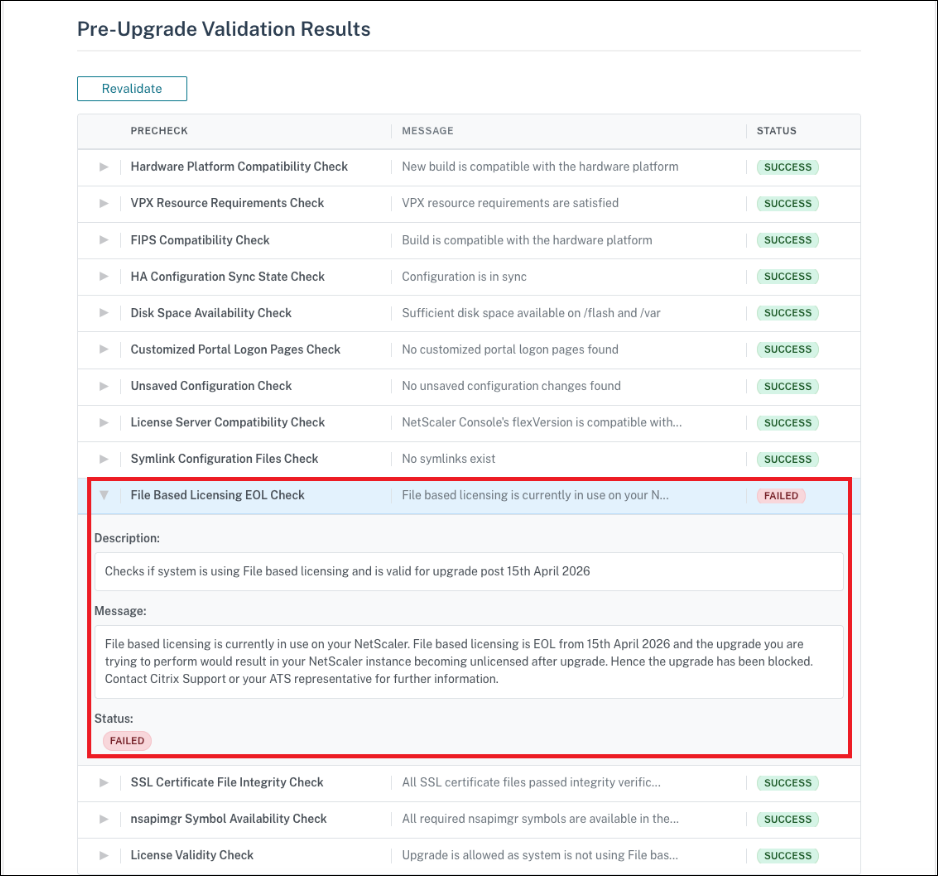
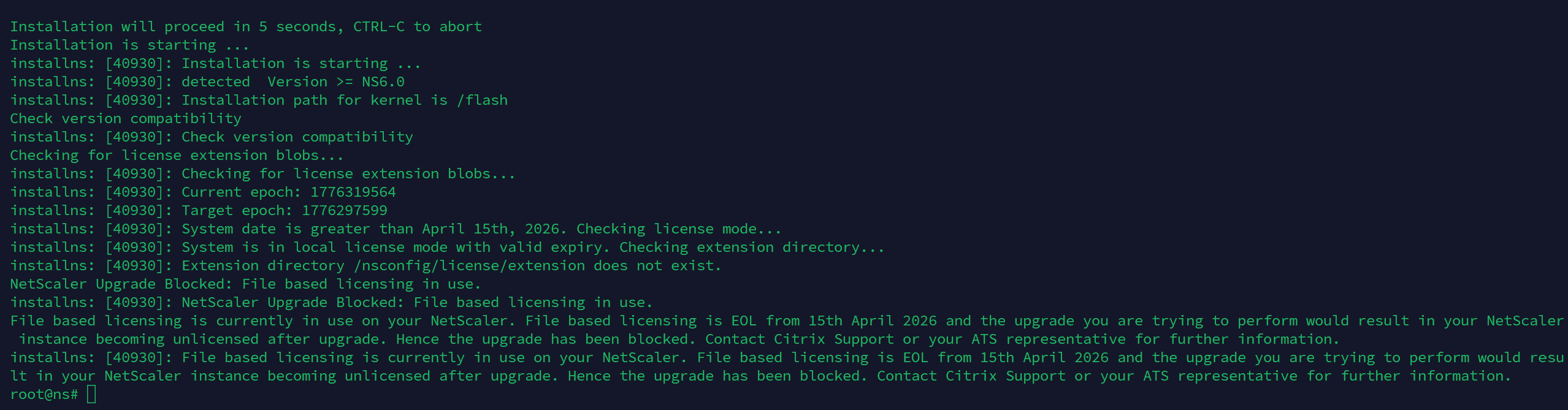
After April 15, 2026, in NetScaler ADC and SVM release 14.1-66.x and later, an upgrade related check will be triggered before NetScaler upgrade. This check validates if your NetScaler (ADC, SVM) is still using file-based licensing, and if true, the upgrade would be blocked with an error “NetScaler Upgrade Blocked: File based licensing in use”. This precaution avoids your NetScaler instances from proceeding with the upgrade and becoming unlicensed after April 15, 2026.
Contact Citrix Support or your ATS representative to understand how you can unblock the upgrade and the risks involved with it.
The following screenshot shows the message in the NetScaler GUI.
The following screenshot shows the message in the NetScaler CLI.
The following screenshots show the messages in NetScaler Console.
-
When file-based licensing is in use, and the contract date has expired.

-
When file-based licensing is in use, which has reached EOL on April 15, 2026.

-
When file-based licensing is in use, and the SA date has expired.

The following message appears in the NetScaler API response.
File based licensing is currently in use on your NetScaler. File based licensing is EOL from 15th April 2026 and the upgrade you are trying to perform would result in your NetScaler instance becoming unlicensed after the upgrade. Hence the upgrade has been blocked. Contact Citrix Support or your ATS representative for further information.
Resolve file-based licensing upgrade blocks
Effective April 15, 2026, all ADC and SVM instances must upgrade to LAS-compliant versions. You must migrate to LAS-based licensing before this date. If your upgrade is blocked with a File-based licensing in use error, resolve this issue either by procuring a new LAS-based license or temporarily overriding the licensing check.
Procure and apply a LAS-based license (recommended)
- Procure a LAS-based license. Ensure that this license is sufficient for your deployment. Contact your ATS or Citrix Customer Support to obtain the license.
Important:
Take a system backup before you attempt the upgrade.
- After the LAS licensing is in place, continue with the upgrade through the standard upgrade workflow.
Override or bypass the licensing check during upgrade
Note:
This option is available, but we do not recommend it.
This option allows you to bypass the file-based licensing validation and continue with the upgrade. Use this approach only as a last resort, typically for emergency or short-term recovery scenarios where an immediate upgrade is required and where migration to LAS-based licensing cannot be completed on time.
Important:
This method might result in an unlicensed state after the upgrade and cause a loss of configuration.
Before attempting the upgrade, ensure that you take a system backup.
To override or bypass the licensing by using the CLI
- At the command prompt, type
shell. - Switch to the directory where the install package is untarred (for example,
cd /var/nsinstall/). - Run the following command.
./installns --skip_lic_exp_chk
To override or bypass the licensing by using the Automation or GUI (APIs or NetScaler GUI or NetScaler Console or any automation tool)
- At the command prompt, type
shell. -
Create an empty file in /var/tmp.
touch /var/tmp/skip_las_checks - Proceed with the normal upgrade workflow using the API or NetScaler GUI or NetScaler Console
To override or bypass the licensing for an SDX upgrade
- Log in to the SVM and run the
shellcommand. -
Create a file named skip_las_prechecks in the
/mpsdirectorytouch /mps/skip_las_prechecks - Proceed with the single bundle upgrade.
Share
Share
This Preview product documentation is Cloud Software Group Confidential.
You agree to hold this documentation confidential pursuant to the terms of your Cloud Software Group Beta/Tech Preview Agreement.
The development, release and timing of any features or functionality described in the Preview documentation remains at our sole discretion and are subject to change without notice or consultation.
The documentation is for informational purposes only and is not a commitment, promise or legal obligation to deliver any material, code or functionality and should not be relied upon in making Cloud Software Group product purchase decisions.
If you do not agree, select I DO NOT AGREE to exit.